PC Components & Storage

10 Best RAM for Gaming 2026: Reliable Performance Without Overpaying

Find the best gaming RAM for your build, from budget DDR4 to high-speed DDR5, focusing on stability and real-world value.

Gaming RAM shopping today means choosing between DDR4 and DDR5, with speed and latency numbers flying around. But the real frustration for many builders is buying a kit that claims 6000MHz only to find it crashes at XMP or needs manual tweaking. The gap between advertised specs and everyday stability is wider than most expect.

That gap is why this guide focuses on kits that actually deliver their rated performance without headaches. You will see top picks that prioritize rock-solid operation over flashy lights or sky-high frequencies. Whether you are building a budget DDR4 rig or a high-end DDR5 system, the key is matching the memory to your motherboard and CPU realistically.

The biggest surprise in today's market is how well budget-friendly DDR5 kits like the Crucial Pro hold up against pricier rivals. Many gamers still overpay for RGB when the real gains come from stable XMP/EXPO operation and careful QVL checking.

1

Crucial Pro DDR5 32GB

Top Pick
Crucial Pro DDR5 32GB

Budget DDR5 gaming

Our Score 9.6/10
Check Price

Worth Noting

  • Compatibility quirks with some ASUS motherboards may require a BIOS update to boot
Capacity
32 GB
Form Factor
DIMM
Speed & Latency
6000 MHz CL36
Memory Generation
DDR5

Crucial Pro DDR5 32GB delivers solid 6000MHz CL36 speeds straight out of the box, using Micron-grade components that have been in the memory game for decades. It boots clean, shaves seconds off loading times, and handles multitasking without stutter. No RGB bloat, no gimmicks — just the baseline speed that DDR5 was meant to provide.

The kit runs reliably at stock 5600MHz without needing XMP or EXPO enabled, and overclocks predictably when you do engage those profiles. Build quality is consistent across units, with heat spreaders that stay cool under gaming loads. For a budget-tier kit, the voltage and timing discipline are tighter than many competing modules at the same price point.

Where this kit stumbles is on certain ASUS motherboards. A minority of builders report the system failing to boot or not recognizing the sticks, often resolved by a BIOS update. If you own an ASUS board, it is worth verifying the motherboard compatibility list before purchase. This is not a universal failure — most users on other brands (and even some ASUS boards) slot it in and go.

This RAM is for the builder who wants DDR5 performance without paying for LED strips or chasing single-digit latency improvements. It suits first-time upgraders, budget gaming rigs, and anyone who prefers a clean, window-ready interior free of RGB glow. If you need CL30 timings or customizable lighting, look at the Corsair Vengeance RGB 6000MHz CL30 kit instead.

Tip: If you are on an ASUS motherboard, check for the latest BIOS version before installing to avoid boot issues.

Bottom line: For budget-focused gamers who want reliable DDR5 speed without extra flash, this kit delivers where it counts — and at a price that leaves room for a better GPU or faster SSD.

2

Corsair Vengeance LPX DDR4 32GB

Corsair Vengeance LPX DDR4 32GB

Budget DDR4 gaming

Our Score 9.6/10
Check Price

Worth Noting

  • DDR4 is a last-generation standard, limiting future platform upgrades
  • A small chance of receiving a defective stick that fails to boot or crashes under load
  • Not suitable for extreme overclocking beyond 3200MHz or DDR5 performance expectations
Capacity
32 GB
Form Factor
DIMM
Speed & Latency
3200 MHz CL16
Memory Generation
DDR4

This Corsair kit packs 32GB of DDR4 at 3200MHz CL16 into a low-profile design that fits under large CPU coolers and in compact cases. Its aluminum heatspreader and hand-sorted memory chips contribute to stable performance across a wide range of motherboards, with particular consistency on ASRock boards. The kit runs at its rated speed out of the box with XMP enabled, no tweaking required for most users.

DDR4 is now the previous generation, so this memory locks you out of future platform upgrades. For anyone building or upgrading a DDR4-based system — especially budget gaming rigs or small form factor builds — the capacity and speed hit a practical sweet spot. The trade-off is clear: you get reliable everyday performance now, but the next CPU or motherboard will likely require DDR5.

Quality control is generally consistent, though a very small number of units may arrive DOA or develop issues under sustained load. Testing the sticks immediately after installation is a sensible precaution. Those seeking higher frequencies above 3200MHz or RGB lighting should look at other options in the lineup.

Tip: Test the sticks immediately after installation; a small number of units may need RMA within the first few days.

Bottom line: For anyone building a DDR4 system now, this kit offers dependable speed and a compact footprint at a fair price — just be aware that DDR4 is a dead-end for future upgrades.

3

G.SKILL Flare X5 32GB

G.SKILL Flare X5 32GB

AMD EXPO gaming

Our Score 9.4/10
Check Price

Worth Noting

  • Compatibility limited to AMD systems; no Intel XMP support.
  • Premium price compared to other CL30 DDR5 kits.
Capacity
32 GB
Form Factor
DIMM
Speed & Latency
6000 MT/s CL30
Memory Generation
DDR5

G.SKILL's Flare X5 DDR5 kit is built specifically for AMD Ryzen 7000 and 9000 series, offering 6000 MT/s at CL30 with no manual timing adjustments. The low-profile heatspreaders clear tall air coolers without issue, a practical advantage over taller RGB kits. Unlike the Ripjaws S5 which supports both platforms, the Flare X5 is optimized solely for EXPO, delivering consistent performance on compatible AM5 motherboards.

This kit is for AMD builders who want a setup-and-forget memory solution. The premium price compared to other CL30 kits is a tradeoff, but for those who value guaranteed EXPO operation and avoid manual tweaking, the cost aligns with the convenience. Intel users cannot use this kit as it lacks XMP support.

The heatspreaders handle thermal loads effectively during extended gaming sessions. Build quality is solid, with no issues fitting into standard DIMM slots. The sticks are stable at advertised speeds once EXPO is enabled on a compatible board.

Tip: Update your motherboard BIOS to the latest version before enabling EXPO to avoid potential instability on earlier firmware.

Bottom line: For Ryzen builders who want a hassle-free EXPO experience with tight CL30 timings, the Flare X5 is a targeted solution that performs as advertised. Its platform limitation and price are clear boundaries that define its audience.

4

Corsair Vengeance RGB DDR5 32GB

Corsair Vengeance RGB DDR5 32GB

RGB DDR5 gaming

Our Score 9.6/10
Check Price

Worth Noting

  • A minority of units may show early issues or RGB software quirks, which is worth noting before purchase
Capacity
32 GB
Form Factor
DIMM
Speed & Latency
6000 MHz CL30
Memory Generation
DDR5

The Corsair Vengeance RGB DDR5 kit runs at 6000MHz with CL30 latency, and its ten-zone RGB lighting offers more customization than the Crucial Pro’s plain heatsinks. iCUE integration lets you sync lighting with other Corsair peripherals, making it a natural fit for a unified build.

This kit is for gamers who want DDR5 speed and vivid RGB, and who are comfortable with the iCUE software ecosystem. A minority of units may experience early issues or RGB quirks, so buyers seeking maximum consistency should consider the top pick instead. It also isn’t the right fit for budget-constrained builds or those who prefer a no-RGB look.

Installation is plug-and-play with XMP or EXPO enabled in BIOS, and the dual-platform support works across AMD and Intel systems. Build quality feels premium, and the RGB light output is bright and evenly diffused. For users already in the Corsair ecosystem, the seamless lighting control adds to the experience without extra software overhead.

Tip: Test the kit immediately after installation; a small chance of early problems exists.

Bottom line: The Corsair Vengeance RGB offers the speed and looks for RGB-focused gaming builds, but the occasional QC variance means the Crucial Pro is a safer choice for consistency-first buyers.

5

Corsair Vengeance DDR5 64GB

Corsair Vengeance DDR5 64GB

64GB multitasking

Our Score 9.4/10
Check Price

Worth Noting

  • Enabling XMP may cause OS crashes or instability in some systems
  • 5200MHz CL40 is slower than the 6000MHz kits preferred for gaming
Capacity
64 GB
Form Factor
DIMM
Speed & Latency
5200 MHz CL40
Memory Generation
DDR5

The Corsair Vengeance 64GB kit offers double the capacity of many DDR5 kits at a similar price point, making it a practical choice for memory-hungry workloads like video editing and live streaming. Balanced against that capacity, the 5200MHz CL40 speed is slower than the 6000MHz CL30 kits preferred for gaming, but remains adequate for tasks where latency isn't the primary bottleneck.

At stock JEDEC speeds the kit runs stable and installs without fuss on most modern motherboards. Enabling XMP to reach 5200MHz can occasionally trigger system instability or crashes, so some users may need to adjust voltages or drop to a lower speed for consistent operation.

This kit suits professionals who prioritize capacity over latency — streamers running multiple applications, editors working with large timelines, or anyone who regularly exceeds 32GB usage. It is less appropriate for competitive gamers chasing the highest frame rates, where a faster 6000MHz kit would offer a clearer advantage. The 5200MHz CL40 speed and occasional XMP issues are the main tradeoffs for capacity seekers.

Tip: If you encounter XMP instability, try adjusting voltage or using the stock 4800MHz profile — most boards run it without issue.

Bottom line: For streamers and editors who need 64GB without the premium of faster kits, this Corsair Vengeance offers a practical balance of capacity and cost.

6

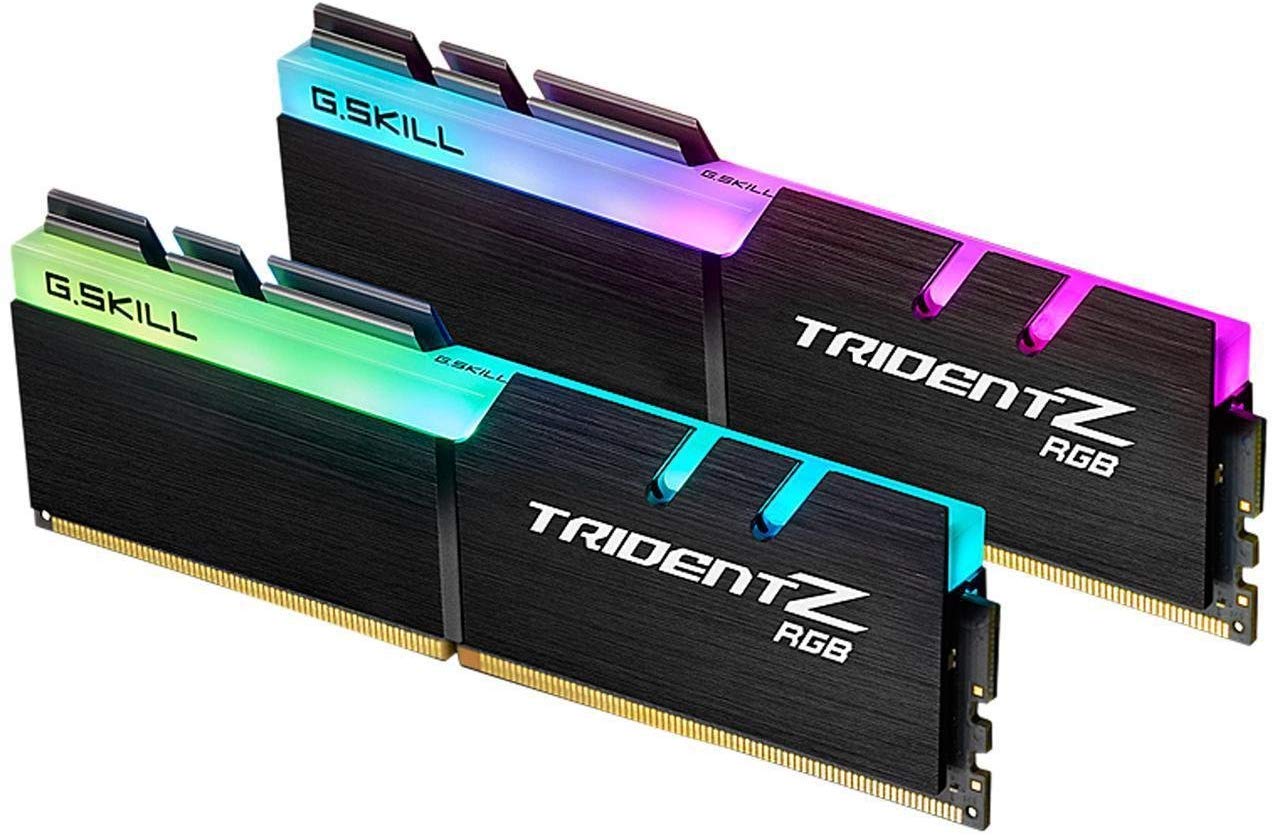
G.SKILL Trident Z RGB DDR4 32GB

G.SKILL Trident Z RGB DDR4 32GB

3600MHz DDR4 gaming

Our Score 9.6/10
Check Price

Worth Noting

  • XMP may cause instability on some motherboards, requiring manual voltage adjustment.
  • Capacity is limited to 32GB, not enough for memory-heavy content creation or virtualization.
Capacity
32 GB
Form Factor
DIMM
Speed & Latency
3600 MT/s CL18
Memory Generation
DDR4

This G.SKILL kit delivers the 3600MHz speed that Ryzen DDR4 systems thrive on, paired with bright RGB lighting and solid build quality. The price undercuts many competing high-frequency kits, offering strong value for gamers. However, enabling XMP may require manual voltage tweaks on some motherboards to stay stable, adding a setup step. While it matches the speed of top-tier DDR4 options, the simpler out-of-box experience and broader community trust of alternatives like the Corsair LPX keep this as a secondary pick for those who prioritize ease over peak speed.

Tip: If XMP causes crashes, try manually setting voltage to 1.35V and adjusting timings per manufacturer specs.

Bottom line: Best for Ryzen DDR4 gamers who want 3600MHz speed and RGB without overspending, and are comfortable fine-tuning XMP if needed.

7

Corsair Vengeance RGB CL36 32GB

Corsair Vengeance RGB CL36 32GB

Reliable DDR5 RGB

Our Score 9.6/10
Check Price

Worth Noting

  • Cold boot issues or XMP instability may require BIOS tweaks to run at rated speed on some systems
Capacity
32 GB
Form Factor
DIMM
Speed & Latency
6000 MHz CL36
Memory Generation
DDR5

This Corsair kit runs stably at 6000MHz CL36 with attractive RGB lighting and solid build quality, making it a consistent DDR5 option for gamers. It supports both Intel XMP and AMD EXPO at 1.4V, which helps with thermal management. Its latency is slightly higher than the CL30 variant — a difference that rarely affects frame rates but may matter in latency-sensitive tasks. A subset of users have noted cold boot or XMP instability that may require BIOS adjustments to reach full speed.

Bottom line: A suitable pick for gamers who want DDR5 RGB performance and are comfortable with potential BIOS adjustments, especially if priced below the CL30 variant.

8

TEAMGROUP T-Force Delta 32GB

TEAMGROUP T-Force Delta 32GB

Fast RGB DDR5

Our Score 9.4/10
Check Price

Worth Noting

  • Some units may stop functioning within weeks of installation.
  • RGB lighting may display white color unevenly, affecting visual consistency.
Capacity
32 GB
Form Factor
DIMM
Speed & Latency
6000 MHz CL30
Memory Generation
DDR5

With tight CL30 timings and colorful RGB, this DDR5 kit looks the part on paper and in a windowed case. Speed is responsive and the price undercuts many premium-brand CL30 kits. The trade-off shows up in two areas: unit longevity can vary, with some losing function within weeks, and the RGB lighting may not display white tones evenly — a detail that matters if color consistency is important. These limitations make it a good fit only if you have easy access to replacements and are comfortable with some uncertainty.

Bottom line: Only consider this kit if you have hassle-free return access and prioritize speed and looks over guaranteed long-term performance.

9

G.SKILL Trident Z5 Neo 64GB

G.SKILL Trident Z5 Neo 64GB

High-end AMD 64GB

Our Score 9.4/10
Check Price

Worth Noting

  • In a high-stakes editing or streaming build where uptime is critical, individual units may crash unexpectedly after weeks of use.
  • The premium cost is significantly higher than most 32GB kits, limiting its value to those who genuinely need 64GB and low latency.
Capacity
64 GB
Form Factor
DIMM
Speed & Latency
6000 MT/s CL30
Memory Generation
DDR5

The G.SKILL Trident Z5 Neo 64GB kit brings together high capacity and tight CL30 timings at 6000 MT/s, making it a natural fit for AMD builders who want to max out their Ryzen system’s memory bandwidth. The EXPO profile typically enables the advertised speeds on compatible motherboards like the 9800X3D without manual tuning. However, the cost sits well above most 32GB alternatives, and a subset of units may develop crashes or Memtest errors after weeks of use — a risk that matters more for production workloads than casual gaming. The Corsair 64GB kit at 5200 MT/s offers similar capacity at a lower price, albeit with slower transfer rates.

Tip: Run a memory stress test (e.g., Memtest86) shortly after installation and monitor system stability for the first few weeks to identify any early anomalies.

Bottom line: This RAM fits AMD enthusiasts building a high-end workstation or gaming rig who prioritize capacity and low latency over upfront cost, and are aware that some units may need early stability checking.

10

G.SKILL Trident Z Neo 64GB

G.SKILL Trident Z Neo 64GB

64GB DDR4 Ryzen

Our Score 9.4/10
Check Price

Worth Noting

  • Reaching the full 3600MHz speed may require manual voltage or timing adjustments on some motherboards.
  • Price sits close to DDR5 alternatives, reducing long-term value for buyers not already locked into DDR4 platforms.
Capacity
64 GB
Form Factor
DIMM
Speed & Latency
3600 MT/s CL18
Memory Generation
DDR4

This 64GB kit from G.SKILL delivers strong 3600MHz CL18 performance with solid stability for demanding editing and gaming workloads on AMD Ryzen systems. The two-stick layout leaves upgrade paths open, and the RGB lighting adds visual appeal. That said, some motherboards need manual voltage tweaks to hit full speed, and the price approaches DDR5 kits that bring faster memory standards and future-proofing to newer platforms.

Bottom line: This DDR4 kit fits best for Ryzen content creators who need 64GB now and plan to stay on DDR4 for several years; for new builds, DDR5 is a more forward-looking investment.

How to Choose

Capacity

16GB is the minimum for modern gaming, but 32GB is the sweet spot for smooth multitasking with a browser and Discord open. 64GB is only needed if you stream, edit video, or run virtual machines alongside games.

The hidden trade-off: going from 32GB to 64GB usually means higher latency or lower clock speeds at the same price point. If you rarely exceed 16GB of usage, the extra capacity just adds cost without benefit.

Memory Generation

DDR4 is still a solid option for budget builds or older platforms, offering good performance at low prices. DDR5 is the future, with higher bandwidth and better efficiency, but it requires a compatible motherboard and CPU.

The catch: DDR5 kits often need BIOS updates or manual tuning to reach advertised speeds. If you are building new today, DDR5 makes sense, but do not upgrade your whole system just for DDR4 to DDR5 if your current setup runs fine.

Speed and Latency

Faster speed (MHz) and lower CAS latency (CL) improve performance, but the gains are marginal in most games. For DDR4, 3200MHz CL16 is the standard; for DDR5, 6000MHz CL30-36 offers the best balance.

The real issue: many kits advertise high speeds but cannot run them stably without tweaking. A 6000MHz CL30 kit that crashes at XMP is slower than a 5600MHz kit that works out of the box. Stability trumps paper specs.

Form Factor

All desktop gaming RAM uses the DIMM form factor. The only variation is height. Low-profile sticks (like Crucial Pro or Corsair LPX) fit under large air coolers, while RGB sticks with tall heatspreaders may conflict with tower coolers.

Measure your cooler clearance before buying. A RAM kit that looks great but forces you to mount a fan higher is a hidden space headache.

Overclocking Profile

Intel systems use XMP, AMD uses EXPO. Most DDR5 kits support both, but some are optimized for one. Using the wrong profile can cause instability or failure to boot at rated speeds.

The hidden trap: enabling XMP/EXPO is overclocking and voids the CPU warranty on most boards. If your system crashes, try dropping to a lower speed or increasing voltage slightly. Always check your motherboard QVL for tested kits.

Frequently Asked Questions