PC Components & Storage

9 Best NAS for Home of 2026: Reliable Storage Without Monthly Fees

Find the right home NAS for backing up files, streaming media, and replacing cloud subscriptions – whether you value software polish or raw hardware specs.

Home NAS buyers face a trade-off that isn't obvious from spec sheets: mature software that just works versus aggressive hardware specs at a lower price. The promise of private cloud storage is appealing, but drive compatibility restrictions and setup headaches can turn a weekend project into a recurring frustration.

The real difference between a NAS that becomes a reliable hub and one that gathers dust often comes down to the operating system. Synology's DSM has years of refinement behind it, while newer platforms like UGREEN's UGOS offer better hardware value but lack the same polish. Neither is right for everyone – the best choice depends on whether you prioritize a friction-free experience or maximum performance per dollar.

This guide breaks down the trade-offs by matching each NAS to a specific use case, from simple photo backup to full Docker and VM workloads. The goal is to help you invest in a setup that fits your workflow without paying for features you won't use or discovering limitations after the return window closes.

1

Synology DS223 2‑Bay

Top Pick
Synology DS223 2‑Bay

Reliable home backup

Our Score 9.0/10
Check Price

Worth Noting

  • Web interface and media indexing can feel slow during initial scans
  • Compatibility with some third‑party hard drives requires checking Synology’s list; QuickConnect remote access can be inconsistent.
RAM
Software
DSM
Bay Count
2
Network Speed
1GbE

The Synology DS223 reaches the market with the most mature NAS operating system available, wrapped in a compact metal chassis that feels built for continuous operation. Its DSM interface guides you from unboxing to shared folders in under 15 minutes, and the package manager offers a curated selection of apps for photos, file sync, and remote access. That said, the web interface can feel sluggish when indexing large media libraries, and 1GbE networking limits large transfers to roughly 110 MB/s – fine for overnight backups but noticeable when moving tens of gigabytes.

During daily use, the DS223 handles concurrent Time Machine backups from multiple Macs without stuttering. The system runs quietly and draws little power, making it easy to leave on 24/7 in a living room or home office. Owners find that once the initial indexing is complete, the interface becomes more responsive for routine file browsing and photo previews.

This NAS suits home users who want a central hub for file storage and automated backups – especially those in the Apple ecosystem. Its guided setup and clear documentation make it a strong fit for beginners who value a turnkey experience over tweaking settings. Light Plex streaming works as long as files don't require transcoding, but anyone planning to run Docker containers, VMs, or expecting faster networking should look at models with more capable processors and 2.5GbE ports.

Build quality is consistent: the metal case and tool‑less drive trays accept both 3.5‑inch and 2.5‑inch SATA drives. Dual USB 3.0 and an eSATA port allow attaching external drives for off‑site backups. While Synology’s ecosystem is the reason many buyers choose this brand, compatibility with some third‑party hard drives requires checking their list – a minor nuisance that can be avoided by selecting recommended models.

Tip: Let the DS223 index overnight after first setup – daytime interface response will feel snappier once the media database is built.

Bottom line: For home users who want a dependable backup hub with the industry’s best software, the DS223 is the most practical entry point – just be aware of its speed constraints and drive compatibility nuances.

2

UGREEN DH2300 2‑Bay

UGREEN DH2300 2‑Bay

Simple private cloud

Our Score 8.8/10
Check Price

Worth Noting

  • Remote access can be inconsistent
  • No Docker or virtual machine support, so advanced applications like a Plex container or home automation hub are off the table.
  • A minority of units may fail to initialize or become unresponsive after extended use
RAM
4 GB onboard
Software
UGOS
Bay Count
2
Network Speed
1GbE

The UGREEN DH2300 delivers an unusually straightforward NAS experience right out of the box — no port forwarding, no router configuration, just a quick app guide that walks you through drive installation and account creation. This simplicity makes it the easiest way to stop paying for Google Drive or iCloud if your primary needs are automatic phone photo backup, file sharing across devices, and a central media library accessible from the living room TV via the 4K HDMI output.

This is a focused device for first-time NAS buyers who value low entry cost over expandability. The 4GB RAM is soldered and not upgradable, there is no Docker or virtual machine support, and the single 1GbE port tops out at around 110 MB/s — fine for streaming a single 4K movie or backing up a laptop overnight, but not for simultaneous multi-user heavy workloads. Remote access works for many users, though some may need to forward ports or restart the app when encountering connection drops.

Build quality is reassuring for a budget unit — a compact metal chassis with tool-less drive bays, quiet fan operation, and negligible desktop footprint. Daily file transfers run smoothly, and the UGREEN app handles scheduling and permissions without frustration. A small number of units have shown initialization failures or become unresponsive after months of use, so testing the unit thoroughly during the return window is sensible.

Tip: Test remote access within the first week and set up a static IP or DDNS if you plan to rely on it regularly.

Bottom line: For anyone who wants a simple, one-time purchase private cloud without tinkering, the DH2300 delivers exactly that — just don't expect to grow into advanced features later.

3

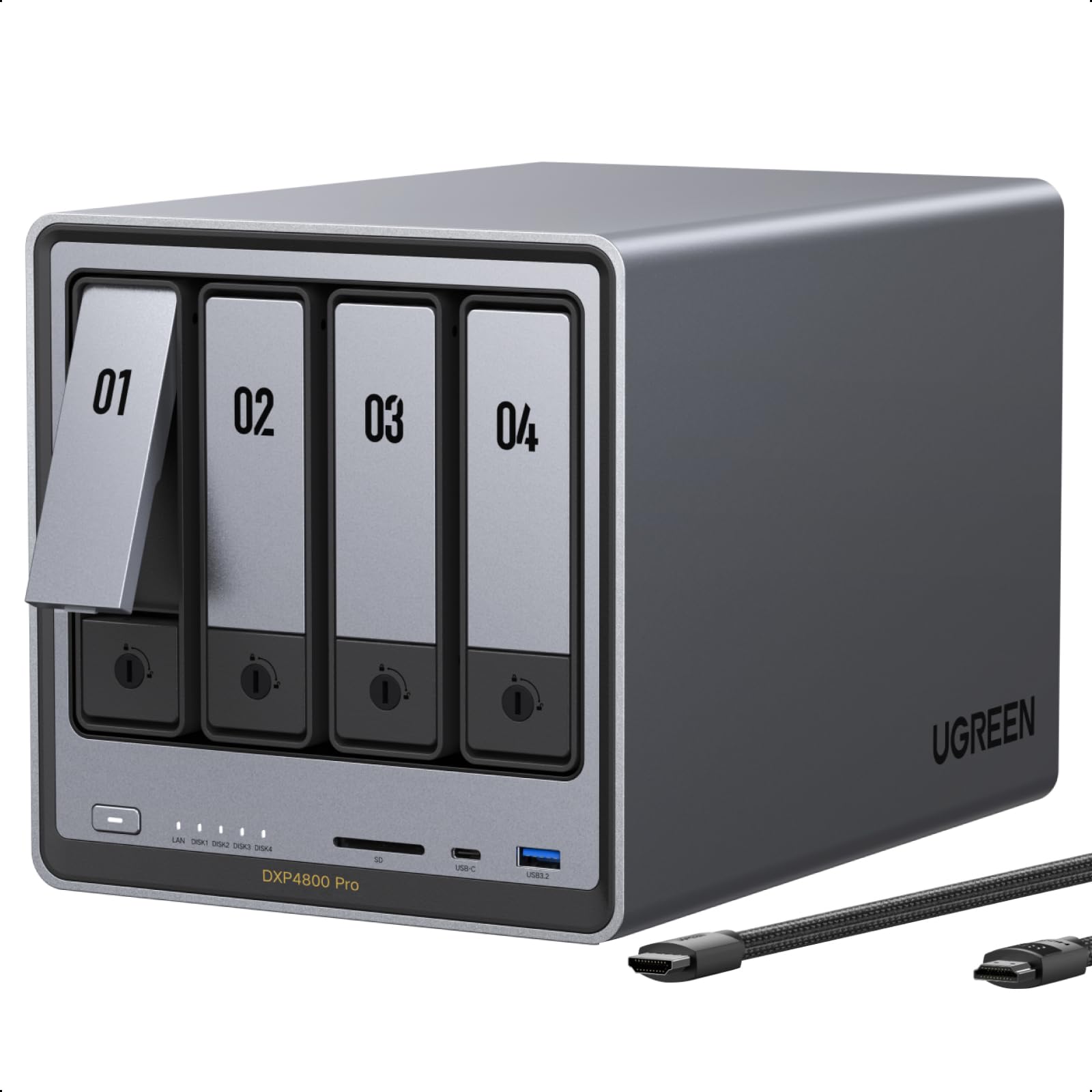
UGREEN DXP4800 Pro 4‑Bay

UGREEN DXP4800 Pro 4‑Bay

Power user workstation

Our Score 9.0/10
Check Price

Worth Noting

  • Some units have experienced a complete hardware failure within the first year of use, requiring replacement.
  • Storage pool setup can be confusing
RAM
8 GB DDR5
Software
UGOS
Bay Count
4
Network Speed
10GbE, 2.5GbE

The Intel Core i3-1315U processor and 10GbE networking make the DXP4800 Pro one of the fastest home NAS units available – it handles Docker containers, virtual machines, and multiple 4K video streams without stutter. For comparison, the top pick's Celeron and 1GbE limit its throughput to a fraction of this speed.

In daily file transfers, the DXP4800 Pro moves large photo libraries and video projects at wire speed when connected to a 10GbE network. The dual NVMe slots further accelerate caching for frequently accessed data. However, the unit's performance consistency is not flawless – some owners have reported complete hardware failure within the first year, leading to data recovery complications. This appears to be an occasional quality control issue rather than a design flaw.

This NAS suits enthusiasts who value raw compute power and high-speed networking over a polished out-of-the-box experience. If you plan to run Docker stacks, host VMs, or edit 4K video directly from the NAS, the DXP4800 Pro delivers performance that Synology cannot match at this price. The tradeoff is two-fold: UGREEN's UGOS software is less mature than Synology's DSM, and the small risk of a hardware fault means an extended warranty is a sensible investment.

Tip: An extended warranty is advisable – occasional hardware faults have been reported within the first year, and this coverage offsets the risk.

Bottom line: For the enthusiast who needs top-tier compute and networking in a home NAS and is willing to accept the possibility of early hardware issues, the DXP4800 Pro is unmatched in its price bracket. Those who prefer a more predictable ownership experience should still lean toward the Synology DS223.

4

Synology DS425+ 4‑Bay

Synology DS425+ 4‑Bay

4-bay media server

Our Score 8.8/10
Check Price

Worth Noting

  • Third-party drive compatibility may break after firmware updates
RAM
Software
DSM
Bay Count
4
Network Speed
Dual 2.5GbE

The DS425+ offers four drive bays, dual 2.5GbE networking, and Synology’s mature DSM operating system in a chassis built for home media streaming and backups. Performance is fast enough for simultaneous streaming and scheduled backups, and owners upgrading from an older Synology NAS report a quick migration process, preserving their existing configuration and data with minimal downtime.

This NAS is best for home users who have outgrown a 2-bay model and want a 4-bay system for media libraries, personal cloud access, and automated backups without moving to more expensive hardware. The dual 2.5GbE ports handle large file transfers well, and the hot-swap bays make drive swaps convenient. One tradeoff worth noting: drive compatibility with third-party drives can be inconsistent after firmware updates – buyers who plan to use non-Synology drives should verify the compatibility list before committing.

Build quality is robust, and the software ecosystem (DSM) remains the most polished in the consumer NAS space. The DS425+ sits in the middle of Synology’s lineup, offering enough capacity and speed for a typical home network without the premium required for enterprise features like 10GbE or expansion units.

Tip: Check Synology’s compatibility list before purchasing third-party drives to avoid surprises after firmware updates.

Bottom line: For home users who need 4-bay capacity and value DSM’s software maturity, the DS425+ delivers fine performance – just verify drive compatibility before buying.

5

Asustor AS5402T 2‑Bay

Asustor AS5402T 2‑Bay

Gaming media server

Our Score 8.8/10
Check Price

Worth Noting

  • Plastic case can vibrate and produce noise in quiet rooms
  • App selection is smaller and some apps may be unstable compared to Synology's ecosystem.
  • Stability may require occasional reboots
RAM
4 GB DDR4
Software
ADM
Bay Count
2
Network Speed
Dual 2.5GbE

Under $400, the Asustor AS5402T delivers an Intel quad-core processor, dual 2.5GbE ports, and four M.2 NVMe slots – specs that cost significantly more in rival 2-bay units. This hardware package handles Docker containers, Plex transcoding, and gaming media streams with ease, making it a strong performer for homelab tasks.

This NAS is best suited for tech-savvy users who prioritize CPU power and connectivity over a refined software experience. The plastic case can transmit drive vibrations, so it works better in a utility closet than a quiet living room. The ADM app ecosystem is smaller and some apps may be buggy compared to Synology's DSM, but core services like file sharing and remote access function well.

The quad-core CPU keeps up with multiple simultaneous workloads, but stability can be inconsistent – some users have needed to reboot after the unit became unresponsive. This is a known boundary rather than a deal-breaker for those who value raw hardware performance and are comfortable with occasional maintenance.

Tip: Placing the NAS on rubber feet or a foam pad reduces case vibration noise significantly.

Bottom line: This is the right NAS if you value CPU power and connectivity over a refined software experience and silent operation. It is a capable machine for homelab enthusiasts on a budget.

6

Synology DS225+ 2‑Bay

Synology DS225+ 2‑Bay

Media transcoding

Our Score 9.2/10
Check Price

Worth Noting

  • In home setups using third-party drives, drive recognition can be disrupted after firmware updates.
  • Transfer speed consistency varies during simultaneous multi-user file access.
RAM
Software
DSM
Bay Count
2
Network Speed
2.5GbE

The DS225+ is purpose-built for Plex users who need hardware transcoding to stream 4K content smoothly, and DSM remains the most polished NAS operating system for media management. However, this focus comes with compromises: drive compatibility with third-party models can be inconsistent, and the 2-bay design limits storage expansion. At a mid-range price that sits above the simpler DS223, the improvements are marginal unless transcoding is a must-have. Buyers who don't need hardware encoding will get better value from the DS223, while those requiring more than two bays should consider a 4-bay model instead.

Bottom line: Ideal for Plex enthusiasts who prioritize hardware transcoding and are prepared to use Synology-branded drives; those after more storage or lower entry cost should choose the DS223 or a 4-bay alternative.

7

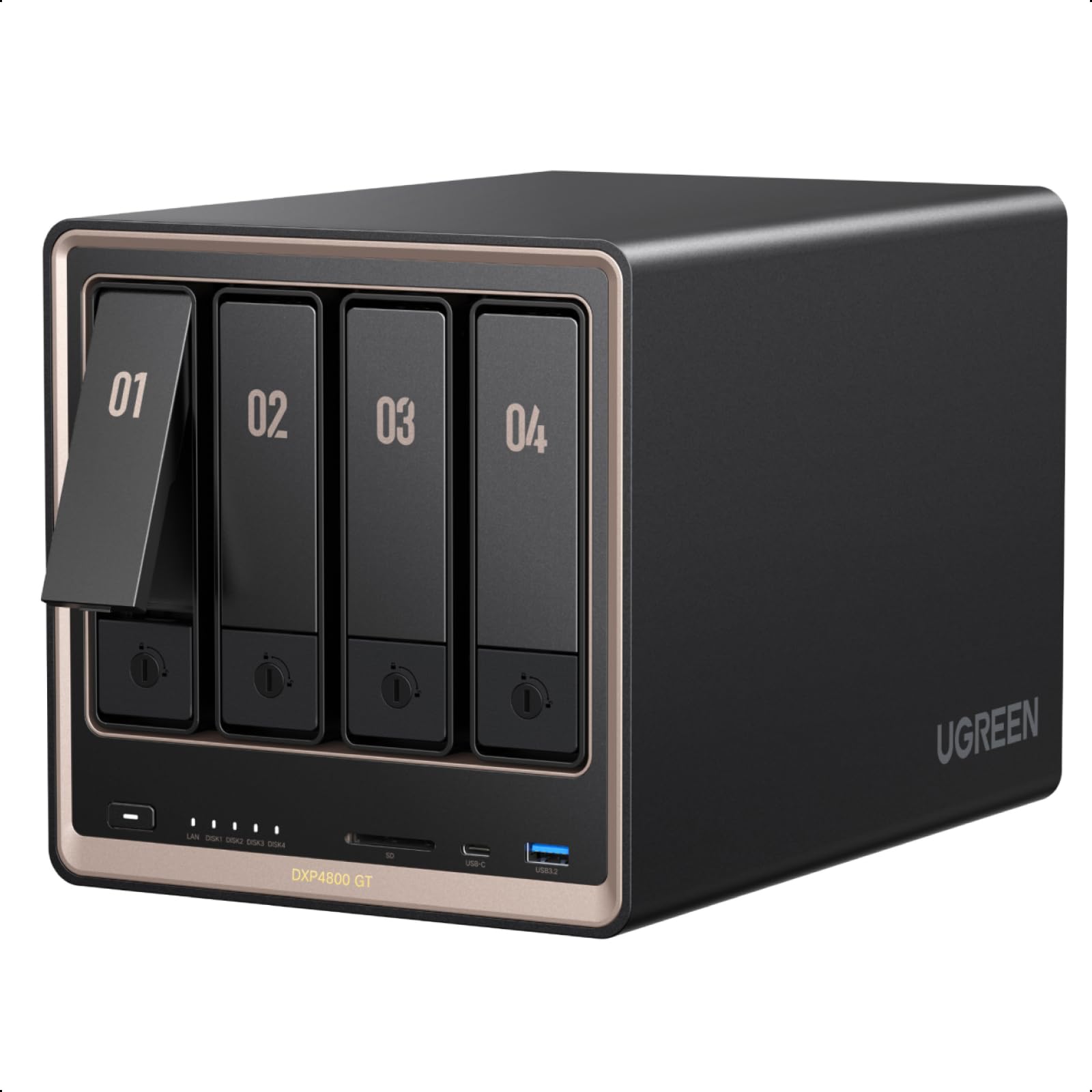
UGREEN DXP4800 GT 4‑Bay

UGREEN DXP4800 GT 4‑Bay

Fast network NAS

Our Score 9.0/10
Check Price

Worth Noting

  • Limited app selection compared to mature NAS operating systems like Synology DSM.
  • Early‑stage UGOS may require occasional troubleshooting for stability.
RAM
8 GB DDR4
Software
UGOS
Bay Count
4
Network Speed
Dual 10GbE

The UGREEN DXP4800 GT packs dual 10GbE ports and a capable AMD processor into a mid-range NAS, giving network-focused buyers the fastest local file transfers available at this price point. Setup is straightforward, and the build quality feels solid. However, the UGOS software platform is still maturing – the app store is sparse compared to Synology, and occasional instability may appear as the OS is ironed out. With a short track record, this NAS is best for tech enthusiasts who prioritize raw speed and are willing to work around early‑stage software limitations.

Bottom line: For buyers who need the fastest local network transfers and are comfortable with a newer OS, the DXP4800 GT offers unbeatable hardware value – but those wanting a polished, worry‑free experience should look to more established platforms.

8

Synology DS620slim 6‑Bay

Synology DS620slim 6‑Bay

Compact multi-bay

Our Score 8.8/10
Check Price

Worth Noting

  • 2.5-inch drives cost significantly more per terabyte than 3.5-inch equivalents
  • Compact layout may complicate initial setup and drive installation for new users
RAM
2 GB DDR3L
Software
DSM
Bay Count
6
Network Speed
Dual 1GbE

The Synology DS620slim packs six drive bays into a footprint that rivals many 2-bay units, making it a compelling option for home lab enthusiasts who prioritize density over raw storage cost. Its support for Docker and virtual machines, combined with quiet SSD operation, suits those running Plex or development containers in a low-noise environment. However, the reliance on 2.5-inch drives drives up cost per terabyte, and dual 1GbE ports limit throughput to around 110 MB/s – a bottleneck for large file transfers or multi-user access. The compact interior can also make initial drive installation and cable management fiddly for those new to NAS systems.

Bottom line: Best suited for homelab enthusiasts who need many bays in a tiny footprint and are comfortable paying a premium for SSD storage – not a general-purpose NAS for budget-conscious backup.

9

BUFFALO TeraStation 4‑Bay 32TB

BUFFALO TeraStation 4‑Bay 32TB

Pre-loaded storage

Our Score 8.8/10
Check Price

Worth Noting

  • Windows 11 and NFS compatibility may need extra configuration.
  • Very basic software
RAM
Software
Proprietary
Bay Count
4
Network Speed
2.5GbE

The BUFFALO TeraStation comes with four 8TB drives already installed, so you can unbox, plug in, and start storing files immediately. That convenience is its main appeal. However, its software environment is extremely basic – no Docker, no app ecosystem, and limited configuration options. Compatibility with Windows 11 and NFS can require workarounds, and the price is high for the hardware you get. This works best for small offices that only need simple shared storage and are already comfortable with Buffalo's ecosystem.

Tip: Verify Windows 11 and NFS compatibility before relying on this for critical file sharing.

Bottom line: If your priority is a turnkey NAS with drives included and you can work without advanced apps or broad compatibility, the TeraStation delivers simplicity.

How to Choose

Bay Count and Storage Flexibility

The number of drive bays determines your maximum raw storage and RAID options. Two-bay NAS units can mirror drives (RAID 1) for redundancy but limit total capacity to roughly 40 TB with today's largest drives. Four bays allow RAID 5 or 6, offering a better balance of usable space and fault tolerance – you can lose one or two drives without losing data.

If you plan to run Docker containers or a media server alongside standard backups, a 4-bay model gives you room to separate storage pools and reduces the chance of running out of space mid-project. For pure photo and document backup, 2 bays are sufficient and save desk space.

Processor and Virtualization Support

Entry-level NAS often use ARM processors that handle basic file serving but choke on tasks like Plex transcoding or running multiple Docker containers. Intel and AMD x86 chips unlock hardware transcoding, containerization, and VM support. A NAS with an Intel Celeron or Pentium can transcode 4K video on the fly, while a Core i3 handles heavy multi-user workloads like video editing.

The hidden trade-off: a faster CPU draws more power and generates more heat, which may require a larger chassis or active cooling. If you don't need Docker or VMs, an ARM-based unit will be quieter, cooler, and cheaper.

Network Speed and Throughput

1GbE is fine for occasional file access and backing up a few devices, but it caps sequential transfers at about 110 MB/s. Upgrading to 2.5GbE nearly triples that to 280 MB/s, which matters when transferring large media libraries or editing video directly off the NAS. 10GbE pushes over 1,000 MB/s but requires compatible switches and cabling.

The catch: network speed only helps if your drives and system bus can keep up. A NAS with slow spinning hard drives may bottleneck a 10GbE connection, making the upgrade pointless until you add SSDs or use a tiered caching setup.

RAM Capacity and Upgradeability

RAM directly affects system responsiveness, especially when running multiple apps or serving files to several users. 4 GB is the minimum for comfortable DSM/UGOS operation; 8 GB is better for Docker and VMs. Upgradeable RAM (via SODIMM slots) lets you expand later without replacing the whole NAS.

Some budget models solder the RAM to the motherboard, locking you into the factory configuration. If you plan to run memory-intensive tasks, prioritize a NAS with accessible RAM slots and check the maximum supported capacity – some units top out at 8 GB regardless of the slot form factor.

Software Ecosystem and App Selection

Synology's DSM remains the gold standard for user experience – it's intuitive, well-documented, and has a large app store covering backup, media, surveillance, and more. UGREEN's UGOS is easier for absolute beginners but has a smaller app library and fewer third-party integrations. Asustor's ADM sits in between, with decent Docker support but occasional stability hiccups.

The trade-off: software maturity trades off against hardware value. A Synology unit with an older CPU may feel snappier due to DSM's optimization, while a UGREEN with superior specs can feel slower if the OS hasn't been fully refined for those components. Test the interface before committing to a platform.

Frequently Asked Questions