Cameras & Photography

8 Best Photo Scanner of 2026: Speed vs. Quality for Your Archive

Which photo scanner fits your collection? Find the right balance of speed and image quality for prints, slides, or both.

Digitizing old photos sounds simple, but picking the right scanner quickly turns into a trade-off between speed and quality. Marketing often touts sky-high megapixel counts that don't reflect real-world output, while the fastest models skip film entirely.

The real dividing line is your collection: a stack of prints needs a different tool than a box of negatives. This guide cuts through the hype to match the scanner to your actual project, whether you're racing through a thousand family snapshots or carefully preserving slides.

No single device does it all perfectly. But knowing what you sacrifice in each direction — speed for quality, versatility for cost — lets you spend money where it actually matters.

1

Epson Perfection V550

Top Pick
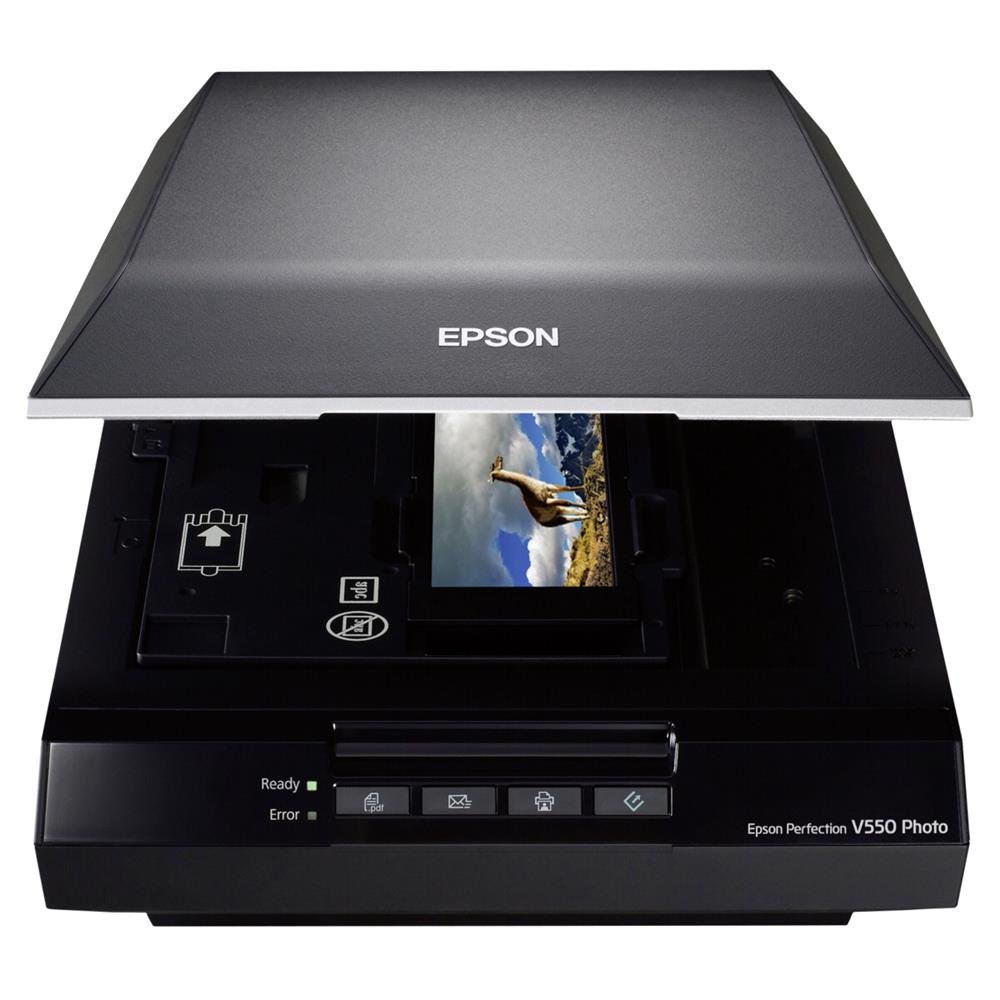
Epson Perfection V550

Mixed prints & film

Our Score 8.6/10
Check Price

Worth Noting

  • Scanning at high resolutions (1200+ dpi) is slow; a single frame can take over a minute.
  • Software can be unintuitive and may produce occasional error messages.
Scan Speed
Film Support
35mm, medium format
Scanner Type
Flatbed + film
Software & OS
Epson Scan, Mac/Win

The V550 delivers sharp, vivid scans across prints and film thanks to its 6400 dpi CCD sensor and Digital ICE dust removal. Color accuracy is strong, and the built-in transparency unit handles up to six 35mm slides or negatives at once, plus medium format strips up to 6x22 cm. The CCD sensor captures fine details in shadow areas, making it suitable for underexposed negatives and old faded prints.

At lower resolutions (300-600 dpi) scans are reasonably quick for occasional use, but pushing to 1200 dpi or higher turns each frame into a multi-minute wait – a single 35mm slide can take over a minute at 6400 dpi. The Epson Scan software offers many adjustment options but can feel unintuitive; occasional error messages may require restarting a scan. Scanning medium format film is slower still but yields high-resolution results suitable for prints up to 11x14. These limits are manageable for a home archivist working through a mixed collection, not for someone needing to digitize hundreds of prints in a single session.

This scanner fits the home user with a box of assorted family photos, old negatives, and slides who wants one device to digitize them all with archival quality. Accept that batch scanning prints is slow – it's better suited for careful, single-item digitization than speed runs. The software learning curve may frustrate those expecting a completely plug-and-play experience, but the results justify the patience for quality-focused users. For the home archivist who values image quality over batch speed, the V550 is a capable partner. It's less ideal for those with thousands of prints who want to finish in a weekend – a dedicated photo scanner would be faster.

Unlike dedicated film scanners that only handle slides and negatives, the V550 also scans prints up to 8.5x11.7 inches. And while many flatbeds stop at 4800 dpi, the V550's 6400 dpi optical resolution and CCD sensor produce genuine detail for enlargements. At its mid-range price, it undercuts specialized film scanners that cost twice as much while providing more flexibility. For users who need occasional high-resolution film scans alongside everyday print digitization, this is the most cost-effective all-in-one solution.

Tip: Save scan settings as presets to bypass repeated adjustments and reduce error messages.

Bottom line: For the home archivist with a mixed collection of prints and film who wants quality over speed, the V550 is the right tool. If speed is your priority, consider a dedicated photo scanner.

2

Plustek ePhoto Z300

Plustek ePhoto Z300

Bulk print scanning

Our Score 9.0/10
Check Price

Worth Noting

  • Image quality can show occasional white lines or graininess
  • No support for negatives, slides, or any film format
Scan Speed
2 sec/photo
Film Support
Prints only
Scanner Type
Sheet-fed prints
Software & OS
Plustek QuickScan, Mac/Win

The Plustek ePhoto Z300 completes a 4x6 scan in about two seconds with automatic crop and deskew, making it far quicker than any flatbed for digitizing stacks of prints. Setup and software are genuinely simple — plug in, feed a photo, and it saves the result without any adjustments.

This scanner is built for someone with thousands of loose photo prints who wants to get through them in a few afternoons, not weeks. Image quality is adequate for sharing online and small prints, but occasional white lines or graininess can appear, so it is not the right tool if every scan needs to be exhibition-ready. It also cannot handle negatives, slides, or any film — a hard boundary that rules it out for mixed-media collections.

While the CCD sensor captures more detail than entry-level CIS models, the tradeoff for speed is that consistency varies between scans. The automatic cropping works well on most 4x6 and 5x7 prints, but glossy or curled photos may feed less smoothly. For the price, it delivers faster throughput than any flatbed, but the top pick (Epson V550) offers film support and more predictable quality if you need both prints and negatives.

Bottom line: The Plustek ePhoto Z300 is the right choice if you have hundreds or thousands of photo prints to digitize fast and are willing to accept occasional quality hiccups — skip it if you need film scanning or consistent archival-grade output.

3

Kodak Slide N SCAN

Kodak Slide N SCAN

Quick slide digitizing

Our Score 8.8/10
Check Price

Worth Noting

  • Image softness and color inaccuracies, especially with negatives, limit use to screen sharing.
  • Curled or warped film strips may jam, requiring manual help to clear.
Scan Speed
2 sec/slide
Film Support
35mm, 126, 110
Scanner Type
Dedicated film
Software & OS
Standalone

The Kodak Slide N SCAN digitizes slides and negatives in roughly two seconds per frame, making it possible to process several hundred in a single evening. The 5-inch LCD provides a clear live preview, and the controls are intuitive enough that anyone can start scanning without reading a manual. This speed and ease set it apart from flatbed scanners like the Epson V550, which offer higher optical resolution but require patience — a fair tradeoff depending on the size of your backlog.

This scanner suits families and casual users who want to preserve old slides and negatives for sharing on social media, email, or digital photo albums. The 22-megapixel captures are interpolated, so image sharpness is modest — fine for screen viewing but not for large prints. Color accuracy, particularly with color negative film, can be off, requiring manual adjustment. Curled or warped film strips may also jam inside the mechanism, though flattened film passes through smoothly.

Compared to professional digitization services, the Slide N SCAN pays for itself after a few hundred scans. For users with thousands of slides who prioritize speed and low upfront cost over archival-grade image quality, this is the most practical option in the under-$200 range.

Tip: Flatten curled negatives under a book for a day before scanning to reduce jamming risk.

Bottom line: For families with large slide collections who want quick digital copies for sharing, the Kodak Slide N SCAN offers unmatched speed and ease at a reasonable price – just don't expect print-quality scans.

4

Epson Perfection V19 II

Epson Perfection V19 II

Basic home scanning

Our Score 8.0/10
Check Price

Worth Noting

  • Scan speed is slow
  • Some units may stop working after a few scans
Scan Speed
10 sec/doc
Film Support
None
Scanner Type
Flatbed
Software & OS
Epson Scan, Mac/Win

With 4800 dpi optical resolution, a removable lid for scanning books, and USB power that eliminates the need for an extra outlet, the V19 II offers a practical entry point for under $100. It delivers clear scans of documents and printed photos at 1200 dpi, making it a capable tool for light home office tasks or digitizing a handful of family prints without spending much.

This scanner fits someone who needs an inexpensive flatbed for occasional use – tax receipts, school forms, or a few old photos – and has no interest in digitizing film negatives or slides. The tradeoff: scan speed is slower than sheet-fed models, so batch projects involving dozens of photos will take noticeable time. Additionally, some units have been noted to stop working after limited use, so verifying functionality early is wise.

Setup is quick, and the included software handles basic corrections like color balance and descreening without fuss. For its price, the V19 II provides acceptable quality for prints and paper – enough for sharing or archiving, though not for professional reproduction. If your scanning needs stay within documents and photos, and you value simplicity and low cost over speed, this model covers the essentials.

Bottom line: If your photo scanning needs are limited to prints and documents, and you don't mind a slower pace, this is the most cost-effective flatbed available. For film or high-volume work, look to the top pick instead.

5

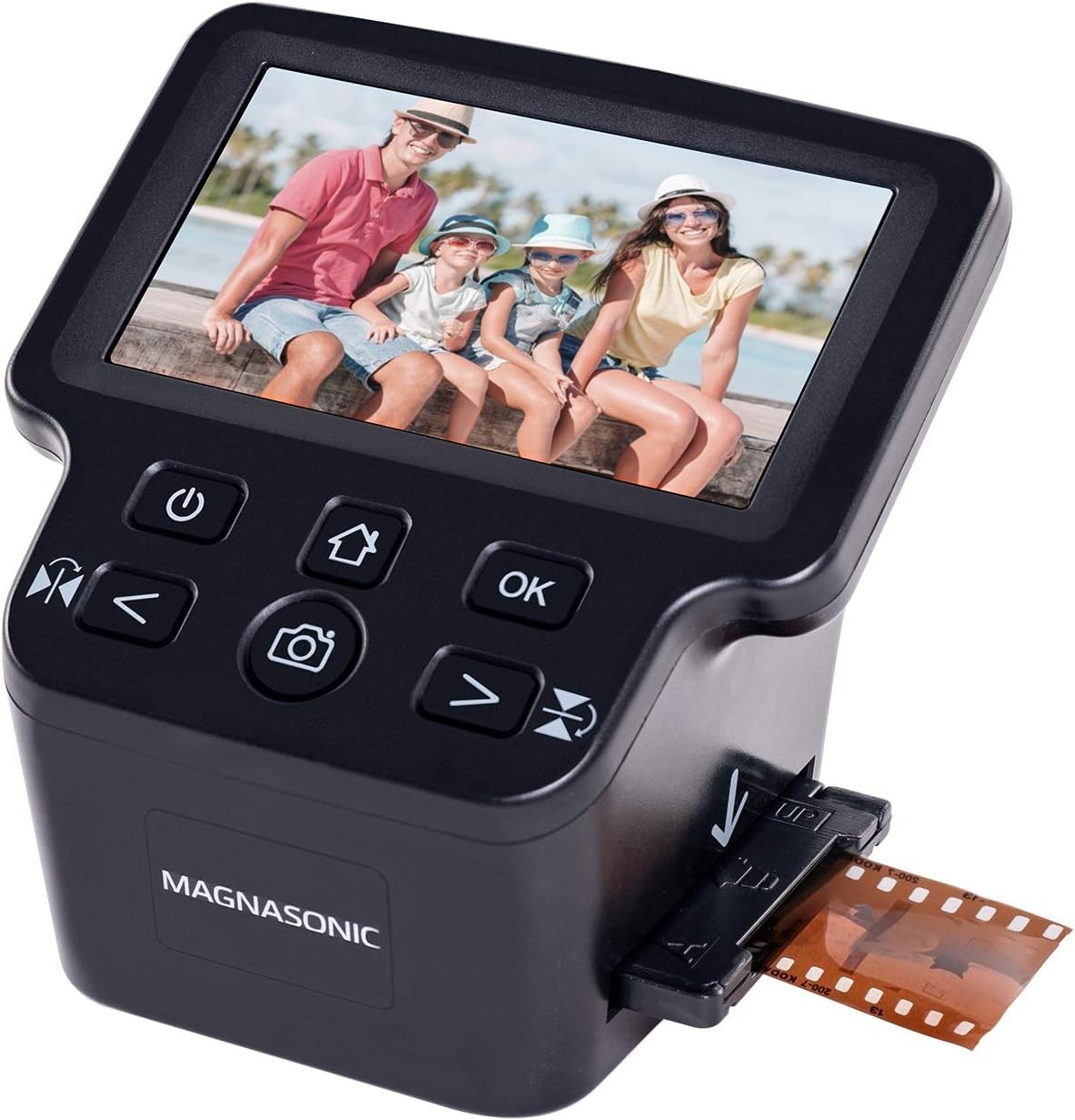
Magnasonic FS71

Magnasonic FS71

Budget film scanning

Our Score 8.6/10
Check Price

Worth Noting

  • Scan sharpness may be inconsistent, with some slides appearing blurry
  • Slide holder alignment can crop the edges of frames if not seated exactly
Scan Speed
150 slides/hr
Film Support
35mm, 126, 110, Super8
Scanner Type
Dedicated film
Software & OS
Standalone

The Magnasonic FS71 handles more film formats than the Kodak Slide N SCAN at a lower price, including Super 8 and 110. Setup takes minutes, and the 5-inch LCD makes previewing easy. Scanning at up to 150 slides per hour is noticeably faster than a flatbed, so you can work through a shoebox of negatives in an afternoon.

This scanner is best for budget-conscious users who need to digitize large numbers of slides and negatives for sharing online or small prints. The image quality is adequate for those purposes – expect some softness on certain slides and the occasional edge cropping from the slide holder alignment. The plastic build feels lighter than the Kodak alternatives, but the tradeoff keeps the cost low. Not suited for users who need sharp, print-ready scans or have very delicate film that requires careful handling.

Tip: Check that slides are fully centered in the holder before scanning; a slight nudge can prevent edge cropping.

Bottom line: If you need to convert a mixed collection of film formats quickly and on a tight budget, the Magnasonic FS71 is a practical choice – just keep expectations modest for ultimate image quality.

6

ClearClick QuickConvert 2.0

ClearClick QuickConvert 2.0

In-album scanning

Our Score 8.6/10
Check Price

Worth Noting

  • Only accepts prints 4x6 or smaller
  • Image resolution and color are adequate for web sharing but not for printing.
Scan Speed
2-3 sec/photo
Film Support
35mm, 110, 126
Scanner Type
Standalone
Software & OS
Standalone

The ClearClick QuickConvert 2.0 fills a narrow gap: it scans 4x6 photos still stuck in albums without requiring removal. The standalone design means no computer needed, and each scan takes about 2-3 seconds. The tradeoff is that it only accepts prints 4x6 and smaller, and image quality is adequate for sharing online but not for making prints. For general photo digitization this is too restrictive, but if you have a stack of album-bound photos that can't be pried out, this is the only scanner that handles them without damage.

Bottom line: Best for digitizing photos that are permanently attached in albums and need a quick digital copy without risk of tearing.

7

Kodak SCANZA

Kodak SCANZA

Casual film digitizing

Our Score 8.4/10
Check Price

Worth Noting

  • For high-quality prints or enlargements, colors may be off and sharpness limited - fine for screen viewing.
  • Negatives with curl may get stuck; requires pre-flattening to avoid delays.
Scan Speed
Film Support
35mm, 126, 110, Super8, 8mm
Scanner Type
Dedicated film
Software & OS
Standalone

The Kodak SCANZA supports an unusually wide range of film formats, including Super 8 and 8mm, making it one of the few dedicated scanners for those media. Setup is immediate and each slide processes in seconds, which matters when you have a large collection to digitize.

However, the image quality does not match the Kodak Slide N SCAN – colors can appear dull and details may look soft, especially when viewed at full resolution. Curled negatives have a tendency to jam, requiring manual flattening. For users focused on standard 35mm and slides, the Slide N SCAN delivers better results at a similar price point.

Tip: Flatten curled negatives with a warm weight or anti-newton ring glass before inserting to reduce jams.

Bottom line: This scanner is worth considering only if you need to digitize Super 8 or 8mm film on a budget - for standard 35mm and slides, the Kodak Slide N SCAN is a better investment.

8

Epson FastFoto FF-680W

Epson FastFoto FF-680W

High-volume prints

Our Score 9.0/10
Check Price

Worth Noting

  • No support for film negatives or slides
  • Premium price may not make sense unless scanning thousands of items.
  • Occasional jams and software glitches can interrupt batch jobs.
Scan Speed
1 photo/sec
Film Support
Prints only
Scanner Type
Sheet-fed prints
Software & OS
Epson software, Wi-Fi

The Epson FastFoto FF-680W chews through stacks of prints at one photo per second, scanning both sides and sending them straight to cloud services over Wi-Fi. Image quality holds up well, with auto color restoration that works on faded shots. However, this speed and convenience come with boundaries: the scanner handles only flat prints and documents up to 8x10, so film negatives and slides are off the table. At a premium price, it's twice the cost of dedicated flatbeds like the Plustek, and some units may experience jams or software hiccups during heavy use. It's a focused tool for mass digitization of photo prints, not a general-purpose home archive solution.

Tip: Use smooth, uncoated prints to reduce the chance of jams during high-volume runs.

Bottom line: Best for users digitizing thousands of photo prints and needing fast duplex document scanning, but skip if you have film or a tight budget.

How to Choose

Optical Resolution

Optical dpi (dots per inch) determines how much fine detail the scanner can capture. 600 dpi is enough for 4x6 prints to look good on screen or small prints, while 1200–2400 dpi reveals grain and texture in film.

Marketed 'interpolated' resolutions (like 22 MP) are software-upscaled and do not add real detail. For film, a true 6400 dpi optical scanner like the V550 can produce enlargements that dedicated film scanners at a lower price cannot match.

Scanner Type

Flatbeds are the most versatile: they handle prints, fragile items, and books, and with a transparency unit they can scan film. The downside is slow per-image speed, especially at high resolutions.

Sheet-fed photo scanners (like the Plustek Z300) are blisteringly fast for batches of prints but cannot handle film or anything thicker than a photo. Dedicated film scanners (like the Kodak Slide N SCAN) are optimised for slides and negatives but often have poor color accuracy and lower effective resolution than flatbeds.

Film and Slide Support

If you have negatives or slides, ensure the scanner explicitly supports your film format. Common sizes are 35mm, 110, 126, medium format (6x6 cm), and large format (4x5 and up).

Flatbeds with a transparency lid (like the V550) handle multiple formats in a single pass, but dedicated film scanners often accept only specific carriers. Check whether the scanner can handle curled or warped film without jamming.

Scan Speed

Speed is the biggest practical difference between scanners. A sheet-fed photo scanner can digitize a stack of 100 prints in under 4 minutes; a flatbed might take 30 minutes for the same job at high resolution.

For film, dedicated scanners process slides in 2–3 seconds each, while a flatbed at 2400 dpi takes 30–60 seconds per frame. If you have thousands of images, speed quickly becomes the deciding factor, even if it means accepting slightly lower quality.

Software and OS Compatibility

Scanner software quality varies enormously. Epson Scan is reliable and feature-rich, while some bundled software (like SilverFast on the V800) has a steep learning curve. Standalone film scanners often work with no computer at all, saving troubleshooting.

Before buying, verify that the scanner has drivers for your current operating system. Many older models lack support for macOS Sonoma or later, and some (like the Canon RS40) have known issues with newer Macs. Check the manufacturer's support page first.

Frequently Asked Questions