PC Components & Storage

9 Best PC Case of 2026: Find Your Balance of Fans, Glass, and Value

Which PC case actually fits your hardware and budget? From budget fan-packed towers to premium panoramic glass, find the case that matches your build style.

A PC case is more than a box for your components. It shapes your build's airflow, noise, and upgrade path. The market is full of options that promise seamless assembly and show-stopping looks, but the real test comes when you try to fit a modern GPU and a 360mm radiator without sacrificing cable management.

Our guide cuts through the marketing. We focus on the practical trade-offs: modularity vs. build consistency, fan count vs. fan quality, and glass panels vs. airflow. Whether you're after a showpiece for custom water cooling or a budget case that works out of the box, the right choice depends on your hardware and your willingness to add accessories.

The most common surprise is that a case that looks spacious in photos can still be tight for a flagship graphics card. This guide helps you match specs to your actual build, so you don't end up with an expensive paperweight.

1

Corsair 4000D RS ARGB

Top Pick
Corsair 4000D RS ARGB

Modular mid-tower enthusiast

Our Score 9.4/10
Check Price

Worth Noting

  • Some units may show bent panels or broken stands in transit
GPU Clearance
360mm
Included Fans
3x 120mm ARGB PWM
Radiator Support
360mm front/top
Motherboard Support
ATX, mATX, ITX

The 4000D RS ARGB stands apart with its InfiniRail mounting system, letting you reposition or swap fans and front I/O without drilling or permanent modifications. Back-connect motherboard compatibility (ASUS BTF, MSI Zero, Gigabyte Stealth) means you can hide nearly all cables from view, a feature usually reserved for pricier dual-chamber designs.

With three pre-installed RS ARGB PWM fans and a high-airflow front panel, thermal performance keeps components cool even under sustained load. The interior comfortably fits GPUs up to 360mm and CPU coolers up to 170mm, while the generous cable management routing behind the motherboard tray keeps builds tidy. The spacious layout also leaves room for large radiators — up to 360mm in the front and top, with an optional side mount for added cooling potential.

This case suits PC builders who value flexibility over a fixed layout — enthusiasts upgrading components over time or planning a future back-connect motherboard transition. That said, some units arrive with cosmetic damage or loose panels; inspecting the case upon delivery is a recommended precaution rather than a dealbreaker.

The clean black exterior and tempered glass side panel show off the ARGB fans without being flashy. The included fans sync with major RGB ecosystems via a built-in controller, adding visual polish without extra cost. For its mid-range price, the 4000D RS ARGB offers a balance of adaptability and good out-of-the-box cooling that hard-to-find in cases at this price point.

Tip: Unbox and inspect the case for any transit damage before starting your build — most issues are cosmetic and can be addressed with Corsair support.

Bottom line: If you want a case that grows with your hardware preferences — modular mounting, back-connect ready, and good airflow out of the box — the 4000D RS ARGB delivers that without the premium price tag of wood-accented alternatives.

2

Fractal Design North

Fractal Design North

Design-focused builder

Our Score 9.4/10
Check Price

Worth Noting

  • Clearance for large GPUs over 355mm is tight, and fitting a thick 360mm front radiator leaves only 300mm for the graphics card.
GPU Clearance
355mm
Included Fans
2x 140mm PWM
Radiator Support
360mm front, 280mm top
Motherboard Support
ATX, mATX, ITX

Where most mid-tower cases chase glass panels and RGB lighting, the Fractal Design North makes its statement with real walnut wood slats across the front. The steel body, tempered glass side, and matte charcoal finish give it a tactile quality that matches high-end furniture. This is a case designed to sit on a desk rather than under it.

Assembly benefits from thoughtful routing channels and sturdy metal brackets. Cable management is straightforward, even for first-time builders, and the two included 140mm Aspect PWM fans move enough air through the mesh intake to keep mid-range hardware cool without needing an immediate fan swap.

The tradeoff for this refined package is interior space. Graphics cards longer than 355mm require careful measurement — many modern flagship GPUs, including RTX 5090-series models, will not fit without removing front fans or radiators. A thick 360mm radiator in the front drops GPU clearance to 300mm, and top supports only 280mm radiators. This makes the North ideal for builders who value appearance over maximum component size, but a poor fit for anyone planning a maxed-out flagship build with a large AIO cooler.

Tip: If you plan a high-end GPU like an RTX 5090, check the card length against the 355mm limit (or 300mm with a front 360mm radiator) to avoid fit issues.

Bottom line: A design-first mid-tower that delivers on its wood-and-metal aesthetic — just measure your GPU and radiator plans before you buy.

3

Lian Li LANCOOL 217

Lian Li LANCOOL 217

High-airflow wood design

Our Score 9.6/10
Check Price

Worth Noting

  • Stock fans can generate noticeable noise at higher RPMs, especially in quiet environments.
  • Wood front trim and USB 2.0 ports have shown occasional fragility; inspecting on arrival is recommended.
GPU Clearance
420mm
Included Fans
5x PWM including 2x170mm
Radiator Support
360mm top/front
Motherboard Support
ATX

While the top-pick Corsair 4000D RS focuses on modular fan rails and back-connect support, the LANCOOL 217 leans into an out-of-box cooling setup that requires no additional fan purchases. Its 170mm front fans move substantial air at low speeds, and the walnut wood strip across the front panel gives it a furniture-like look that stands apart from the glass-and-steel norm.

This case suits builders who want a distinctive, non-RGB aesthetic paired with strong airflow from the factory. However, the stock fan curve can produce noticeable noise when pushed above 70% speed - less of an issue in a living room or office with ambient sound, but worth considering for a quiet bedroom setup. The wood trim, while attractive, has shown occasional chipping or detachment in shipping; inspecting the panel on arrival is wise.

Cable management is helped by Velcro straps and generous channels behind the motherboard tray. GPU clearance up to 420mm fits any current card, and the top radiator mount handles up to 360mm without clearance conflicts with the RAM. Build quality feels solid overall, with a steel chassis that minimizes flex during assembly.

Tip: Adjust the fan curve in BIOS or use a PWM hub to keep the 170mm fans below the noise threshold for quiet environments.

Bottom line: Strong value for a case that bundles five fans and genuine wood, though the fan noise and trim durability require consideration.

4

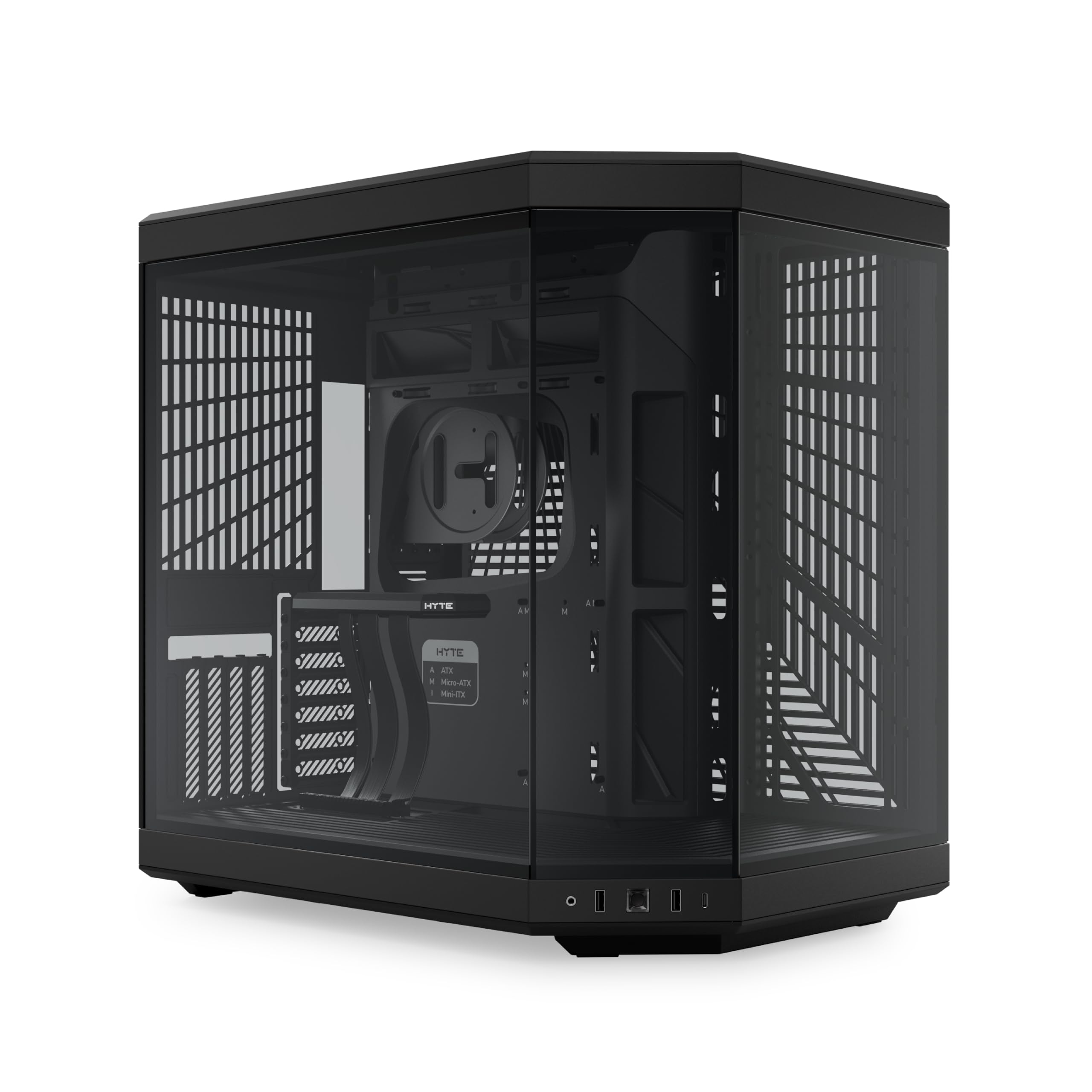
Hyte Y70

Hyte Y70

Showcase PC build

Our Score 9.6/10
Check Price

Worth Noting

  • Large footprint may not fit under standard desks or in compact spaces
  • No fans included at a premium price, requiring additional purchase for airflow
GPU Clearance
420mm
Included Fans
None
Radiator Support
360mm side/top
Motherboard Support
ATX, mATX, ITX

The Hyte Y70’s defining feature is its wraparound panoramic glass — a single curved panel that gives an unobstructed view of every component inside. That, paired with the included PCIe 4.0 riser cable, lets you mount the GPU vertically without buying extra accessories. It’s a case designed from the ground up to be a display piece, not just a box for parts.

The dual-chamber layout frees up interior space for cable management and allows 420mm GPU clearance and 185mm CPU coolers, so even oversized hardware fits. But the tradeoff is a large footprint that can surprise buyers — it may not slide under standard desks. And at this price point, the Y70 ships without any fans, so achieving airflow requires a separate purchase. That’s less of an issue for enthusiasts already planning custom fan setups or liquid cooling, but it adds to the total cost.

The build quality is consistent with the premium price: thick steel panels, glass that feels substantial, and a tool-free hinge for the glass door. Cable management channels are deep and well-placed, making it easier to keep the interior clean for display. For someone building a showpiece PC and willing to budget for fans, the Y70 delivers a look that’s hard to match in this price tier.

Tip: Measure your desk clearance before ordering, and budget for at least three 120mm fans or a liquid cooling setup to get airflow moving.

Bottom line: The Hyte Y70 is for builders who value a showpiece aesthetic over convenience — buy it if you’re already planning custom fans and have desk space to spare.

5

Lian Li O11Vision Compact

Lian Li O11Vision Compact

Compact panoramic build

Our Score 9.6/10
Check Price

Worth Noting

  • Builds that rely on stock cooling require a separate fan purchase
  • Front USB-C port functionality may become inconsistent after several months of use, worth checking early.
GPU Clearance
420mm
Included Fans
None
Radiator Support
360mm top/side
Motherboard Support
ATX, mATX, back-connect

The O11 Vision Compact uses three tempered glass panels with no front pillar, creating an unobstructed view of the interior from the side and front. The dual-chamber layout shifts the power supply and storage behind the motherboard tray, leaving the main compartment open for display-focused builds. This design pairs naturally with back-connect ATX boards, routing cables entirely out of sight without extra effort.

This case is best for builders who already own a set of fans or plan to use a liquid cooling loop — the empty chassis keeps costs lower for those who don't need bundled fans. It also suits anyone who wants a clean cable presentation and is willing to budget for separate cooling. The front I/O panel includes a USB-C port, but that connector can become inconsistent after several months; testing it early in the return window is a reasonable precaution.

Assembly benefits from tool-less side panels and a modular interior that accepts ATX motherboards and GPUs up to 420mm. The side radiator mount supports 360mm units without blocking the glass view, and the compact mid-tower footprint fits on most desks without dominating the space. Cable management channels and Velcro straps make the back-connect path straightforward, though the lack of pre-installed fans means the first boot requires an external cooling solution.

Tip: Test the front USB-C port immediately upon assembly to confirm functionality within the return window.

Bottom line: For builders who want a compact showcase case without the extra cost of fans they don't need, the O11 Vision Compact delivers clean cable paths and unobstructed views — just plan your fan budget separately.

6

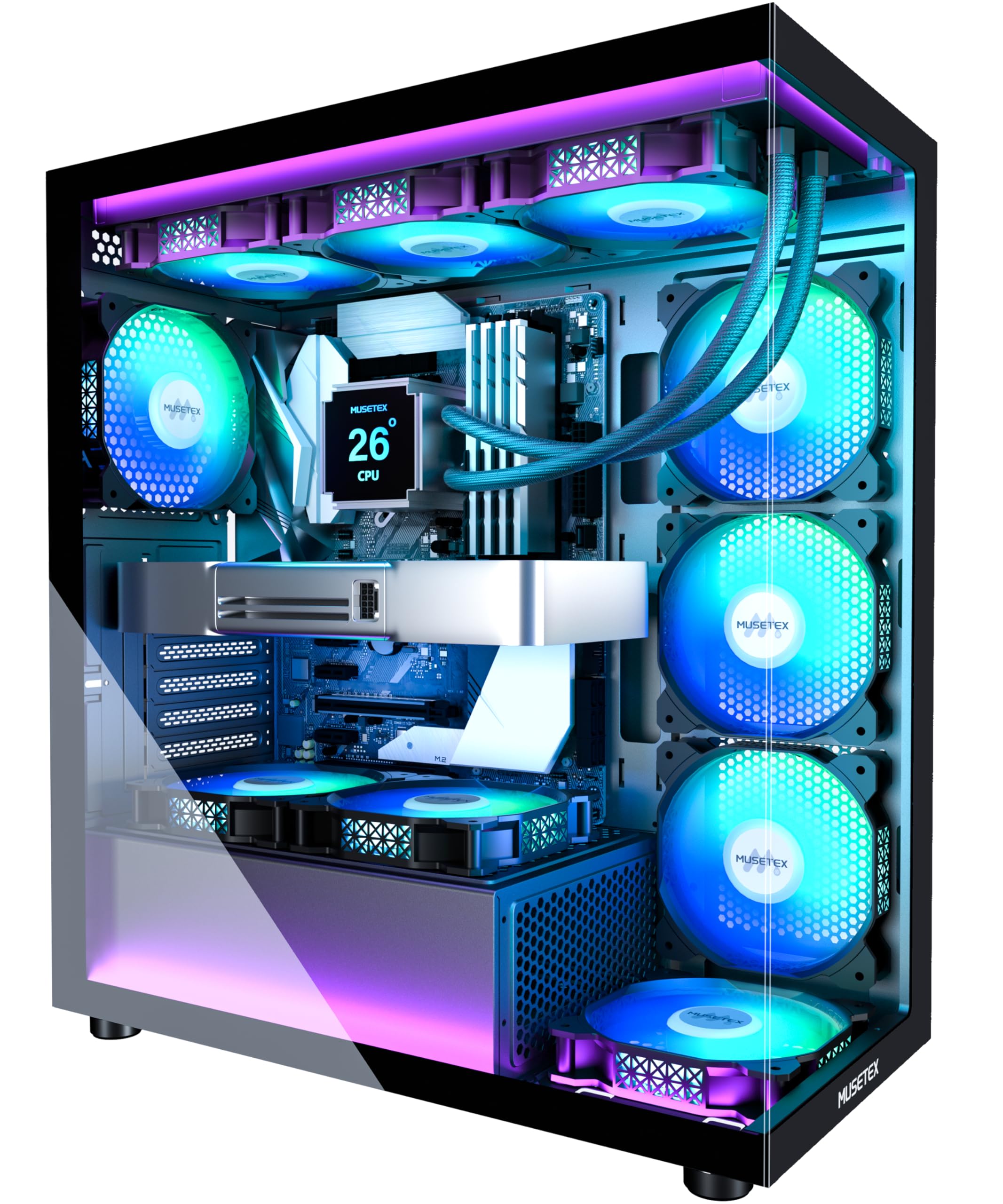
MUSETEX K2

MUSETEX K2

Budget RGB galore

Our Score 9.2/10
Check Price

Worth Noting

  • Cable routing in the rear chamber can be tight because fan cables are pre-routed.
  • Some fan connectors are proprietary to MUSETEX, limiting replacement options.
  • Occasional cosmetic defects like bent metal may be present on arrival.
GPU Clearance
400mm
Included Fans
7x 120mm ARGB PWM
Radiator Support
360mm top
Motherboard Support
ATX, mATX, ITX

With seven pre-installed PWM ARGB fans, the MUSETEX K2 delivers a fully lit build straight out of the box — no extras needed. The dual tempered glass panels provide clear views of components, and the interior easily fits large GPUs up to 400mm plus 360mm top radiators. Assembly is tool-free for the most part, which speeds up the build process.

This case is aimed at budget-conscious gamers who want maximum visual impact and airflow without spending extra on fans. The tradeoff: the rear cable management channel is cramped, and some fan connectors are proprietary to MUSETEX, limiting replacement options. Occasional cosmetic issues such as bent metal have been noted on arrival, so inspecting the chassis early is advisable.

The pre-routed fan cables add bulk behind the motherboard tray, so tidy cable work requires patience and careful routing. For builders who don't mind a slightly messy back panel and who prioritize lighting volume over premium touches, the K2 offers a compelling package at an entry-level price.

Tip: Route cables before installing the PSU to maximize the limited rear space.

Bottom line: For builders who prioritize maximum lighting and airflow on a tight budget, the MUSETEX K2 delivers more than any competitor at this price — just be prepared for a cramped rear cable channel.

7

Lian Li Vector V100

Lian Li Vector V100

Budget value build

Our Score 9.6/10
Check Price

Worth Noting

  • For builders using standard ATX or smaller motherboards, the limited E-ATX support is irrelevant
  • Back-connect motherboard compatibility is absent, a feature now available on competing cases at similar prices.
GPU Clearance
420mm
Included Fans
4x 120mm ARGB PWM
Radiator Support
360mm top
Motherboard Support
ATX, mATX, ITX, back-connect

For builders on a tight budget, this Lian Li case offers a complete out-of-box experience with four PWM ARGB fans, a glass side panel, and front-panel USB-C at a price that undercuts competitors bundling fewer fans. The tool-less panels and spacious interior simplify the first build, and build quality holds up well against cases costing more. Where it falls short for some: the motherboard tray lacks cutouts for back-connect boards, and E-ATX support is limited to select narrow models — standard ATX and smaller fit without issue.

Bottom line: Best for budget builders who want a fully outfitted mid-tower with good airflow and don't need E-ATX or back-connect support.

8

Antec Flux Pro

Antec Flux Pro

Full-tower enthusiast

Our Score 9.4/10
Check Price

Worth Noting

  • Very large full-tower size may be too big for desktop placement or under a standard desk
  • Stock fans are functional but can be noisy at high RPM; some buyers replace them for quieter operation
GPU Clearance
420mm
Included Fans
6x 140mm PWM
Radiator Support
420mm + 360mm
Motherboard Support
E-ATX, ATX, mATX, ITX

The Antec Flux Pro delivers six pre-installed 140mm PWM fans and room for up to two 420mm radiators, making it a strong option for custom water-cooling or high-airflow builds. The front panel combines a walnut wood accent with a mesh design, giving the large chassis a refined look that stands out from typical plastic or glass fronts. The iShift PSU mount rotates 90 degrees to simplify cable routing behind the motherboard tray, a thoughtful touch for managing thick wiring.

The full-tower footprint is its main limitation: at nearly 24 inches deep, it may not fit under standard desks or on smaller desks comfortably. The included fans move plenty of air but aren’t the quietest at higher speeds, so buyers sensitive to noise may want to replace them after the build is complete. This case suits builders who genuinely need E-ATX support and dual large radiators — for a typical mid-tower build, its size becomes a burden rather than a benefit.

Tip: Measure your desk depth and clearance before buying — the case extends 528mm to the rear, so you need at least 22 inches of free space.

Bottom line: Only worth the space commitment if you are building a high-end E-ATX system with multiple 360mm or 420mm radiators; for mid-tower builds, the size is overkill.

9

Thermaltake View 270 Plus

Thermaltake View 270 Plus

Ultra-budget glass case

Our Score 9.4/10
Check Price

Worth Noting

  • Included fans use 3-pin DC connection, limiting speed control to voltage regulation
  • Glass panels and metal panels may show signs of damage or flex in some units; inspect on arrival
GPU Clearance
420mm
Included Fans
3x 120mm ARGB (non-PWM)
Radiator Support
360mm top
Motherboard Support
E-ATX, ATX, mATX, ITX

The Thermaltake View 270 Plus delivers three ARGB fans and a panoramic glass front at a budget-friendly price, making it an attractive option for those building on a tight budget. The included fans are 3-pin DC rather than PWM, so speed control is limited to voltage regulation – fine for casual users but not for those wanting silent profiles. For the price, it's a solid case with E-ATX support that undercuts many competitors.

Bottom line: Best for budget builders who want a glass showcase with fans out of the box and can accept basic fan control and potential QC variance.

How to Choose

Motherboard Support

ATX is the standard for mid-tower cases. E-ATX support adds room for workstation motherboards but often increases case width and reduces clearance for cable routing. Back-connect motherboards (like ASUS BTF or MSI Zero) require cases with cutouts behind the CPU socket and special standoff layouts.

If you plan to use a back-connect board, check the case explicitly lists support. Standard ATX cases won't route the connectors properly, and you'll end up with a messy build or blocked ports.

Included Fans

Pre-installed fans save money but vary in quality. Budget cases often include 3-pin DC fans that can't be fine-tuned via PWM, leading to either constant noise or limited speed control. High-end cases sometimes include no fans at all, expecting you to buy your own.

Check fan size and bearing type. 140mm fans move more air at lower RPM than 120mm ones, and fluid-dynamic bearings last longer than sleeve bearings. If you value quiet operation, plan to replace stock fans even in mid-range cases.

GPU Clearance and Radiator Support

Modern graphics cards like the RTX 5090 can exceed 350mm length. A case claiming 360mm clearance may still be tight when front fans are installed. Always subtract 25-30mm from the max GPU length if you mount a front radiator.

Radiator thickness matters too. A 360mm radiator with 25mm fans needs roughly 55mm of clearance from motherboard to side panel. Cases with offset mounting brackets or removable fan trays offer more flexibility. If you want a thick 420mm radiator, you'll need a full-tower or a dual-chamber case.

Cable Management and Build Ease

Dual-chamber designs hide cables behind a separate compartment, making builds cleaner but adding width. Tool-less panels and Velcro straps simplify assembly, but cramped rear chambers on budget cases can make cable routing frustrating.

Consider how many drive cages you need. Cases with PSU shrouds and plenty of grommets are easier to manage. If you plan to use many SATA drives or custom cable extensions, look for at least 20mm of clearance behind the motherboard tray.

Aesthetics

Panoramic glass cases with minimal pillars offer the best component visibility but often sacrifice front airflow. Mesh panels provide better cooling but hide the interior. Wood accents add a natural look but can be less durable than aluminum or steel.

RGB compatibility is another factor. Some cases use proprietary controllers that only work with the brand's software. If you want to sync lighting across components, choose a case with standard ARGB headers (3-pin 5V).

Frequently Asked Questions