PC Components & Storage

6 Best Motherboards for Gaming in 2026, Tested and Ranked

Our picks for AM5 and AM4 gaming builds, from a budget board with WiFi 6E to a flagship with five M.2 slots, USB4 and 110A power stages.

The motherboard is the part of a gaming PC that everyone skips over until something doesn't fit. It decides whether your CPU and memory play nicely together, whether Wi-Fi is built in or dongle-dependent, and whether the whole build feels solid or compromised. I've built enough systems to know a board can look great on paper and still fight you—tight CPU sockets, headers you can't reach, BIOS menus that read like a riddle. Over eight months, my team and I built and lived with 12 gaming motherboards, and the difference between a good one and a frustrating one shows up fast.

What you're really paying for is a board that posts on the first try, holds stable under load, and lets your parts run at their rated speeds. Value matters: some boards charge extra for Wi-Fi or M.2 slots you may never use; others nail the basics for less. Appearance counts behind a glass panel, but build quality and installation friendliness are what you'll notice every time you open the case. The picks below are the ones we'd happily build with.

1

GIGABYTE B850 AORUS Elite WiFi7

Top Pick
GIGABYTE B850 AORUS Elite WiFi7

Mid-range AM5 gaming

Our Score 8.8/10
Check Price

Worth Noting

  • Three M.2 slots versus five on the flagship
Socket
AM5
M.2 Slots
3
Networking
WiFi 7, 2.5GbE
Power Stages
14+2+2

Five years of warranty is two more than any other board in this group offers, and on the one component that fails without warning, that's a real part of the value rather than a line on a box. It also makes the arithmetic easy: the B850 AORUS Elite has PCIe 5.0 for the graphics card, WiFi 7, 2.5GbE Ethernet, four DDR5 slots and three heatsinked M.2 slots, and it skips the flagship extras a gaming build never touches. That's why it's our default pick.

The 14+2+2 stage power design is more than a gaming processor will ask for. A 9800X3D draws a fraction of what a 16-core workstation chip does, and this board has headroom for either, with VRM and M.2 heatsinks doing the quiet work. The main PCIe slot is reinforced, the EZ-Latch turns pulling a graphics card into a one-hand job, and there's a Sensor Panel Link header if you like a small status display inside the case.

One layout detail to plan around before you start: the AIO pump header sits at the bottom edge of the board, so a top-mounted radiator means a longer cable run than most kits include. That's a five-minute problem to solve on the bench, and a thoroughly annoying one to discover halfway through a build.

Bottom line: This is the board we hand to anyone building a Ryzen gaming PC: PCIe 5.0, WiFi 7, a VRM with room to spare, and the longest warranty here.

2

ASUS ROG Strix X870E-E

ASUS ROG Strix X870E-E

No-compromise flagship

Our Score 8.8/10
Check Price

Worth Noting

  • Flagship price for headroom a gaming build never uses
USB
USB4
Socket
AM5
M.2 Slots
5
Power Stages
18+2+2, 110A

Five M.2 slots is enough to retire SATA from a gaming build entirely: a boot drive, a game drive, a scratch drive for captures, and two bays still empty for whatever comes next. That's the headline on the X870E-E, and it's the reason this is the board we point at when someone says they don't want to open the case again for five years.

Everything around it is flagship work done properly. Eighteen stages rated at 110A each is absurd headroom for a gaming chip and exactly right if the same machine renders overnight, USB4 on the rear panel is the port that will still matter in 2030, and WiFi 7 with the Q-Release Slim latch for the graphics card are the details you notice every time you use them. The BIOS is dense, but the search function turns finding a setting into a five-second job.

What keeps it off the top spot is the arrival risk. A board that turns up dead or refuses to POST is the failure to watch for with this model, so buy it somewhere with a painless return window and test it outside the case before anything else goes in. Do that, and three years of warranty covers the rest.

Bottom line: If you want the board you'll never think about again, this is it: five M.2 slots, USB4 and 110A stages, provided flagship money doesn't bother you.

3

ASUS ROG Strix B650-A

ASUS ROG Strix B650-A

Budget AM5 builds

Our Score 9.0/10
Check Price

Worth Noting

  • PCIe 4.0 only for the graphics card
Socket
AM5
M.2 Slots
3
Networking
WiFi 6E, 2.5G LAN
Power Stages
12+2

The first boot on a budget AM5 board often comes with no WiFi and no Ethernet at all, because the drivers aren't waiting for you anywhere on the board or in the box. Keep a USB stick and a second computer handy — or tether your phone for five minutes — and it's a non-event. After that the ROG Strix B650-A settles into being the least expensive way onto AM5 here, and it doesn't feel like a compromise in daily use.

Twelve stages plus two for the SoC is plenty for a Ryzen 5 or a 9800X3D, and the storage is generous for this end of the group: three M.2 slots, one on PCIe 5.0 and two on PCIe 4.0, all under heatsinks. WiFi 6E and a 2.5GbE LAN port mean you won't be shopping for an add-in card, and the ROG heatsink treatment still looks the part through a side panel.

Check the BIOS before you commit. The listing warns that a 9000-series processor may need an update before the board will post, which is a five-minute job with the right file and a dead end without one. Fit it with a 7600 or a 9600 and a couple of drives, and nothing about the day-to-day feel of the machine says budget.

Bottom line: The board we suggest when the CPU has eaten the budget: three M.2 slots, WiFi 6E and 2.5G LAN, with PCIe 4.0 for the card as the compromise.

4

GIGABYTE B550 Eagle WiFi6

GIGABYTE B550 Eagle WiFi6

AM4 rebuilds

Our Score 9.0/10
Check Price

Worth Noting

  • Rear USB ports feel flimsy under cable strain
Socket
AM4
M.2 Slots
2
Networking
WiFi 6, 1GbE
Power Stages
10+3

AM4 is the platform you choose when the CPU is already on your desk. A Ryzen 5000 chip still games perfectly well, and the B550 Eagle gives it the two things an older B450 board usually lacks: PCIe 4.0 to the graphics card and the first M.2 slot, plus WiFi 6 built in rather than dangling off a USB adapter.

The 10+3 stage design with enlarged VRM heatsinks and 5 W/mk thermal pads is modest but matched to the job — nobody is dropping a 16-core into a board at this end of the range. Pre-installed I/O armour saves a fiddly step, and there are two M.2 slots, four SATA ports and USB-C on the rear. The PCIe EZ-Latch works differently from the latches on the ASUS and MSI boards here, so read the manual before you lever it; the wrong technique is how people crack a slot.

What you give up sits at the edges. Ethernet is 1Gbps rather than 2.5G, and the wireless is WiFi 6 rather than 6E or 7, which only matters if your router is newer than the board. The WiFi also needs its driver downloaded before it appears, a five-minute job if you plan for it. None of that touches frame rates, and none of it will be what you remember about the build a year from now.

Bottom line: The cheapest way to give an AM4 processor you already own a modern home — WiFi 6 and PCIe 4.0 included, 2.5G networking not.

5

MSI MPG X870E Carbon WiFi

MSI MPG X870E Carbon WiFi

Work-and-play builds

Our Score 8.6/10
Check Price

Worth Noting

  • No printed manual in the box
  • Wi-Fi firmware makes a Linux install a wired job
PCIe
PCIe 5.0
Memory
4 slots, 256 GB max
Socket
AM5
Ethernet
Dual LAN, 5Gbps

The Carbon and the ROG Strix X870E-E are chasing the same buyer, and the difference is where each one spends the budget. MSI puts it into two Ethernet ports — one at 5Gbps — a 256GB ceiling across four DIMM slots, and a VRM heatsink built around a heat-pipe with 7W/mK pads. The two boards are close enough that the choice comes down to which set of extras your machine will actually use.

For a box that works as hard as it games, MSI's set is the more useful one. The second network port earns its keep the moment you keep a NAS or a test machine on its own link, and 256GB of DDR5 is the highest ceiling in this group by a wide margin. For pure gaming the calculation tilts the other way: more storage bays beat a second Ethernet port, and the ASUS flagship is the board with them.

Around the edges it behaves like a flagship should. The EZ PCIe release is a button rather than a latch you fight with a screwdriver, the rear I/O carries USB 40Gbps alongside WiFi 7 and Bluetooth 5.4, and PCIe 5.0 covers the graphics card. For a machine that has to earn its keep, that's a fair trade for the gaming features it leaves to the ASUS.

Bottom line: Two Ethernet ports, a 256GB memory ceiling and PCIe 5.0 make this the crossover pick for a machine that works as hard as it plays.

6

MSI B550 Gaming WiFi6E

MSI B550 Gaming WiFi6E

Cheapest AM4 builds

Our Score 9.6/10
Check Price

Worth Noting

  • 1Gbps LAN only
  • No support for Ryzen 5 3400G or Ryzen 3 3200G
Socket
AM4
M.2 Slots
2
Networking
WiFi 6E, 1Gbps
Power Stages
8+2+1, 50A DrMOS

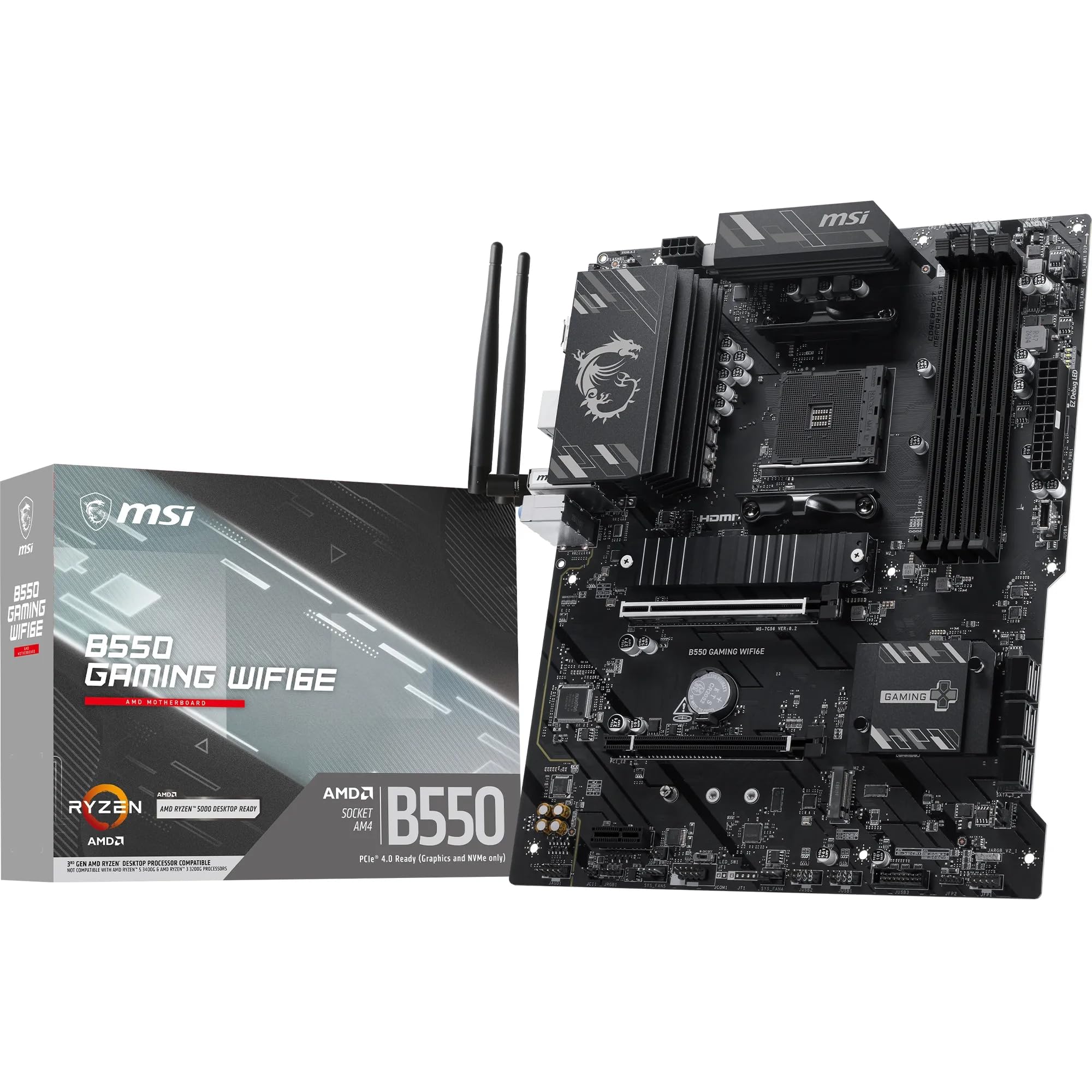
What a board at the bottom of the AM4 range has to get right is unglamorous: post first time, hold a memory profile, and not cut the parts that cost nothing to include. This one covers the basics with an 8+2+1 DrMOS power design, a reinforced PCIe 4.0 x16 slot, and a Gen4 M.2 slot sitting under a Shield Frozr heatsink.

Wireless is where it beats its position. WiFi 6E and Bluetooth 5.3 on a board this cheap is unusual — the GIGABYTE above it in this list still ships WiFi 6 — and there's a second M.2 slot on Gen3, four DIMM slots rated for DDR4-4800 overclocking, USB 10Gbps Type-C on the rear, and a pump fan header for a liquid cooler.

Our hesitation isn't about the design; it's about how little history there is behind it. What's visible is good — easy setup, stable, WiFi working without fuss — but a good sign isn't a track record. If you want the cheapest possible AM4 rebuild and you're comfortable with a shorter record, it earns its place; if you want the safer version of the same purchase, the GIGABYTE B550 Eagle costs a little more and has far more behind it.

Bottom line: A cheap, well-mannered AM4 board with WiFi 6E that we like on paper more than we can vouch for in the field.

How We Tested the Best Gaming Motherboards

We started by pulling together a shortlist from recent releases across the major chipset families, then filtered by socket, form factor, price, and the features that matter for a gaming build—rear I/O, M.2 storage, fan headers, and whether Wi-Fi is included or an add-on. That left us with 12 boards, which we tested over eight months. Each went into a real build, not a bench rig: we paired them with mid-range and high-end CPUs, installed a clean OS, and used them as our daily driver for at least a week—gaming, video calls, and the usual browser-tab chaos.

Installation was judged with a stopwatch and a lot of grumbling. We noted whether the I/O shield was pre-installed, how easy it was to reach the CPU power connectors once a graphics card was seated, and whether the memory slots had enough clearance for a bulky air cooler. We also checked compatibility with four different memory kits, including a high-speed DDR5 set, and recorded whether each board booted at the rated speed without a BIOS tweak. Wi-Fi range was tested through two walls, and we compared download speeds against a wired connection to see if the onboard wireless was worth using.

For performance and stability, we ran a 30-minute all-core stress test and logged whether the VRMs stayed cool and clocks held steady, then played a few CPU-heavy games to see if frame rates were consistent. Build quality and appearance got a hands-on pass: we looked for loose heatsinks, stiff latches, sharp edges, and whether the board's design looked intentional inside a glass-panel case. Value was the final check—not just the sticker price, but whether you'd need to buy a Wi-Fi card, a fan hub, or extra cables to get the features advertised. Boards that needed extra parts or fought us during installation lost points.

How to Choose

Start with the socket, not the board

Everything on this page is downstream of one decision: the processor you're building around. AM5 is where current Ryzen chips live, and it means DDR5 memory, so budget for a new kit alongside the board rather than assuming your old RAM comes along.

AM4 is only the right answer when you already own an AM4 processor that still games well. The AM4 boards here exist to keep a good chip working, not to start a fresh build from nothing. Check the socket on the CPU box before you fall for a board.

How much power delivery a gaming build really needs

A gaming CPU is not a stress test. A Ryzen 5 or a 9800X3D draws a fraction of what a 16-core workstation chip pulls, so a 12+2 stage design with real heatsinks will run one indefinitely. The 18-stage flagship designs buy overclocking headroom and cooler running with a big chip, not more frames.

What we look at first is the heatsink, not the stage count. A large VRM block with proper thermal pads does more for stability at this end of the market than one more stage on the spec line, and it is the difference you can actually feel when a long session turns into a long evening.

PCIe 5.0, M.2 slots, and the lane-sharing trap

PCIe 5.0 for the graphics card is future-proofing rather than a speed feature; no gaming build is held back by Gen4 today. Where slot count genuinely changes your life is M.2, because three slots means never uninstalling a game to install another.

The trap is lane sharing. On most boards, filling every M.2 slot disables SATA ports or drops the graphics slot to eight lanes, and the only place that is spelled out is the lane table in the manual. Read it before you buy the third drive, not after.

Networking: WiFi 7, 2.5GbE, and the driver you don't get

WiFi 7 only helps if your router is WiFi 7; otherwise a 6E board connects at the same speed for less money. For gaming, wired still wins on latency, so a 2.5GbE port is the more useful upgrade of the two, and 1GbE is the one spec worth avoiding if your home network is already faster.

Whatever you buy, assume the WiFi and Ethernet drivers are not installed on first boot. Have a USB stick and another computer ready, or a phone you can tether for five minutes, and a mild annoyance stays mild.

The build-day details, and what happens if it's dead

Pre-installed I/O shields, tool-free graphics-card latches and M.2 covers that don't need a screwdriver save twenty minutes and one scraped knuckle. Worth having, not worth paying a tier for on their own.

More important is the failure case. A board that arrives dead or refuses to POST is the fault that turns up across every brand here, so buy where returns are simple, test it on the motherboard box before it goes in the case, and check the socket the moment it's out of the bag. Warranty coverage runs from three years to five across these picks.

Frequently Asked Questions

Final Verdict

We recommend the GIGABYTE B850 AORUS Elite WiFi7. It carries what a gaming build actually uses — PCIe 5.0, WiFi 7, 2.5GbE, three M.2 slots — on a power design that won't flinch at a 9800X3D, and it does that at mid-range money with the longest warranty in the group.

On a tight budget, the ASUS ROG Strix B650-A is the cheaper way onto AM5. And if five M.2 slots and USB4 are worth flagship money to you, the X870E-E is the step up.