PC Components & Storage

10 Best AIO Cooler of 2026: Prioritize Performance Over Gimmicks

Find the AIO cooler that keeps your CPU cool and quiet without LCD headaches. Real-world performance and reliability guide.

Most modern AIO coolers can handle a high-end CPU. The real differences come down to noise, reliability, and how easy they are to install. Many expensive models add LCD screens that glitch or fail early.

This guide focuses on what actually matters: thermal performance, pump noise, and mounting ease. The choice often comes down to raw cooling capacity versus a polished, whisper-quiet experience.

We've selected coolers that excel in specific use cases, so you can match the right one to your build priorities without overspending on features you don't need.

1

ARCTIC LF III Pro 360

Top Pick
ARCTIC LF III Pro 360

High-end CPUs

Our Score 9.0/10
Check Price

Worth Noting

  • Mounting the pump head on AM5 sockets can be frustrating due to awkward screw alignment.
  • Fans are loud at default settings, requiring manual fan curve adjustment for quiet operation.
Radiator Size
360mm x 38mm
Extra Features
VRM fan, A-RGB
Installation Type
Standard bracket

The ARCTIC Liquid Freezer III Pro 360's 38mm thick radiator and integrated VRM fan push cooling performance into territory typically occupied by coolers that cost twice as much. High-TDP processors like the Intel i9 or AMD Ryzen 9 stay under 70°C under sustained load, giving enthusiasts headroom for overclocking without thermal throttling.

That thermal dominance comes with a default noise profile that may surprise anyone used to quieter AIOs. At its stock fan curve, the 3000 RPM fans are audible even in a standard room. The fix is straightforward — a custom fan curve in BIOS or a utility like Fan Control drops noise to acceptable levels while keeping temps in check. Once adjusted, the cooler operates without drama.

This is a cooler for the builder who values raw cooling per dollar above all else. It makes sense if you run a high-wattage CPU, don't mind spending 15 minutes with a screwdriver on the AM5 mounting bracket, and plan to tune fan speeds right after assembly. Noise-sensitive users in quiet spaces or first-time builders expecting tool-free installation should consider alternatives like the Corsair iCUE LINK Titan 360 RX.

Build quality is competitive for the mid-range price, and the six-year warranty exceeds what most brands offer at this level. The integrated VRM fan is a small but useful addition — it pulls air across motherboard components near the socket, which can help stability during all-core loads. For the money, you get hardware that handles extreme heat without forcing a premium cable-management system.

Tip: Set a custom fan curve in BIOS or with Fan Control before final assembly — the default profile prioritizes cooling over quiet operation.

Bottom line: If you need maximum cooling per dollar and are comfortable with a one-time mounting challenge and tweaking fan speeds, this is the most effective 360mm AIO available at its price.

2

Corsair Titan 360 RX

Corsair Titan 360 RX

Quiet performance

Our Score 9.4/10
Check Price

Worth Noting

  • Price is premium for a non-LCD cooler, though sales bring it closer to value
  • Cable length may be short for large cases; some units ship missing necessary accessories
Radiator Size
360mm x 27mm
Extra Features
iCUE LINK, A-RGB
Installation Type
iCUE LINK daisy-chain

The Corsair Titan 360 RX delivers strong cooling with a notably quiet fan curve out of the box, avoiding the whir of many competitors. Its iCUE LINK system lets you daisy-chain fans and the pump, reducing cable clutter to a single connection, which makes installation particularly clean compared to the thicker-radiator alternative that demands manual fan tuning.

This cooler suits enthusiasts who already own Corsair iCUE accessories or want a quiet system for a bedroom or office. The all-black design and non-LCD pump keep the focus on performance. One tradeoff: the included cables may be too short for full-tower cases, and occasional reports of missing accessories mean you should verify the contents upon arrival.

Corsair backs this unit with a six-year warranty, and the iCUE software provides full control over fan and pump curves. For those already in the iCUE ecosystem, the seamless integration is a clear benefit.

Tip: Inspect the package for all included cables immediately; the USB data cable and PCIe power cable are occasionally missing and can be replaced under warranty.

Bottom line: This is the AIO to buy if you want quiet, hassle-free cooling and already have or plan to use Corsair's iCUE ecosystem — just ensure your case accommodates the cable length.

3

CM 360L Core

CM 360L Core

Budget 360mm

Our Score 9.2/10
Check Price

Worth Noting

  • In some cases, fans or radiator arrive damaged, requiring a replacement.
  • Fan noise can increase over months of use, potentially needing aftermarket fans.
Radiator Size
360mm x 27mm
Extra Features
ARGB
Installation Type
Standard bracket

The Cooler Master 360L Core delivers 360mm liquid cooling and addressable RGB lighting at a price that undercuts nearly every competing unit. Its Gen S dual-chamber pump and 71.93 CFM fans keep mid-range CPUs cool during gaming sessions, narrowing the gap with premium coolers. Compared to the ARCTIC Liquid Freezer III 360, the Cooler Master offers cleaner ARGB lighting and simpler installation with pre-applied paste and clear instructions.

In practice, the cooler operates quietly after adjusting the fan curve away from stock settings. The ARGB lighting looks clean and adds visual appeal without being flashy. However, build quality is inconsistent - some units arrive with damaged fans or radiator fins, and fan noise may become noticeable after several months of use. These issues are not universal, but they are worth factoring into the purchase decision.

This cooler suits budget-conscious builders who prioritize low upfront cost over long-term reliability. If you can accept potential returns or plan to replace the stock fans with quieter aftermarket options, the Cooler Master 360L Core provides substantial savings. For buyers who prefer a set-and-forget experience, a more expensive model with better QC may be a safer choice.

Tip: If fan noise increases after months, swapping the stock fans for quieter aftermarket models can restore a quiet experience without replacing the entire cooler.

Bottom line: For builders on a tight budget who can handle possible QC hiccups or fan upgrades, the Cooler Master 360L Core is the most affordable way to get 360mm cooling with ARGB.

4

Thermalright Notte 360

Thermalright Notte 360

Ultra-budget 360

Our Score 9.0/10
Check Price

Worth Noting

  • Pump may require replacement within months; warranty covers the cost but expect potential downtime.
  • Pump or fan noise can be audible in quiet rooms, especially at higher speeds.
Radiator Size
360mm x 27mm
Extra Features
ARGB
Installation Type
Pre-mounted fans

The Thermalright Frozen Notte 360 delivers cooling performance that rivals coolers costing twice as much, all for an entry-level price. It does not match the thermal headroom of a thicker 38mm radiator competitor, but for most mid-range CPUs the difference is marginal. Installation is straightforward thanks to pre-mounted fans, reducing build time.

Some units may experience pump noise, and there are reports of pumps ceasing to function within months. The included six-year warranty provides a recovery path, but the possibility of early replacement means this is not a set-and-forget solution. In quiet environments, fan or pump noise may be noticeable.

This cooler suits extreme budget builders who prioritize cooling capacity per dollar above all else and are comfortable with the chance of a warranty claim. If you need silent operation or require the cooler to run unattended for years, a model with a more established pump design is a better fit.

Tip: Monitor coolant temps and listen for pump noise; the six-year warranty simplifies replacement if issues arise.

Bottom line: The Thermalright Frozen Notte 360 offers extreme cooling per dollar for builders who accept a higher chance of pump issues, with the warranty serving as a safety net.

5

Thermalright Aqua Elite 240

Thermalright Aqua Elite 240

Compact builds

Our Score 9.4/10
Check Price

Worth Noting

  • Installation involves many small parts that can confuse beginners
  • Pump coil whine or loss of cooling may occur within a year in some units
Radiator Size
240mm x 27mm
Extra Features
ARGB lighting
Installation Type
Standard bracket

For builders limited to a 240mm radiator, the Thermalright Aqua Elite 240 V3 delivers cooling performance that rivals pricier options while staying quieter than most budget coolers. The top pick in this roundup focuses on 360mm cooling, but this unit fits where space is tight and cost matters more.

This cooler suits budget builds in small form factor cases where every dollar counts. Some units may develop pump coil whine or lose cooling capacity within the first year, though the majority operate without issues. If long-term reliability is a priority, consider a more established model.

In a typical Ryzen 7 5800X setup, the Aqua Elite 240 lowered core temperatures by 10-12°C under load. The 240mm radiator and 1500 RPM fans keep noise levels low enough for most living-room or office environments, and the ARGB lighting adds a clean aesthetic without being intrusive.

Tip: Watch an installation video before starting — the included instructions can be hard to follow.

Bottom line: For budget-focused builders with a small case, this AIO offers a quiet, effective cooling solution — just be aware that a small number of units exhibit early pump issues.

6

NZXT Kraken Core 360

NZXT Kraken Core 360

Budget NZXT

Our Score 9.4/10
Check Price

Worth Noting

  • Lacks an LCD screen or advanced display features
Radiator Size
360mm
Extra Features
None
Installation Type
Single-frame fan

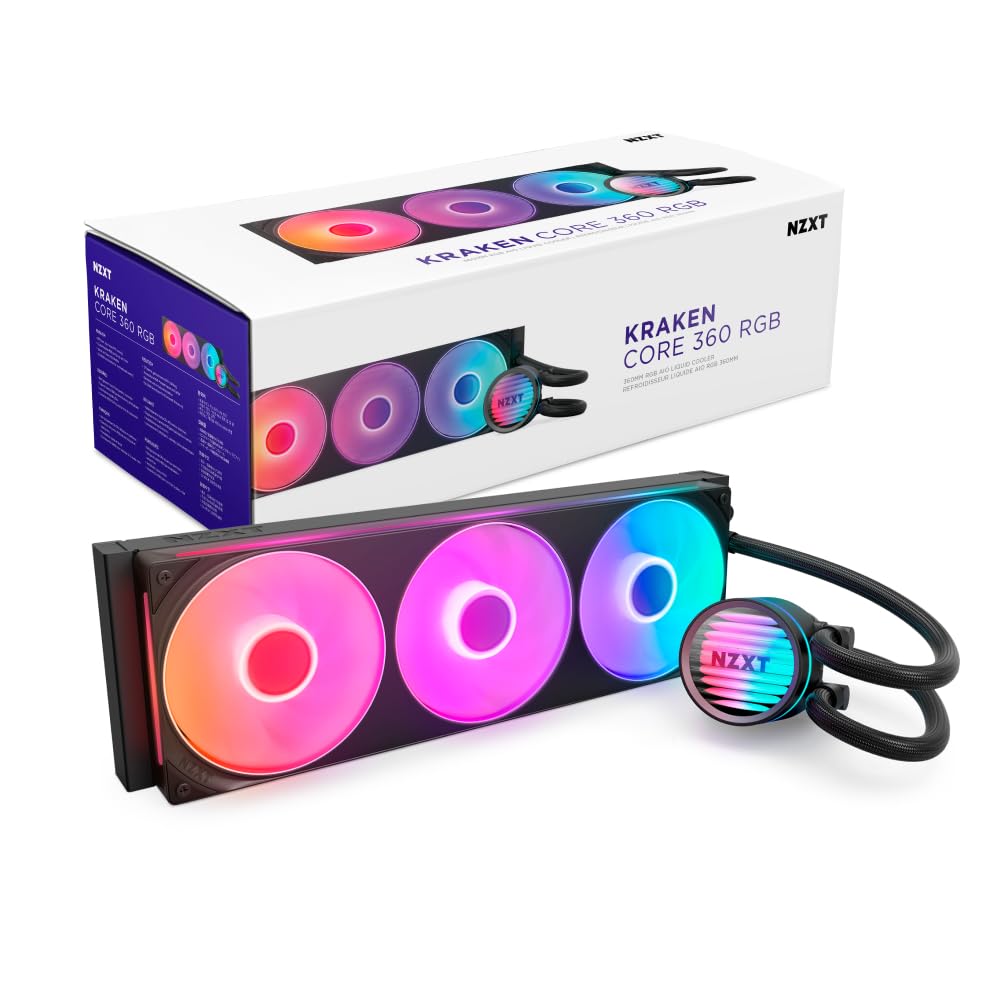
The NZXT Kraken Core 360 offers solid cooling performance for its price, matching many pricier 360mm AIOs in thermal tests. The single-frame fan design simplifies mounting and keeps cable management nearly invisible, a clear advantage for builders who value a tidy interior.

Fan noise from the Core 360 is generally subdued, though some units may produce a pump hum under sustained load — this is unlikely to bother gamers with case fans running, but could be noticeable in ultra-quiet environments.

This cooler suits NZXT fans or builders prioritizing clean aesthetics and easy installation over proven long-term data. Given the limited user reports, durability under heavy continuous use is not yet established, making it a reasonable choice for standard builds rather than 24/7 server duty.

Tip: If you prefer visual feedback or temperature readouts, consider the NZXT Kraken Elite with LCD, though it costs substantially more.

Bottom line: If you want a budget-friendly 360mm NZXT with easy cable management and don't need a flashy LCD, the Kraken Core 360 delivers — just know it's a newer model without the long-term reliability data of more established options.

7

CM ML240L V2

CM ML240L V2

Mainstream 240

Our Score 9.2/10
Check Price

Worth Noting

  • Fan noise can be noticeable at higher speeds, with occasional rattling reported.
  • Mounting hardware may feel less secure on some sockets, particularly AM4.
Radiator Size
240mm x 27mm
Extra Features
ARGB
Installation Type
Standard bracket

The Cooler Master MasterLiquid ML240L RGB V2 delivers consistent cooling for mid-range CPUs, with a large user base confirming its day-to-day performance. Noise can be noticeable at higher fan speeds, and the mounting system may feel less solid on some sockets — tradeoffs that make it more suited to builders who don't mind adjusting fan curves or are comfortable with the installation process. While it doesn't reach the thermal headroom of larger 360mm radiators, its extensive feedback makes it a familiar option for those seeking a 240mm AIO without surprises.

Bottom line: Best suited for builders who value broad community feedback and are willing to accept fan noise and basic mounting hardware.

8

TRYX Panorama SE 360

TRYX Panorama SE 360

Display showcase

Our Score 9.2/10
Check Price

Worth Noting

  • Premium price does not deliver better cooling than less expensive 360mm AIOs.
Radiator Size
360mm x 27mm
Extra Features
6.67" AMOLED screen
Installation Type
Standard bracket

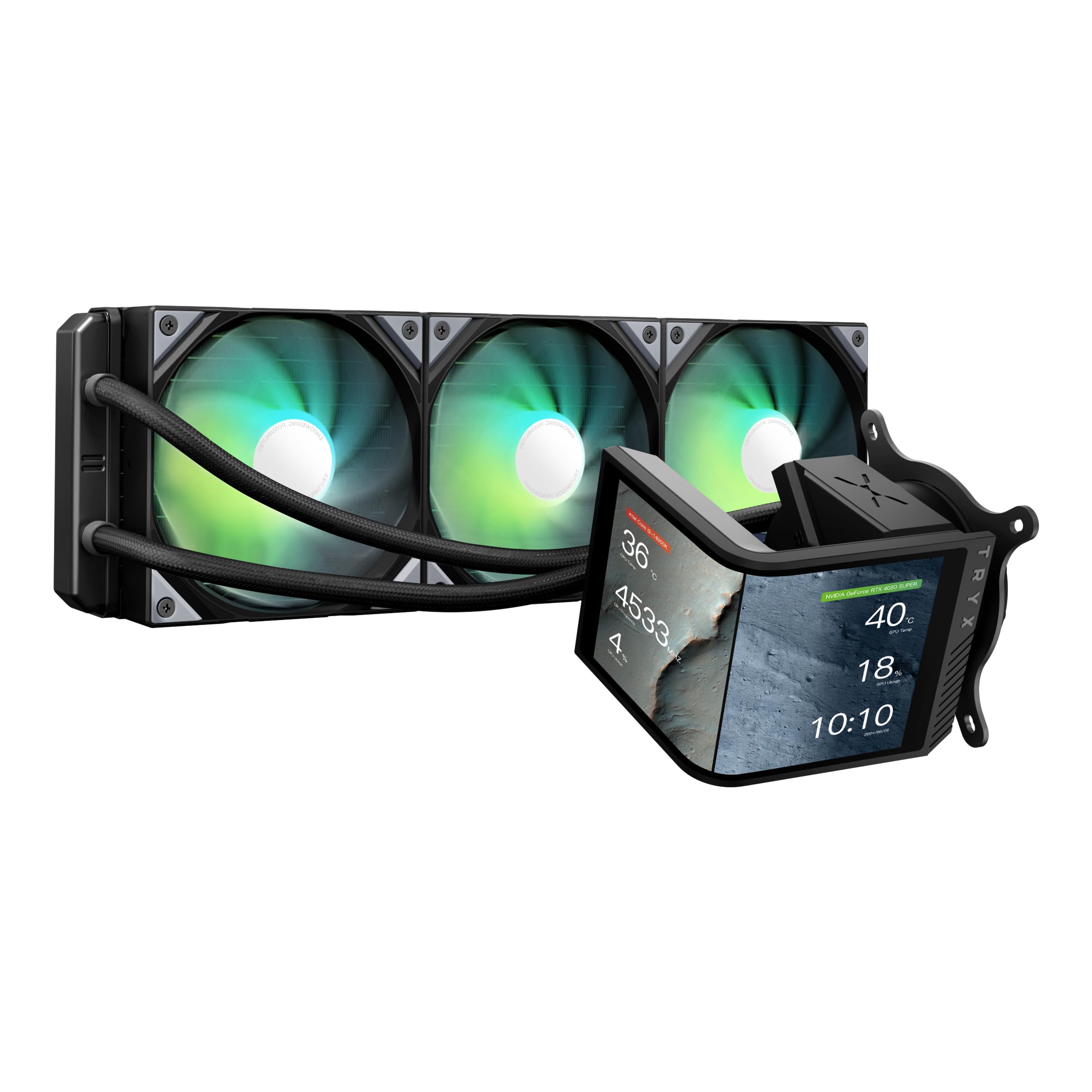
The TRYX Panorama SE 360 stands out with its 6.67-inch curved AMOLED screen, delivering vivid colors and 3D anamorphic effects that make it a visual centerpiece. Cooling is adequate for modern CPUs, staying under 70°C under load, and the fans are whisper-quiet. However, the software that controls the screen can be glitchy — in some cases the display fails to wake after the PC resumes from sleep. The real tradeoff is that this cooler's thermal performance is matched by several cheaper 360mm AIOs, so the premium price buys the screen, not better cooling.

Bottom line: Buy this if you want a conversation piece for your PC; skip it if cooling performance per dollar is your priority.

9

ASUS ROG Ryujin III 360

ASUS ROG Ryujin III 360

ROG theme

Our Score 9.2/10
Check Price

Worth Noting

  • Price is high for the cooling performance delivered
  • Fan noise at high speeds and occasional screen behavior (e.g., staying on after shutdown)
Radiator Size
360mm
Extra Features
3.5" LCD screen
Installation Type
Magnetic daisy-chain

The Ryujin III 360 keeps high-end CPUs well below 60°C under load and its 3.5-inch LCD delivers vibrant system stats. Build quality is robust, and the magnetic fan daisy-chain simplifies installation. However, the price is steep for cooling performance that can be matched by coolers costing half as much. Fan noise at higher speeds may also be noticeable, and occasional screen quirks (like staying on after shutdown) have been reported. This is a luxury component for those who value the ASUS ecosystem and a large LCD over pure thermal value.

Bottom line: This cooler suits ASUS fans who want a large LCD and cohesive RGB control, but those seeking the best cooling per dollar should look at more affordable options.

10

Corsair Nautilus 360 RS

Corsair Nautilus 360 RS

Budget Corsair

Our Score 9.2/10
Check Price

Worth Noting

  • Pump can produce grinding noises at low RPMs in some units.
  • At full retail price, the cooler's value is less distinct against alternatives with more consistent pump behavior.
Radiator Size
360mm x 27mm
Extra Features
None
Installation Type
Daisy-chain

The Nautilus 360 RS delivers effective cooling for high-end CPUs like the i9-13900K, keeping it below 80°C under load, and its daisy-chained fan cables make installation simpler than many alternatives. However, the pump can emit grinding noises at low RPMs, and while Corsair offers a 5-year warranty, some buyers may need to RMA a noisy unit — a factor that tempers its value against quieter options within Corsair's own lineup.

Bottom line: A sensible choice if you're building a Corsair-system build on a budget and can tolerate the occasional pump noise or return process.

How to Choose

Radiator Size: 240mm vs 360mm

Radiator size directly determines cooling capacity: a 360mm radiator has about 50% more surface area than a 240mm, allowing it to dissipate heat more efficiently. For CPUs like an i7 or Ryzen 7 under heavy load, the extra margin matters; for an i5 or Ryzen 5, a 240mm is usually sufficient and easier to fit.

The trade-off is case compatibility and fan noise. Larger radiators require more case space (typically a top or front mount) and often push you toward wider cases. They also allow fans to run slower for the same cooling, which can reduce noise — but only if the pump and fan design are quiet to begin with.

Pump and Fan Noise

Pump noise is often the hidden annoyance. Many AIOs use a fixed-speed pump that hums at a constant low frequency, while PWM-controlled pumps can be quiet at idle but may emit a whine at higher RPMs. Fan noise at higher speeds is a common complaint, especially on budget models that use sleeve bearings.

Look for coolers with fluid-dynamic bearing (FDB) fans and a pump that can be controlled via PWM or motherboard curves. Some models list noise in dBA at max speed — anything under 30 dBA is considered quiet. Real-world noise also depends on case airflow and mounting orientation.

Mounting Difficulty and Cold Plate

Mounting hardware varies widely: some coolers use tool-free brackets and pre-applied thermal paste, others require aligning small screws into a backplate while holding the pump. The ARCTIC Liquid Freezer III, for example, is notoriously fiddly on AM5 sockets, while Corsair's iCUE LINK systems simplify wiring with daisy-chained cables.

The cold plate material (usually copper or nickel-plated copper) affects thermal transfer, but differences between quality coolers are minimal. More important is the mounting pressure and paste spread — an uneven mount can cost 5–10°C. Watch an installation video before buying if you are new to AIOs.

Extra Features: LCD Screens and RGB

LCD screens add $50–100 to the price and are prone to software glitches or early failure. If you want a customizable display, expect to spend extra for smooth operation — and be prepared for potential RMA if the screen dies. RGB lighting is more reliable but adds cable clutter unless you use daisy-chain controllers.

Other extras like an integrated VRM fan (found on some ARCTIC models) help cool motherboard power delivery but are rarely necessary for stock operation. Decide whether these features genuinely improve your build or are just marketing hooks.

Frequently Asked Questions