Tools & DIY

10 Best 3D Printer of 2026: Reliable Picks for Every Budget

Struggling to find a 3D printer that just works? These picks balance speed, reliability, and price for hobbyists and beginners.

Many 3D printers promise blazing speeds and multi-color capabilities, but reliability remains the biggest headache for hobbyists. Frequent clogs, failed first layers, and parts that stop working after a few months are common complaints that can turn a creative tool into a source of frustration.

The real choice often comes down to whether you need an enclosed printer for high-temperature materials or an open-frame model that keeps costs down and simplifies maintenance. Each approach has its own trade-offs in cost, material compatibility, and long-term dependability.

This guide focuses on models that deliver consistent results across hundreds of real-world prints, helping you avoid the downtime that can sour the experience.

1

Bambu Lab A1

Top Pick
Bambu Lab A1

First-time buyers

Our Score 9.2/10
Check Price

Worth Noting

  • Open frame limits material compatibility to PLA, PETG, and TPU only
  • Hotend can suffer blob damage if a filament clog goes unnoticed
Enclosure
Open
Print Speed
500 mm/s
Build Volume
256mm
Auto Leveling
Yes

The Bambu Lab A1 delivers high-speed printing (up to 500mm/s) with full-auto calibration and a noise level of 48 dB in silent mode, all in an affordable open-frame design. Its CoreXY motion system and active flow rate compensation produce smooth, dimensionally accurate parts right out of the box.

Out of the box, the A1 requires minimal tweaking – the Bambu Studio slicer is intuitive, and the auto-leveling system handles most inconsistencies. Print quality is crisp, with clean corners and consistent layers across PLA, PETG, and TPU. Most users report consistent success over dozens of prints, with few interruptions to workflow.

This printer suits first-time buyers and hobbyists who primarily use PLA, PETG, or TPU and value a quiet, hassle-free setup. However, the open frame means it is not suitable for high-temperature materials like ABS or ASA. Additionally, the hotend can experience a blob buildup if a clog goes undetected – a known vulnerability that requires occasional monitoring during long prints.

The A1 punches above its price point with features normally reserved for more expensive machines, including error compensation and active flow rate control. Combined with a large community and regular firmware updates, it offers a complete package for budget-conscious makers. The optional AMS Lite adds multi-color capability for under $200 when bought together.

Tip: Check the nozzle area during long prints and use a silicone sock if possible to reduce blob risk.

Bottom line: For hobbyists and newcomers who stick to PLA and want a quiet, fast, and consistent printer, the A1 is a standout buy.

2

Bambu Lab P1S

Bambu Lab P1S

Enthusiasts, ABS/ASA

Our Score 9.0/10
Check Price

Worth Noting

  • Bed adhesion can be inconsistent with small or narrow parts, occasionally requiring glue stick or bed tuning.
  • Multicolor printing requires the AMS unit sold separately, adding significant cost.
Enclosure
Enclosed
Print Speed
500 mm/s
Build Volume
256mm
Auto Leveling
Yes

The Bambu Lab P1S brings a fully enclosed CoreXY design to the mid-range segment, enabling printing with ABS and ASA filaments that need stable ambient temperatures. Its 500mm/s speed and full auto-calibration deliver smooth print quality on par with more expensive machines. For hobbyists moving from open-frame printers, the enclosure alone justifies the upgrade.

The 256mm cubed build volume accommodates typical hobbyist projects, and Bambu's slicer profiles get you printing quickly. This printer suits enthusiasts who need an enclosure for higher-temperature materials. Beginners can also use it, but should be prepared to address bed adhesion characteristics on small parts. Those wanting multicolor out of the box should factor in the additional AMS cost, which brings the total to around $600.

The auto-leveling system operates consistently, and the CoreXY kinematics produce uniform results across PLA, PETG, and ABS. The enclosed chamber reduces warping for ABS, though ventilation is still required. Overall, the P1S balances speed, print quality, and material compatibility at a price that undercuts fully-featured premium alternatives.

Tip: Using a textured PEI sheet or applying glue stick can improve adhesion for small parts.

Bottom line: The P1S is the go-to choice for hobbyists who want to print engineering materials like ABS without moving to a premium-priced machine, provided they accept the occasional bed adhesion adjustment and the extra cost for multicolor.

3

Creality K1C

Creality K1C

Carbon fiber users

Our Score 8.6/10
Check Price

Worth Noting

  • Nozzle clogs with PETG and certain filaments can occur, requiring time to clear.
  • Some units may experience mid-print stoppages or develop problems after weeks of use.
Enclosure
Enclosed
Print Speed
600 mm/s
Build Volume
220x220x250mm
Auto Leveling
Yes

For hobbyists and engineers needing an enclosed CoreXY printer for carbon fiber composites, the K1C delivers solid print quality at 600mm/s without the premium price of the Bambu P1S. Jamming with PETG and occasional consistency issues mean it's not as polished as Bambu alternatives, but for carbon fiber work it stands out in this price bracket.

This printer fits best for engineers prototyping with carbon fiber composites or users who want an enclosure for ABS/ASA without spending more. If PLA is your primary material, an open-frame printer like the Bambu A1 offers a simpler experience with fewer tradeoffs. The K1C's jamming issues with PETG are worth noting, and some units may develop problems after weeks of use, so a willingness to troubleshoot is part of ownership.

Tip: For PETG prints, pre-dry the filament and consider a hardened steel nozzle upgrade to reduce clogging risk.

Bottom line: A capable carbon fiber printer at a moderate price, but the jamming and consistency tradeoffs make it best for those who don't mind occasional maintenance.

4

Anycubic Kobra X Multicolor

Anycubic Kobra X Multicolor

Budget multicolor

Our Score 8.6/10
Check Price

Worth Noting

  • Clogging with the stock nozzle may require replacement
  • Leveling sensor and software glitches can interrupt prints
Enclosure
Open
Print Speed
600 mm/s
Build Volume
260mm
Auto Leveling
Yes

The Anycubic Kobra X Multicolor brings native 4-color printing to an entry-level price, delivering smooth layer finishes and a setup process that takes under 30 minutes from unboxing to first print. Its 600mm/s maximum speed and AI camera with spaghetti detection add features often reserved for more expensive machines, all within an open-frame design that keeps costs down.

Compared to the top open-frame pick, the Kobra X trades some day-to-day dependability for that lower entry point. The print quality is genuinely impressive when the printer is running smoothly, but owners should expect occasional hiccups—this is not a set-and-forget device.

This printer suits hobbyists and beginners who are willing to handle occasional maintenance in exchange for multicolor capability. If you enjoy tinkering and can work through calibration quirks, the Kobra X delivers good output at a fraction of the cost of more polished alternatives.

Bottom line: For buyers who want multicolor without the premium price and are comfortable with occasional maintenance, the Kobra X Multicolor delivers good print quality at a fraction of the cost.

5

ELEGOO Mars 5 Ultra Resin

ELEGOO Mars 5 Ultra Resin

Miniatures, high detail

Our Score 8.6/10
Check Price

Worth Noting

  • Prints can pull loose without careful build-plate preparation and leveling.
  • FEP film and LCD screen can wear out sooner than expected under regular use.
  • Print success may vary, with some owners needing to adjust settings or replace components to achieve consistent results.
Enclosure
Open
Print Speed
150 mm/h
Build Volume
153x78x165mm
Auto Leveling
Yes

The ELEGOO Mars 5 Ultra delivers crisp 9K resolution with 18-micron detail, putting high-fidelity miniatures within reach of hobbyists on a budget. Unlike the open-frame Bambu Lab A1 which prioritizes ease and reliability for PLA, this resin machine trades fuss-free operation for finer surface finish and sharper edges.

This printer suits users who already know how to handle liquid resin, wash, and cure prints. The learning curve is real: bed adhesion can be touchy, and the FEP film and LCD screen may need replacement under regular use. A well-ventilated workspace and a willingness to dial in settings are not optional.

Print success varies between units, so patience and troubleshooting are part of the package. Those who stick with it get results that rival more expensive resin printers, but the path requires closer attention than most FDM alternatives demand.

Tip: Sanding the build plate and ensuring a fresh FEP film can improve adhesion significantly.

Bottom line: For hobbyists who already know resin workflows and want ultra-fine detail on a budget, this printer delivers — just plan for the learning curve and potential part replacements.

6

Flashforge Adventurer 5M

Flashforge Adventurer 5M

Speed enthusiasts

Our Score 8.0/10
Check Price

Worth Noting

  • Bed adhesion can be inconsistent, leading to warped or failed first layers.
  • Mechanical components such as cooling fans and springs may need early replacement.
  • Hotend clogs and power interruptions can occur, interrupting prints.
Enclosure
Open
Print Speed
600 mm/s
Build Volume
220mm
Auto Leveling
Yes

The Flashforge Adventurer 5M delivers class-leading print speeds up to 600 mm/s and a quick-swap hardened steel nozzle, all within a cost-effective CoreXY frame. This combination is rare at this price point, making it a strong option for users who prioritize fast turnaround over plug-and-play consistency.

This printer is aimed at budget-conscious enthusiasts who are comfortable with ongoing maintenance. The high-speed performance comes with tradeoffs: hotend clogs, bed adhesion inconsistencies, and mechanical wear can occur after a few prints. It is not suited for those seeking a set-and-forget machine or for beginners wanting a reliable first printer.

The quick-swap nozzle and auto-leveling simplify initial setup, but the open frame limits material compatibility to PLA and PETG for best results. Users who enjoy tweaking settings and cleaning nozzles will find the speed worthwhile. For a more dependable daily driver, the top pick offers better out-of-box reliability with a similar price.

Tip: Applying a thin layer of glue stick to the build plate can reduce adhesion issues with PLA.

Bottom line: For speed-focused tinkerers on a budget, this printer delivers high velocity at a low cost, provided you are ready to handle maintenance. Most hobbyists will find better value in the top pick's consistency.

7

Bambu Lab A1 Mini Combo

Bambu Lab A1 Mini Combo

Small spaces

Our Score 8.8/10
Check Price

Worth Noting

  • Reliability can vary; some units develop errors after extended use.
  • 180mm build volume limits the size of projects you can print
Enclosure
Open
Print Speed
500 mm/s
Build Volume
180mm
Auto Leveling
Yes

This compact printer delivers the same polished app and fast setup as its bigger sibling, making it a natural fit for beginners and classroom desks. Its 180mm build volume handles small trinkets, toys, and multi-color projects with the bundled AMS Lite, but that same size becomes a hard limit once you need anything larger than a desk organizer. Unit consistency can vary over months of use, so expect occasional troubleshooting rather than years of worry-free operation.

Tip: For better bed adhesion on small prints, applying glue stick or tape is recommended.

Bottom line: Best suited for beginners, kids, or as a secondary printer for small models and multicolor projects when the build volume fits your needs.

8

Creality K1 Max

Creality K1 Max

Large prints

Our Score 8.6/10
Check Price

Worth Noting

  • Auto-leveling may need manual tweaks for consistent first layers.
  • Some units can develop persistent issues after initial use.
Enclosure
Enclosed
Print Speed
600 mm/s
Build Volume
300mm
Auto Leveling
Yes

The Creality K1 Max offers a generous 300mm build volume and full enclosure at a price that undercuts many competitors. The integrated AI camera with LiDAR first-layer detection aids print monitoring. Where it falls short of top-tier options is consistency: some units may develop mechanical or leveling problems that demand user intervention, and the auto-leveling system can need manual refinement for reliable first layers. This makes it a good fit for hobbyists comfortable with tuning and maintenance, but a gamble for those seeking a set-and-forget machine.

Bottom line: A worthwhile option for hobbyists who want maximum build volume on a budget and are prepared to handle occasional alignment or reliability hiccups.

9

AOSEED X-Maker Joy AI+

AOSEED X-Maker Joy AI+

Kids, beginners

Our Score 8.2/10
Check Price

Worth Noting

  • App connectivity and hardware issues may appear over time, requiring troubleshooting.
  • Printed parts can snap when removed from the build plate, adding fragility to the workflow.
Enclosure
Enclosed
Print Speed
400 mm/s
Build Volume
Auto Leveling
Yes

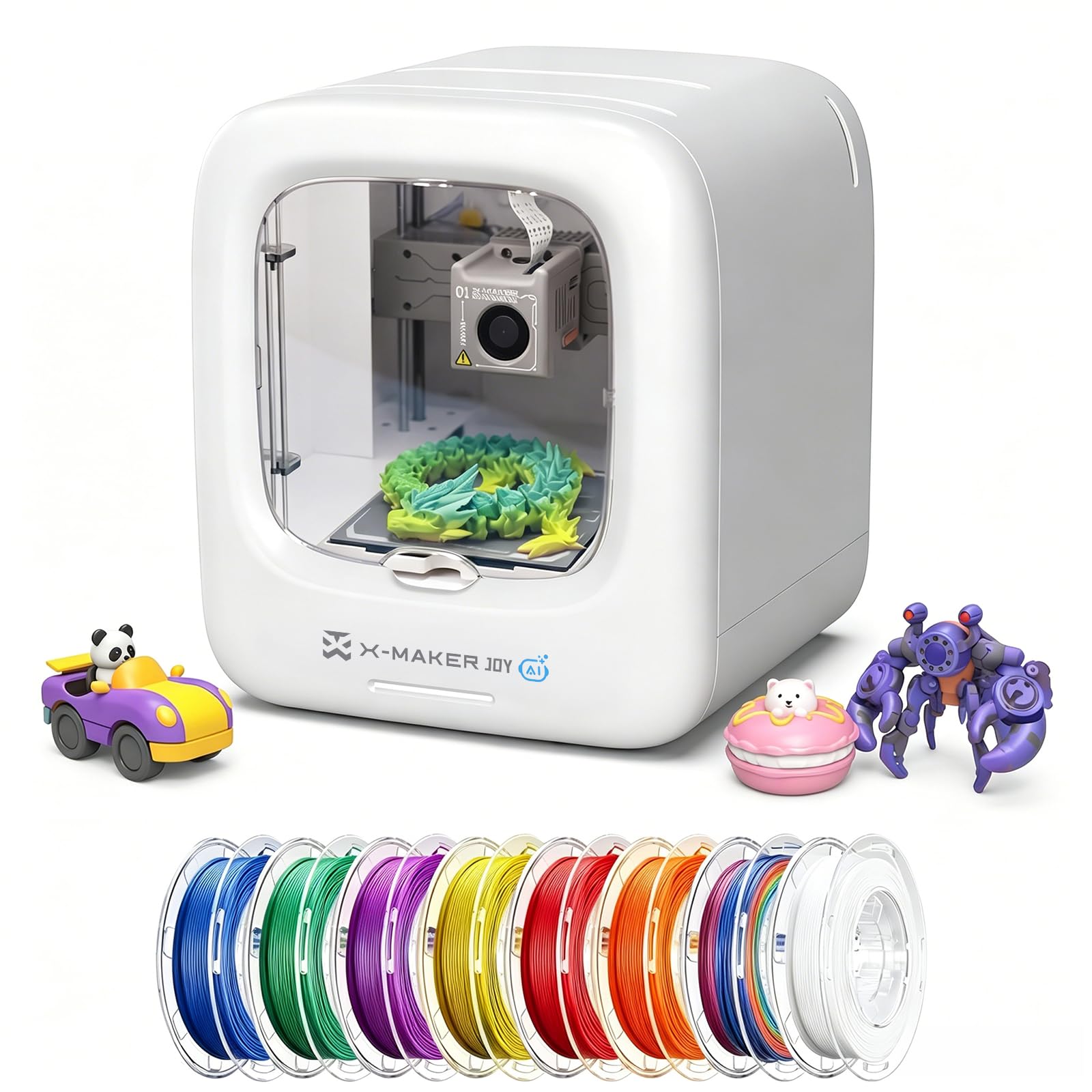
The AOSEED X-Maker Joy AI+ is a purpose-built printer for children, with a safe enclosed design, TÜV Rheinland-tested PLA, and an app that makes setup fast. Kids can independently create from the 8,000+ model library or turn photos into 3D objects. But the trade-off is inconsistent performance: app connectivity can drop mid-print, and some units develop hardware issues after a short period. Printed parts also tend to be fragile during removal, adding to the learning curve. This printer works well for families who are comfortable with occasional troubleshooting and don't mind a bit of tinkering.

Bottom line: Best for families who can handle the occasional connectivity glitch and fragile prints; not a worry-free gift for those wanting set-and-forget operation.

10

Creality K2 Pro Combo

Creality K2 Pro Combo

Professional prototyping

Our Score 8.4/10
Check Price

Worth Noting

  • Nozzle clogs and filament jams can occur, needing periodic attention.
  • Extruder components may wear out under normal use, requiring replacement.
Enclosure
Enclosed
Print Speed
600 mm/s
Build Volume
300mm
Auto Leveling
Yes

The Creality K2 Pro Combo delivers a spacious 300mm build volume and fast 600mm/s printing with active chamber heating up to 60°C, making it suitable for large prototypes or multicolor projects up to 16 colors. Setup requires minimal assembly and the interface is user-friendly. However, reliability inconsistencies such as nozzle clogs and extruder component wear have been noted, which undercuts the premium price. While the active heating is a nice bonus for engineering materials, it lacks the polished reliability of Bambu Lab alternatives like the P1S.

Bottom line: Best for professionals or enthusiasts who need a large build volume and multicolor capability and are comfortable with occasional troubleshooting.

How to Choose

Build Volume: Room to Grow or Tight Quarters

A larger build volume lets you print bigger parts or multiple objects in one batch, but it also increases the machine's footprint, weight, and cost. Printers with 180mm cubes are fine for miniatures and small gadgets, while 300mm volumes open up functional prototypes and cosplay props.

The hidden trade-off is that larger beds require more careful leveling and can amplify warping issues, especially with materials like ABS. If you rarely need parts over 200mm, a smaller volume saves space and simplifies maintenance.

Enclosure: Necessary for Engineering Filaments

Open-frame printers handle PLA, PETG, and TPU well, but ABS, ASA, and nylon need a stable hot chamber to avoid warping and cracking. An enclosure traps heat, reduces drafts, and lowers noise, but adds cost and restricts access during prints.

If you stick to PLA, an open printer is simpler and cheaper. If you ever plan to print functional parts that need heat or impact resistance, budget for an enclosed model upfront.

Print Speed: Faster Isn't Always Better

High print speeds (500-600 mm/s) rely on aggressive acceleration and a rigid motion system. While they cut print times dramatically, they can introduce ringing, ghosting, and reduced surface quality if the frame isn't stiff enough.

The sweet spot for most hobbyists is around 200-300 mm/s, where modern CoreXY printers deliver a good balance of speed and finish. Extremely fast printers often require more tuning to maintain quality.

Multi-Color: The Hidden Waste Factor

Multi-color printing uses a purge tower or filament flushing to switch colors, and the waste can equal or exceed the mass of the printed object. A four-color print of a small model might discard as much filament as the model itself.

This adds cost per print and increases the frequency of filament changes. If you print mostly single-color, the extra complexity and waste of a multi-color system may not be worth it.

Auto Leveling: Not All Systems Are Equal

Auto-leveling compensates for minor bed warps, but it doesn't guarantee perfect first layers if the nozzle is too far or too close. Strain-sensor systems can be misled by debris or imperfect bed surfaces.

The most reliable systems use inductive or capacitive sensors combined with mesh bed compensation. Even then, occasional manual tweaks to z-offset are still required, especially after changing build plates.

Frequently Asked Questions