Creator & Streaming

13 Best Studio Monitors of 2026: True Reference Sound for Your Mix

Which studio monitors actually deliver flat response and balanced inputs for accurate mixing? We cut through the marketing hype to find the ones that work for real near-field production.

Walk into any music equipment store and you will see dozens of speakers labeled 'studio monitors' that are really just colored bookshelf speakers. They sound great for casual listening but introduce frequency bumps that trick your ears during mixing. The result? Tracks that sound unbalanced on car stereos and headphones.

A true near-field monitor must deliver a flat frequency response and accept balanced connections (XLR or TRS) to reject noise. It also needs acoustic tuning controls so you can compensate for desk or wall reflections. These features separate a mixing tool from a multimedia toy.

This guide focuses on monitors that genuinely serve mixing and mastering. The hardest trade-off is between bass depth and budget: deeper bass usually costs more, but a well-chosen 5-inch driver with proper porting can save you from needing a subwoofer later.

1

JBL 305P MkII

Top Pick
JBL 305P MkII

Semi-pro mixing

Our Score 9.4/10
Check Price

Worth Noting

  • No audio cables included
  • Some units produce audible hiss at close range in quiet environments.
Power
82W total
Inputs
XLR, 1/4" TRS
Woofer Size
5 inch
Acoustic Tuning
HF trim, Boundary EQ

The JBL 305P MkII delivers room-filling clarity with a 5-inch woofer that reaches 43 Hz via the Slip Stream port, paired with an Image Control waveguide that creates a wide, stable sweet spot. The Boundary EQ lets you dial in compensation for desk or wall placement, preserving low-end accuracy in less-than-ideal rooms.

This setup works well for semi-pro studios where critical listening matters, but there are two things to know. The self-noise (a low hiss) can be audible during very quiet passages when seated close — less noticeable in a typical mixing environment. And the box does not include audio cables; you will need to buy balanced XLR or TRS cables separately.

Tip: Order balanced XLR cables alongside the monitors to avoid a delay in setup.

Bottom line: For home studios that need accurate bass and spacious imaging without the noise issues found in cheaper monitors, the JBL 305P MkII is the most practical investment.

2

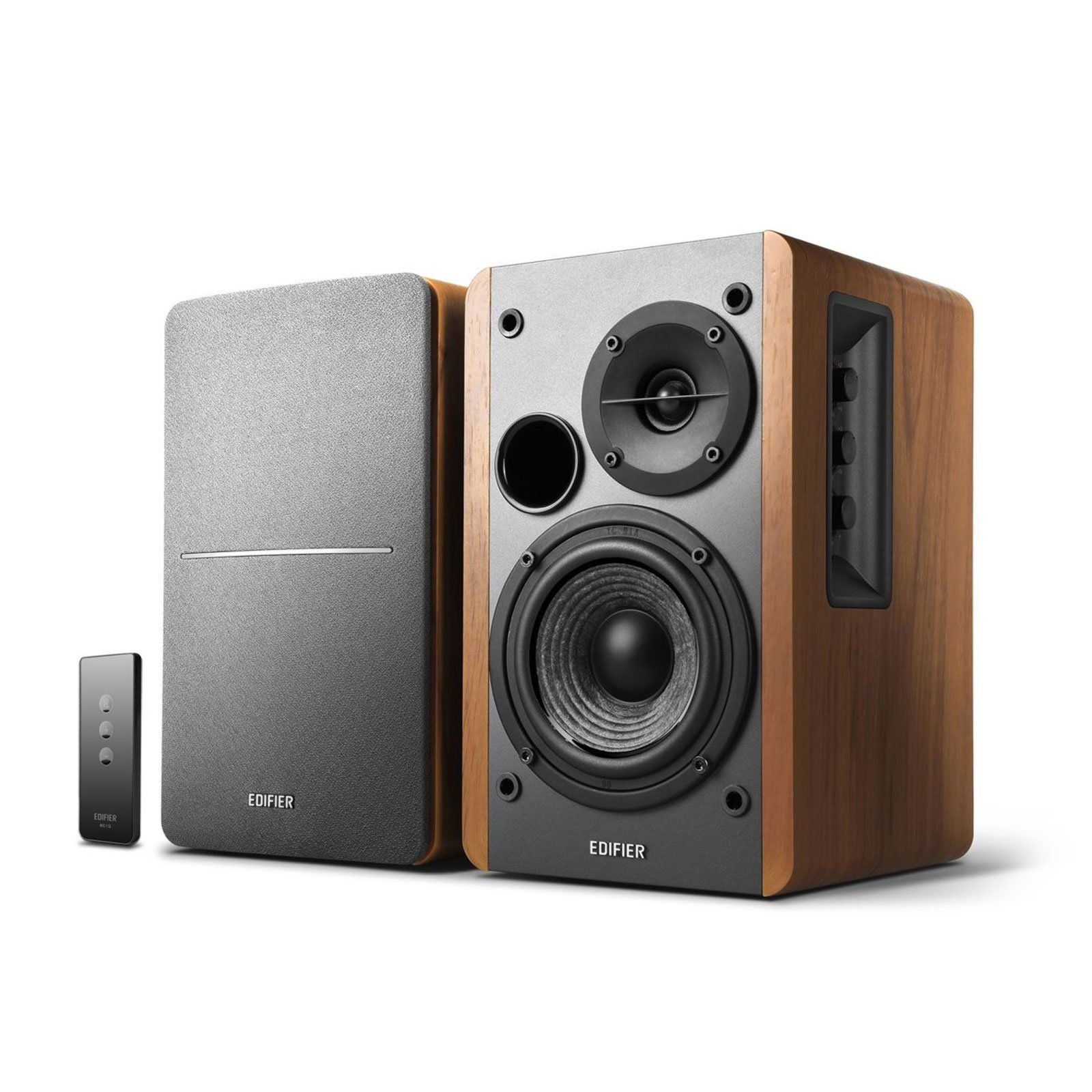
Edifier MR4

Edifier MR4

Budget mixing

Our Score 9.2/10
Check Price

Worth Noting

  • Volume control uses stepped clicks that can make fine level matching tricky
  • A low-level hiss may be audible at close range in very quiet rooms
Power
42W total
Inputs
1/4" TRS, RCA, AUX
Woofer Size
4 inch
Acoustic Tuning
Monitor/Music mode

The Edifier MR4 brings a genuinely flat frequency response and balanced TRS inputs to the sub-200-dollar market, a combination that is rare at this price. The switchable monitor and music modes let you toggle between flat mixing and a more colored listening curve, while the MDF cabinet keeps unwanted resonance low. For a beginner stepping into critical listening, these speakers deliver clarity and detail that rivals more expensive options, though the stepped volume knob makes fine adjustments a bit clunky and a low-level hiss may be noticeable in a dead-quiet room.

This set is best suited for budget home studios and small desk setups where the user prioritizes accuracy over deep bass extension. If you are mixing in a quiet space or need to dial in subtle level changes, the clicky volume control and potential hiss are trade-offs to weigh. For those who can work around these quirks, the MR4 offers a near-field listening experience that punches well above its price tag.

Tip: Use your audio interface or software mixer for finer volume adjustment and keep the MR4 knob at a fixed setting to bypass the stepped control.

Bottom line: The Edifier MR4 is the go-to choice for budget-conscious producers who want a flat monitor with professional connectivity, as long as they can accommodate the stepped volume and minor hiss in their setup.

3

Edifier MR3

Edifier MR3

Ultra-budget mixing

Our Score 9.4/10
Check Price

Worth Noting

  • App-based EQ adjustments can feel laggy
Power
36W total
Inputs
TRS, RCA, AUX, Bluetooth 5.4
Woofer Size
3.5 inch
Acoustic Tuning
App EQ, Monitor mode

The MR3 delivers professional connectivity at a price that undercuts most competitors. While it lacks the low-end authority of the larger MR4, its 3.5-inch drivers still produce clear, detailed sound for beginner mixing on a desktop. This pair suits students and hobbyists on tight budgets who need balanced inputs for accurate monitoring but can accept limited dynamic range and bass extension.

Tip: Place them close to a wall for slight bass reinforcement, but avoid expecting sub-bass.

Bottom line: For beginners who prioritize affordable professional inputs over bass authority, the MR3 is the most cost-effective entry point.

4

Yamaha HS5

Yamaha HS5

Professional mixing

Our Score 9.4/10
Check Price

Worth Noting

  • No audio cables included
  • Limited low-end extension below 54 Hz
Power
70W total
Inputs
XLR, 1/4" TRS
Woofer Size
5 inch
Acoustic Tuning
Room control, High trim

The Yamaha HS5 delivers a flat, uncolored frequency response that makes it a go-to for professionals who need accurate playback. The 5-inch woofer and bi-amped 70W design provide clear mids and highs, with room control and high trim switches to adapt the speaker to your space. Compared to smaller near-field monitors, the HS5 offers more headroom and detail for critical listening.

This monitor is best suited for experienced producers working in treated rooms who prioritize mixing precision over low-end punch. The bass rolls off around 54 Hz, so genres relying on deep sub-bass (EDM, hip-hop) typically benefit from adding a subwoofer. At a premium price point, it makes sense for dedicated studios rather than casual desktop setups.

Tip: A subwoofer extends low-end response below 54 Hz – useful for bass-heavy genres like EDM or hip-hop.

Bottom line: For mixing engineers who need uncolored playback and can manage the low-end gap, the HS5 remains a benchmark studio tool.

5

Yamaha HS4

Yamaha HS4

Compact pro studio

Our Score 9.4/10
Check Price

Worth Noting

  • Tweeter hiss may be noticeable in quiet rooms at close range
  • Limited low-end extension from the 4.5-inch driver; needs a sub for bass-heavy genres
Power
52W total
Inputs
XLR, 1/4" TRS, RCA
Woofer Size
4.5 inch
Acoustic Tuning
Room control, High trim

The HS4 brings Yamaha's studio-grade clarity to a compact 4.5-inch form factor with XLR/TRS inputs and room compensation. Its controlled midrange and treble suit near-field monitoring on crowded desks, inheriting the neutral signature of the larger HS series.

This monitor fits producers who need reliable reference sound in a small space and don't require deep bass or dead-quiet operation. The audible tweeter hiss is less intrusive in rooms with ambient noise, and adding a subwoofer solves the low-end limitation — though the HS4 lacks a dedicated sub output.

Tip: Adding a subwoofer with high-level inputs can extend bass, though the HS4 lacks a dedicated sub output.

Bottom line: A compact, accurate monitor for small studios — hiss and bass limits are manageable tradeoffs for desk space and Yamaha's signature neutrality.

6

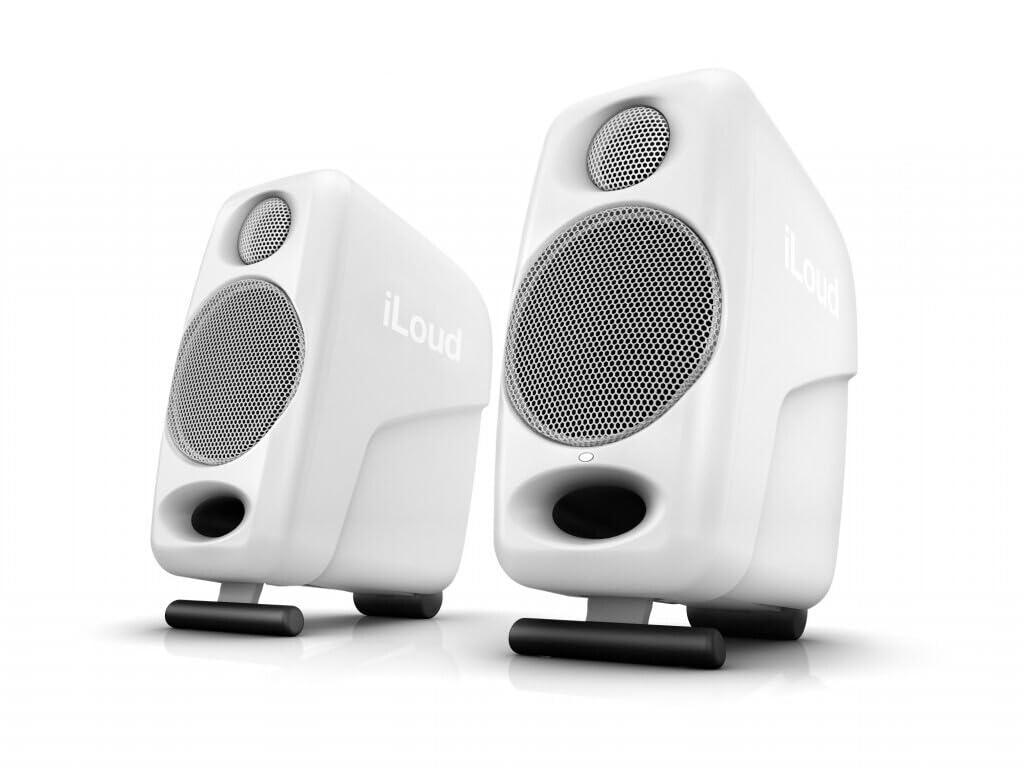
IK iLoud Micro

IK iLoud Micro

Mobile production

Our Score 9.4/10
Check Price

Worth Noting

  • Plastic cabinet may feel less substantial for the price
  • No XLR balanced inputs
Power
50W total
Inputs
Bluetooth, RCA, 1/8"
Woofer Size
3 inch
Acoustic Tuning
Digital crossover

The iLoud Micro delivers a surprisingly powerful and clear sound from an enclosure you can fit in a backpack, with the digital crossover squeezing a 45 Hz low end from a 3-inch woofer. Bluetooth connectivity makes it a true grab-and-go setup for quick sessions or listening on location.

This is the monitor for mobile producers and ultra-compact desktop setups who value portability and a wide frequency response over cabinet heft and professional connectivity. The plastic build and lack of XLR balanced inputs mean it’s best suited for casual or travel-based near-field work rather than fixed studio installations.

Tip: The lightweight plastic enclosures travel well – use the included carrying case to protect them during transport.

Bottom line: For mobile producers who need genuinely portable monitors with surprising bass and Bluetooth convenience, the iLoud Micro delivers where traditional monitors can't go.

7

PreSonus Eris E3.5

PreSonus Eris E3.5

Budget home studio

Our Score 9.4/10
Check Price

Worth Noting

  • Some units may stop working within the first year, making long-term durability uncertain
Power
50W total
Inputs
1/8", RCA, front aux
Woofer Size
3.5 inch
Acoustic Tuning
Room compensation

The PreSonus Eris E3.5 delivers clear, detailed audio with room compensation controls, making it a strong contender for budget-conscious desktop monitoring. However, some units may stop working within the first year, so this pair suits short-term or low-stakes setups rather than critical long-term use.

Bottom line: Best for short-term or low-stakes desktop use where longevity is less critical.

8

PreSonus Eris E5

PreSonus Eris E5

Bass on budget

Our Score 9.2/10
Check Price

Worth Noting

  • In quiet mix rooms, the tweeter hiss remains audible even at idle
Power
80W total
Inputs
XLR, 1/4" TRS, RCA
Woofer Size
5.25 inch
Acoustic Tuning
Room compensation

The PreSonus Eris E5 delivers solid low-end punch and high output for its size, with XLR and TRS inputs plus room compensation controls that help tailor the sound to your space. However, the tweeter produces audible hiss even at idle, and unbalanced RCA connections can introduce buzzing in some setups. This makes it a practical choice for home studios where ambient noise covers the hiss, not for quiet critical mixing sessions.

Bottom line: Worth considering if your studio has enough ambient noise to mask the hiss and you need the larger woofer without spending more; otherwise, look at monitors with quieter electronics.

9

Edifier R1280T

Edifier R1280T

Casual desktop

Our Score 9.2/10
Check Price

Worth Noting

  • Consumer-tuned sound lacks the flat response needed for accurate mixing
Power
42W total
Inputs
2x RCA
Woofer Size
4 inch
Acoustic Tuning

With a 4-inch woofer and 42W total output, the R1280T delivers clear, balanced audio that works well for desktop TV, vinyl, or gaming. The dual RCA inputs make setup simple, and the MDF cabinet looks good on a shelf. However, its consumer-tuned voicing and lack of balanced inputs mean it cannot deliver the flat response needed for accurate mixing or mastering. This is a budget home speaker, not a near-field monitor for production.

Bottom line: This speaker fits casual desktop audio needs, but anyone mixing or mastering should look for a monitor with balanced inputs and neutral response.

10

Edifier R1700BT

Edifier R1700BT

Bluetooth convenience

Our Score 9.2/10
Check Price

Worth Noting

  • Consumer tuning and lack of balanced inputs
Power
66W total
Inputs
Bluetooth, 2x RCA
Woofer Size
4 inch
Acoustic Tuning

The Edifier R1700BT delivers warm, detailed sound with reliable Bluetooth and an attractive wood finish – ideal for casual music or TV audio. Its 66W output fills a room well. However, its consumer tuning and lack of balanced inputs make it unsuitable for near-field mixing or mastering.

Bottom line: Best for casual desktop listening or TV audio where Bluetooth convenience and aesthetics matter, not for production.

11

Edifier R1280DBs

Edifier R1280DBs

TV/video

Our Score 9.2/10
Check Price

Worth Noting

  • Remote control may require near-line-of-sight within a few feet, reducing convenience for across-the-room use.
Power
42W total
Inputs
Bluetooth, Optical, Coaxial, RCA
Woofer Size
4 inch
Acoustic Tuning

The Edifier R1280DBs pairs optical and coaxial digital inputs with Bluetooth and a subwoofer output, making it a flexible companion for TV or desktop listening. However, its consumer-tuned sound and lack of balanced inputs mean it is not a studio monitor – better suited for casual home entertainment than critical mixing. The remote control may require close proximity to function reliably.

Bottom line: Best for upgrading TV audio or casual desktop listening where optical input and subwoofer out are needed – skip if you need flat response for mixing.

12

Edifier R1280Ts

Edifier R1280Ts

Turntable

Our Score 9.2/10
Check Price

Worth Noting

  • No balanced inputs or digital connectivity
Power
42W total
Inputs
2x RCA, sub out
Woofer Size
4 inch
Acoustic Tuning

The R1280Ts pairs a 4-inch woofer and silk dome tweeter with a subwoofer output, delivering clear, loud sound at a budget-friendly price. The wood finish and straightforward RCA inputs make it easy to integrate into a turntable or casual listening system. However, the lack of balanced inputs, digital connections, or Bluetooth means it is not suitable for near-field mixing or mastering; its consumer tuning and wired-only setup target home audio rather than production work.

Bottom line: If you need a simple wired speaker for a turntable or secondary system and don't plan on mixing, the R1280Ts offers good value with subwoofer flexibility.

13

MEVOSTO DS19

MEVOSTO DS19

Gaming/TV

Our Score 9.2/10
Check Price

Worth Noting

  • Bass lacks precision at higher volumes; no balanced inputs for monitoring
Power
36W total
Inputs
Bluetooth, AUX, RCA, USB
Woofer Size
5 inch
Acoustic Tuning
Bass/treble knobs

The MEVOSTO DS19 delivers impressive low-end punch and convenient Bluetooth 5.4 connectivity for desktop entertainment. Bass becomes boomy at higher volumes, and the consumer tuning lacks the flat response needed for accurate mixing — better suited for movie nights than near-field production.

Bottom line: Best for budget-conscious listeners who prioritize bass and input variety over mixing accuracy.

How to Choose

Woofer Size

Woofer size directly determines low-end extension. A 3.5 inch driver typically rolls off around 80 Hz, while a 5 inch driver can reach 50 Hz or lower. If you mix bass-heavy genres like electronic or hip-hop, a 5 inch or larger woofer saves you from needing a subwoofer.

The trade-off is physical footprint: larger woofers demand bigger cabinets and more desk space. Smaller studios often compromise with 4 or 4.5 inch drivers, accepting that the lowest octave will be missing and must be checked on headphones.

Amplifier Power

Power ratings (watts) determine maximum clean volume. A 70W system can fill a small room without distortion, while a 30W monitor may struggle to deliver punch at moderate listening levels. But raw wattage matters less than amplifier quality and driver sensitivity.

Bi-amped designs (separate amps for woofer and tweeter) offer better clarity and headroom because each driver gets dedicated power. Look for bi-amp when possible, especially if you plan to push the monitors in a semi-treated room.

Input Connectivity

Balanced inputs (XLR or 1/4 inch TRS) reject electrical noise from cables longer than a few feet. RCA and AUX are unbalanced and will pick up hum in studio environments with many devices. If your audio interface has balanced outputs, use them – the difference is audible as a lower noise floor.

Some monitors combine both balanced and unbalanced inputs, giving flexibility for consumer sources (TV, turntable). But for critical mixing, always prioritize balanced connections.

Acoustic Tuning

Room compensation controls let you adjust the monitor's frequency response to account for desk reflections, corner bass buildup, or wall proximity. Typical adjustments include HF trim (tame harshness) and boundary EQ (cut bass when placed near walls).

Without these controls, a monitor that sounds perfect in a shop may boom or sound dull in your space. Tuning controls are not a substitute for room treatment, but they get you closer to flat on the first day.

Frequency Response

Frequency response is the range of bass to treble the monitor can reproduce at a reasonable volume. A wider range does not guarantee accuracy – look for a response that is flat within +/-3 dB. Many budget speakers claim 20 Hz to 20 kHz but cannot actually output 20 Hz at useful levels.

Pay attention to the low-end number: a speaker rated at 45 Hz will feel more solid than one rated at 80 Hz. The high end above 20 kHz is mostly marketing – most adults cannot hear beyond 18 kHz.

Frequently Asked Questions