Creator & Streaming

11 Best Audio Interface of 2026: Which Preamps Match Your Studio Needs

Find the audio interface that fits your recording style and budget — from solo podcasters to multi-mic home studios. No more noise or dropout surprises.

Between driver dropouts, hissing preamps, and units that fail within months, finding a dependable audio interface can feel like a gamble. The challenge is that ratings alone don't tell the full story — a product can score 4.5 stars while a significant minority of users experience failures.

The real decision comes down to matching the interface's strengths to your specific workflow: solo recording versus multi-mic setups, Mac versus Windows, and how much troubleshooting you're willing to tolerate. Some brands prioritize preamp clarity; others pack in inputs at the expense of noise. This guide cuts through the noise by focusing on the trade-offs that actually matter in home studios.

1

Focusrite Scarlett 2i2 3rd Gen

Top Pick
Focusrite Scarlett 2i2 3rd Gen

Duo recording, podcasters

Our Score 9.4/10
Check Price

Worth Noting

  • At high gain settings, an audible hiss may appear in quiet recording spaces.
  • Occasional reports of the unit losing audio output or failing to power on.
Inputs
2
Preamp Quality
Low noise, 56dB gain
Max Sample Rate
192 kHz
Driver Stability
Proven on Mac/Windows

The 2i2 captures vocals and guitar with minimal noise, and its straightforward layout makes setup quick. Two XLR/Instrument combo inputs handle simultaneous recording, while USB-C connectivity and 192 kHz sample rate deliver studio-grade audio without fuss.

Home studio musicians recording two sources at once will appreciate the dual inputs and included software bundle (Pro Tools Intro, Ableton Live Lite, Cubase LE, Hitmaker Expansion). In very quiet rooms, some units may introduce a hiss at high gain, and a small number of units have shown power or audio dropout issues over time. These are worth checking for, but most owners find the interface stable for years of consistent use.

Tip: Keep gain below 4 o'clock to minimize hiss; most dynamic mics need less gain anyway.

Bottom line: For duo creators who need clean preamps and consistent performance, the Scarlett 2i2 delivers without overcomplicating the process.

2

Focusrite Scarlett Solo 3rd Gen

Focusrite Scarlett Solo 3rd Gen

Solo vocalists, guitarists

Our Score 9.4/10
Check Price

Worth Noting

  • Single input limits recording to one source at a time.
  • Some units may develop audio dropouts or require driver troubleshooting.
Inputs
1
Preamp Quality
Low noise, 56dB gain
Max Sample Rate
192 kHz
Driver Stability
Proven on Mac/Windows

The Scarlett Solo inherits the same high-gain, low-noise preamp design as the step-up 2i2, delivering clean recordings at a budget-friendly price. It is purpose-built for solo singer-songwriters, podcasters using a single microphone, and beginners who want an easy setup. The single XLR-instrument combo input means two-source recording is off the table, which is the main constraint for duos or stereo tasks. Included software like Pro Tools Intro and Ableton Live Lite adds immediate value for new producers.

Tip: If you encounter dropouts, disable USB power saving in your operating system.

Bottom line: For solo creators who need one pristine input, the Scarlett Solo offers exceptional value without compromising on preamp quality.

3

Behringer UMC404HD

Behringer UMC404HD

Multi-mic studio

Our Score 9.2/10
Check Price

Worth Noting

  • Some units develop phantom power glitches
  • Headphone output may be too quiet for high-impedance headphones
Inputs
4
Preamp Quality
Midas preamps, low noise
Max Sample Rate
192 kHz
Driver Stability
Windows driver tweaks needed

The Behringer UMC404HD packs four inputs and Midas preamps into a metal chassis at a price that undercuts competitors, making it a budget-friendly workhorse for home studios recording drums or multiple instruments. It suits band rehearsals, small group recordings, and producers who need MIDI connectivity. Windows driver setup can be finicky, and phantom power glitches have been noted on some units – a tradeoff that matters less if input count is your priority.

Run a phantom power test on each input immediately after purchase to catch any glitches within the return period.

Bottom line: For home studios needing four inputs on a budget, the UMC404HD delivers strong per-channel value — just be prepared to test your unit early.

4

Shure MVX2U Gen 2

Shure MVX2U Gen 2

Single-mic streaming

Our Score 9.2/10
Check Price

Worth Noting

  • Single XLR input
  • DSP configuration requires the MOTIV app, which some find less intuitive.
Inputs
1
Preamp Quality
Onboard DSP, +60dB gain
Max Sample Rate
192 kHz
Driver Stability
Plug-and-play Mac/Windows/iOS

The Shure MVX2U Gen 2 skips the multi-input complexity and focuses on making one XLR microphone sound consistently polished. Plug any dynamic or condenser mic into the USB-C port, and the onboard DSP handles auto-level, denoiser, and pop suppression – no third-party plugins or separate hardware required. That simplicity comes with a hard limit: only one microphone can connect at a time, so duos or instrument recording are out. The DSP settings live in the MOTIV app, which some users find less intuitive to navigate on first setup, but once configured the interface remembers your preferences.

Tip: Spend a few minutes in the MOTIV app tweaking DSP presets to match your voice – default settings work, but fine-tuning yields noticeably better results.

Bottom line: For solo streamers and podcasters who want a fuss-free audio chain with professional processing, this interface delivers – just know it cannot grow with multi-mic needs.

5

MOTU M2

MOTU M2

High-fidelity Mac recording

Our Score 9.2/10
Check Price

Worth Noting

  • Intermittent hardware faults have been noted
Inputs
2
Preamp Quality
Ultra-low noise, 59dB gain
Max Sample Rate
192 kHz
Driver Stability
Excellent on Mac, Windows issues

The MOTU M2 matches the Focusrite Scarlett 2i2's preamp quality while offering a superior headphone DAC that drives high-impedance cans – a clear win for headphone users. Its LCD metering and loopback features also make live monitoring and streaming easier.

This interface is primarily a Mac-first device: on macOS driver issues are absent, and the audio chain remains stable. Windows users should expect occasional crackling that may require a restart. It's ideal for producers who want studio-grade conversion on a budget and can accept the platform caveat.

Bottom line: For Mac users who want premium audio without paying premium prices, the M2 is a strong alternative to the Scarlett 2i2 – just stick to Apple hardware for a hassle-free experience.

6

Behringer UMC202HD

Behringer UMC202HD

Budget duo recording

Our Score 9.2/10
Check Price

Worth Noting

  • Windows users may experience driver hiccups or volume quirks after system sleep.
Inputs
2
Preamp Quality
Midas preamps, clean gain
Max Sample Rate
192 kHz
Driver Stability
Plug-and-play Windows/Mac

The UMC202HD delivers clean preamps with ample gain, inherited from Midas consoles, at a fraction of competitors' cost — a clear win for budget-minded musicians who want high-resolution recording. Windows users should note occasional driver hiccups after sleep, but for most home studios this interface provides solid performance without the premium price tag.

Tip: Keep Behringer's latest driver installed and restart the interface after system sleep to avoid volume inconsistencies.

Bottom line: For home studio recording on a budget, the UMC202HD offers exceptional preamp quality and high sample rates — just be prepared to manage potential driver quirks on Windows.

7

PreSonus Studio 24c

PreSonus Studio 24c

Home studio musicians

Our Score 9.2/10
Check Price

Worth Noting

  • Gain may be insufficient for low-output dynamic mics like the SM7B without a cloudlifter or similar booster.
Inputs
2
Preamp Quality
Low noise, 56dB gain
Max Sample Rate
192 kHz
Driver Stability
Good Mac/Windows

The PreSonus Studio 24c delivers clean preamps and a full Studio One 6 Artist DAW at a mid-range price. Its preamp gain is modest, so low-output dynamic mics like the SM7B will require an external booster, and some units have shown USB-C port looseness. It trails the top pick slightly in reliability and dynamic mic support.

Bottom line: For home studio musicians who use condenser mics and need a DAW, this is a capable mid-range interface – just plan around its dynamic mic gain.

8

MOTU M4

MOTU M4

Pro-level 4-channel

Our Score 9.2/10
Check Price

Worth Noting

  • Windows driver instability may cause crackling or dropout in some configurations.
Inputs
4
Preamp Quality
Ultra-low noise, 59dB gain
Max Sample Rate
192 kHz
Driver Stability
Excellent Mac, Windows issues

The MOTU M4 delivers remarkable audio clarity and flexible routing for producers who need four inputs. Windows driver instability can cause crackling or dropout in some configurations, and the higher price makes it best suited for Mac users who prioritize fidelity over cost.

Bottom line: Worth considering for Mac users who need four inputs with superb audio quality, but Windows users should verify driver compatibility first.

9

Audient iD14 MKII

Audient iD14 MKII

Audiophile solo recording

Our Score 9.2/10
Check Price

Worth Noting

  • Driver installation and occasional software crashes create a setup hurdle for users seeking plug-and-play operation
Inputs
2 (plus ADAT expand)
Preamp Quality
Class-A console preamps
Max Sample Rate
192 kHz
Driver Stability
Windows driver crashes

The Audient iD14 MKII brings console-grade Class-A preamps and a tough all-metal chassis to a compact USB-C interface — a clear step up in audio fidelity over entry-level options. However, it demands driver installation and software registration before use, and some users have reported software crashes or unit issues after initial setup. This added complexity and reliability variance keep it from being as broadly accessible as alternatives like the MOTU M2, making it a strong fit for Mac users who prioritize sound quality and can accept a more hands-on setup.

Bottom line: Best for Mac-based audiophiles who value sound quality over plug-and-play convenience and are prepared for occasional driver quirks.

10

PreSonus AudioBox 96

PreSonus AudioBox 96

Budget with DAW suite

Our Score 8.8/10
Check Price

Worth Noting

  • Some units can produce crackling, popping, or lose audio entirely
Inputs
2 (plus MIDI)
Preamp Quality
Class-A preamps, 48V
Max Sample Rate
96 kHz
Driver Stability
Poor reliability, crackling

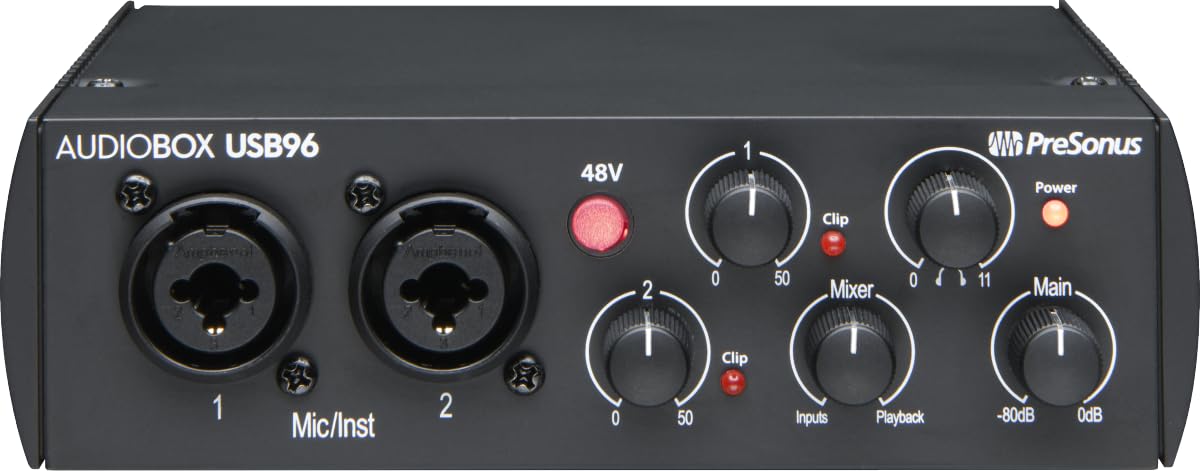
The AudioBox 96 packs Studio One Artist and a suite of plugins, making the software bundle its standout feature. However, hardware consistency varies — some units can introduce crackling, popping, or static, so this interface suits buyers who prioritize the DAW over trouble-free recording.

Bottom line: Only worth buying if Studio One Artist is essential and you can accept the chance of returning a faulty unit.

11

Behringer UM2

Behringer UM2

Absolute beginner

Our Score 8.8/10
Check Price

Worth Noting

  • In a quiet studio, audible hiss can appear with condenser microphones
Inputs
1 XLR + 1 instrument
Preamp Quality
Basic noise floor
Max Sample Rate
48 kHz
Driver Stability
Plug-and-play Mac/Windows

At its low price, the UM2 offers plug-and-play setup and sufficient sound quality for simple guitar or vocal practice. However, the audible noise floor makes it unsuitable for clean recordings or podcasting, and the single XLR input limits dual-mic use. This interface works best for beginners who already own a separate preamp or for experimental recording.

Bottom line: Buy this only if your budget is extremely tight and you don't plan to publish recordings or use two microphones at once.

How to Choose

Number of Inputs

More inputs let you record multiple microphones or instruments simultaneously, but drive up cost and complexity. If you only record solo vocals or one instrument at a time, a single-input interface saves money. For duets, stereo recording, or small band sessions, two or four inputs are essential. Consider future needs: adding an external preamp doesn't let you record two sources at once.

Sample Rate

48kHz is sufficient for voice and most instruments; 192kHz captures high-frequency harmonics but doubles file sizes and strains your CPU. The audible difference is negligible for podcasting and typical music production. Only invest in 192kHz if you record bats or need extreme editing flexibility.

Preamps and Gain

Gain range matters most for dynamic microphones like the Shure SM7B, which need at least 60dB of clean gain. Budget interfaces often offer 50-56dB, requiring an external booster. Preamp noise becomes audible at high gain; Midas or Class-A designs yield lower noise floors. If you use condensers, even basic preamps usually suffice.

Driver Stability

Windows users face more driver-related dropouts and compatibility issues than Mac users. Some interfaces (like MOTU) are near-flawless on macOS but problematic on Windows. Plug-and-play via class-compliant USB is ideal but not guaranteed — always check recent user reports for your OS before buying.

Software Bundle

A full-featured DAW like Studio One Artist or Ableton Live Lite can be worth $100-200, effectively reducing the interface's net cost. However, if you already own a DAW, a bundle-free interface at a lower price may be smarter. Bundled software is often limited in track count or effects, so evaluate what you actually need.

Frequently Asked Questions