Computers & Accessories

11 Best Laptops of 2026: The Right Specs for Every-Day Productivity

Find the best general-purpose laptops for students, professionals, and everyday users that balance performance, portability, and long-term value.

Many laptops marketed as '2026 Edition' still ship with dim 1366x768 screens and processors that struggle with more than a few browser tabs. The gap between advertised features and real-world usability is wider than ever, especially in the budget and mid-range segments.

The hardest decision isn't Windows versus Mac — it's whether to prioritize a polished daily experience with tight hardware constraints or a more versatile machine with extra headroom. That trade-off shows up in every comparison between an ultra-efficient design and a spec-heavy alternative.

This guide cuts through the noise by focusing on three things that matter for daily use: real-world battery life, a screen you can actually see, and enough RAM to stay comfortable for years. The right laptop for you depends on how much you value ecosystem fluidity versus raw multitasking capacity.

1

MacBook Neo 13"

Top Pick
MacBook Neo 13"

Everyday productivity

Our Score 9.4/10
Check Price

Worth Noting

  • 8GB RAM and 256GB storage may feel tight for users who run many apps or store large files locally.
RAM
8GB unified
Display
13.3" Liquid Retina
Storage
256GB SSD
Processor
Apple A18 Pro

The A18 Pro chip delivers exceptional speed for everyday tasks — web browsing, office work, video calls, and light creative projects — without the fan noise or heat common in many Windows laptops. Battery life consistently stretches through a full day of mixed use, often lasting into the evening on a single charge.

The 13.3-inch Liquid Retina display provides sharp, color-accurate visuals for streaming, reading, and photo editing. The aluminum chassis feels rigid and premium, and at 2.71 pounds the Neo is among the most portable 13-inch models you can buy.

In daily use, the MacBook Neo handles school workloads, office productivity, and media consumption with no lag. The SSD boots macOS quickly, and the unified memory keeps apps responsive even with a dozen browser tabs open.

This is the right choice for students, casual users, and anyone invested in the Apple ecosystem who wants a dependable daily driver without exceeding $700. However, the 8GB unified memory and 256GB SSD cannot be upgraded after purchase — users who keep many apps open simultaneously or store large media libraries locally may feel constrained within a couple of years.

Tip: If you anticipate running multiple virtual machines or editing 4K video, consider a model with 16GB RAM — the Neo's 8GB is best suited for typical productivity and media consumption.

Bottom line: For anyone seeking a polished, lightweight laptop for everyday tasks that integrates seamlessly with iPhone, iPad, and Apple services, the MacBook Neo offers an unmatched blend of performance and value — just be realistic about your memory and storage needs.

2

Acer Aspire 14 AI (Ultra5)

Acer Aspire 14 AI (Ultra5)

Value Windows UX

Our Score 8.8/10
Check Price

Worth Noting

  • Screen brightness can be insufficient in brightly lit outdoor settings
RAM
16GB LPDDR5X
Display
14" WUXGA LCD
Storage
512GB SSD
Processor
Intel Core Ultra 5 226V

The Acer Aspire 14 AI pairs Intel's latest Core Ultra 5 processor with 16GB of RAM and a 512GB SSD, delivering snappy performance for daily productivity and media. Where the top-pick MacBook Neo offers a refined ecosystem with only 8GB RAM, this Acer provides double the memory and solid storage at a similar cost. Battery life easily stretches through a full workday of mixed use, and the 3.1-pound chassis makes it effortless to carry.

This laptop suits students and travelers who need a lightweight, long-lasting machine for browsing, document editing, and streaming. The 300-nit screen works well indoors but can appear dim under direct sunlight — best kept to shaded or indoor environments. Gamers or users needing a dedicated GPU should look elsewhere.

Tip: Reduce brightness when working indoors to extend battery; outdoors, find shade or adjust the viewing angle to improve visibility.

Bottom line: For indoor use, this Acer delivers unbeatable value — modern performance, ample memory, and long battery life at a price that undercuts most competitors.

3

Dell 16 Plus (Ultra9)

Dell 16 Plus (Ultra9)

Heavy multitasking

Our Score 8.4/10
Check Price

Worth Noting

  • At 4.12 pounds, it sits at the heavier end for a 16-inch laptop
RAM
32GB LPDDR5X
Display
16" 2.5K IPS
Storage
2TB SSD
Processor
Intel Core Ultra 9 288V

The Dell 16 Plus combines an Intel Core Ultra 9, 32GB of LPDDR5X RAM, and a 2TB SSD with a sharp 2.5K IPS display, making it a direct alternative to the MacBook Neo for those who need raw processing power. The screen delivers crisp text and accurate colors for design work or data-heavy spreadsheets, and the hardware handles demanding multitasking without hesitation – compiling code, rendering video, or running multiple virtual machines all benefit from the ultra-fast storage and ample memory.

Real-world performance is consistent: the laptop stays responsive under sustained loads, and the integrated Arc graphics can handle light creative work. That speed comes with a trade-off in portability – at 4.12 pounds, it's average for a 16-inch machine, and the single USB-A port means a hub is necessary for anyone connecting multiple peripherals. This is a desktop replacement that sits on a desk, not a laptop for constant travel.

Tip: Keep a USB-C hub handy to expand connectivity beyond the single USB-A port.

Bottom line: For users who need the raw compute power of a Core Ultra 9 and 32GB of RAM without paying MacBook prices, the Dell 16 Plus delivers – just budget for a USB hub.

4

Lenovo Yoga 7i 2-in-1

Lenovo Yoga 7i 2-in-1

Convertible work

Our Score 9.0/10
Check Price

Worth Noting

  • At 4.6 pounds, holding it in tablet mode for extended drawing or note-taking may cause arm fatigue.
RAM
16GB DDR5
Display
16" 2K Touch IPS
Storage
1TB SSD
Processor
Intel Core Ultra 7 155U

The Lenovo Yoga 7i 2-in-1 pairs a 16-inch 2K touchscreen with an Intel Core Ultra 7 processor and 16GB of DDR5 RAM, making it a capable machine for creative work and note-taking. The display folds into tablet and tent modes, and the touch response is snappy for drawing or annotations. Multitasking across multiple apps feels fluid, and the 1TB SSD provides ample storage for projects.

Build quality is reassuring — the chassis feels solid and the hinge holds firm at any angle. Battery life is good enough for a full workday of mixed use, though it doesn't quite match the endurance of lighter ultrabooks. This is a midscreen performance that suits most office and school days.

This convertible is best suited for professionals and students who need a large touchscreen for presentations, note-taking, or digital art. The 4.6-pound weight is noticeable when holding it as a tablet for extended periods, so it works better as a laptop that occasionally folds into tablet mode rather than a dedicated tablet. If you need a lighter option for frequent tablet use, consider a smaller convertible or a standard laptop.

Tip: If you plan to use it primarily as a tablet, consider a secondary stand or external keyboard to reduce arm strain.

Bottom line: For users who prioritize a large, high-resolution touchscreen and convertible functionality over extreme portability, the Yoga 7i delivers solid performance and build quality at a mid-range price.

5

Acer Aspire Go 15

Acer Aspire Go 15

Budget performance

Our Score 8.6/10
Check Price

Worth Noting

  • Fan noise can be noticeable in quiet environments
RAM
16GB DDR4
Display
15.6" FHD IPS
Storage
512GB SSD
Processor
AMD Ryzen 7 7730U

The Acer Aspire Go 15 pairs a Ryzen 7 7730U processor with 16GB of DDR4 RAM and a 512GB SSD, all in a 15.6-inch FHD IPS chassis that lands well under $600. This combination handles everyday multitasking, web browsing, office work, and media consumption without stuttering — a level of performance typically reserved for pricier machines.

This laptop suits students and professionals on a tight budget who need strong CPU performance for productivity tasks and don't require silence. The fan noise is present under load, so users in quiet libraries or open-plan offices may find it distracting. It also lacks the AI copilot features found on some competitors, which is a non-issue for most general-purpose use.

Setup is quick out of the box, and the 15.6-inch IPS display delivers clear, sharp images for daily use. For buyers weighing this against the Core Ultra 5 alternative, the Acer offers more raw CPU power but the fan tradeoff is worth considering if you prioritize a quiet workspace.

Tip: The fan ramps up under sustained loads; using headphones or a well-ventilated workspace helps mitigate the noise.

Bottom line: If you need a budget-friendly laptop with strong CPU performance and can tolerate fan noise, this Acer delivers. For a quieter experience with similar specs, the Core Ultra 5 alternative is worth a look.

6

Lenovo V15 Gen 4

Lenovo V15 Gen 4

Office productivity

Our Score 8.8/10
Check Price

Worth Noting

  • Fan may run continuously in some units, creating audible background noise
RAM
16GB DDR4
Display
15.6" FHD LCD
Storage
512GB SSD
Processor
Intel Core i5-13420H

The Lenovo V15 Gen 4 ships with Windows 11 Pro and maintains an Ethernet port, two features that immediately set it apart from many consumer-focused alternatives. Its Intel Core i5-13420H paired with 16GB of RAM and a 512GB SSD delivers snappy performance for spreadsheets, document editing, and web conferencing. This is a machine that prioritizes function over flash.

This laptop suits IT departments provisioning standard-issue devices and business users who need a predictable, no-nonsense tool for daily office applications. The 15.6-inch FHD display is adequate for indoor work but won't impress anyone looking for vibrant colors or a touch interface. Integrated graphics limit it to basic visuals — creative work or gaming requires a different machine, but that's outside the intended scope.

At its mid-range price point, the V15 delivers good value for organizations buying in volume. The build is sturdy enough for a desk-centric life, and the inclusion of Windows 11 Pro adds management features that home versions lack. It won't win any design awards, but it will reliably handle a day's workload.

Tip: In quiet environments, fan noise may be noticeable; placing the laptop on a hard surface can help reduce it.

Bottom line: For offices that need a straightforward, well-connected laptop with Windows 11 Pro, the V15 gets the job done without fuss.

7

Dell 16 DC16251

Dell 16 DC16251

Large touchscreen

Our Score 9.0/10
Check Price

Worth Noting

  • For users who need maximum CPU horsepower, the Core 7 150U lags behind newer Ultra series processors.
  • At 4.18 pounds, it's heavier than many 16-inch laptops, making it less ideal for frequent travel.
RAM
16GB DDR5
Display
16" 2K Touch
Storage
1TB SSD
Processor
Intel Core 7 150U

The Dell 16 DC16251 delivers a crisp 2K touchscreen display, generous 16GB DDR5 RAM and 1TB SSD, all in a chassis that feels solidly built. For daily productivity, web browsing, and media consumption, its performance is more than adequate. However, the Core 7 150U processor is a generation behind Intel's Ultra series, meaning it won't match the raw speed of similarly priced competitors. At just over 4 pounds, it's also heavier than many alternatives, so frequent carrying may become noticeable. For home users who value screen quality and build over peak CPU performance and portability, this Dell is a sound choice.

Bottom line: This Dell fits best for home users who prioritize a large, sharp touchscreen and sturdy build over raw CPU performance and lightweight portability.

8

Acer Aspire 14 AI (Ultra7)

Acer Aspire 14 AI (Ultra7)

AI ultraportable

Our Score 9.2/10
Check Price

Worth Noting

  • Pays a premium over the Ultra5 version for minimal day-to-day performance gain
  • Matte display may appear less vivid in side-by-side comparisons with glossy screens
RAM
16GB LPDDR5X
Display
14" WUXGA LCD
Storage
1TB SSD
Processor
Intel Core Ultra 7 256V

This version of the Aspire 14 swaps the Ultra5 for the faster Ultra 7 and doubles the storage to 1TB, making it a natural pick for users who want local AI processing and extra drive space from day one. The 14-inch WUXGA display is crisp and the matte finish cuts reflections well in bright rooms. Battery life easily covers a full workday. The catch is that the Ultra5 version delivers nearly identical speed for most everyday tasks at a lower price, so the premium here is for the larger SSD and the slightly faster NPU. That tradeoff matters if your workflow involves running AI models locally or you prefer not to upgrade storage later.

Bottom line: A solid ultralight for buyers who specifically want 1TB of onboard storage and the faster NPU for AI tasks, but if those aren’t priorities, the Ultra5 version gives nearly identical real-world experience for less.

9

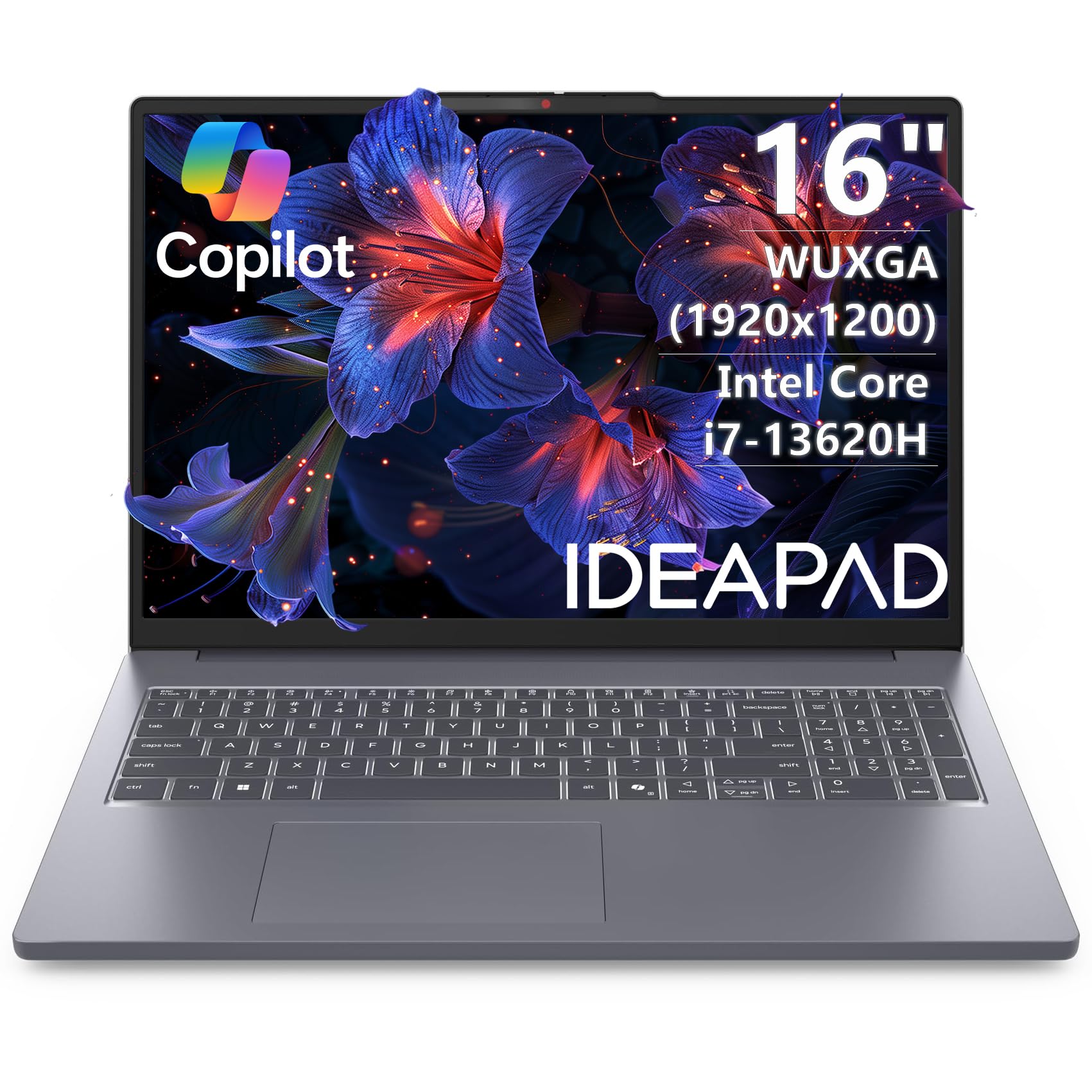
Lenovo IdeaPad Slim 3 16

Lenovo IdeaPad Slim 3 16

Portable productivity

Our Score 8.6/10
Check Price

Worth Noting

  • No touchscreen support
  • Unit reliability can vary; early failure has been noted in some units
RAM
16GB DDR5
Display
16" WUXGA IPS
Storage
512GB SSD
Processor
Intel Core i7-13620H

The Lenovo 16-inch Premium Laptop delivers the kind of processing headroom and display real estate that suits students and professionals handling moderate workloads. At 3.75 pounds, it’s notably easy to carry for a 16-inch machine, and the 16:10 WUXGA screen offers extra vertical space for documents and web pages.

The tradeoffs are two-fold: there is no touchscreen, which limits its appeal for note-taking or tablet-style use, and unit-to-unit consistency can vary — early failures have been noted in a small number of units. For buyers who can accept that potential risk and don’t need touch input, this remains a solid performer in its price bracket.

Bottom line: This Lenovo suits buyers who need a portable, performant 16-inch laptop for daily tasks and can tolerate the possibility of unit variance — not for those who require a touchscreen or absolute zero-risk on hardware defects.

10

HP 15 N100

HP 15 N100

Budget desktop

Our Score 8.4/10
Check Price

Worth Noting

  • In a quiet room, the fan noise and heat buildup can be noticeable during extended use
  • Battery life is short, so the laptop needs to stay plugged in for most sessions
RAM
8GB DDR4
Display
15.6" FHD IPS
Storage
256GB SSD
Processor
Intel N100

The HP 15 N100 offers a crisp 15.6-inch FHD IPS display and built-in Copilot AI for a low entry price. However, the battery runs through its charge quickly, and under sustained load the chassis heats up and the fan becomes audible — this is a machine designed for desk duty rather than mobility. It works well as a budget secondary device for students who keep it plugged in at a study desk.

Bottom line: Best suited as a stationary secondary computer for note-taking or basic tasks where a power outlet is always within reach.

11

HP 17 i7-1255U

HP 17 i7-1255U

RAM-intensive tasks

Our Score 8.4/10
Check Price

Worth Noting

  • 1600x900 display may appear soft for detailed text or media consumption.
  • Some units may experience early hardware issues requiring replacement.
RAM
64GB DDR4
Display
17.3" HD+ Touch
Storage
2TB SSD
Processor
Intel Core i7-1255U

This laptop delivers exceptional memory and storage for its price, with 64GB RAM and a 2TB SSD handling virtual machines and data-heavy workflows without hesitation. The 17.3-inch touchscreen offers a spacious view, though the 1600x900 resolution may appear soft for detailed text or media. Some units have experienced early hardware issues, making it a secondary consideration for those who need a primary machine. Best suited for desk-bound users who prioritize RAM capacity over display fidelity and long-term dependability.

Bottom line: This laptop is a specialized tool for users who need 64GB RAM and work primarily at a desk; the low-res screen and potential hardware variance make it a niche pick rather than a general-purpose machine.

How to Choose

Processor Generation and Core Count

A modern mid-range chip like Intel Core i5-13420H or AMD Ryzen 7 7730U handles daily multitasking smoothly. Budget N-series processors (N100, N150) are fine for light web and office work but choke under six browser tabs or a video call while working.

The real trade-off: newer Ultra-series chips (Core Ultra 5/7/9) include an NPU for AI features, but that matters little if you don't use Copilot or local AI tools. For general use, a last-gen i7 with more cores often outperforms a brand-new Ultra 5 in raw multi-tasking.

RAM Capacity

8GB is the absolute minimum for light use, but it fills up fast — especially with modern web apps and background updates. 16GB is the real sweet spot for longevity, allowing you to keep a dozen tabs, Slack, Spotify, and a document open without slowdowns.

The hidden cost: many budget laptops solder RAM, so you cannot upgrade later. Paying a bit more for 16GB now saves frustration down the road. Avoid 4GB or 8GB machines unless the laptop is strictly a secondary device.

Storage Type and Size

An SSD is mandatory; eMMC or UFS storage is significantly slower. 256GB is tight for most users after Windows and a few applications. 512GB is the practical minimum for general use, and 1TB leaves comfortable headroom for photos and documents.

Watch out for third-party configs that advertise '2TB' but pair it with a low-end processor or dim screen. The storage upgrade often costs little, but the overall machine remains underpowered.

Display Resolution and Quality

Resolution has the biggest impact on day-to-day satisfaction. A 1366x768 panel looks noticeably grainy even for basic tasks and makes side-by-side windows cramped. 1920x1080 (FHD) is the minimum acceptable, and 1920x1200 or higher offers extra vertical space for documents and web pages.

IPS panels have better viewing angles and color than TN or VA. Touchscreens add cost and weight but are useful for note-taking or media browsing. Matte finishes reduce glare outdoors but can mute colors.

Real-World Battery Life

Manufacturer battery claims are based on light video playback. Real-world usage — web browsing, email, video calls — delivers about 40-60% of the advertised time. A 10-hour rating often means 5-6 hours of mixed use.

The hidden trade-off: laptops with high-performance processors (Core i7 H-series, Ultra 9) or large 4K screens consume more power. If you need all-day portability, look for a machine with a U-series processor and an efficient display, and check user reviews for real-world battery reports.

Frequently Asked Questions