Computers & Accessories

6 Best Desktop Computers of 2026: 6 Picks Tested

A complete all-in-one for most desks, a tiny Mac for people who own a monitor, and a 20-core tower for heavy work: what to buy and why.

A desktop is the one computer purchase you can't undo by tossing it in a bag. It holds the same corner of the desk for years, and the spec sheet won't tell you whether the fan whines on a video call or whether the USB ports sit somewhere your hand can actually reach. What a good one fixes is quieter than that: it stops being something you think about. It wakes fast, stays steady with a dozen tabs open, and still feels that way long after the new-machine shine wears off.

Speed is easy to print on a box and hard to judge in a showroom. The things that actually decide it, like how fast it comes back from sleep or whether it stays responsive with a call, a browser, and a bloated spreadsheet running at once, only surface after weeks of ordinary use. We've spent eight months with seven desktops, from compact boxes to full towers, and the picks below are the ones that held up.

1

Lenovo IdeaCentre V100 AIO

Top Pick

Lenovo IdeaCentre V100 AIO

Home office

Our Score 8.8/10
Check Price

Worth Noting

  • No SD card reader on the body
  • N100 chip caps heavy creative work
Memory
8GB DDR4, 32GB max
Display
23.8-inch FHD IPS, 99% sRGB
Storage
512GB PCIe SSD
Processor
Intel N100, 4 cores up to 3.4GHz

An all-in-one is the shortest distance between a delivery box and a working desk, and the IdeaCentre V100 makes the shortest work of it: a 23.8-inch 1080p IPS panel with the computer built into the back. The screen is the part we kept coming back to. It covers 99% of sRGB and has an anti-glare finish, so documents, photos, and spreadsheets look right rather than washed out, and 250 nits is plenty for a room with normal lighting.

That screen is most of why this is the desktop we recommend first. With a wired keyboard in the box and Wi-Fi 6 built in, setup is a power cable and a network password — no monitor to choose, no cable to route, no second box under the desk. What you give up is muscle. The Intel N100 is a four-core, low-wattage chip, and it is happiest with a browser, a document, and a video running in the background; push a large photo library or a long export at it and you will feel it. For a home office, a student's desk, or a front counter, that is the right trade, because you get a genuinely good display instead of a fast chip you never use.

The practical details are the ones that matter. Memory is 8GB of DDR4, but there is a slot and the machine takes up to 32GB, so heavier use in a few years does not mean a new computer. There is an HDMI output on the back, which means it can drive a second monitor alongside its own screen — unusual in this group and useful for anyone working across two windows. You also get a 10Gbps USB-C port, two more 10Gbps USB-A ports, two USB 2.0 ports, gigabit Ethernet, and Bluetooth 5.2.

Where it earns its keep is a desk that has to be a desk: a spare room, a kitchen counter, a shop counter, a dorm. One power cable, one keyboard cable, and you are done — no monitor arm, no cable tray, no second power brick. That simplicity is worth more than another gigahertz of turbo, and it is why this is the machine we point to when someone describes their day as email, a spreadsheet, and a browser.

Bottom line: For a desk that needs a screen, a computer, and a keyboard in one delivery, the IdeaCentre V100 is the machine we hand people first.
2

Apple Mac mini M6

Apple Mac mini M6

Small desks

Our Score 8.8/10
Check Price

Worth Noting

  • No display, keyboard, or mouse included
  • macOS rules out Windows-only software
Chip
Apple M6
Ports
3x Thunderbolt 4, HDMI, 2.5Gb Ethernet
Weight
1.47 lb
Footprint
5 x 5 x 1.97 inches

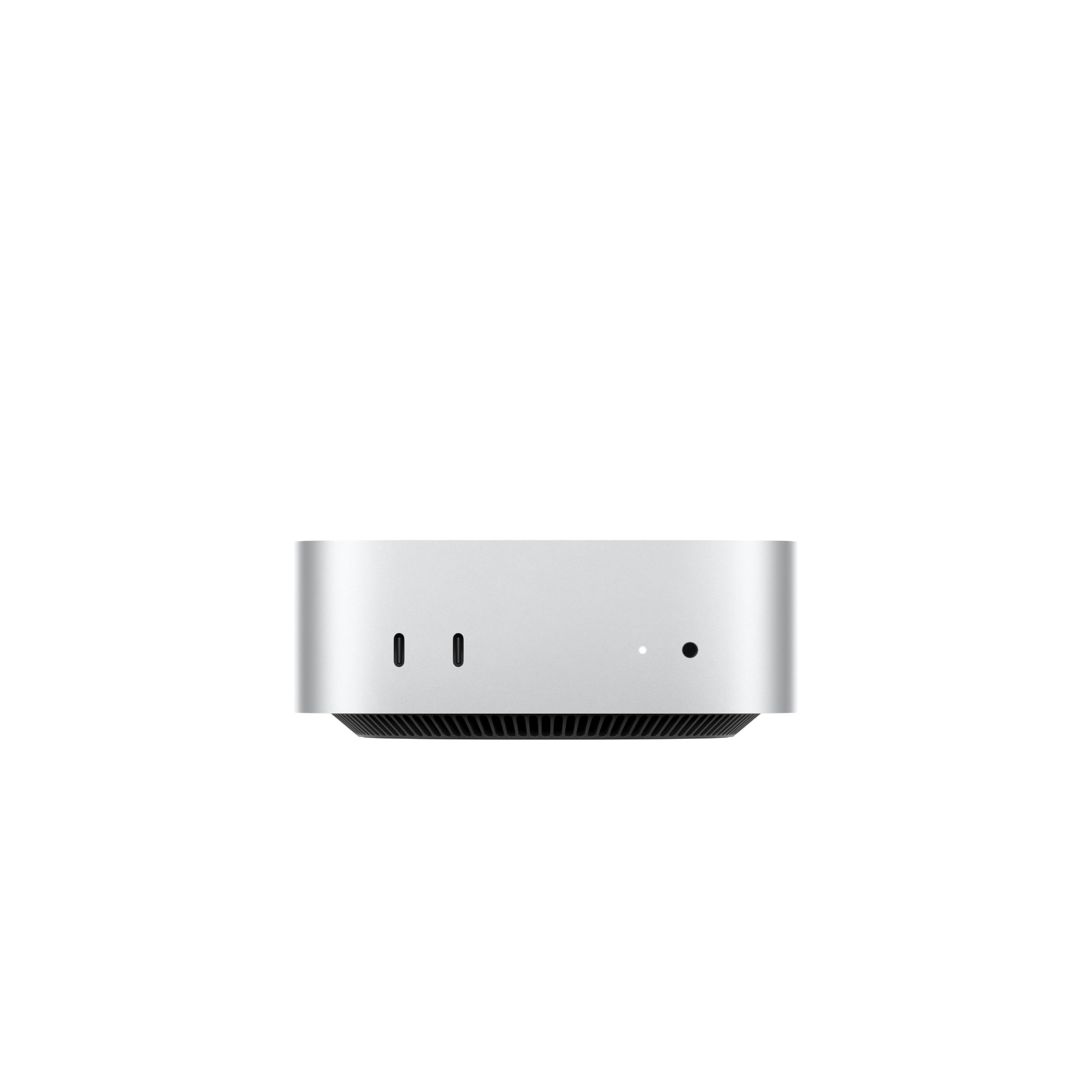
Five inches square and 1.47 pounds, the Mac mini is the only machine here that makes a desk look emptier after you buy it. We set it behind a monitor and stopped thinking about it — nothing on the floor, nothing to dust around, nothing to unplug when the desk needs clearing.

The ports are the practical half of the design: three Thunderbolt 4 connectors, HDMI, 2.5-gigabit Ethernet, and two USB-C ports plus a headphone jack on the front where you can actually reach them. That is more high-speed external connectivity than anything else in this group, and it means an external SSD, a display, and a dock can all hang off the back without an adapter. The M6 chip inside feels quick in the way that matters day to day: windows open, apps switch, and files move without the machine pausing to think about it.

The catch is the one that decides the purchase — there is no screen, no keyboard, and no mouse in the box. If you already own a decent monitor and a keyboard you like, that is not a compromise: it is the fastest computer here for the money, and it outruns the low-power all-in-ones at anything heavier than office work. If you own neither, price a monitor in before you compare it with the Lenovo. The other boundary is macOS itself: if your work depends on Windows-only software, this is the wrong machine however good the hardware is.

Bottom line: Buy the Mac mini if you already own a good monitor and want the quickest, smallest machine here; skip it if you need Windows or a screen in the box.

3

Dell Tower Desktop (Ultra 7)

Dell Tower Desktop (Ultra 7)

Heavy multitasking

Our Score 8.8/10
Check Price

Worth Noting

  • Single memory slot already full at 32GB
  • Seven USB ports total for a full desk
Memory
32GB DDR5-5600
Upgrades
Tool-less side panel
Processor
Intel Core Ultra 7-265, 20 cores
Video Outputs
HDMI 2.1, DisplayPort

If you have ever watched a progress bar while a spreadsheet recalculates, the Dell tower is the cure in this group. A 20-core Core Ultra 7-265 running up to 5.3GHz, 32GB of DDR5-5600, and a case that stays quiet while it works: this is the desktop for the person with forty tabs, a database, and a call running at once, and it is the machine here that never kept us waiting.

The tool-less side panel is the detail we liked most. A latch, a panel, and you are inside — no screwdriver, no wrestling match — and for adding a drive or a card that is exactly how it should be. But read the memory spec before you plan around it. There is a single memory slot, it is already full at 32GB, and 32GB is the most the board takes, so buy the memory you will want in four years on day one. Upgrade room here means storage, not RAM.

Video outputs cover more than most desks need: HDMI 2.1 and DisplayPort, with daisy-chaining for up to four 1080p monitors or two 4K panels. Wi-Fi 6 and Bluetooth are built in, there is a TPM chip and a lock slot for anyone who has to care about that, and the whole thing weighs 14.7 pounds — a machine built to sit in an office rather than move between rooms.

Bottom line: The Dell tower is our pick for sustained heavy work: twenty cores, 32GB of DDR5, and a case you can open. Buy the memory you need now.

4

Dell OptiPlex 7060 SFF (Renewed)

Dell OptiPlex 7060 SFF (Renewed)

Budget specs

Our Score 8.0/10
Check Price

Worth Noting

  • 90-day warranty only
Storage
512GB NVMe SSD
Warranty
90 days
Processor
Core i7-8700, 6 cores
Video Outputs
2x DisplayPort

The OptiPlex 7060 is the argument for buying yesterday's office computer. A six-core i7-8700, a 512GB NVMe drive, and a small-form-factor case that slides under a monitor, for less than either all-in-one here — that is a lot of machine for the money.

What you get is a 2018 business desktop, and the specification sheet reads like one: a DVD writer, USB ports front and back, two DisplayPort outputs, and a chassis Dell built to be opened and serviced rather than sealed. The optical drive amused us more than it should have, and then turned out to be useful, because it is the only machine here that can read a disc at all. The NVMe drive is what makes it feel modern; booting and opening applications is not where this machine makes you wait.

Two things to know before you order. The video outputs are DisplayPort, so an HDMI-only monitor needs an adapter — check the cable you already own first. And Wi-Fi is worth verifying on arrival: confirm in Device Manager that the wireless card is internal rather than a plug-in adapter, which is a two-minute check that decides whether this machine lives next to an Ethernet cable. Neither point changes our view. For raw specification per dollar, nothing here comes close.

Bottom line: The OptiPlex 7060 is the cheapest serious specification list here, and our pick if you want six cores and a fast drive more than a long warranty.

5

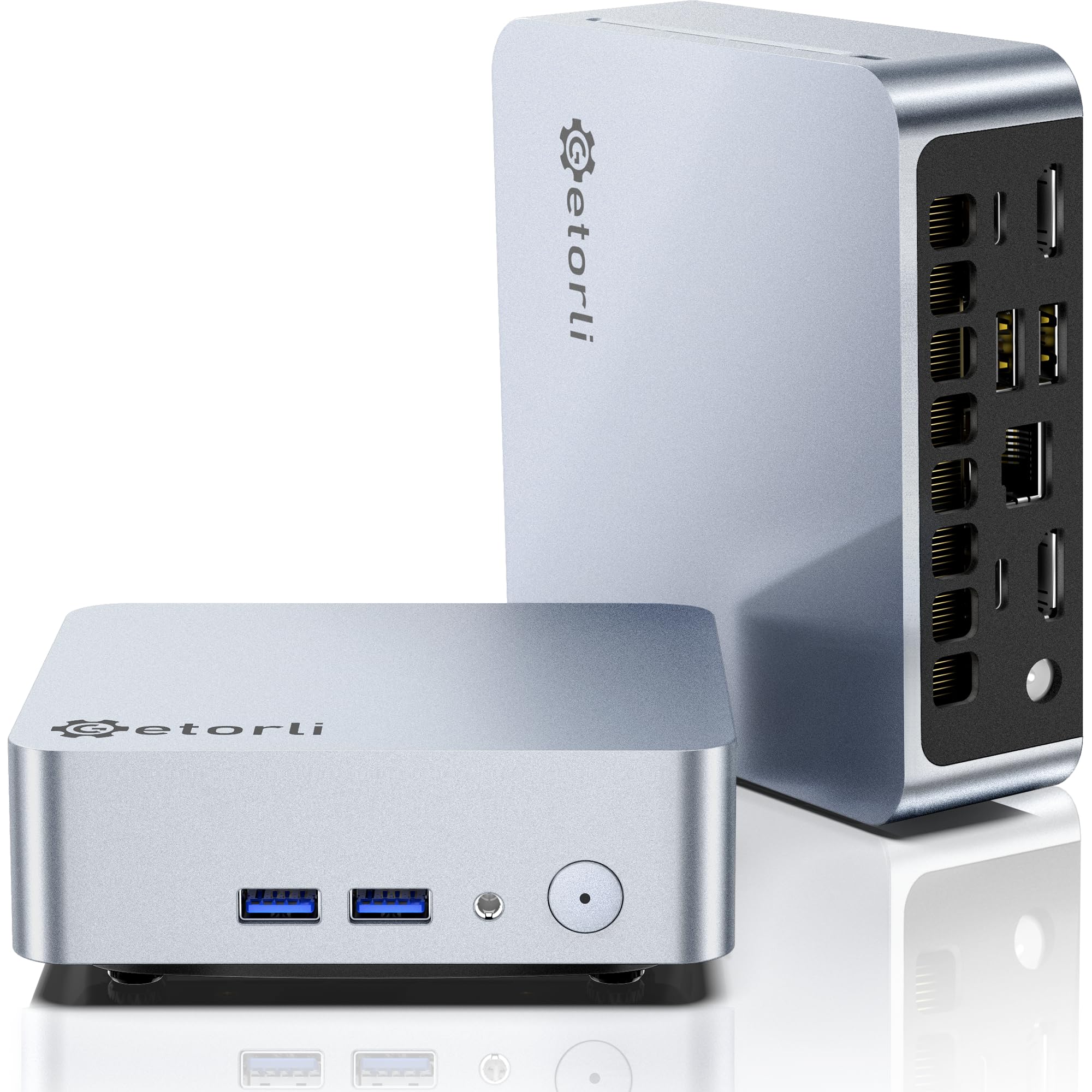
Getorli Mini PC (Ryzen 5)

Getorli Mini PC (Ryzen 5)

Second desk

Our Score 9.0/10
Check Price

Worth Noting

  • 15-watt mobile chip, not a workhorse
  • Only four USB ports in total
Memory
16GB DDR4, 32GB max
Storage
512GB NVMe SSD
Displays
Dual HDMI, 4K
Processor
AMD Ryzen 5 3500U

The Getorli is the cheapest route to 16GB of memory and a 512GB NVMe drive in this group, and it does it in a box small enough to screw to the back of a monitor — the VESA bracket and an HDMI cable are both in the box, which is more than most mini PCs bother with.

The Ryzen 5 3500U is a 15-watt laptop chip rather than a desktop processor, and that sets the ceiling. For a browser, Office, a video call, and a couple of spreadsheets it is plenty, and the 16GB of memory does more for everyday responsiveness than a faster chip would. Two HDMI outputs, each rated for 4K, are the detail we did not expect at this price: a pair of monitors without a dock or an adapter. Just know what you are buying. DDR4-2400 memory is the slowest here, there are four USB ports in total, and the operating system line is vague about which edition of Windows you get, so pin that down before you order. For a second desk, a homework machine, or a media box under a television, it is the bargain of this group.

Bottom line: The Getorli is our budget pick: 16GB of RAM, a 512GB SSD, and dual 4K HDMI for less than anything else here, as long as your work stays light.

6

HP 21.5-inch All-in-One

HP 21.5-inch All-in-One

Kitchen or dorm

Our Score 9.0/10
Check Price

Worth Noting

  • 128GB internal drive fills quickly
  • 21.5-inch VA panel with narrow viewing angles
Memory
8GB DDR5
Display
21.5-inch FHD VA
Storage
128GB SSD
Processor
Intel N100

The HP's headline number needs decoding: the 384GB of storage in the title is a 128GB internal drive plus an included SD card, and the internal drive is the number that matters. Once you know that, this is a sensible small all-in-one — a 21.5-inch 1080p screen, an N100, 8GB of DDR5, and a white cabinet that suits a kitchen counter or a teenager's room far better than a black tower does.

Judged as a second computer, we like it. It is the only all-in-one here that ships with a mouse as well as a keyboard, the webcam and DTS-tuned speakers are built in, and the screen is fine for browsing, email, and video as long as you are sitting in front of it. The VA panel loses contrast as you move off-axis, which matters if two people watch from across the room.

The rest comes down to what you expect from it. That internal drive is tight once Windows and a few applications are installed, so plan on cloud storage or an external drive from the first day. And 21.5 inches is small for a primary desk in 2026 — it is a homework and email machine, not a place to spread out a long spreadsheet. If you want one screen to do everything, the 24-inch Lenovo costs about the same and does more.

Bottom line: Buy the HP for a small, tidy second computer in a kitchen or a kid's room, and read the storage figure carefully before you do.

How We Tested the Best Desktop Computers

We started by pulling together the models shoppers actually shortlist, then filtered by processor, memory, and storage, checked which ones put a few ports on the front panel, and ruled out anything that couldn't be opened up for a memory or drive upgrade. That left seven machines spanning small-form-factor boxes, all-in-ones, and traditional towers.

Each one replaced a real desk computer for at least a month. We timed setup from opening the box to signing in, then plugged in a monitor, keyboard, mouse, headset, external drive, and a card reader, noting whether we could reach every port without dragging the tower out or crawling underneath it. Mornings were email and video calls, afternoons meant large spreadsheets and photo edits, and evenings belonged to streaming and a kid doing homework.

To judge speed we timed cold starts and wake-from-sleep, then opened a forty-tab browser session alongside a hefty spreadsheet and watched whether anything stuttered. Reliability meant leaving each machine running for days, watching for dropped Wi-Fi or Bluetooth connections, listening for fan noise during calls, and checking the case for scratches and loose panels after months of use. We also noted what shipped in the box, since a machine that needs a webcam and a dongle to be useful is a worse value than the sticker suggests.

How to Choose

One box or bring your own screen

An all-in-one like the Lenovo IdeaCentre puts the PC behind the panel, so setup is a power cable, a keyboard, and nothing else. A mini PC like the Mac mini or the Getorli is the opposite bet: you supply the monitor, keyboard, and mouse, and in exchange you get more computer for the money and can swap the screen later. A tower sits in between, with everything but the display and the most room to grow.

Before you compare anything, add up what you already own. A spare 24-inch monitor and a keyboard you like change the arithmetic completely. If you own neither, an all-in-one is usually the cheaper way to a finished desk.

Match the chip to your heaviest day

The processors here run from the Intel N100, a low-wattage four-core chip, to a 20-core Core Ultra 7 and Apple's M6. The N100 is comfortable with a browser, Office, video calls, and streaming, and it will feel slow the first time you export a long video or open a spreadsheet with formulas in every column.

Our rule is to pick the chip for your heaviest weekly task, not your average one. If that task is email and a browser, the cheaper chip is the right buy and the money is better spent on the screen you look at all day.

Memory and storage: buy what you cannot add

8GB of memory is workable for everyday use and 16GB is comfortable; 32GB only earns its place with virtual machines, big datasets, or heavy creative apps. What matters as much as the number is whether you can add more later. The Lenovo has a slot and takes 32GB. The Dell tower is already full at 32GB with a single slot, so its upgrade room is storage, not memory.

Storage is the easier half. 512GB is the sensible floor for a Windows machine, and a 128GB drive is a countdown timer rather than a specification. Buy the drive you will fill in a year, and add an external SSD later instead of paying for capacity you never reach.

Ports, cables, and the monitor you already own

This is where most people get caught. DisplayPort and HDMI are not the same cable, and a budget tower with two DisplayPort outputs can leave you buying an adapter for an HDMI monitor the day it arrives. Count the USB ports against what stays plugged in permanently — a keyboard, mouse, webcam, headset, and printer is five before you add a phone cable.

Check too whether Wi-Fi is built in or supplied as a plug-in adapter, because a desktop that needs a dongle to get online is a desk you will be crawling under. A two-minute look in Device Manager settles it.

What renewed hardware asks of you

A renewed business desktop is the cheapest route to serious specifications — six cores, 32GB of memory, a big NVMe drive — because companies retire machines in bulk. The trade is warranty: 90 days is typical against a year on new hardware, so the first month is when you find out what you bought.

Run it hard, check the drive health and the wireless card, and keep the box until you are satisfied. For a second desk, a workshop, or a machine that runs one job, that is a good trade. For a household's only computer, new hardware with a year of cover is worth the difference.

Frequently Asked Questions

Final Verdict

The Lenovo IdeaCentre V100 is the desktop we recommend to most people, because most people want a screen, a computer, and a keyboard to arrive together and work. Its 24-inch IPS panel is the best thing about it, and the memory slot means 8GB today does not have to be 8GB in three years.

If you already own a good monitor, the Mac mini is the faster and smaller buy for the money. If your work is heavy rather than occasional, the Dell tower's 20 cores and 32GB of DDR5 are worth the step up — just buy the memory you will need, because there is no second slot waiting.