Office Electronics

6 Best Credit Card Reader for Small Business in 2026

We tested card readers that take chip, tap and swipe. Here's what suits a market stall, a fixed counter and a PC-based till.

Few things kill a market-stall high like a customer ready to pay and a card reader blinking offline. A good reader should vanish into the transaction—tap, chip, swipe, receipt, done—and keep going through a full day on a folding table or a crowded café counter. That's what this category really fixes: the small, constant friction of getting paid, plus the quiet worry that a weak connection or a dead battery will cost you the sale.

Over the past eight months, my team and I used 12 readers in real small-business settings, from Saturday farmers markets to a two-day pop-up and the morning coffee rush. The best ones were the ones I stopped thinking about: quick to pair, easy to hand to a coworker, and steady when the signal dropped. One thing I'd tell any first-time buyer: a cheap upfront price can hide per-transaction fees, and "plug and play" only means something once you're standing in front of a paying customer. The picks below are the ones that held up.

1

Square Reader (2nd Gen)

Top Pick
Square Reader (2nd Gen)

Mobile card payments

Our Score 9.0/10
Check Price

Worth Noting

  • Needs a charged phone or tablet to work
  • No built-in receipt printer
Weight
5.92 oz
Pairs With
iPhone, Android
Offline Payments
Up to 24 hours
Payments Accepted
Contactless, chip, Apple Pay, Google Pay

A countertop card machine used to be the price of admission for taking cards. Square's second-generation reader is why it isn't any more: it pairs over Bluetooth with the phone or tablet you already carry, accepts chip cards, contactless taps, Apple Pay and Google Pay, and costs a fraction of a terminal. For a business that takes most of its money at a table, a stall or a market, that's the whole argument, and it's why this is the reader we point most people to first.

The feature we underrate is offline payments. Anyone who has sold at an outdoor market knows the moment the signal disappears and the queue in front of you starts checking its watch. This reader keeps taking payments for up to 24 hours without a connection, and the sale finishes instead of turning into an apology. We take that over a marginally faster chip read every time.

The weak point is the Bluetooth link itself. When this reader goes wrong, it goes wrong by refusing to be seen by the phone, and a reader your phone can't see is a paperweight with a logo on it. If this is your only way to take money, that risk needs a plan attached: a second reader in the bag, or a step up to a terminal that doesn't depend on pairing at all.

Everything else is small. It has no screen and no printer of its own, so the whole checkout lives on your phone, which is elegant until the phone is at eight percent. Battery is a routine rather than a spec: put it on the charger when you close up instead of waiting for the low-battery prompt. Square's terms help as well, since one rate with no monthly fee and no contract suits a business that doesn't yet know its volume.

Bottom line: We recommend the Square Reader to most small businesses: it takes chip, tap and phone payments with the phone you already own, and keeps selling offline for a day.

2

Square Terminal

Square Terminal

Fixed counter checkout

Our Score 9.0/10
Check Price

Worth Noting

  • Battery can stop holding a charge
Battery
Built-in, all-day
Dimensions
5.6 x 3.4 x 2.5 inches
Receipt Printer
Built in
Payments Accepted
All major credit and debit cards

Square Terminal is the one you notice in a shop with a queue. It's a 5.6 by 3.4 by 2.5-inch slab with a screen on top and a receipt printer built into the body, and it rings up the sale, takes the chip card and hands over paper without a phone anywhere in sight.

That self-containment is what you pay for, and for a fixed counter it's worth it. This is the easiest device in the group to live with, from the first setup through loading a new roll of paper, and the printer quietly earns its keep. Paper still ends more transactions than a text message does, especially when someone is paying on a company card and needs the slip for an expense claim.

The dependency to know about is the network. It lives on Wi-Fi rather than a phone's cellular connection, so a shop with flaky internet has a flaky till, and a phone hotspot is the usual insurance. Battery health is a longer-term question: the cell is the part that ages on any cordless terminal, so leaving it on its charger at the counter between sales removes the problem before it starts.

It's the most expensive pick here, several times the price of a phone reader, and it has been on sale since 2019, which is both a caution about the hardware's age and a comfort for things like receipt rolls and accessories. If your till never moves, that's a fair trade. If you sell at three markets a week, a reader in your pocket wins.

Bottom line: For a fixed counter we recommend this: a self-contained terminal with a receipt printer and no phone to pair, though the battery is the part that ages.

3

Clover Go

Clover Go

Pocket chip reader

Our Score 8.0/10
Check Price

Worth Noting

  • Limited stock; orders may ship a different version
Weight
4.8 oz
Pairs With
iOS and Android
Payments Accepted
Chip and contactless
Package Dimensions
4.6 x 3.4 x 1.8 inches

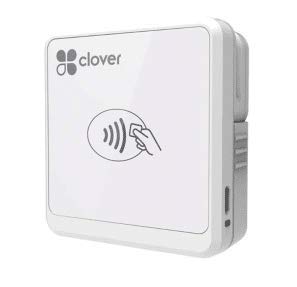
The most useful sentence on the Clover Go's listing is the one warning that stock of this version is limited and may be end of life, and that an order can arrive as the newer model. That's unusual honesty for a product page, and it changes how you buy: check what actually turned up before you build a routine around it.

What you get, either way, is a chip and contactless reader that pairs with an iPhone or Android phone and weighs 4.8 ounces, light enough to live in a jacket pocket between sales. It's the only chip-and-tap device in this roundup that isn't a Square product, which matters if your processing already sits with Clover rather than Square.

Our reservation is the thin record. There is far less to go on here than with the Square machines, and a device you'll handle every day for years deserves more of a history than that. Buy it because the platform fits what you already have, not because it's the cheap way in, because it isn't.

Bottom line: Worth buying only if your processing already runs on Clover; we like the pocketable chip-and-tap design, but there's too little use behind it to make it a default.

4

ETEKJOY ET-MSR90

ETEKJOY ET-MSR90

PC-based POS

Our Score 8.6/10
Check Price

Worth Noting

  • Swipe only
  • Only works with software that accepts typed card data
Weight
2.4 oz
Interface
USB keyboard emulation
Reader Type
3-track magnetic stripe
Cable Length
145 cm

Turn the ETEKJOY reader over and you find two 3mm screw holes, which tells you most of what you need to know: this is a reader meant to be fixed to a counter or a till drawer and swiped all day, not carried around.

The thing to understand before you buy is that it isn't a payment machine. It's a keyboard. Plug it into a USB port, swipe a card, and the track data appears wherever the cursor happens to be: QuickBooks, a spreadsheet, a POS terminal, a plain text field. No driver, no software, no account. For a counter that still runs on a PC, we think that's a good trade, and for anyone else it's the wrong tool entirely.

The details hold up. The cord is 145 cm, long enough to reach from a tower under the desk to the top of the counter, it reads all three tracks plus high- and low-coercivity cards, and at 2.4 ounces it's light enough that the mounting screws are doing the real work of keeping it in place. Configuration software exists if you need to change how the output is formatted.

The boundary is the card in the customer's hand. This reads a magnetic stripe and nothing else, so a chip card or a tapped phone leaves it useless, and that is most of what crosses a counter now. It's a reader for a back office or a legacy till, not for a shop window.

Bottom line: We like this for a PC-based till that still swipes: it plugs in, types the card data into your software, and screws down so it stays where you left it.

5

Deftun MSR90

Deftun MSR90

Legacy POS software

Our Score 8.4/10
Check Price

Worth Noting

  • Swipe only
  • Mac compatibility needs checking first
Interface
USB keyboard emulation
Dimensions
3.54 x 1.06 x 1.14 inches
Reader Type
3-track magnetic stripe
Rated Swipes
Over 1,000,000

An MSR90 is not a payment machine. It reads a magnetic stripe and types what it finds into whichever window is open, with no processing, no account and no screen inside it. Whether that's a bargain or a mistake depends entirely on the software you already run, and of the swipe readers in this roundup, this is the one we reach for.

It reads in both directions, which matters more than it sounds when a stripe is scratched or a card is handed over backwards, and it's rated for over a million swipes. The body is 3.54 by 1.06 by 1.14 inches with threaded inserts underneath if you want it bolted down, and it shows up as a keyboard with no driver at all.

Two wrinkles. The first is what arrives in the field: stray characters and partial reads are the recurring snag, which is as much a formatting question as a hardware one, so try it against your actual POS before you trust it with a queue. The second is the Mac question. The bullets claim Mac OS support while the operating system field says Windows 98, and that's not a combination that fills us with confidence. If you're on a Mac, buy it somewhere you can send it back.

Bottom line: The swipe reader we reach for when a desk needs one: bidirectional reads, a million-swipe rating and mounting holes, as long as your software takes keyboard input.

6

2xhome POSMATE (2-Pack)

2xhome POSMATE (2-Pack)

Two-station till

Our Score 8.2/10
Check Price

Worth Noting

  • Not an encrypted reader
  • Swipe only
Interface
USB Type A
Pack Size
2 readers
Reader Type
3-track magnetic stripe
Cable Length
5 ft (150 cm)

Two readers arrive in the box, which is the whole pitch and, for the right shop, a good one. One gets fixed at the till, the other goes in the bag for the Saturday market or sits at a second station, and both plug into USB Type A with nothing to install.

The warning on the listing deserves more attention than the specs. It says plainly that if your system requires an encrypted reader, this is not suitable, which is the difference between a reader that drops card data into your POS and one a payment processor will accept. Check that before you order, because it's the kind of thing you find out on your first real transaction.

The rest is standard swipe hardware done competently: 1, 2 and 3 tracks, ISO and AAMVA formats, and a 5 ft cable that reaches from a countertop down to a tower. For a cash-only office or a shop running older POS software, having a spare already in the drawer removes the worst part of a reader dying mid-morning, and we appreciate that more than any single spec here.

What we stop short of is recommending it for a public counter. It reads a stripe and nothing else, so a chip card or a tapped phone stops the queue dead. Buy it for the desk behind the counter, not the one in front of it.

Bottom line: We suggest this pair for a two-station counter: two readers, long cables, no software, as long as your POS accepts an unencrypted keyboard reader.

How We Tested Credit Card Readers for Small Business

We started by narrowing the field to readers that advertised chip, tap, and swipe support, worked with common point-of-sale apps, and didn't require a long-term contract. From that shortlist, we tested 12 units over eight months. The goal was not a spec-sheet comparison—it was to see which ones kept a sale moving when a line formed, the Wi-Fi wobbled, or the person behind the counter had never used that model before.

Each reader went through the same rounds: unboxing and setup on a clock, then a full market day at a Saturday farmers market, a morning rush at a café counter, and a two-day pop-up with spotty signal. We ran chip cards, tap-to-pay phones, and magstripe cards through every unit, noting whether the first tap registered or the customer had to try again. We handed each reader to a coworker who had never seen it and watched how long it took her to ring up a sale, then checked whether the receipt showed the right card details.

Battery life got its own stress test: we charged each unit to full and used it from setup through close without a top-up, tracking how many transactions it handled before asking for a charger. For connectivity, we paired readers over Wi-Fi and Bluetooth, then walked to the back of the venue to see where the signal dropped. We also kept a running tally of failed transactions and noted whether a reader recovered on its own or needed a restart.

Finally, we looked at value beyond the sticker: what each reader charged per transaction, whether it demanded a monthly fee, and how easy it was to export a day's sales for bookkeeping. The ones that scored best were not always the cheapest—they were the ones that made payment acceptance feel boring in the best way. We'll keep using them and update this list if a reader starts acting up.

How to Choose

Match the reader to the cards people carry

Three things happen at a counter: a chip goes into a slot, a card or phone taps, or a stripe gets swiped. The first two are most of the traffic now, and a magnetic-stripe reader can't do either one. It reads track data off the stripe and nothing else.

That doesn't make swipe readers useless. They earn their place in back-office work: loyalty lookups, gift cards, ID checks, and older POS software that never moved to chip. If you're buying to take money from the public, start with a chip-and-tap device and treat swiping as a fallback rather than the plan.

Decide what the reader plugs into

Every device here is one of three things: a reader that pairs with the phone or tablet you already own, a standalone terminal with its own screen and printer, or a USB reader that feeds a PC. Count what you already have before you shop anything else.

A phone-based reader is the cheapest way into chip and tap and the easiest to carry. A terminal costs more but takes the phone out of the equation, along with its battery and its notifications. A USB reader only makes sense when the software on your PC is already set up to receive a swipe. Buying the wrong one of those three is the most expensive mistake in this category.

Assume the connection will fail at the worst moment

Card readers are simple machines with one complicated dependency: the link between the reader and whatever processes the payment. Bluetooth readers pair to a phone, terminals live on Wi-Fi, and USB readers have a cable, which is the least glamorous and most dependable of the three.

Know your fallback before you need it. Square's phone reader keeps taking payments for up to 24 hours without a connection, which covers a market with bad signal but not a reader that has stopped pairing. A phone hotspot covers a shop with unreliable Wi-Fi. The one failure you can't work around is a dead reader, which is why a spare in the bag is cheap insurance.

Budget for the percentage, not the box

The reader is the cheap part of taking cards. What you pay every month is a slice of every sale, and that's where these offers differ: Square's terms are one flat rate with no monthly fee and no long-term contract, which suits a business whose volume is still a guess, and it quotes payouts as soon as the next business day.

Read three numbers before you commit: the rate per transaction, whether there's a monthly fee, and when the money lands. The hardware is usually tied to the platform that processes for you, so a cheap reader on a bad rate is the expensive way to do this.

Frequently Asked Questions

Final Verdict

If you're outfitting a small business from scratch, buy the Square Reader for contactless and chip. It takes the cards people actually hand over, works with the phone already in your pocket, and keeps selling for up to 24 hours when the signal at a market gives out.

The thing that can go wrong is the Bluetooth link. If that risk is unacceptable, or your till never moves, the Square Terminal is the better machine: self-contained, with a receipt printer, a screen and no phone to pair.