Office Electronics

4 Best Sublimation Printers 2026: Tested Picks for Small Shops

We tested dedicated dye-sublimation printers for shirts, mugs, and small merch, from a compact letter-size workhorse to a 24-inch production machine.

Here's what nobody tells you before the first box of blanks arrives: the printer isn't really printing on the mug. The ink turns to gas under heat and bonds with the polyester coating, which is why a design that looks crisp on paper can come out muddy or banded on fabric, and why two machines with nearly identical spec sheets can turn out wildly different work. Getting the printer right is the difference between a craft you keep and a drawer full of misprints.

I've ruined a fair number of tumblers learning this. Over the past six months my team put nine sublimation printers through real projects — spirit shirts, photo mugs, a run of coasters for a craft fair — and the gap between the best and the rest came down to things you only notice after a few dozen prints: color that holds from the first sheet to the fiftieth, setup that doesn't eat an afternoon, and a footprint small enough to share a desk with a heat press. The picks below are the ones still loaded with ink.

1

Epson SureColor F170

Top Pick
Epson SureColor F170

Everyday apparel

Our Score 9.2/10
Check Price

Worth Noting

  • No mobile printing
Connectivity
USB, Ethernet, Wi-Fi
Included Inks
Genuine Epson set
Max Media Size
3.5 x 5 to 8.5 x 14 in
Paper Capacity
150 sheets

The F170's closed 150-sheet tray is the detail that makes it easy to live with. Paper stays flat and dust-free between jobs, and the body is compact enough to claim a roughly 15-inch-wide strip of desk rather than a whole worktable. For a small shop printing shirts, totes, mugs, and gift items, that practical footprint is more valuable than a larger format you rarely fill. It is the printer we recommend first because it keeps the daily routine tidy.

Epson's genuine sublimation inks and PrecisionCore printhead are part of the package, so you are not turning an ordinary inkjet into a science project. Setup is straightforward on Windows and Mac, and the prints are crisp enough for fine lettering and detailed artwork. The limitation is clear: there is no mobile printing. If your design workflow lives on an iPad, this is not the machine for you; the Brother SP-1 is the one to look at.

Sublimation color still asks for patience. The image on paper looks flatter than the final transfer, and profiles for your paper and substrate do the real work. We treat the first print on any new blank as a test, not a production run. The F170 gives you a clean starting point for that routine, and most buyers will find the closed tray and compact size worth more than a larger format they do not need.

Bottom line: Our default recommendation for most small sublimation shops, because it combines genuine Epson inks, a clean closed tray, and a compact body with no mobile-printing detour.


2

Brother SP-1

Brother SP-1

App-led crafting

Our Score 8.8/10
Check Price

Worth Noting

  • Letter-size media only
  • Design work tied to mobile app
Weight
7.9 lb
Print Size
8.5 x 11 in
Connectivity
Wi-Fi
Print Resolution
1440 x 1440 dpi

Brother's SP-1 treats the Artspira app as the control room. You import an image, choose a project, send it to print, and move on to the heat press; there is no desktop detour in that sequence. The printer itself is light enough to move between rooms, and its 8.5 x 11 output covers the usual shirt-front, mug-wrap, and small-sign jobs.

That directness is appealing if you sketch ideas on a tablet and want the shortest path from file to transfer. Where we hesitate is color and size. The SP-1 stops at letter-size paper, and the app is doing a lot of the color work for you. For bright, simple craft projects that is fine; for repeatable shop work, you may find yourself chasing a teal that prints closer to blue. We also wish the desktop software were available now, because detailed layouts on a small screen get old.

The SP-1 is still a dedicated sublimation machine, and setup is quick. Its real dividing line is the 8.5 x 11 cap: generous for a mug wrap, tight for a full shirt back with bleed. If your jobs fit that box, it is an easy, friendly printer to own; if they do not, the F170 gives you more room without changing the basic desktop workflow.

Bottom line: We recommend the SP-1 to phone-first crafters who want a light, app-led sublimation printer and can live with letter-size output.

3

Sawgrass SG500

Sawgrass SG500

Larger sheet work

Our Score 8.6/10
Check Price

Worth Noting

  • Tops out at 8.5-inch width
  • Premium price for the format
Warranty
2-year limited
Connectivity
Wi-Fi, USB
Max Media Size
8.5 x 14 in
Print Resolution
1200 x 1200 dpi

The SG500's two trays are the first thing we notice, because they let you keep production paper and test sheets separate. It handles media up to 8.5 x 14 inches, so a full shirt front or a small banner fits with more room than a letter-only machine allows. That sounds like a small convenience until you are cycling through jobs; then it becomes the difference between a smooth afternoon and a lot of paper swapping.

Sawgrass's MySawgrass software is the other reason this printer earns its premium. It gives you a design and layout platform built around sublimation rather than a generic print driver, and the two-year limited warranty adds support that matters when the machine is part of your income. Auto-maintenance helps keep the head ready between runs, although it consumes ink, so the convenience is not free.

At 1200 x 1200 dpi, the SG500 is specified for the kind of type and graphics a small merchandise shop produces. Color still deserves a test on your own blanks; closed systems make repeatability easier, but paper and substrate profiles decide the final result. If you need wider than 8.5 inches, this is not the machine; if you need a supported business workflow and 8.5 x 14 sheets, it is the strongest fit here.

Bottom line: We see the SG500 as the business-minded step up for shops that need 8.5 x 14 sheets, two trays, and supported design software, and the premium buys real workflow room.

4

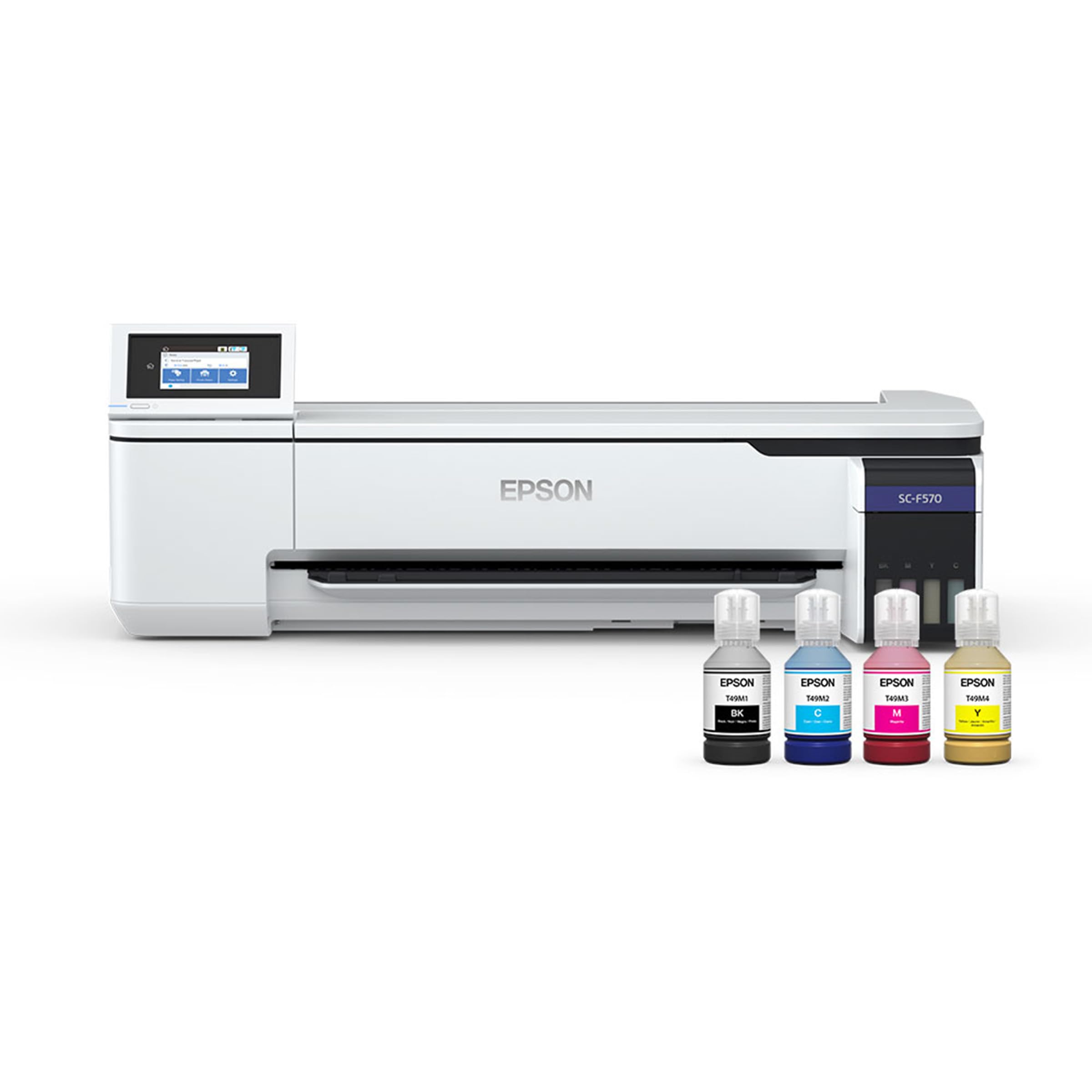
Epson SureColor F570

Epson SureColor F570

Wide-format production

Our Score 8.8/10
Check Price

Worth Noting

  • 151-pound installation needs freight and space
  • Premium production price
Weight
151 lb
Connectivity
USB, Ethernet, Wi-Fi
Media Handling
Rolls and sheets
Max Media Width
24 in

The F570 takes media up to 24 inches wide, in rolls or sheets, and adds a built-in cutter for trimming a finished run. That puts all-over shirt panels, yardage, and large signage within reach, and Epson's PrecisionCore printhead and nozzle verification are part of the package. The printer weighs 151 pounds and measures 38 inches wide, so this is a production tool rather than a tabletop upgrade.

What makes the F570 worth its floor space is the workflow around the printhead. Epson Edge Print Pro handles job layout, nesting, and pattern repeats, which matters when you are filling a roll rather than feeding one sheet at a time. The built-in cutter and nozzle verification are the kind of production details that save time on a deadline, and the 50-sheet tray gives you a sheet path when a roll is overkill. We like that flexibility, even though the machine makes you commit to a permanent spot.

The practical barrier is installation. The F570 ships freight, and it needs clearance for a 24-inch media path plus a route wide enough to get it into the room. It is not a starter machine. The F570 makes sense once wide-format work is regular enough to justify dedicated space; below that, the SG500 or F170 will earn their keep with far less disruption.

Bottom line: We point production shops to the F570 when 24-inch rolls and sheets are the job; it is too much machine for anyone still working a letter-size desk.

How We Tested the Best Sublimation Printers

We started with more than 20 machines sold as sublimation-ready or easily converted, then narrowed by spec sheet: maximum sheet size, ink configuration, and whether the driver actually supports sublimation profiles. Anything that needed a separate converter kit to run sublimation ink safely got cut, as did models with no realistic path to consistent color. That left nine printers, which lived on our craft tables for six months.

Setup was the first thing we clocked. Each tester unboxed their own machine, filled and primed the ink lines, installed the driver, and ran a first test sheet without help — and we noted where they stalled, whether that was a Wi-Fi pairing that took four attempts, an ink line that needed three purges before color ran clean, or software that assumed a color profile we had to hunt down. We also set every printer on a desk that already held a heat press, to see how much room was left, and checked how reliably each fed a 100-sheet stack without grabbing two at once.

Then we printed for real, over and over. Every machine ran the same files — a photo with skin tones, a saturated gradient, fine text — onto sublimation paper, and we pressed the results onto polyester shirts, mugs, and coasters, looking for banding, ghosting, and color that shifted between the first transfer and the tenth. Consistency got its own test: the same image once a week for three months, compared side by side under the same lamp. Machines that drifted, clogged after a weekend idle, or demanded a head clean before every job fell out regardless of how good the first print looked.

Value came last, and it wasn't the sticker price. We tracked ink used per finished piece and counted the sheets we threw away, since a cheap printer that eats blanks isn't cheap for long.

How to Choose

Start With the Largest Blank You Print

Most buyers begin with shirts, totes, mugs, and small gifts, where an 8.5-inch-wide desktop printer covers the job. The trap is assuming compact means the same print width as every other small machine: it usually describes the desk footprint. Check the maximum media size and whether the printer takes sheets or rolls. An 8.5 x 14 sheet buys extra length for shirt fronts and small banners. If you regularly print all-over panels, yardage, or signage, a 24-inch machine is a different category of purchase, with freight delivery and a permanent footprint to plan for.

Treat Color as a Workflow

Sublimation color is not a plug-and-play specification. The same printer can look vivid on one polyester blend and muddy on another, and the image on paper often looks flatter than the final transfer. What matters is a profile matched to your ink, paper, and substrate, plus a test print before every new blank. A closed system such as MySawgrass or Artspira can shorten the learning curve, but it does not remove the need to test. We prefer a modest printer with a disciplined color routine to a wide-format machine and no profile.

Pick the Interface You Will Actually Use

Desktop printers usually mean a Windows or Mac workflow, while the Brother SP-1 is built around a phone or tablet app. Neither approach is inherently better; the question is where you design. If you build layouts at a computer and send files from a desktop folder, the Epson F170 fits naturally. If you sketch on a tablet and want to move straight to print, the app-first Brother is quicker. Check connectivity before you buy, too: a wired Ethernet connection can be the difference between a reliable studio printer and one that drops off the network mid-job. The F170 does not support mobile printing, so it cannot anchor an iPad-only workflow.

Budget for Ink, Maintenance, and Space

The purchase price is only the entry ticket. Sublimation inks, transfer paper, heat-press supplies, and test prints all recur, so look at replacement ink availability and cartridge capacity rather than only the starter bundle. Maintenance matters as well: auto-clean cycles and nozzle verification help a printer survive between jobs, but they consume ink. Finally, weigh the machine as a piece of furniture. The F570 is 151 pounds and ships freight; the desktop models fit on a sturdy table, but the Brother and Epson still need clearance for their paper paths.

Frequently Asked Questions

Final Verdict

The Epson SureColor F170 is the printer we point most people to. It puts genuine sublimation ink, a dust-protected 150-sheet tray, and a compact desktop body into a package that handles the shirts, mugs, and small gifts most shops start with. If your layouts need 8.5 x 14 sheets and you want Sawgrass's software and two-year warranty, the SG500 is the business-minded step up; for phone-first design, the Brother SP-1 is easier. The F570 only makes sense once 24-inch production is the regular job.