Audio & Headphones

12 Best Computer Speakers of 2026: Models That Actually Hold Up

Find computer speakers that balance sound, connectivity, and durability for your desk - from budget to premium.

Many computer speakers sound great out of the box but start cutting out or losing channels within months. Power supply issues, flimsy connectors, and heat buildup in small enclosures are common failure points that aren't obvious from the product page. This guide focuses on models that have proven reliability across thousands of user reports, plus sound quality that matches your actual use case.

The real trade-off is often between feature depth and long-term dependability. A subwoofer system with Bluetooth and RGB may seem appealing, but if the amp fails after a year, the upfront value vanishes. We've prioritized clear, verified performance and construction that holds up to daily desktop use, so you can buy with confidence regardless of whether you need 2.0 or 2.1, wired or wireless.

1

Edifier M60

Top Pick
Edifier M60

Near-field listeners

Our Score 9.0/10
Check Price

Worth Noting

  • Bass is limited by the 3-inch drivers; no subwoofer output for future expansion.
  • The companion app can show update prompts or disconnect during initial setup.
Bass
No subwoofer output
Power
66W RMS
Form Factor
2.0 bookshelf
Connectivity
Bluetooth 5.3, USB-C, AUX

The M60 delivers clear, articulate sound with a balanced midrange and detailed treble — well suited for critical listening at a desk. The 1-inch silk dome tweeter handles vocals and cymbals with air, while the 3-inch aluminum mid-bass driver provides enough snap for acoustic instruments and electronic beats. The included metal stands tilt the speakers upward by 12 degrees, which improves image focus and reduces desk reflection smearing.

Connectivity covers the essentials for a modern computer setup: Bluetooth 5.3 with LDAC for hi-res wireless streaming, USB-C for lossless digital audio from a laptop or desktop, and a 3.5mm AUX for older sources. The Edifier companion app provides a 10-band EQ and preset profiles, though the app can occasionally prompt firmware updates or drop the connection during initial pairing — a minor friction that doesn't affect daily use after setup.

This speaker is built for near-field listening in compact spaces. If your desk has limited width and you want a pair of bookshelves that don't dominate the surface, the M60's footprint — roughly 7 inches tall on stands — is a practical fit. The bass, while controlled and punchy for its size, won't rattle walls or fill a large room. There is no subwoofer output, so adding a dedicated woofer later is not an option. Buyers who want deep low-end or a 2.1 setup should look at larger speakers or a traditional system with a separate sub.

The build quality avoids the hollow plastic feel of many budget computer speakers. Each cabinet uses a wood-like MDF with a vinyl wrap, and the aluminum driver frames feel solid. Compared to larger bookshelf speakers that require significant desk space or an amplifier, the M60 keeps the setup clean: power and audio arrive through a single USB-C cable (or Bluetooth), and the speakers connect to each other via a supplied 5-pin cable — no speaker wire needed.

Tip: Set EQ via the app once, then disable notifications to avoid update prompts.

Bottom line: The Edifier M60 brings hi-res wireless and USB-C connectivity to a compact desktop speaker with solid clarity — the bass tradeoff suits near-field detail over room-filling thump.
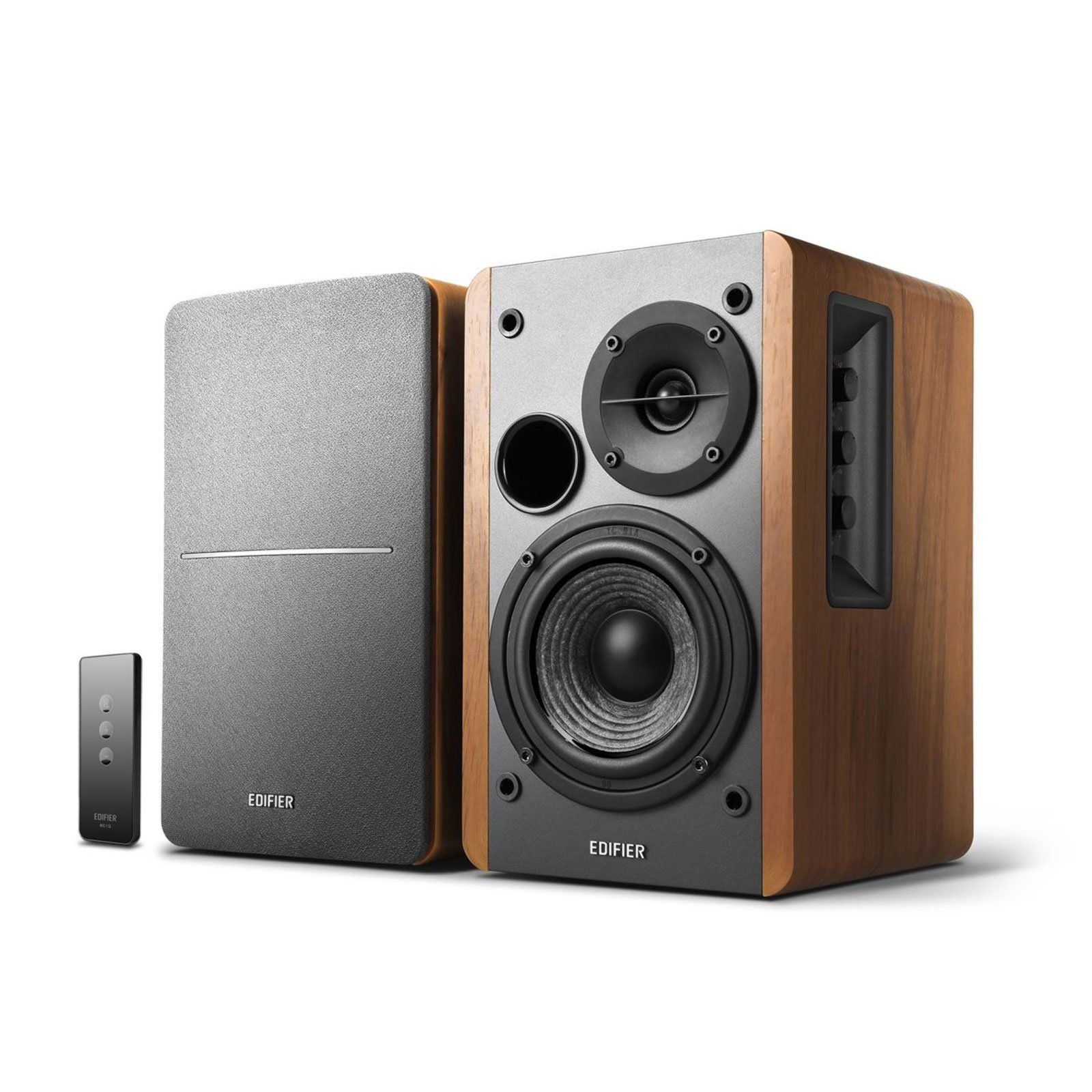
2

Edifier R1280T

Edifier R1280T

Budget audiophiles

Our Score 9.2/10
Check Price

Worth Noting

  • Larger than typical computer speakers; requires desk space and may not fit under a monitor
  • Wired-only connectivity via RCA/3.5mm; no Bluetooth or USB
  • Some units may stop working after extended use
Bass
4in woofer
Power
42W RMS
Form Factor
2.0 bookshelf
Connectivity
RCA, 3.5mm

Edifier R1280T delivers a rich, warm sound signature that competes with speakers at twice the price, offering a natural tonality that the slimmer wireless option in this lineup cannot match. Its 4-inch woofer and silk dome tweeter produce detailed mids and clear highs that shine in near-field listening.

This model suits listeners who prioritize audio quality over convenience and have adequate desk space for its wooden bookshelf design. The lack of Bluetooth or USB means a wired connection only, and the 9.5-inch height may not fit under shorter monitors. For those building a dedicated desk setup without wireless needs, the tradeoff is straightforward.

Long-term durability has been mixed for some units, with occasional reports of speakers ceasing to function after several years. That noted, the vast majority of buyers find the sound quality well worth the compromise, making this a sensible choice for audiophiles on a budget.

Tip: Measure your desk depth – these speakers are 7.5 inches deep and need at least a few inches behind for cable clearance.

Bottom line: If your desk can accommodate its bookshelf size and you are happy with wired connections, the R1280T offers audiophile-grade sound at a fraction of the cost of comparable speakers.

3

Klipsch ProMedia 2.1

Klipsch ProMedia 2.1

Gamers movie lovers

Our Score 9.0/10
Check Price

Worth Noting

  • In a quiet room, the lack of a power switch means constant standby power draw unless unplugged
  • No Bluetooth or USB
  • Some units may exhibit satellite or subwoofer issues within the first year of use
Bass
6.5in subwoofer
Power
200W peak
Form Factor
2.1 with subwoofer
Connectivity
3.5mm only

The Klipsch ProMedia 2.1 delivers a level of cinematic impact that most desktop speakers can't touch. The horn-loaded tweeters project crisp highs and well-balanced mids with clarity that makes dialogue, footsteps, and ambient details pop. The 6.5-inch subwoofer adds deep, clean bass that shakes the floor without muddying the mids — a rare balance at this price point. THX certification isn't just a sticker; it translates to controlled dynamics that work equally well for late-night gaming sessions and movie marathons.

This setup is best for buyers who prioritize raw audio performance over connectivity and convenience. If your desk has floor space for the subwoofer and you rely on a wired 3.5mm connection from your PC or TV, the ProMedia 2.1 rewards you with immersive sound. But the lack of Bluetooth or USB means no wireless streaming, and the absence of a power switch forces you to unplug or use a switched power strip to avoid constant standby draw. Reliability has been noted as variable — some units may develop issues within the first year, so a warranty check is prudent.

Tip: Connect to a switched power strip to cut standby power with one click instead of unplugging.

Bottom line: If you want a 2.1 system that makes games and movies feel bigger than your monitor, the ProMedia 2.1 delivers — just plan for a wired setup and keep a power strip handy.

4

Amazon Basics 2.0

Amazon Basics 2.0

Ultra-budget setups

Our Score 8.8/10
Check Price

Worth Noting

  • Maximum volume is modest
  • Some pairs may develop an imbalance where one speaker drops out over time
  • Bass response is minimal
Bass
Passive radiator
Power
2.4W USB
Form Factor
2.0
Connectivity
3.5mm only

At under $30, these speakers provide clear sound for voice calls and YouTube – a price that would be hard to beat. The compact, USB-powered design fits under most monitors and the inline volume control adds basic convenience. This is the entry-level option that simply works for undemanding desktop audio.

For office workers needing simple audio at a desk, the limited volume suits near-field use but won’t fill a room. Bass is absent, and some units may develop an imbalance where one speaker drops out over time. These are acceptable boundaries for a temporary or secondary computer setup where sound quality is secondary to cost.

The real-world behavior matches the price: enough output for a single listener, a clear midrange for podcasts and calls, but no low-end presence. Buyers who need anything beyond basic audio or plan to cover a larger space should look at higher-powered options.

Tip: Position them close to your listening position for best clarity – they don't have the power to fill a room.

Bottom line: These speakers are the most budget-friendly option for basic desktop audio, but only if you accept low volume and no bass for casual near-field use.

5

Edifier MR3

Edifier MR3

Content creators

Our Score 9.4/10
Check Price

Worth Noting

  • 3.5-inch drivers cannot produce sub-bass, limiting low-end impact for bass-heavy genres.
  • Occasional power or sound issues have been noted in some units after short use.
Bass
3.5in woofer
Power
42W RMS
Form Factor
2.0 studio monitors
Connectivity
Bluetooth 5.4, TRS, RCA, AUX

The Edifier MR3 delivers studio-level clarity and detail in a compact bookshelf speaker, thanks to its balanced TRS inputs and Hi-Res certified Bluetooth 5.4. Where the top-pick M60 emphasizes wireless codec support (LDAC) and a sleeker desktop design, the MR3 prioritizes direct connection to audio interfaces and mixing boards, making it a more natural fit for home studios and content-creation workflows.

This speaker suits desktop audio enthusiasts, home studio owners, and content creators who monitor their work at close range. The 3.5-inch drivers lack deep sub-bass, so bass-heavy genres like EDM or hip-hop will feel thin — a tradeoff inherent to compact near-field monitors. Additionally, a small portion of units have shown power or sound issues within the first few months; checking the return policy and buying from a retailer with a solid warranty is advisable. For critical listening and production at a desk, the MR3’s clarity and input options outweigh these boundaries.

Tip: Positioning the speakers close to a wall can slightly reinforce low frequencies; for genuine sub-bass, pair with a separate subwoofer via a 3.5mm splitter.

Bottom line: For desktop creators who need accurate sound and balanced inputs in a compact package, the MR3 delivers — just work around the bass limitation with placement or a subwoofer, and buy from a retailer with a fair return policy.

6

Logitech Z207

Logitech Z207

Budget-conscious buyers

Our Score 8.8/10
Check Price

Worth Noting

  • Bass extension is weak; audio can sound thin at higher volumes.
  • Peak volume may be insufficient for larger rooms or loud listening sessions.
  • Power adapter issues may cause some units to develop problems over time.
Bass
Passive radiators
Power
10W peak
Form Factor
2.0
Connectivity
Bluetooth 4.2, 3.5mm

The Logitech Z207 brings Bluetooth 4.2 with easy device switching to the budget desktop speaker category. Unlike the entry-level Logitech Z313 (which lacks wireless), this 2.0 system lets you toggle between a computer and phone without re-pairing. The compact design fits neatly on small desks.

This speaker pair suits casual listeners who prioritize convenience over bass depth. The 2.0 configuration means no subwoofer – low frequencies are limited, and the sound can turn tinny when pushed past moderate volumes. If your primary need is clear dialog for video calls and background music at a desk, that limitation is easy to live with.

Setup takes seconds: plug USB for power, connect via 3.5mm or Bluetooth. The price point keeps this accessible for anyone who doesn't want to invest in a larger system. The 10W peak output won't fill a living room – it's designed for near-field listening.

Tip: Keep the volume below 70% to avoid the tinny upper range – the Z207 sounds best at moderate levels.

Bottom line: A cost-effective Bluetooth speaker set for desk-bound casual use – best suited for those who value connectivity over bass impact.

7

Edifier G2000

Edifier G2000

RGB gamers

Our Score 9.2/10
Check Price

Worth Noting

  • In a large room, the maximum volume may not be enough to fill the space
Bass
Bass port
Power
32W peak
Form Factor
2.0
Connectivity
Bluetooth, USB, 3.5mm

The Edifier G2000 delivers strong bass and clear audio for its size, with customizable RGB lighting and three EQ modes that enhance the gaming experience. Connectivity options include Bluetooth, USB, and 3.5mm, making it easy to pair with PCs, laptops, and consoles. However, the sound quality doesn't match the clarity of dedicated bookshelf speakers like the M60 or R1280T, and the maximum volume is better suited for near-field listening than filling a large room. For gamers who want a visually striking desktop setup with decent audio and versatile inputs, this is a capable choice – just don't expect audiophile-grade precision or room-shaking loudness.

Bottom line: Best suited for gamers who want RGB and EQ modes in a compact desktop speaker – a strong value for its niche, but music purists should look to the M60 or R1280T.

8

OHAYO C6

OHAYO C6

Budget gaming setups

Our Score 9.0/10
Check Price

Worth Noting

  • Volume knob and Bluetooth may behave unpredictably over time in some units
Bass
3in driver
Power
60W peak
Form Factor
2.0 bookshelf
Connectivity
Bluetooth 5.3, RCA, AUX, USB

The OHAYO C6 delivers a surprisingly big, clear sound from a compact bookshelf design, competing well with more expensive models for desktop music and gaming. Its Bluetooth 5.3 pairs quickly and the multiple wired inputs (RCA, AUX, USB) cover most setups. However, occasional volume knob and Bluetooth inconsistencies mean this pair suits buyers who prioritize immediate audio performance over long-term dependability — and who are comfortable with the possibility of unit-to-unit variance.

Bottom line: Best for budget-conscious desktop users who want loud, clear sound and can accept the chance of occasional control or connectivity quirks.

9

PreSonus Eris 3.5

PreSonus Eris 3.5

Home studio owners

Our Score 9.0/10
Check Price

Worth Noting

  • Limited bass from 3.5-inch woofers
  • Analog-only inputs
Bass
3.5in woofer
Power
50W AB
Form Factor
2.0 studio monitors
Connectivity
1/4TRS, RCA, 3.5mm

PreSonus Eris 3.5 delivers accurate flat response for home studio critical listening. The compact size and acoustic tuning controls are practical additions. However, bass extension is limited by the 3.5-inch woofers, making these unsuitable for bass-heavy genres. Power switch reliability has been inconsistent in some units, and the analog-only inputs lack Bluetooth or USB connectivity. For dedicated producers who already own an audio interface and need precise monitoring, these offer good value, but the MR3's Bluetooth and better reliability make it a more versatile desktop option.

Bottom line: Best for home studio owners who need flat response and have an analog audio interface, with the caveat that power switch consistency may vary.

10

XKX Clip-On Soundbar

XKX Clip-On Soundbar

Minimalist desks

Our Score 8.8/10
Check Price

Worth Noting

  • Clip may not hold firmly on monitors with thick bezels or non-standard profiles.
  • Sound quality is acceptable for casual use but lacks bass and clarity for music.
Bass
Passive radiators
Power
10W USB
Form Factor
Soundbar
Connectivity
USB / USB-C

The XKX Clip-On Soundbar lives up to its name: it clips onto your monitor, instantly reclaiming desk space from bulky speakers. It connects via USB or USB-C with no driver hassle, and the audio output, while lacking depth, beats most built-in laptop speakers for casual listening. The tradeoff is that the clip can lose grip on monitors thicker than typical slim displays, and the sound quality tops out at 'clear enough for YouTube and voice calls.' This makes it a practical choice for minimalist desks or dorm rooms where every inch counts, but not for anyone expecting immersive music or movie audio.

Tip: Test the clip on your monitor before committing — it works best on standard-thin displays.

Bottom line: Ideal for students or remote workers who need basic audio from an ultra-compact desk setup and already have better speakers for serious listening.

11

Nylavee Soundbar

Nylavee Soundbar

Office workers

Our Score 8.6/10
Check Price

Worth Noting

  • Volume may fall short in noisy environments or larger rooms.
  • Bass is shallow, a typical tradeoff for compact USB-powered speakers.
Bass
Passive diaphragms
Power
5W USB
Form Factor
Soundbar
Connectivity
Bluetooth 5.0, 3.5mm

Built-in microphone and headphone jack make the Nylavee Soundbar a focused tool for conference calls and video streaming. Setup is effortless with a single knob controlling volume and power, and Bluetooth pairing holds steady. Sound is clear and sufficiently loud for a small desk, though it won't fill a noisy room or deliver deep bass – expected from a USB-powered soundbar. This is a capable desktop companion for office workers who prioritise call clarity over music playback.

Bottom line: Works well for quiet office desks and frequent calls, but not for music enthusiasts or loud spaces.

12

Bluedee Soundbar

Bluedee Soundbar

Desk organizers

Our Score 8.6/10
Check Price

Worth Noting

  • Volume output is modest
  • Bluetooth connectivity can be spotty, with occasional drops during use
Bass
Passive diaphragms
Power
15W USB
Form Factor
Soundbar
Connectivity
Bluetooth 5.0, 3.5mm

The Bluedee soundbar brings a splash of color to your desk with its RGB ambient lighting, and the eco-friendly materials are a nice touch. Audio is clear and balanced enough for casual movie or music sessions. Setup is simple with USB power and 3.5mm or Bluetooth 5.0 connectivity. However, output volume is limited — suitable for near-field listening but not large rooms — and Bluetooth pairing can drop occasionally. For desk organizers or RGB enthusiasts who keep volume moderate, this is a visually appealing option.

Bottom line: A good fit for users who value desk aesthetics and casual audio at moderate volumes over raw power or wireless reliability.

How to Choose

Audio Power and Driver Size

Power ratings are often stated as peak watts, which can be double the continuous RMS figure. A 200W peak system may only deliver 100W RMS, and that's split across satellites and subwoofer. For a desktop, 20-40W RMS per channel is ample for clear sound up to moderate volumes. Larger drivers (4 inches or more) produce fuller mids and bass without straining, while 2-3 inch drivers may sound thin at higher levels.

Connectivity Options

Bluetooth adds convenience but introduces latency and potential dropouts. For gaming or video editing, a wired USB or 3.5mm connection is always more reliable. USB-C is becoming standard for power and data, while balanced TRS inputs (like on studio monitors) provide cleaner signal in electrically noisy environments. Check whether the speaker can handle multiple inputs simultaneously if you switch between PC, phone, and console.

Form Factor

2.0 bookshelf speakers take up desk space but offer better stereo imaging than soundbars. Soundbars save room but often lack true stereo separation and cannot produce deep bass without a separate subwoofer. 2.1 systems (with a sub) deliver room-filling low end but the subwoofer box needs floor space and may rumble through thin walls. Measure your desk height - taller speakers like Edifier R1280T may not fit under a monitor.

Bass Performance

Bass is determined by driver size and enclosure type. A dedicated subwoofer (6.5 inches or larger) can produce sub-50Hz frequencies that shake a room. Passive radiators in small soundbars add a bit of thump but cannot match a proper sub. If you listen to bass-heavy music or play FPS games, invest in a 2.1 system. For podcasts and acoustic music, a quality 2.0 set with good mid-bass (4-5 inch woofers) is sufficient.

Reliability and Longevity

Many speaker failures happen within the first year due to under-sized power supplies, thermal stress, or poor solder joints. Models with passive cooling, minimal heat buildup, and a history of low failure rates (like the Edifier lineup) tend to last longer. Features like a physical power switch (instead of standby) prevent continuous power draw and potential damage. Check user reports for recurring issues like channel dropouts before buying.

Frequently Asked Questions