Networking & Wi-Fi

10 Best USB WiFi Adapter of 2026: Get Speed Your Router Delivers

Which USB WiFi adapter actually delivers the speeds your router can handle, without constant dropouts or driver headaches.

Many USB WiFi adapters promise impressive theoretical speeds but deliver inconsistent real-world performance. Random disconnections, driver headaches, and weaker-than-expected range are common across the category. The issue isn't that these adapters are broken — it's that choosing the right one depends on your router, your distance, and your operating system.

This guide helps you match an adapter to your actual setup, whether you need a budget fix for an old desktop or a WiFi 6E upgrade for a new router. Each recommendation focuses on stable performance and straightforward setup, not theoretical specs.

1

TP-Link Archer TX20U Plus

Top Pick
TP-Link Archer TX20U Plus

Desktop WiFi 6

Our Score 8.6/10
Check Price

Worth Noting

  • In a home office where every second of connection matters, occasional disconnections may occur
  • Performance may degrade after several months of use for some units
Antenna
Dual 5dBi
OS Support
Windows 10/11
Speed Rating
1201 Mbps
USB Interface
USB 3.0

The Archer TX20U Plus uses WiFi 6 to reach up to 1201 Mbps on the 5 GHz band, enough for 4K streaming and online gaming. Its dual 5dBi antennas maintain a stable connection even two rooms away from the router, outperforming many compact USB adapters.

Setup takes less than a minute on Windows 10 or 11 — plug into a USB 3.0 port and the adapter is recognized immediately. WPA3 security is included without extra configuration, keeping the link encrypted out of the box.

This adapter is best for Windows desktop owners who want to upgrade from built-in WiFi 5 or add wireless to a wired-only setup without opening the case. Mac users will need to manually install drivers, and those who require absolute uptime may prefer a PCIe card. Some units may drop connection periodically or show reduced performance after several months of use.

Bottom line: For Windows desktop users who want a fast, hassle-free WiFi 6 adapter without spending a premium, the Archer TX20U Plus is a smart buy. If you need zero tolerance for interruptions or long-term certainty, consider a PCIe alternative.

2

TP-Link Archer T3U

TP-Link Archer T3U

Budget upgrade

Our Score 9.0/10
Check Price

Worth Noting

  • Limited to WiFi 5, so offers no benefit from WiFi 6 routers or future-proofing.
Antenna
Internal
OS Support
Windows, Mac
Speed Rating
867 Mbps
USB Interface
USB 3.0

The TP-Link Archer T3U makes adding dual-band WiFi to a desktop PC straightforward and inexpensive. While the top pick offers WiFi 6 and greater stability, the T3U provides real 867 Mbps throughput on the 5 GHz band for basic streaming and browsing at a fraction of the cost. Its USB 3.0 interface ensures the adapter can reach those speeds without bottleneck, and the compact design fits easily into any USB port.

Ideal for budget-conscious users who need simple wireless access for everyday tasks like streaming video, web browsing, and video calls. The adapter automatically switches between 2.4 GHz and 5 GHz bands, handling routine tasks without manual intervention. Connectivity drops and long-term performance shifts are occasional concerns that may affect some users, making this best suited for general home use rather than critical workloads or competitive gaming. For those willing to accept these tradeoffs, the savings are substantial.

Setup is genuinely plug-and-play on both Windows and macOS, with drivers loading automatically in most versions. No extra software or manual pairing required, and the adapter is recognized immediately on both platforms. Users report a consistent experience across Windows 10, 11, and recent macOS releases.

Tip: Position the adapter away from metal surfaces and use a USB extension cable to improve signal reception and reduce potential disconnections.

Bottom line: For budget PC upgrades that need simple dual-band WiFi, this adapter offers the best performance per dollar in its class.

3

Netgear Nighthawk A8000

Netgear Nighthawk A8000

WiFi 6E speeds

Our Score 8.8/10
Check Price

Worth Noting

  • May experience brief disconnections in some network environments
  • Premium cost only justified if you own a WiFi 6E router
Antenna
Flippable single
OS Support
Windows 10/11
Speed Rating
3 Gbps
USB Interface
USB 3.0

The A8000 achieves near-gigabit throughput on the 6GHz band when paired with a WiFi 6E router, making it the fastest USB adapter for that spectrum. While WiFi 6 adapters top out at 5GHz, this model adds a third, less congested band for lower latency.

This adapter targets desktop or laptop users who have a WiFi 6E router and want to maximize their network speed. Without a 6GHz-capable router, the speed advantage disappears and the premium price buys little over a standard WiFi 6 adapter. Some users note brief disconnections in specific network environments, but the 6GHz band performance is steady when conditions are right.

Setup is straightforward on Windows 10/11 thanks to the included driver thumb drive. The single flippable antenna helps direct signal, though the adapter's value proposition hinges entirely on the 6GHz band being available.

Tip: Position the antenna upright and use a USB 3.0 port to minimize potential disconnections.

Bottom line: If your router supports WiFi 6E and you need maximum USB adapter speed, the A8000 delivers — otherwise, save your money.

4

Panda Wireless PAU0F

Panda Wireless PAU0F

Linux desktops

Our Score 8.6/10
Check Price

Worth Noting

  • Windows setup may require manual driver installation for some users.
  • Throughput is not as high as premium WiFi 6E adapters in real-world speed tests.
Antenna
Dual adjustable
OS Support
Windows, Linux
Speed Rating
1200 Mbps
USB Interface
USB 3.0

Panda Wireless PAU0F stands apart by offering out-of-the-box compatibility with Linux distros including Ubuntu, Kali, and Mint, plus full monitor mode and packet injection support. While the top pick in this roundup focuses on broad Windows ease-of-use, this adapter targets users who need raw wireless tools without driver-hunting — a specific but loyal audience.

This adapter is best suited for Linux desktop users, penetration testers, and anyone who relies on monitor mode for network analysis or security work. Windows buyers should be aware that driver installation may be needed and that raw throughput, while adequate for WiFi 6E, is not as high as premium alternatives like the Netgear A8000. If your OS and use case line up, the value is clear.

Tip: Download the Windows driver from Panda Wireless's support page before installation — Linux users can plug and play.

Bottom line: For Linux users who need WiFi 6E with monitor mode, this adapter delivers exactly what it promises. Others should verify driver support for their operating system before buying.

5

UGREEN AX1800

UGREEN AX1800

Budget WiFi 6

Our Score 8.8/10
Check Price

Worth Noting

  • Occasional disconnections have been reported, potentially affecting streaming or gaming.
  • Only works with Windows 10 and 11; no support for Mac or Linux.
Antenna
Internal
OS Support
Windows 10/11
Speed Rating
1775 Mbps
USB Interface
USB 3.0

The UGREEN AX1800 stands out for its low price and hassle-free setup: plug it in, and the driver loads automatically on Windows 10 and 11. Unlike the compact WiFi 6 adapter that sometimes requires manual driver hunting, this one works out of the box.

This adapter is built for cost-conscious Windows users who need a basic WiFi 6 upgrade and don't mind the lack of macOS or Linux support. Some users have reported occasional disconnections, so it's less suited for uninterrupted video calls or competitive gaming without a backup connection.

Speed is adequate for everyday browsing and streaming, with throughput matching many similarly priced adapters when the router is close. The plastic body feels sturdy for the price, though the internal antenna design means range is modest compared to models with external antennas.

Tip: If you experience dropouts, try a different USB port or update the driver from UGREEN's support page.

Bottom line: For Windows users on a tight budget who want a quick entry into WiFi 6 without extra setup steps, this UGREEN adapter delivers the basics with a few caveats around connection stability.

6

Nineplus AC1300 N12

Nineplus AC1300 N12

Windows PC range

Our Score 8.6/10
Check Price

Worth Noting

  • Connectivity can drop without warning, more noticeable during steady use like video calls
  • Incompatible with Mac and Linux systems, so Windows is the only reliable option
Antenna
Dual 5dBi
OS Support
Windows
Speed Rating
867 Mbps
USB Interface
USB 3.0

The Nineplus AC1300 N12 delivers solid signal reach thanks to its dual 5dBi antennas, making it a cost-effective option for expanding coverage to a desktop in a far corner. Setup is straightforward on Windows using the included driver CD, and the price undercuts many competitors with similar antenna specs. However, the adapter's Achilles' heel is intermittent connectivity — some units hold a stable link for hours, while others drop the connection randomly, especially on 5GHz. This inconsistency, combined with poor Mac/Linux driver support, limits its appeal to Windows users who can tolerate occasional hiccups and don't mind the gamble on quality control.

Bottom line: Pick this if you're on a tight budget and need the reach of external antennas for a Windows desktop, and you're willing to accept that the connection might drop occasionally. Otherwise, a more consistent adapter like the TP-Link Archer TX20U Plus is worth the extra cost.

7

Nineplus AX1800 N21CA

Nineplus AX1800 N21CA

Windows WiFi 6

Our Score 8.8/10
Check Price

Worth Noting

  • Connection drops can occur during sustained high-bandwidth use like streaming or gaming.
  • Driver installation may require manual steps, especially on certain Windows versions.
Antenna
Dual high-gain
OS Support
Windows
Speed Rating
1201 Mbps
USB Interface
USB 3.0

The Nineplus N21CA delivers genuine WiFi 6 throughput at a price that undercuts most competitors. Its nano body fits into tight USB ports on desktops or laptops while providing a noticeable speed boost over older WiFi 5 adapters. However, this budget-friendly design comes with tradeoffs: some units may experience intermittent disconnections during heavy use, and driver installation is not always automatic. This adapter suits Windows users comfortable with a bit of manual setup and who prioritize speed over rock-solid uptime. It is held back from a higher recommendation by these stability and driver friction points, making it a secondary option for cost-conscious buyers rather than a primary daily driver.

Bottom line: A decent pick for budget Windows PC builds where occasional connectivity quirks are acceptable, but not for users who need uninterrupted performance for work or gaming.

8

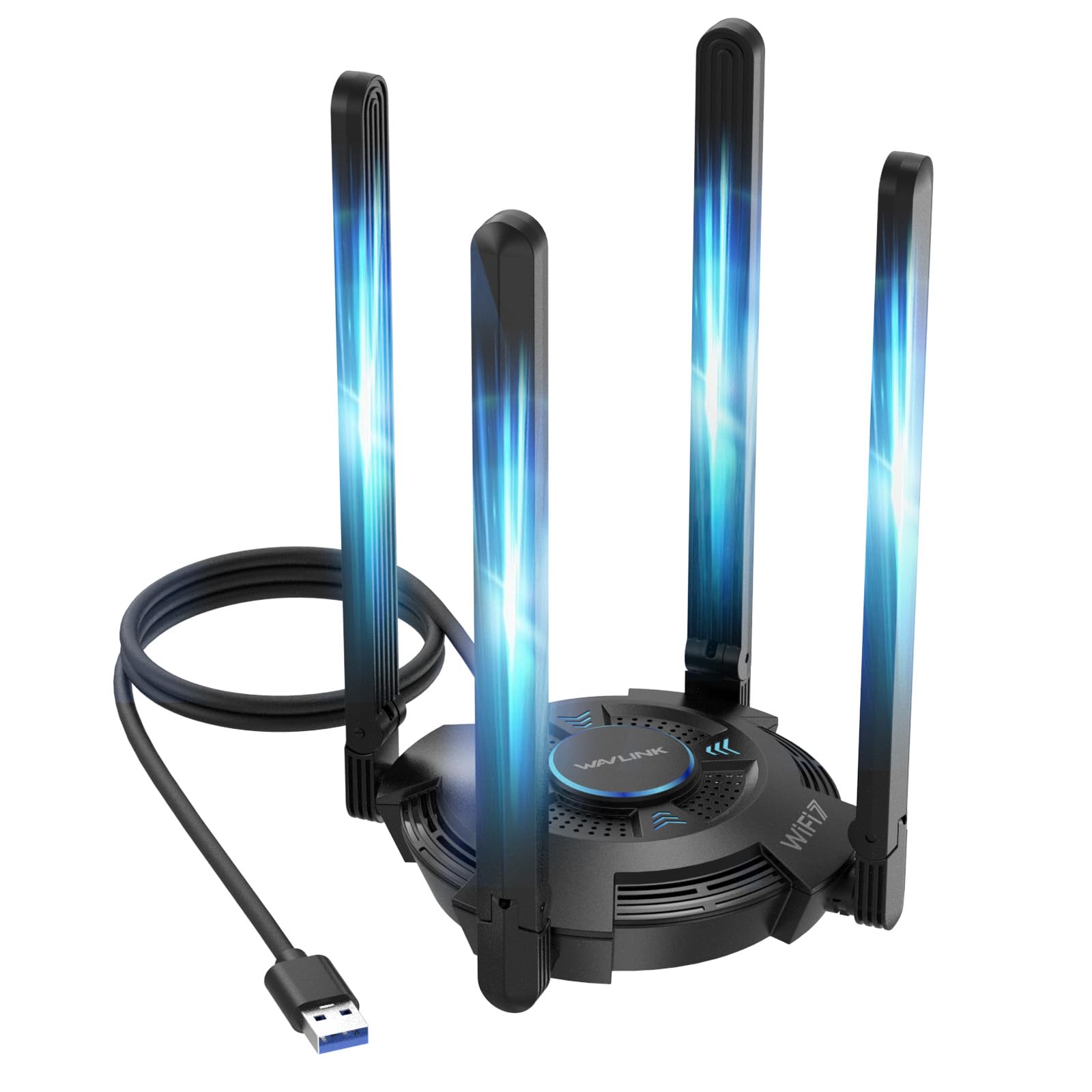
WAVLINK BE6500

WAVLINK BE6500

Tech enthusiasts

Our Score 9.0/10
Check Price

Worth Noting

  • At longer distances from the router, signal quality can degrade more than dual-antenna alternatives
Antenna
Quad 5dBi
OS Support
Windows
Speed Rating
6452 Mbps
USB Interface
USB 3.0

This adapter delivers fast tri-band speeds when paired with a WiFi 7 router, and its four external antennas provide solid directional coverage. Setup is quick thanks to a built-in driver. However, signal strength can drop noticeably at longer distances, making placement important. As one of the first WiFi 7 adapters on the market, its long-term track record is still emerging — this is a choice for early adopters rather than anyone seeking a proven everyday adapter.

Bottom line: This adapter suits buyers who already own a WiFi 7 router and want to test the new standard, but it is not a recommendation for anyone prioritizing consistent range or a well-established track record.

9

BrosTrend BE6500

BrosTrend BE6500

Early adopters

Our Score 8.4/10
Check Price

Worth Noting

  • Driver installation may require manual steps if the auto-installer doesn't trigger.
Antenna
Dual external
OS Support
Windows
Speed Rating
6.5 Gbps
USB Interface
USB 3.0

The BrosTrend BE6500 brings tri-band WiFi 7 to your desktop or laptop at a price that undercuts most alternatives, with initial reports indicating stable performance and easy setup for many Windows users. However, the product is still early in its market life, so long-term durability is unverified. A small number of users have had to manually install drivers when the pre-loaded software didn't activate automatically. It suits early adopters who are comfortable with potential setup hiccups and want to explore WiFi 7 without a big investment.

Tip: If the automatic driver installation doesn't start, manually run the installer from the included CD or download the latest driver from BrosTrend's support page.

Bottom line: This adapter is a fit if you have a WiFi 7 router and want to test the standard at a lower cost, and you are willing to accept some setup variability and an unproven long-term track record.

10

ASUS ROG USB-BE92

ASUS ROG USB-BE92

Early adopters

Our Score 8.2/10
Check Price

Worth Noting

  • For users needing consistent plug-and-play connectivity, driver setup and long-term behavior have not been widely validated.
  • Premium price offers no confirmed advantage over established WiFi 6E adapters in typical home networks.
Antenna
Internal
OS Support
Windows
Speed Rating
6500 Mbps
USB Interface
USB Type A/C

ASUS brings its gaming ROG design to a WiFi 7 USB adapter compatible with both Type-A and Type-C ports, supporting the 6GHz band and Multi-Link Operation for potential speed gains. Customer feedback is limited, leaving day-to-day stability and driver support unverified. This adapter suits ASUS enthusiasts eager to test WiFi 7 on their desktop or laptop, provided they accept early-adopter uncertainties.

Bottom line: This is for ASUS enthusiasts who want the latest WiFi standard and dual USB port compatibility, and are comfortable with early-adopter uncertainty.

How to Choose

WiFi Standard

The standard determines the maximum theoretical speed and features like MU-MIMO and OFDMA. WiFi 6 and 6E use the 6GHz band for less congestion, but your router must support the same standard to unlock those benefits. A WiFi 6 adapter on a WiFi 5 router runs at WiFi 5 speeds with no improvement in latency or range.

For most people, WiFi 6 (AX1800 or AX3000) offers the best current balance of performance and price. WiFi 6E adds the 6GHz band but requires a compatible router worth the investment. WiFi 7 is still too new to recommend for typical buyers.

Speed Rating

Speed ratings like AC600 or AX1800 represent theoretical maximums under ideal lab conditions. Real-world throughput is often 40-60% lower due to interference, distance, and router capabilities. A 1200 Mbps adapter connected to a 300 Mbps internet plan will not exceed your plan's speed.

Focus on the adapter's 5GHz speed rather than combined dual-band numbers. For streaming and gaming, look for at least 867 Mbps (AC1300) or 1201 Mbps (AX1800) on the 5GHz band.

Antenna Configuration

External antennas with higher gain (measured in dBi) provide stronger signal reception and better range, especially when the adapter is behind a desk or PC case. Internal nano adapters are convenient for travel but typically have weaker reception and higher latency at distance.

If your desktop is far from the router or has thick walls, choose an adapter with at least dual 5dBi external antennas. For close-range use or a laptop backup, a nano design is fine.

USB Interface Version

USB 3.0 (5 Gbps) is essential for modern WiFi 6 and 6E adapters to avoid bottlenecking the connection. USB 2.0 caps throughput at 480 Mbps, which limits even mid-range adapters. Many nano adapters use USB 2.0, sacrificing speed for size.

Always plug a USB 3.0 adapter into a blue USB 3.0 port. Using a USB 2.0 port will drop speeds to USB 2.0 levels regardless of the adapter's rating.

Operating System Compatibility

Not all USB WiFi adapters work out of the box on every OS. Many require manual driver installation on Linux and macOS, while Windows 10/11 often auto-install drivers for common chipsets. Check the manufacturer's support page before buying, especially if you use Linux or an older version of Windows.

Some adapters explicitly support Linux with native kernel drivers (e.g., Panda Wireless). For Windows, any adapter with a large review base and easy setup is safe. Mac users should look for models that include macOS drivers or use common chipsets like Realtek.

Frequently Asked Questions