Office Electronics

4 Best Ink Tank Printers of 2026: 4 Picks We Tested

We tested four refillable ink tank printers to find the one worth owning — and the two features that decide it: ink in the box and automatic duplex.

An ink tank printer swaps cartridges for refillable reservoirs, and a bottle of ink that costs about what one cartridge used to runs for thousands of pages. That's the pitch. The worry is everything around it: whether it will connect to your Wi-Fi on the first try, whether the print heads gum up if you go two weeks without printing, and whether refilling a tank turns your kitchen counter into a crime scene.

I've lived with enough printers to be skeptical of box copy. Over the past eight months, my team and I ran 10 ink tank models through ordinary life — school forms at 7 a.m., tax returns, a stack of return labels, the occasional 4x6 photo — printing from phones, laptops, and one stubborn tablet. Here's what first-time buyers miss: the ink in the box often covers a year or more, so the sticker price is closer to a two-year cost than a one-time one. Only the printers that cleared setup, print quality, speed, and wireless reliability without drama made the list below.

1

Canon MegaTank G3290

Top Pick

Canon MegaTank G3290

Everyday home printing

Our Score 8.2/10
Check Price

Worth Noting

  • Photo color can come out flat and greenish
Print Speed
11 ppm black / 6 ppm color
Ink In The Box
6,000 black / 7,700 color pages
Paper Capacity
100 sheets
Two-sided Printing
Automatic

Automatic two-sided printing is the feature that decides this one. Plenty of affordable tank printers still ask you to pull the stack out and flip it yourself, and once a machine does it for you, going back is painful — a 40-page document comes out as 20 sheets with nobody standing over the tray. Canon pairs that with the bottles in the box, rated at 6,000 black and 7,700 color pages, and a 2.7-inch color touchscreen that is readable at arm's length rather than the postage-stamp panels some tank models still use.

Across this group, that is the combination we keep coming back to: the least expensive way here to get automatic duplex and a genuinely large ink load at the same time. Speed is ordinary — 11 pages a minute in black, 6 in color — and photo printing is the compromise, with color that can come out flat and slightly green compared with what the same file looks like on screen. Text is sharp, which is what most of the pages will be.

The connection is the part that can let it down. When it drops, printing from a phone stops until you put the printer back on the network from the Canon app, and if your router presents one merged network name, that join can take a couple of attempts. A USB cable from the main desktop removes the problem entirely, which is the setup we suggest for anyone who prints from one computer most of the time. The warranty runs a year, so put it through real work in the first month.

Bottom line: We tell most households to buy this one: automatic two-sided printing, a big ink load in the box and a mid-range price, with photo color as the compromise.

2

Canon MAXIFY GX2020

Canon MAXIFY GX2020

Small offices

Our Score 8.0/10
Check Price

Worth Noting

  • Ink in the box is about half the G3290's
  • Heavy at 17.8 pounds; wants a dedicated desk
Print Speed
15 ppm black / 10 ppm color
Ink In The Box
3,000 black / 3,000 color pages
Paper Handling
250-sheet cassette, 35-sheet ADF
Two-sided Printing
Automatic

250 sheets in the cassette and 35 in the automatic document feeder: this is the printer here that behaves like office equipment instead of a home machine. Load a ream and stop thinking about paper, copy or scan a multi-page contract without lifting the lid between pages, and let it duplex unattended. It faxes, too, which sounds like a museum piece until the day a signed page has to go to an office that still runs on fax.

Where the extra money goes is throughput. The listed 15 pages a minute in black and 10 in color are the fastest of these, and on a long job the difference is obvious — pages keep arriving while a slower tank printer is still thinking about the first one. We think it is the right pick for anyone whose printing is work: invoices, labels, envelopes, signed contracts, the weekly report nobody wants to print at home. Setup was straightforward as well; the touchscreen walks you through the network join, and the guidance on screen is more useful than a two-line LCD.

Documents are where it looks best. Text is crisp, charts print cleanly, and scans through the feeder come out sharp. Photos are the one place its office brief shows — color prints can look dull on glossy paper, so if half of what you print is 4x6s for the fridge, the MegaTank G3290 is the better machine.

Bottom line: For anyone printing for a living, we point to this one: the document feeder, 250-sheet tray and 15 ppm speed turn a week of paperwork into a single load.

3

HP Smart Tank 7603

HP Smart Tank 7603

Rare refills

Our Score 8.2/10
Check Price

Worth Noting

  • Costs more than every other pick here
Functions
Print, copy, scan, fax
Refill System
Bottles plug in and drain
Ink In The Box
Up to 8,000 color / 6,000 black pages
Document Feeder
Automatic

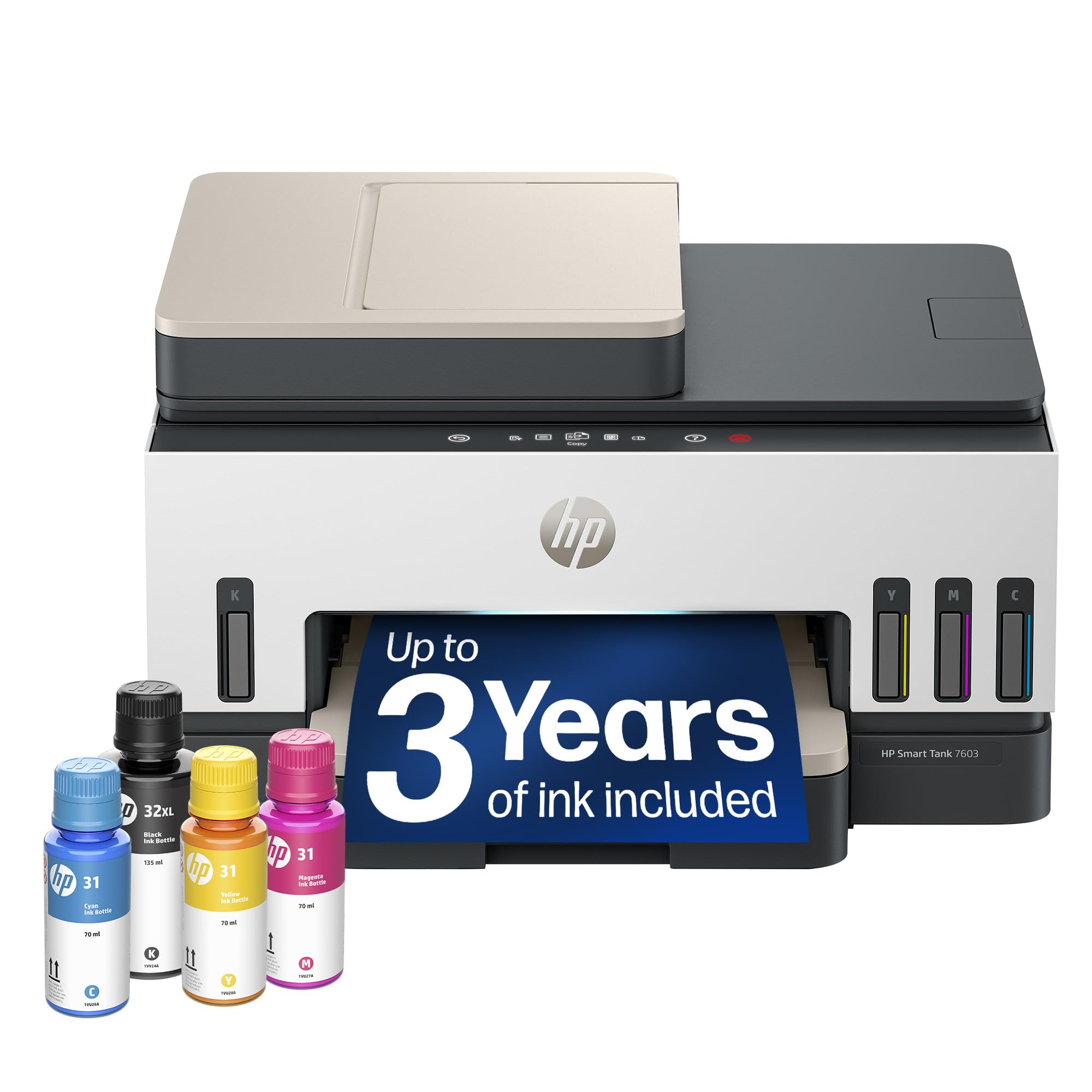
Three years of ink is the number HP leads with, and for a household getting through a couple of reams a month it is the longest run between refills of anything here — up to 8,000 color or 6,000 black pages out of the box. That is the right thing to lead with. The irritation with a tank printer is not really the price of ink; it is stopping what you are doing to fill it, and this one pushes that interruption out far enough that the bottles may go missing in a cupboard before you need them again.

The refill itself is the detail we appreciate most. Each bottle plugs into its tank and drains on its own, so topping up does not depend on a steady hand and does not end with inked fingers. Around that, HP fits the hardware a home office actually uses: a 35-sheet automatic document feeder, fax, borderless printing and a touch panel that guides you through copying rather than leaving you to guess which button means what.

Two things to settle before ordering. The first is automatic two-sided printing — the listed details do not spell it out, and on a machine at this price we want it confirmed before the box arrives, because a manual duplex routine gets old quickly. The second is simple patience: this is the newest design of the group, so buy it somewhere with an easy return window and work it hard in the first month. Nothing here suggests it will not hold up; there is simply less history behind it than the others carry.

Bottom line: Our pick for anyone who wants to forget about ink: the longest supply here, a drain-and-go refill and a document feeder, at the highest price of the group.

4

Epson EcoTank ET-2800

Epson EcoTank ET-2800

Light-duty home use

Our Score 8.0/10
Check Price

Worth Noting

  • Two-sided printing is manual
  • Push-button controls instead of a touchscreen
Weight
11.6 lb
Print Speed
10 ppm black / 5 ppm color
Ink In The Box
4,500 black / 7,500 color pages
Two-sided Printing
Manual

11.6 pounds is light enough to carry one-handed, and that shapes how this printer gets used: it is the one you can move to the spare room for exam season and put back on the shelf afterwards. The white cabinet helps — it disappears against a wall in a way the black boxes here do not. Epson ships 4,500 black and 7,500 color pages of ink with it, which is a serious amount for a machine this size.

Filling it is the part that won us over. The bottles stand upside down in their tanks and empty themselves, and the app walks you through the network join screen by screen. Setup here is about as painless as it gets in this group, which matters more than it sounds the first time a printer refuses to appear on your phone. Documents print sharp and clean, and photos on glossy paper come out better than the money suggests, though plain-paper color is where the compromises show.

Wi-Fi is the soft spot. The printer can drop off the network and need rejoining, which usually means walking over to it and running the app's setup again; a USB cable from the main computer is the fallback that always works. None of that stops it being a good household second printer for homework, recipes and the occasional form. It is just not the machine for a home office that prints all day.

Bottom line: We keep this one for light-duty homes: it is easy to move, cheap to keep in ink and simple to fill, as long as flipping pages yourself does not bother you.

What We Put These Printers Through

We started with the models that keep turning up in owner reviews and on spec sheets, then filtered by bottle yield, the real cost-per-page math, whether replacement ink is easy to buy, and whether the paper handling — document feeder, flatbed, or both — matched how people actually print. That left 10 machines, which we ran for eight months.

Setup got tested the way you'd do it: on a kitchen counter, after work, with only the quick-start sheet and a phone. We timed unboxing to first print, then connected from an iPhone, an Android phone, and a laptop, noting whether the app found the printer on its own or whether we were digging for an IP address. Each one then sat about two rooms from the router, where we watched for dropped jobs and printers that quietly vanished from the network between sessions.

The print queue was deliberately ordinary — school forms at 7 a.m., tax returns, a sheet of return labels, 4x6 photos, and one 200-page double-sided document. We timed tap-to-first-page and pages per minute in both plain-text and photo modes, and checked the output for banding, smeared edges, and small type that went fuzzy.

Reliability meant leaving a couple of them alone for three weeks, then running a nozzle check to see which recovered on the first pass and which needed cleaning cycles and still streaked. We refilled every tank ourselves with a paper towel underneath, watching for drips and burps, and did the arithmetic on cost per page from bottle yields rather than marketing claims. Then we unplugged the router mid-job to see who reconnected without help.

How to Choose

Count the ink before you count the price

Two tank printers can look like the same purchase and arrive with wildly different amounts of ink. The Canon MegaTank G3290 comes with 6,000 black and 7,700 color pages; the more expensive MAXIFY GX2020 ships with 3,000 and 3,000. Estimate what you print in a month, divide the included pages by that, and see how long you get before the first refill.

Our preference is the machine with twice the ink in the box, even when it costs more up front. Over the first year, the bundled bottles usually outweigh a small difference in purchase price — and they certainly outweigh a big one.

Check whether two-sided printing is automatic

A printer that prints on both sides and a printer that offers two-sided printing are not the same thing. With automatic duplex the pages flip inside the machine. With manual duplex you pull the stack out, turn it over and feed it again — fine for a two-page form, miserable for a forty-page report.

The G3290 and GX2020 duplex automatically; the Epson ET-2800 does not. If long documents are a weekly event for you, this is the feature to pay for ahead of print speed.

Size the tray and feeder to your paperwork

A 100-sheet tray suits a household that prints in bursts and refills when it thinks of it. A 250-sheet cassette plus a document feeder, which is what the MAXIFY GX2020 brings, is what turns a printer into office equipment: you load a ream every few weeks and copy a stapled contract without lifting the lid between pages.

If you scan and copy more than you print, the feeder matters more than the pages-per-minute number. If you mostly print tickets and homework, a flatbed is enough and you can spend the difference on ink.

Treat the connection as a feature

A tank printer that keeps falling off the network is a tank printer you stop using, and wireless is the weakest link across this category. The models that stay connected most reliably are the ones with an alternative route in: the GX2020 accepts an Ethernet cable, and every printer here will run over USB from a single computer.

Put the printer within reach of the router where the layout allows, and keep a cable as the fallback for the machine that matters most. It is a less interesting decision than print resolution and a far more consequential one.

Match the output to what you actually print

Quoted pages-per-minute figures describe plain text in its fastest mode. Photos, graphics and dense color pages take considerably longer, and the gap between an 11 ppm printer and a 15 ppm one narrows once half your jobs are images.

If your printing is documents, buy speed and duplex. If it is photos and school projects, buy color quality and expect to use photo paper — plain paper will disappoint on any tank printer, including the good ones.

Frequently Asked Questions

Final Verdict

We recommend the Canon MegaTank G3290 for most people, because automatic two-sided printing and a first ink load that runs to thousands of pages are the two things that make a tank printer feel like an upgrade rather than a chore. Photo color is the compromise, and it is one most households will barely notice.

If your printing is office work — contracts, invoices, multi-page scans — the Canon MAXIFY GX2020's feeder and 250-sheet tray are worth the step up. The HP Smart Tank 7603 is the one to take if the longest possible gap between refills is what you are after.