Car & GPS

10 Best OBD2 Scanner of 2026: Pick the Right Tool for Your Job

Stop overpaying for OBD2 features you don't need. Find the right scanner for your car and skill level, from basic code readers to pro diagnostics.

Every OBD2 scanner claims to be professional-grade, but most only read engine codes. If you need airbag or ABS diagnostics, that marketing copy won't tell you — until you have already bought the wrong tool.

This guide cuts through the claims. Whether you are a DIYer just clearing a check engine light or a home mechanic diagnosing transmission faults, the right scanner depends on what systems your car uses and how deep you need to go.

1

ANCEL AD310

Top Pick
ANCEL AD310

Basic code reader

Our Score 9.2/10
Check Price

Worth Noting

  • Only reads engine and emission codes
Live Data
Code Lookup
Screen Size
2.4 inches
Connection Type
Wired

The ANCEL AD310 reads and clears check engine codes on any OBDII-compliant vehicle within seconds of plugging in. It supports all five OBDII protocols (KWP2000, J1850, ISO9141, CAN), so compatibility is universal across US cars from 1996 onward. The 2.4-inch display is large enough to read codes without squinting, and the menu is so simple that no manual is needed.

The scanner draws power from the vehicle's OBD port, so there are no batteries to charge or replace. The cable is generously long — about two feet — making it easy to reach the port even when it's tucked behind a panel or under the steering column. Once plugged in, the AD310 immediately powers on and begins communicating with the ECU. It displays the DTC number and a short description, though you'll still need to look up the full definition online if the built-in text is insufficient. The buttons are tactile and responsive, and the screen is backlit for use in dim garages.

This scanner is built for two kinds of buyers: DIYers who want to read and clear the check engine light themselves, and anyone who wants a cheap, no-dependency backup tool to keep in the glove box. It does not cover ABS, airbag, or transmission systems — that's a hard boundary. If you need those diagnostics, step up to a multi-system scanner. But for engine and emission codes, the AD310 gets the job done with zero fuss. At its price point, it's hard to beat for the sheer consistency of performance.

Bottom line: If your only need is reading and clearing check engine codes on any OBDII vehicle, this is the tool to buy — it's simple, consistent, and costs less than a single visit to a mechanic.

2

BlueDriver LSB2

BlueDriver LSB2

ABS/SRS diagnostics

Our Score 9.0/10
Check Price

Worth Noting

  • Bluetooth connection can drop during use or fail to pair on the first attempt
  • Enhanced ABS, SRS, and TPMS diagnostics may not work on some vehicles despite listed support
Live Data
Yes (app)
Code Lookup
App-based
Screen Size
None (app)
Connection Type
Bluetooth (wireless)

The BlueDriver scans more than just engine codes, covering ABS, SRS, and TPMS on many makes via a polished free app. Its wireless Bluetooth connection lets you view real-time data and log trips directly on your phone, which is a clear advantage over handheld readers that only show text.

This tool suits advanced DIYers who want deeper diagnostics without spending on a professional scan tool. However, its enhanced system coverage varies by vehicle — some cars won’t return ABS or SRS data despite being listed. Bluetooth dropouts can also interrupt a session, so it helps to have the phone close to the OBD port.

Tip: Check BlueDriver's online compatibility list for your specific vehicle's enhanced system coverage before buying.

Bottom line: The BlueDriver is a strong choice for DIYers who want wireless multi-system diagnostics and can accept occasional Bluetooth hiccups and variable vehicle support.

3

OBDLink MX+

OBDLink MX+

Specialized app use

Our Score 9.2/10
Check Price

Worth Noting

  • Bluetooth connection can drop during long diagnostic sessions, especially with phone in pocket.
  • Premium price does not include app costs for advanced features like coding or multi-system diagnostics.
Live Data
Yes (app)
Code Lookup
App-dependent
Screen Size
None (app)
Connection Type
Bluetooth (wireless)

The MX+ stands out for its broad compatibility with specialized apps like FORScan, BimmerCode, and Torque, delivering data that mirrors dealer-level diagnostics. It pulls enhanced OEM parameters from Ford, GM, and Mazda vehicles — something basic code readers cannot do. Build quality and transmission speed consistently meet high expectations, making it a go-to for owners who need more than engine-only codes.

This adapter makes sense for tech-savvy DIYers who already use or plan to use advanced apps for coding, module diagnostics, or live data logging. It is not a standalone tool; you supply the phone or tablet and pay extra for feature-rich apps. The price reflects that ecosystem — it is a premium accessory, not a budget fix for a check engine light.

Tip: Keep your phone close to the OBD port to minimize Bluetooth dropouts.

Bottom line: For DIYers who demand deep app integration and OEM-level data, the MX+ delivers where basic code readers fall short — just factor in app costs and occasional Bluetooth hiccups.

4

FOXWELL NT301

FOXWELL NT301

Live data graphing

Our Score 9.0/10
Check Price

Worth Noting

  • In some cases the scanner may fail to read codes or establish communication with the vehicle
  • Lifetime updates require a Windows PC and a USB cable, not over-the-air
Live Data
Yes (graphing)
Code Lookup
Screen Size
2.8 inches color
Connection Type
Wired

The FOXWELL NT301 brings real-time graphing and I/M readiness to a standalone scanner at a mid-range price. Its 2.8-inch color screen displays live sensor curves as you drive, making it easier to spot intermittent issues than a basic code reader. The menus are intuitive, and the device requires no app or phone tether.

This scanner suits DIYers who want to watch oxygen sensor or fuel trim data without carrying a phone. It also works well as a smog-check helper, showing readiness monitors at a glance. The tradeoff: a minority of owners find the NT301 cannot communicate with their vehicle on the first try. Compatibility is good across most OBDII cars, but the occasional no-connect situation makes it less predictable than the top-rated basic reader.

Tip: If the scanner doesn't connect on first plug-in, try a different ignition cycle (key off, then on) or a short drive to wake the OBDII bus.

Bottom line: If live data graphing matters more than absolute first-try reliability, the NT301 delivers that capability at a reasonable price. For pure code reading and clearing with fewer surprises, the simpler budget option is a safer bet.

5

Innova 5610

Innova 5610

Bidirectional control

Our Score 8.8/10
Check Price

Worth Noting

  • Communication errors or screen freezes can interrupt a diagnostic session.
Live Data
Yes
Code Lookup
App-based
Screen Size
3.5 inches color
Connection Type
Wired

The Innova 5610 gives serious DIYers the ability to command components like fuel injectors and ABS solenoids, a feature usually limited to dealer-level tools. Its 3.5-inch color screen displays live data from engine, transmission, ABS, and SRS, alongside graphing for trends. You can test parts like fuel pumps and cooling fans by activating them from the tool, confirming operation before parts are replaced. The free RepairSolutions2 app provides code definitions and repair suggestions, though you will need to stay near the vehicle during use.

This scanner suits serious DIYers or small shop mechanics who own a vehicle on Innova's coverage list. Before buying, confirm that your make and model supports bidirectional and enhanced diagnostics; on unsupported cars it functions as a basic OBDII code reader only. Supported makes often include Ford, GM, Chrysler, Toyota, and Honda, but coverage varies by year and model. Considering the price difference from dealer-grade tools, the 5610 is a cost-effective option for those with compatible cars.

Tip: Check Innova's coverage list before buying to confirm vehicle support for bidirectional and enhanced functions.

Bottom line: If your vehicle is supported, the Innova 5610 delivers bidirectional capability at a price that outperforms most consumer-grade alternatives.

6

MOTOPOWER MP69033

MOTOPOWER MP69033

Cheapest backup

Our Score 9.2/10
Check Price

Worth Noting

  • Compatibility with some vehicles, such as specific VW and Mini models, is not guaranteed.
Live Data
Code Lookup
Screen Size
2.7 inches
Connection Type
Wired

The MOTOPOWER MP69033 provides a budget-friendly way to read and clear engine codes on many common US-market vehicles, with straightforward plug-and-play setup. However, vehicle compatibility is not universal – some models like certain VW or Mini may not connect. For owners of a single US car seeking a low-cost backup, this scanner fits the bill. If you need broader coverage or own European vehicles, the more consistent top pick is a safer choice.

Bottom line: A sensible backup scanner for a single US-market vehicle, but not a universal tool for mixed makes or European cars.

7

Veepeak OBDCheck BLE

Veepeak OBDCheck BLE

Budget Bluetooth

Our Score 9.0/10
Check Price

Worth Noting

  • Bluetooth pairing can be troublesome, especially on iOS
Live Data
Yes (app)
Code Lookup
App-dependent
Screen Size
None (app)
Connection Type
Bluetooth (wireless)

This compact Bluetooth adapter makes a cost-effective companion for app-based diagnostics, especially if you own a BMW and want to use BimmerCode for coding. It connects wirelessly to your phone and works with many popular apps like Torque and Car Scanner. The catch is that Bluetooth pairing can be finicky, particularly on iOS devices, and there is no built-in screen, so you are fully dependent on a smartphone. That makes it a good fit for tech-savvy DIYers willing to troubleshoot the connection, but not for anyone seeking a straightforward plug-and-play experience.

Bottom line: If you already own a smartphone and need a low-cost way to code a BMW or run third-party OBD apps, this adapter gets the job done — provided you are comfortable with the occasional pairing hiccup.

8

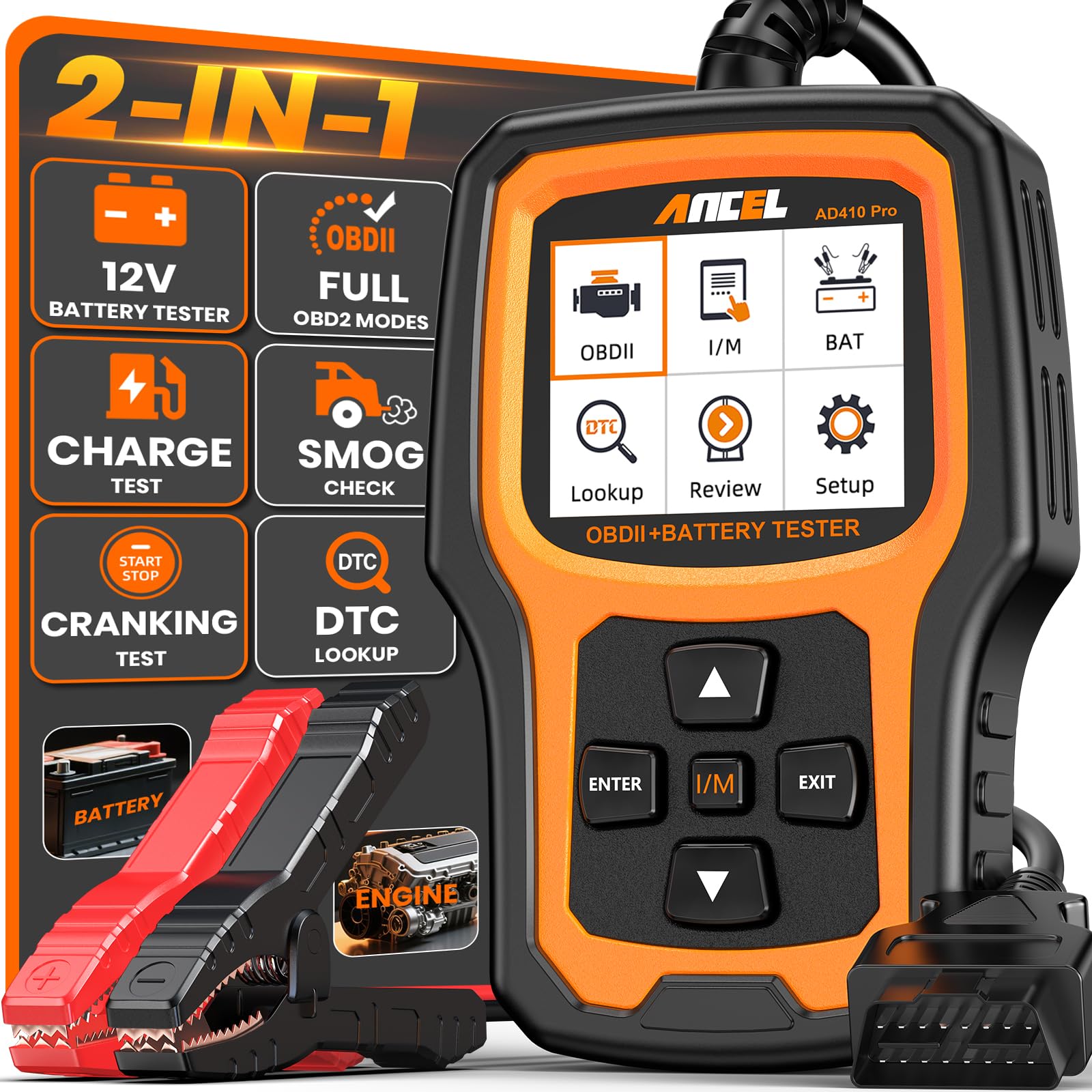
ANCEL AD410 PRO

ANCEL AD410 PRO

Scanner + battery

Our Score 9.2/10
Check Price

Worth Noting

  • Battery health readings are basic compared to dedicated testers
Live Data
Yes
Code Lookup
Built-in
Screen Size
2.4 inches TFT color
Connection Type
Wired

The AD410 PRO adds battery testing to standard OBD2 code reading, saving space and money for those who need both. But the scanner side mirrors the AD410's engine-code-only capability, and the battery test is basic — it gives a health reading rather than the detailed analysis of a dedicated tester. It suits car owners who want a quick check on battery condition alongside code reading, but those needing precise battery diagnostics or multi-system scanning should look elsewhere.

Tip: Use the battery test as a quick reference; verify with a multimeter for precise measurements.

Bottom line: Good for a DIYer who wants a single tool to check engine codes and get a battery health estimate, but not for those needing accurate cranking or charging analysis.

9

FOXWELL NT201

FOXWELL NT201

Simple I/M readiness

Our Score 9.0/10
Check Price

Worth Noting

  • Compatibility can be inconsistent with certain European models, such as BMW and Mercedes.
Live Data
Code Lookup
Screen Size
2.4 inches color
Connection Type
Wired

The FOXWELL NT201 works well on many common US and Asian vehicles, with intuitive menus that make reading and clearing codes simple. The dedicated I/M readiness button is a time-saver for smog checks. However, it is slightly less feature-rich than the NT301 and compatibility can be inconsistent with some European cars like BMW or Mercedes, making it a better fit for owners of domestic or Asian brands.

Bottom line: Best suited for DIYers working on common US and Asian vehicles who want a simple dedicated readiness check, but not ideal if you own a BMW or Mercedes.

10

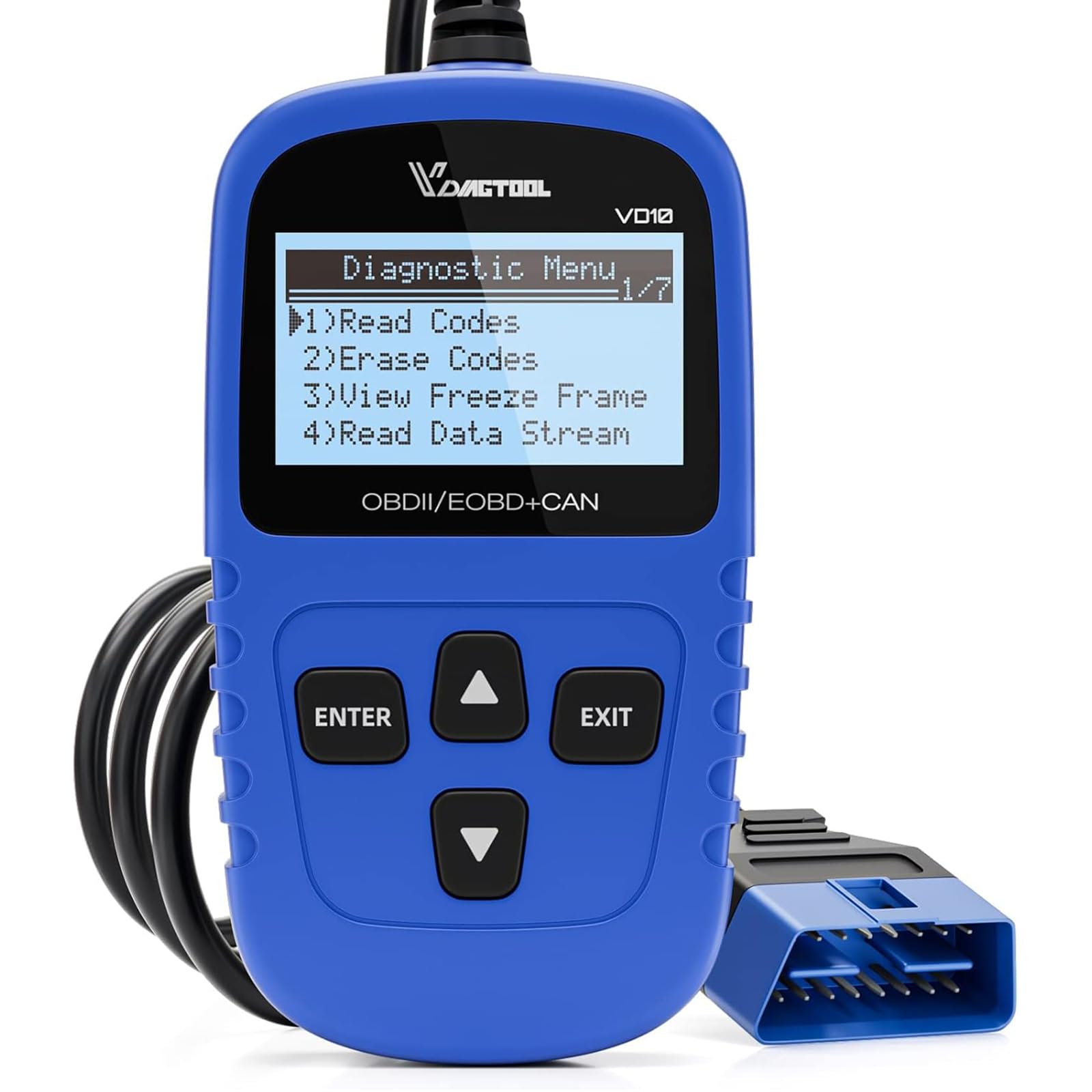
VDIAGTOOL VD10

VDIAGTOOL VD10

Ultra-budget cheap

Our Score 9.2/10
Check Price

Worth Noting

  • Small mono screen may be difficult to read in direct sunlight or for users with vision difficulties.
  • Occasional connectivity issues on some vehicles, making it less suitable as a primary tool.
Live Data
Code Lookup
Built-in
Screen Size
2.1 inches mono
Connection Type
Wired

For under sixteen dollars, the VD10 reads and clears engine codes on many US cars without needing a phone. Its built-in library of over 3000 code definitions speeds up diagnosis. However, the small 2.1-inch mono screen can be hard to read in bright conditions or for those with less sharp vision. Additionally, some units may not connect reliably to certain vehicle models, making this a tool best kept as a backup rather than a primary diagnostic device.

Bottom line: For occasional code checks on a familiar daily driver, this budget option covers the basics — but plan for possible connection hiccups.

How to Choose

Screen Size and Clarity

A 2.4-inch monochrome screen is functional for checking codes, but it can be hard to read in direct sunlight or from an awkward angle under the dash. Color screens offer better contrast and readability, especially when navigating menus or viewing live data graphs.

If you plan to use the scanner frequently or in varying lighting, a 2.8-inch color display makes the difference between a quick glance and squinting at tiny characters. For occasional use, the smaller mono screen still gets the job done.

Live Data Graphing

Live data graphs show sensor values over time, which is critical for diagnosing intermittent issues like a misfire or oxygen sensor fluctuation. A scanner with graphing capability lets you see trends rather than static numbers, making it easier to spot a failing sensor before it triggers a hard code.

Budget scanners usually only display raw PIDs without graphing, which means you will need to monitor multiple values separately. If you frequently diagnose drivability problems, a model with onboard graphing saves time and guesswork.

Code Lookup Method

Some scanners come with a built-in database of DTC definitions, so you can see the meaning of a code directly on the screen without pulling out your phone. Others rely on an app or manual lookup, which adds a step but often gives more detailed repair suggestions.

Built-in libraries are convenient for quick checks, but they rarely update as often as app-based databases. If you work on newer vehicles with freshly defined codes, an app that gets regular updates is more reliable.

System Coverage

Basic OBD2 scanners only read engine and emissions codes. If your check engine light is off but the airbag or ABS light is on, a basic tool is useless for those systems. Scanners with enhanced coverage can access multiple control modules, but that capability varies by make and model.

Before buying, check whether the scanner supports ABS, SRS, or transmission diagnostics for your specific vehicle. Many multi-system tools claim broad compatibility but only work on a subset of cars, especially European models.

Connection Type

Wired scanners are simple: plug in, read codes, unplug. They never lose connection and require no smartphone setup. Bluetooth scanners pair with a phone app, giving you a larger screen and data logging, but they can suffer from dropouts and pairing headaches.

If you value reliability and speed, a wired unit is the safer choice. If you want portable diagnostics with smart features, a Bluetooth model offers more flexibility at the cost of occasional connection issues.

Frequently Asked Questions