Computers & Accessories

9 Best Laptop Stand of 2026: Find the One That Doesn't Wobble When You Type

Typing on your laptop while using an adjustable stand? This guide cuts through the wobble and tells you which laptop stands stay stable for your typing style.

Typing directly on a laptop keyboard while using an adjustable stand often introduces a wobble that undermines the ergonomic benefit. Fixed-height stands eliminate that wobble but sacrifice flexibility. The right choice depends entirely on whether you use an external keyboard.

This guide cuts through the marketing claims by matching each stand to a specific typing setup. If you type on the laptop itself, a fixed stand delivers the stability you need. If you use an external keyboard, adjustable stands offer versatility without the bounce.

The picks below reflect that core divide. Each stand is recommended for a specific use case, so you can buy with confidence that your desk setup will actually stay stable when you work.

1

Lamicall Adjustable Stand

Top Pick
Lamicall Adjustable Stand

Home office

Our Score 9.6/10
Check Price

Worth Noting

  • Hinges require firm effort to adjust initially
  • Rubber base pads may lose adhesion over time
Material
Aluminum alloy
Stability
Wobbles when typing on laptop
Portability
Foldable, portable
Adjustability
Yes, foldable multiple angles

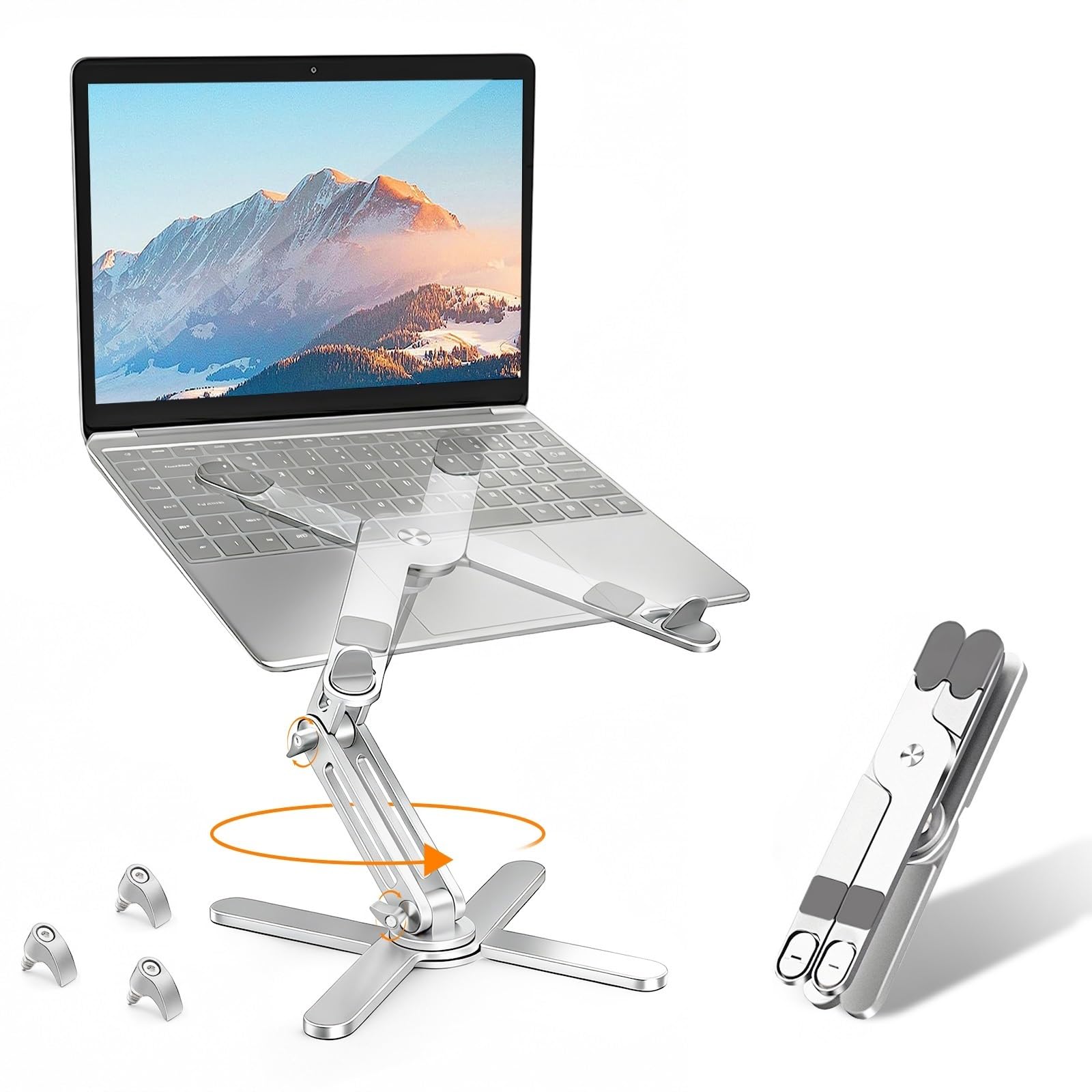
The Lamicall Adjustable Stand combines a foldable aluminum body with multiple height angles and a two-year warranty — a rare mix in the mid-range market. The aluminum alloy construction feels solid, and the non-slip base keeps the stand planted on the desk during use.

A practical design: the foam inserts on the arms grip the laptop firmly, and the vented surface allows airflow even when the stand is folded. The stand adjusts smoothly through several detents, letting you dial in the right screen height for your chair and desk setup without tools.

For actual daily use, the stand stays put when paired with an external keyboard and mouse. The foldable design makes it easy to stow in a bag or slide into a drawer when not needed. The 2-year warranty adds a layer of confidence that the hinges and finish will hold up.

This stand suits home office workers who use an external keyboard, have multiple laptops, or need a portable ergonomic solution without a permanent setup. Typing directly on the laptop keyboard at higher angles can cause some movement — an external keyboard sidesteps that limitation entirely.

Tip: If hinges feel stiff, gentle repeated adjustment can loosen them over time.

Bottom line: For home office workers who use an external keyboard and need an adjustable, portable stand, the Lamicall delivers a practical balance of ergonomic benefit and value.

2

Nulaxy C3 Fixed

Nulaxy C3 Fixed

External keyboard

Our Score 9.6/10
Check Price

Worth Noting

  • Fixed height cannot be adjusted for different ergonomic needs.
  • Slight bounce when typing directly on the laptop keyboard
Material
5mm aluminum alloy
Stability
Stable with external keyboard
Portability
Detachable, not foldable
Adjustability
Fixed height (6 inches)

What sets the Nulaxy C3 apart is its rock-solid stability: a 5mm aluminum alloy frame that supports up to 22 lbs without flexing or sliding. This is a fixed-height stand — two-piece open design with detachable legs that snap together in seconds. No screws, no tools, no angle adjustments. The tradeoff is predictability: every time you set your laptop on it, the screen sits exactly 6 inches above the desk.

This stand suits a specific workflow. If you always use an external keyboard and mouse — meaning your hands never touch the laptop keyboard — the Nulaxy C3 feels like a permanent extension of your desk. The open design allows passive airflow underneath, and the rubber pads keep the laptop from shifting during heavy typing or trackpad use. However, the fixed height means you can't raise or lower the screen to match your chair or monitor height; it works best for desks where a 6-inch lift aligns with your eye level.

The main limitation is wobble when typing directly on the laptop keyboard — the raised front edge acts as a fulcrum, and the aluminum bars have enough spring to bounce slightly. That's why the stand's own user-base overwhelmingly recommends an external keyboard. The fixed height also won't suit someone who needs to switch between sitting and standing or share the desk with people of different heights. For its intended use with external peripherals, these are boundaries, not flaws.

Tip: Pair with an external keyboard and mouse to avoid the slight bounce.

Bottom line: For desk setups where an external keyboard is always in use, the Nulaxy C3 is the most stable budget stand available.

3

tounee Telescopic Swivel

tounee Telescopic Swivel

Sit-stand

Our Score 9.6/10
Check Price

Worth Noting

  • Height adjustment requires considerable force initially
  • Rubber strips on the base may peel over time with repeated repositioning
Material
Aluminum alloy
Stability
Stable for typing
Portability
Bulky for travel
Adjustability
Telescopic 2.1-21 inches

Telescopic height from 2.1 to 21 inches and a smooth 360° swivel base transform this stand into a sit-stand workstation without requiring a full desk replacement. The aluminum alloy construction feels dense and stable, supporting up to 22 lbs. But that heft (over 4 lbs) means it stays on the desk — this is not a travel companion.

This stand suits users who switch between sitting and standing throughout the day and need to share their screen with colleagues. The 360° rotation makes collaborative discussions seamless. However, the height adjustment mechanism is stiff out of the box and requires deliberate force, and the rubber strips on the base may peel over time — minor boundaries for a dedicated desk setup that isn't moved often.

Compared to fixed-height stands, the tounee offers unmatched height range for ergonomic tuning. Against other telescopic stands, it delivers a solid balance of build quality and value at a mid-range price point.

Tip: Apply steady, even pressure when adjusting height — the mechanism loosens with regular use.

Bottom line: A stable sit-stand converter for users who prioritize height range and collaborative screen sharing over portability and effortless adjustment.

4

Rain Design mStand

Rain Design mStand

MacBook desk

Our Score 9.6/10
Check Price

Worth Noting

  • Fixed height and angle cannot be adjusted
  • The tilted angle makes laptop keyboard use awkward; a separate Bluetooth keyboard is necessary for comfortable typing.
Material
Single-piece aluminum
Stability
Excellent stability, no wobble
Portability
Heavy (2.2 lbs), not portable
Adjustability
Fixed height (5.9 inches)

The mStand's single-piece aluminum construction delivers a rock-solid foundation that feels more like integrated furniture than an accessory. No joints, no assembly, and the rear cable hole routes power and peripheral lines cleanly out of sight.

Unlike adjustable stands that trade stability for versatility, the mStand locks you into one position. The fixed 5.9-inch height and 15-degree tilt mean laptop keyboard use requires a separate Bluetooth keyboard — a tradeoff the top pick partly sidesteps with foldable angles, though at the cost of some rigidity.

This stand suits MacBook owners who prioritize aesthetics and stability above all else and plan to use an external keyboard and mouse as part of their permanent setup. It works best as a desk fixture — not for travelers or anyone who frequently changes desk configurations.

Tip: Place the mStand on a desk mat to prevent scratching the surface and keep the aluminum from sliding on glossy desks.

Bottom line: For a permanent desk setup where appearance and solidity matter most, the mStand is the benchmark — but only if you're prepared to pair it with an external keyboard.

5

Roost V3

Roost V3

Travel

Our Score 9.6/10
Check Price

Worth Noting

  • Premium-priced relative to similar-functioning stands, with composite build raising questions about value for stationary setups
Material
Engineered composite
Stability
Very stable for its size
Portability
Ultra-portable (5.8 oz)
Adjustability
Adjustable 6.5-12.5 inches

At 5.8 ounces, the Roost V3 folds into a shape no thicker than a marker, yet holds laptops from 12 to 18 inches with no wobble — a rare combination in adjustable stands. Setup takes seconds with no tools, and the height adjusts smoothly from 6.5 to 12.5 inches, accommodating different desk heights and seating positions.

This stand suits digital nomads and frequent travelers who value every ounce in their bag. For desk-only users, the premium price tag on a composite stand may feel steep — the value emerges only when portability is the priority. The lifetime warranty helps offset the initial investment for those who plan to use it across multiple locations.

Despite its slim profile, the Roost V3 remains stable during typing on a laptop keyboard, even on uneven surfaces like a train table or a cafe counter. The engineered composite material contributes to its low weight but lacks the heft of metal stands, which some users may notice when adjusting.

Tip: The Roost’s portability only pays off if you move between locations regularly; for a single desk, a cheaper fixed stand makes more sense.

Bottom line: For anyone who regularly packs a laptop bag, the Roost V3 is the most space-efficient lift on the market. For stationary setups, cheaper fixed stands deliver similar ergonomics with less cost.

6

OMOTON LA10 Rotating

OMOTON LA10 Rotating

Budget rotation

Our Score 9.4/10
Check Price

Worth Noting

  • Height and angle joints can be stiff to move, requiring firm adjustments
  • The silver finish may appear slightly rose-gold compared to product images
Material
Aluminum alloy
Stability
Stable for external keyboard
Portability
Foldable, portable
Adjustability
Adjustable height and angle

The OMOTON LA10 sets itself apart with a smooth 360-degree rotating base and multiple height angles, all in a foldable aluminum frame that stows easily. At under two pounds, it is noticeably lighter than the heavier rotating stands in this roundup, making it a practical choice for desk sharing or packing into a bag.

This stand suits buyers who need to swivel their laptop for quick screen sharing without buying a separate turntable, and who value portability for occasional travel. The tradeoff: adjusting the height and tilt can require deliberate force, especially when new, and the silver finish on some units may read slightly warmer than expected – a minor visual variance that does not affect function.

Once set, the LA10 holds laptops up to 16 inches securely, with the aluminum build providing a sturdy base that resists wobble during normal use. The rotation remains fluid after initial adjustments, supporting collaborative workflows without the stand shifting on the desk.

Tip: Stiff joints may require a bit of force when first adjusting; they tend to ease with repeated use.

Bottom line: If you prioritize a rotating, foldable stand for occasional travel or collaborative work and can handle some initial stiffness, the OMOTON LA10 delivers solid build and smooth swivel at a fair price.

7

BESIGN LS03

BESIGN LS03

Budget riser

Our Score 9.6/10
Check Price

Worth Noting

  • Fixed height at 5.7 inches limits ergonomic customization
  • Typing directly on the laptop keyboard can feel bouncy
Material
Aluminum alloy
Stability
Bouncy when typing on laptop
Portability
Detachable, not foldable
Adjustability
Fixed height (5.7 inches)

The BESIGN LS03 delivers impressive build quality for its price, with a tool-free snap-together aluminum design that feels sturdy for a fixed-height stand. However, its 5.7-inch height is not adjustable, and the stand can feel bouncy when typing directly on the laptop keyboard. For those who use an external keyboard and mouse, this is a minor compromise, but the Nulaxy C3 offers slightly better stability at a similar price, making it a stronger choice for typing-focused setups.

Bottom line: This stand suits budget-conscious buyers who use an external keyboard and need a simple, sturdy riser without height adjustments.

8

RIWUCT Foldable

RIWUCT Foldable

Budget adjustable

Our Score 9.4/10
Check Price

Worth Noting

  • Lightweight base may shift if the desk is bumped or during transport
  • Can feel less stable when typing aggressively on the laptop keyboard without an external keyboard
Material
Aluminum alloy
Stability
May shift when bumped
Portability
Foldable, portable
Adjustability
Adjustable up to 7.48 inches

The RIWUCT Foldable delivers solid adjustability and a slim, foldable design at a budget-friendly price. Its lightweight aluminum construction keeps it portable but can shift if bumped or under heavy typing, making it less stable than fixed stands. For users who need rock-solid stability while typing directly on the laptop keyboard, a fixed stand or pricier adjustable like the Lamicall is a better fit.

Tip: For stable typing, pair with an external keyboard to avoid shifting from laptop keyboard pressure.

Bottom line: Best for budget-conscious users who need an adjustable stand for occasional travel or desk use with an external keyboard, where the lightweight design’s shift risk is manageable.

9

Moallia N86 Swivel

Moallia N86 Swivel

Rotating foldable

Our Score 9.2/10
Check Price

Worth Noting

  • Heavier than some portable stands, less ideal for daily bag carry
  • Swivel cannot be locked, which may be noticeable during gaming or precise work
Material
Aluminum alloy
Stability
Very stable, no wobble
Portability
Foldable, but heavy (1.74 lbs)
Adjustability
Adjustable height and angle

The Moallia N86 delivers very stable support with no wobble and smooth 360° rotation, folding down to a compact 11.4x1.7 inches for occasional storage or travel. Its all-aluminum build feels solid, and adjustable height and angle accommodate various setups. The stand supports laptops up to 16 inches with rubber pads that keep it secure. However, the 790g weight is heavier than some competitors, making it less suited for frequent bag carry, and the swivel may feel too loose for those who need a locked position during gaming or precise typing.

Bottom line: Best for home or office users who want a rotating stand with solid stability and don't need an ultra-light travel companion.

How to Choose

Adjustability

Adjustable stands let you change height and angle to match your chair and desk, but that freedom introduces moving parts. Hinges and sliding mechanisms create potential wobble points that fixed stands avoid entirely.

If you switch between sitting and standing during the day, an adjustable stand is necessary. But if you always work at the same desk height, a fixed stand is sturdier and usually cheaper.

Stability When Typing

Every adjustable stand trades some rigidity for versatility. When you type directly on the laptop keyboard, the downward force can make the stand shake or bounce. This is the most common complaint among adjustable stand users.

Fixed-height stands, with their single-piece construction or solid hingeless design, eliminate that bounce. If you use a separate keyboard and mouse, adjustability won't affect your typing experience.

Build Material

Aluminum alloy is the standard for good reason: it's lightweight, conducts heat away from the laptop, and resists bending. Thicker gauges (4-5 mm) add rigidity without much weight gain.

Cheaper plastic or thin metal stands may flex under pressure or warp over time. Stick to aluminum stands with a minimum stated weight capacity of 8-10 lbs for most 13-16 inch laptops.

Portability

Foldable stands collapse into a slim package for travel, but weight and stability often correlate. Sub-1 lb stands may shift when bumped, while heavier 2+ lb stands stay planted.

For daily commuters, the Roost V3 (5.8 oz) and similar ultra-portable designs balance weight and stability through engineered composites. For occasional transport, a foldable aluminum stand is sufficient.

Compatibility

Most stands claim to fit 10-17 inch laptops, but depth and weight distribution matter. A bulky 17-inch gaming laptop may overhang a stand designed for 15-inch MacBooks. Always check the maximum supported depth and weight.

Laptops with large rubber feet or protruding hinges may not sit flat on some stands. Look for stands with adjustable or wide padded supports to avoid instability from uneven contact.

Frequently Asked Questions