Office Electronics

11 Best Headphone Stand with USB Hub of 2026: Stable Charging That Lasts

Which headphone stands with USB hubs actually deliver stable charging and durable ports, and which ones fail after months of use.

A headphone stand with a USB hub sounds like a simple desktop upgrade: store your headset and charge devices in one spot. But once you start reading reviews, a pattern emerges—ports that stop working after a few months, wobbly bases that tip over with heavier headsets, and adhesive mounts that give up mid-week.

This guide cuts through those frustrations by focusing on the stands that actually hold up to daily use. We highlight models where the USB ports stay connected, the base stays planted, and the features match real-world needs—whether that's fast charging, extra AC outlets, or a clean under-desk installation.

The key is to match the stand to your specific devices and desk setup. Not every stand needs to do everything, but the right one will handle your headset and charging duties without becoming another desk headache.

1

COZOO USB Charger Stand

Top Pick
COZOO USB Charger Stand

Budget gamers

Our Score 9.4/10
Check Price

Worth Noting

  • USB charging speeds max at 20W USB-C and 18W USB-A; not suitable for fast-charging modern phones.
  • ABS plastic build feels less premium than aluminum competitors.
USB Ports
3 USB (1 USB-C 20W)
AC Outlets
2 outlets (1250W)
Extra Features
RGB, non-slip pad
Build & Stability
ABS + aluminum, weighted base

Three USB ports (one USB-C PD 20W, two USB-A 18W), two AC outlets, and a weighted base that keeps heavy headsets from tipping — all for under $17. This COZOO stand puts the essentials where you need them, turning a headphone holder into a desktop power hub.

The stand handles simultaneous charging for a phone, wireless earbuds, and a controller without issue. The AC outlets are useful for plugging in a lamp or laptop charger, reducing the hunt for wall sockets. Its stable footprint means no wobble even when reaching for the headset.

Budget gamers and desk workers who need extra outlets and USB ports will get the most from this accessory. Just keep expectations in check: USB charging tops out at 20W on the USB-C port and 18W on USB-A, so modern phones won't fast-charge. It's ideal for overnight or casual top-ups, not quick refuels.

The ABS plastic shell feels less expensive than aluminum alternatives, but that's expected at this price. The tradeoff is a lighter overall weight, which still grips the desk well thanks to the weighted base. For the cost, the build is acceptable and the functionality is where this stand shines.

Tip: Use the USB-C port for faster charging of newer phones and reserve USB-A for accessories that don't need quick power.

Bottom line: If you want a headphone stand that also adds USB ports and AC outlets without spending much, this COZOO model delivers exactly that — no extras, no frills, just practical desk power.

2

Razer Base Station V2 Chroma

Razer Base Station V2 Chroma

Premium gamers

Our Score 9.4/10
Check Price

Worth Noting

  • USB 3.1 ports may disconnect or stop working over time
  • Premium price for a stand that offers fewer ports and no AC outlets compared to budget alternatives.
USB Ports
2 USB 3.1
AC Outlets
Extra Features
Chroma RGB, 7.1 DAC, 3.5mm
Build & Stability
Aluminum, rubber non-slip base

Aluminum construction, Chroma RGB syncing, and a built-in 7.1 surround DAC set this stand apart from the typical USB-hub headphone stand. Where the top pick delivers multiple USB and AC outlets at a low price, the Razer prioritizes build materials and audio integration. For gamers already using Razer peripherals, the lighting sync adds to the setup without extra software.

This stand suits buyers who want their headphone holder to double as a sound card for virtual surround sound through any 3.5mm headset. The premium price and the possibility that the USB ports may lose connection over time make it a less practical choice for office workers who need a consistent charging hub. For the gaming desk where RGB cohesion matters more than port count, the tradeoffs are acceptable.

The taller stand and anti-slip ledge hold even heavy gaming headsets securely, and the weighted rubber base keeps everything planted. The built-in DAC works well for activating 7.1 virtual surround on PC without a separate sound card — useful for spatial audio in games where footsteps and environmental cues matter.

Tip: Treat the USB ports as auxiliary connections for occasional use; a dedicated powered hub will give more consistent charging for daily devices.

Bottom line: The Razer Base Station V2 Chroma fits best when you are already in the Chroma ecosystem and want a clean audio passthrough solution — just don't expect its USB ports to serve as a permanent charging hub.

3

Tilted Nation RGB Stand

Tilted Nation RGB Stand

Wired mouse users

Our Score 9.4/10
Check Price

Worth Noting

  • Price is higher than many competitors that offer more connectivity.
  • USB 2.0 ports are slow for data transfer and may fail in some units.
USB Ports
2 USB 2.0
AC Outlets
Extra Features
Mouse bungee, RGB
Build & Stability
Weighted base, non-slip grips

The Tilted Nation stand stands out with an integrated mouse bungee that holds a wired mouse cable in place, reducing cord drag and desk clutter. The weighted base and non-slip grips keep the stand stable, and the RGB lighting offers several color modes that match most gaming setups. Unlike the top pick, which bundles USB-C and AC outlets at a lower price, this stand dedicates its design to solving one cable management problem well.

This stand is best for gamers who use a wired mouse and want a clean desk without extra ports. The two USB 2.0 ports are fine for charging a headset or connecting a low-speed device, but they won't handle fast data transfers or power delivery. Some units have had the USB ports stop working – verify them on arrival. At a mid-range price, you're paying for the bungee and build quality over stands that offer more connectivity for less.

During gameplay, the mouse bungee holds the cable securely for most wired mice, and the RGB lighting adds a subtle glow that complements a gaming setup. The USB ports are best used for low-power accessories like a wireless receiver dongle. For the wired mouse gamer who wants a dedicated headset stand without a mess of cables, this does the job well.

Tip: Test the USB ports immediately after purchase – if they fail early, the warranty covers replacement.

Bottom line: If you use a wired mouse and want a clean desk without USB speed demands, this stand delivers. Otherwise, the top pick offers more for less.

4

New Bee RGB USB-C

New Bee RGB USB-C

Wireless charging fans

Our Score 9.4/10
Check Price

Worth Noting

  • Wireless charging is limited to 5-10W, so it is noticeably slower than a dedicated fast charger.
USB Ports
2 USB-C, 1 USB-A
AC Outlets
Extra Features
Qi wireless charging, RGB
Build & Stability
Aluminum, rubber base

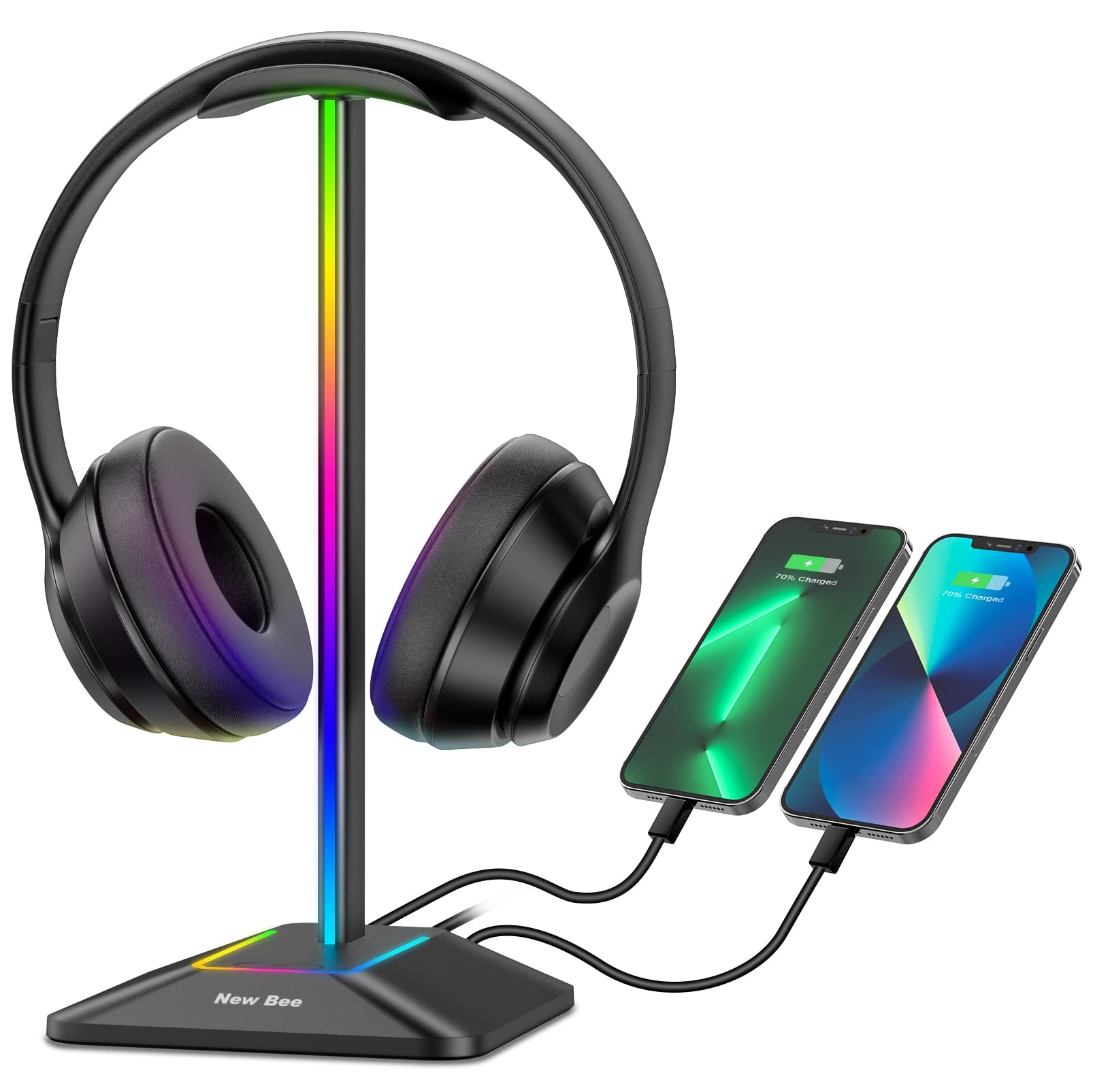
A Qi charging pad sits on the base, letting you drop a phone or AirPods case onto the stand for cable-free top-ups while the headset hangs above. The aluminum body and 7-mode RGB lighting give it a clean desk presence that matches gaming or office setups.

This stand trades charging speed for convenience. The wireless output runs at 5-10W, which suits overnight or casual charging rather than a quick boost before a meeting. For buyers who value a clutter-free desk and already own a headset without a dedicated charging dock, the tradeoff is easy to live with.

Two USB-C ports and one USB-A port sit on the rear, covering modern cables and legacy devices alike. The rubber base keeps the stand planted during use, and the aluminum rod feels more premium than the all-plastic alternatives at similar prices.

Tip: Leave the phone on the pad overnight or during long work sessions; it is not meant for a quick charge between calls.

Bottom line: A practical pick if you want to ditch the phone charging cable on your desk and don't mind a slower top-up while your headset is stored.

5

KAFRI Dual RGB Stand

KAFRI Dual RGB Stand

Households with 2 headsets

Our Score 9.0/10
Check Price

Worth Noting

  • The joint connecting the arms can become loose after months of use, reducing long-term stability.
USB Ports
3 USB (1 USB-C)
AC Outlets
2 outlets (1250W)
Extra Features
Dual headset, RGB
Build & Stability
Plastic base, dual hanger

The KAFRI Dual RGB Stand distinguishes itself by holding two headsets at once, while most competitors only accommodate one. It also packs three USB ports (including USB-C), two AC outlets, and customizable RGB lighting — all in a single desktop accessory.

This design suits households where multiple gamers each have their own headset and need a shared charging station. The stand's joint, which allows the arms to fold, may become loose after extended use. If you plan to adjust the arms often or need a stand that stays rigid for years, a simpler single-hook design may be more appropriate.

The RGB section includes nine effects, from static colors to breathing and rainbow modes, letting you match the look to your setup. The two AC outlets can power a monitor or lamp, freeing up wall sockets. For a dual-headset setup with extra power options, the KAFRI is a practical choice at a mid-range price.

Tip: Gently tighten the joint screws every few months; a touch of thread-locker can help keep them secure.

Bottom line: For multi-headset households that value storage and charging options over an indefinite lifespan, the KAFRI covers the essentials — just keep an eye on the joint if you move it often.

6

EKSA RGB 7.1 Stand

EKSA RGB 7.1 Stand

Surround sound seekers

Our Score 9.2/10
Check Price

Worth Noting

  • USB and audio ports may stop working in some cases; worth testing early.
  • Stand can wobble noticeably with heavier headsets
USB Ports
2 USB
AC Outlets
Extra Features
7.1 audio, 3.5mm jacks, RGB
Build & Stability
Aluminum alloy + ABS, rubber pad

The EKSA stand routes audio through its USB connection and 3.5mm jacks to deliver 7.1 virtual surround sound to any headset. No separate sound card or DAC needed — the processing happens inside the stand. The stand is designed for gaming headphones with a 3.5mm plug, making it compatible with most wired headsets. RGB lighting with three touch-switch modes adds desk flair without extra software.

This setup suits gamers who want virtual surround without upgrading their headset or buying extra gear. If you use a lightweight headset (under 400 grams), the stand stays stable enough for daily use. However, with bulkier gaming headsets the wobble becomes noticeable during cable adjustments. The USB and audio ports can be inconsistent in some cases — worth testing soon after purchase if you plan to use them regularly.

Compared to the pricier Razer stand with built-in DAC, the EKSA offers similar audio features at a lower price point. The aluminum alloy and ABS construction looks decent, but the base stability and port consistency are areas where variability has been noted.

For the price, the audio feature set is unique among mid-range stands — most competitors offer only USB ports and RGB without sound processing. This makes it an attractive option if you specifically need audio passthrough.

Tip: Test the USB and audio ports immediately after purchase to confirm they work.

Bottom line: If virtual surround sound is your priority and you can accept the chance of port inconsistency, the EKSA offers audio features not found in cheaper stands.

7

COZOO Under Desk Stand

COZOO Under Desk Stand

Desk space savers

Our Score 9.0/10
Check Price

Worth Noting

  • Adhesive tape may lose grip over time, especially in warm conditions.
  • USB port durability can vary; some units may stop working after several months.
USB Ports
3 USB (PD + QC3.0)
AC Outlets
Extra Features
6 cable hooks, smart charge
Build & Stability
Adhesive/screw mount, plastic body

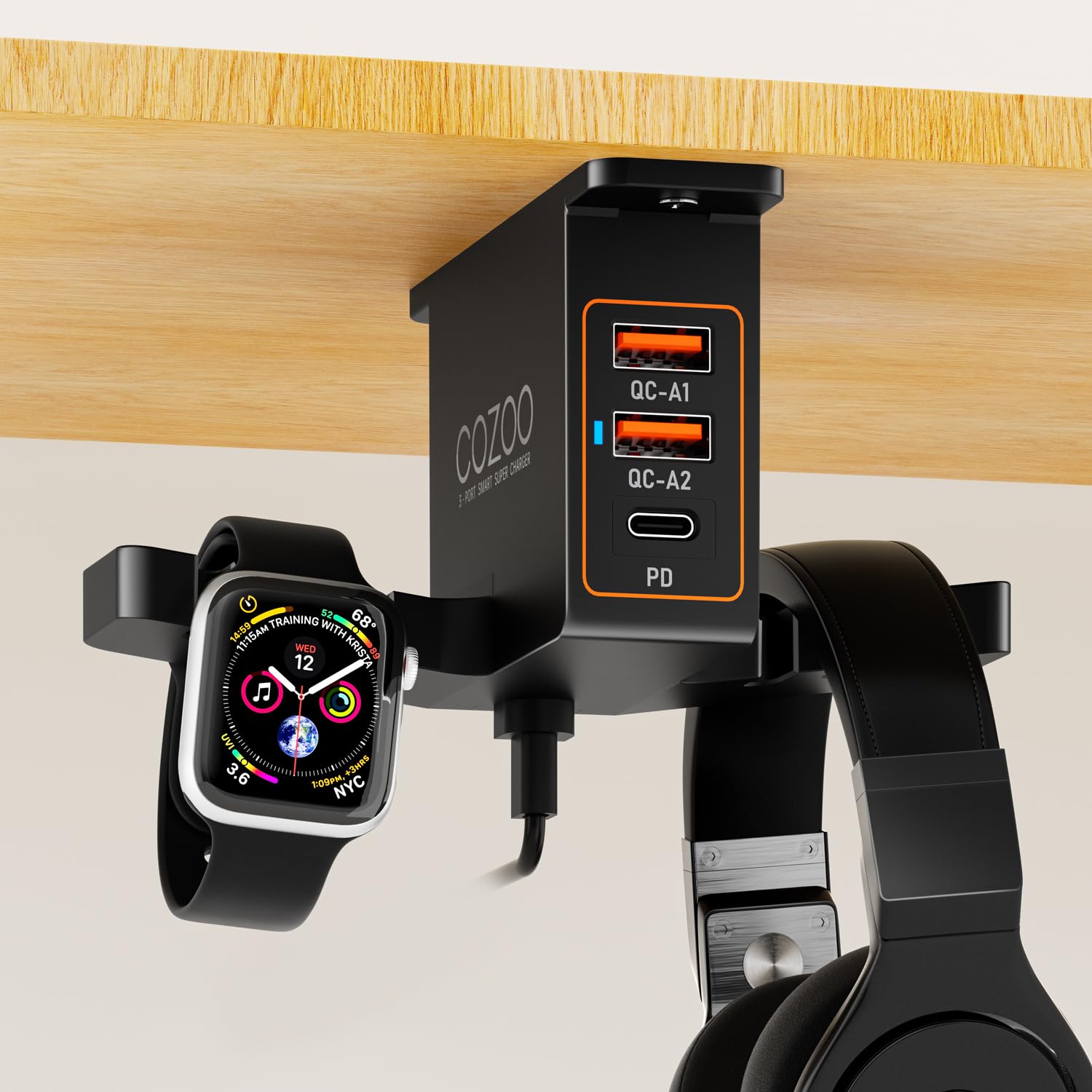
The COZOO headphone stand takes a different approach than typical desktop stands: it mounts underneath the desk to free up surface space entirely. Three USB ports with Power Delivery and Quick Charge 3.0 let you fast-charge phones and tablets while keeping cables out of sight. This design works best when desk real estate is at a premium and you don't want a bulky base taking up room.

This stand suits anyone willing to drill holes or use screws for a permanent mount. The included adhesive tape is convenient initially but can lose grip over time in warm or humid conditions, so the hardware route avoids that headache. If you prefer a no-drill setup and aren't bothered by occasional re-sticking, the tape works for lighter headsets — just keep a backup plan.

The USB ports deliver genuine fast charging for modern devices, a step above the slower ports found on many budget stands. Cable management is tidy with six included hooks, and the dual earphone hangers hold over-ear and on-ear headsets securely. The main limitation is USB port longevity: some units may see ports stop working after several months, though the charger performance while functional is solid.

Tip: Use the included screws for a permanent mount to avoid adhesive failure.

Bottom line: Best for users who can mount with screws and want fast USB charging under desk without sacrificing desktop space.

8

New Bee RGB Aluminum

New Bee RGB Aluminum

Budget gamers

Our Score 9.4/10
Check Price

Worth Noting

  • USB charging ports are slow
USB Ports
1 USB-C, 1 USB-A
AC Outlets
Extra Features
RGB
Build & Stability
Aluminum rod, TPU base

The New Bee RGB Aluminum offers a simple aluminum rod and TPU base, two USB ports, and seven RGB lighting modes at a budget-friendly price. Assembly is quick and the stand looks clean on a desk. However, the lightweight base may tip with heavier over-ear headsets, so it's best suited for lighter gaming headsets. It also lacks the AC outlets that the top pick includes, and the USB ports charge slowly — adequate for a headset but not for fast device charging.

Bottom line: A straightforward option if you need an attractive, low-cost stand with basic USB charging and use lighter headsets.

9

KDD USB AC Stand

KDD USB AC Stand

Budget power users

Our Score 9.0/10
Check Price

Worth Noting

  • AC outlets may not work in some units, reducing the stand's utility as a power strip.
  • USB ports can be unreliable, with occasional failures affecting device charging.
USB Ports
2 USB-A
AC Outlets
3 outlets (1250W)
Extra Features
RGB, controller slots
Build & Stability
Plastic base

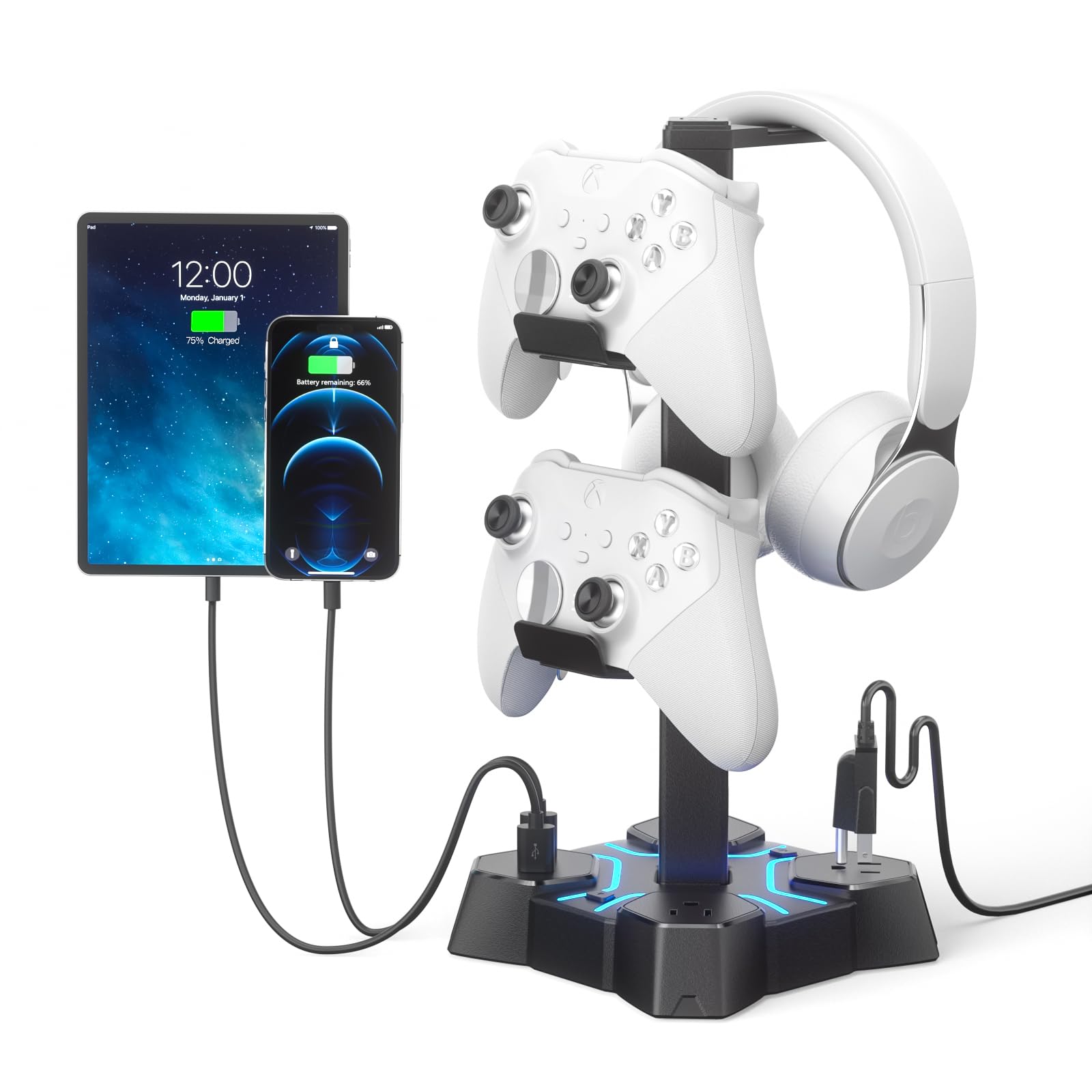
The KDD Headphone Stand combines three AC outlets, two USB-A ports, RGB lighting, and capacity for a headset plus two controllers at a budget price. Its main appeal is adding extra power sources to a desk without spending much. However, quality control affects some units — outlets or USB ports may not work. This makes it a gamble: if you get a fully functional unit, it delivers good value, but the risk of receiving one with dead ports is real. That variability keeps it behind the more consistent COZOO stand, which offers similar features with higher reliability.

Bottom line: This stand fits users who need extra AC outlets at their desk on a tight budget and are willing to accept the possibility of port defects.

10

PHNIXGAM RGB AUX

PHNIXGAM RGB AUX

Budget audio

Our Score 8.6/10
Check Price

Worth Noting

  • USB 2.0 ports limit data transfer speeds and charging rates, adequate for basic peripherals but not for fast file transfers
  • Performance over extended use is not well-documented; individual units may behave differently
USB Ports
3 USB 2.0
AC Outlets
Extra Features
3.5mm AUX, RGB
Build & Stability
Metal base

The PHNIXGAM stand provides three USB 2.0 ports and a 3.5mm audio pass-through in a compact white design, with a metal base that keeps it planted on the desk. However, performance consistency and durability under daily use remain unverified due to minimal user feedback, making it a gamble for those who need guaranteed reliability.

Bottom line: This stand makes sense if you need a low-cost way to add USB ports and audio pass-through to your desk and are willing to accept the uncertainty around long-term reliability.

11

KDD RGB USB A&C

KDD RGB USB A&C

Organization

Our Score 9.2/10
Check Price

Worth Noting

  • USB ports deliver basic charging
  • All-plastic chassis can feel hollow and less secure than metal alternatives
USB Ports
2 USB-A, 1 USB-C
AC Outlets
Extra Features
Drawer, device slot, rotating hook
Build & Stability
Plastic base

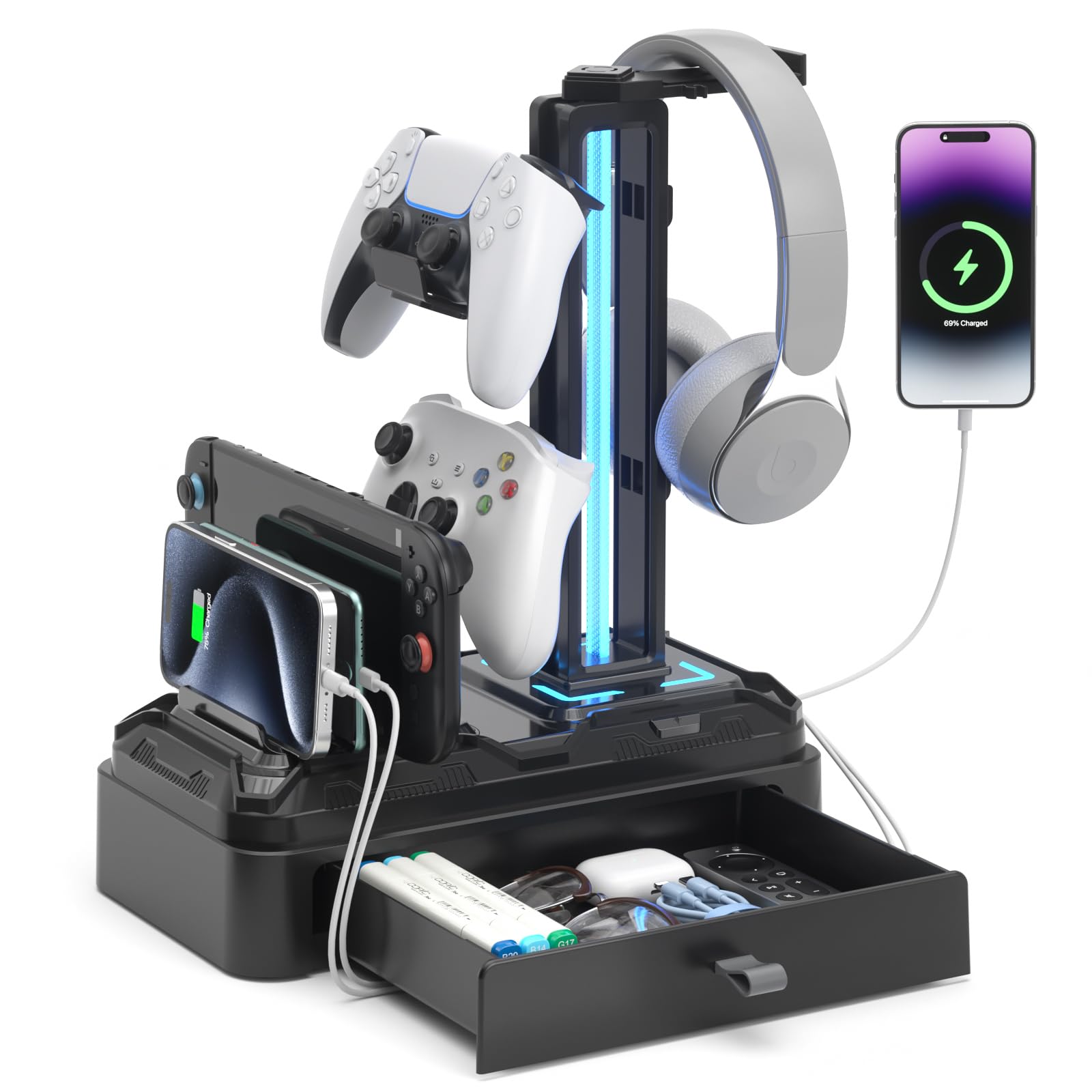
The KDD stand sets itself apart with a built-in drawer and a dedicated slot for a phone or tablet, plus a rotating hook and removable controller holders that keep multiple devices within reach. These organizational features are its main draw, yet the stand’s charging speed and build quality lag behind more balanced competitors that offer faster USB ports and sturdier materials.

Bottom line: This stand works if desk organization matters more than charging speed or a premium feel – especially for keeping a headset, phone, and controller in one spot.

How to Choose

USB Ports and Charging Speed

The number and type of USB ports determine what you can charge and how fast. Most stands use standard 5V/1-2A ports, which are fine for headphones, controllers, or older phones but won't fast-charge modern USB-C phones or tablets.

If you need faster charging, look for stands with a dedicated USB-C Power Delivery (PD) port—typically 20W or higher. These can charge a phone at full speed, but they are rare in budget models. Also note that USB ports on stands are often passthrough extensions: if the stand's cable is low-quality, you may see voltage drops or disconnections.

AC Outlets for Extra Power

Some stands integrate AC power outlets alongside USB ports, turning the stand into a mini power strip. This is useful if your desk has limited outlets and you need to plug in a laptop, monitor, or lamp.

The trade-off is size: stands with AC outlets tend to have larger bases and may use cheaper plastic housings. Check the outlet rating (usually 1250W) and ensure the stand doesn't block adjacent outlets on your power strip. Also, AC outlet reliability varies—some units have loose sockets or fail after a few months.

Audio Passthrough and DAC

A few stands include a 3.5mm jack or a built-in DAC for virtual surround sound. This lets you use any headphones with 7.1 audio without needing a separate sound card or software.

The catch: the DAC quality is entry-level and may introduce static or latency. It's a convenience feature for gamers who don't want to swap headsets, not a replacement for a dedicated sound device. Also, these audio ports share the USB connection, so any USB issues affect audio.

Build Material and Stability

A headphone stand with USB ports needs a stable base, especially if you plug and unplug cables frequently. Aluminum and weighted bases resist tipping, while lightweight plastic stands wobble with heavier over-ear headsets.

Under-desk mounts rely on adhesive or screws. Adhesive loses grip over time, especially in humid or warm environments. Screwing the mount into a solid desk surface ensures long-term hold. If you rent or can't drill, look for a clamp-style mount instead.

Extra Features: RGB, Mouse Bungee, Storage

RGB lighting is common on gaming stands, but it adds a point of failure—LEDs can burn out or the controller may glitch. If reliability is more important than aesthetics, choose a non-RGB model.

Mouse bungees, controller slots, and drawers help organize a cluttered desk, but they add bulk and complexity. A mouse bungee works well only with wired mice; a drawer that holds a small phone or earbuds is useful but not all have enough clearance for larger devices.

Frequently Asked Questions