Office Electronics

6 Best Graphing Calculator 2026: Reliable Models Without Overpaying

Which graphing calculator actually works for your math class? Compare display, CAS, battery, and exam approval to find the right fit for high school or college.

The most commonly assigned graphing calculator isn't always the most practical for your particular math class. Exam policies restrict certain models, battery reliability varies, and a color display can make a real difference when interpreting complex graphs. A calculator that works well for algebra may feel limiting by the time you reach calculus.

This guide focuses on the key differences that affect daily use: color versus monochrome displays, CAS versus non-CAS math engines, battery type (rechargeable or AAA), and exam approval from the SAT to the IB. The right match balances these features with your course level and budget.

The trickiest decision often involves choosing between a model with near-universal school adoption and one that offers a better screen or lower cost. Recognizing that trade-off helps you buy with confidence, not just follow the crowd.

1

TI-84 Plus CE

Top Pick
TI-84 Plus CE

Algebra to calculus

Our Score 9.4/10
Check Price

Worth Noting

  • Screen may crack if the calculator is pressed against hard objects in a packed backpack
CAS
No
Battery
Rechargeable Li-ion
Display
3.2-inch color LCD
Exam Approval
Approved

The TI-84 Plus CE’s massive adoption means your teacher and classmates likely use the same interface, and it’s approved for SAT, ACT, AP, and IB exams. The color display makes it easy to distinguish multiple function graphs, and the rechargeable battery saves on AAA replacements. The calculator handles algebra through calculus without fuss, and the MathPrint mode shows expressions as they appear in textbooks.

For students who carry their calculator in a backpack with textbooks and laptops, the screen can crack under pressure – a hard-shell case is a worthwhile investment.

This calculator suits high school and college students taking algebra through calculus who want a smooth classroom experience. Those who rely on charging between classes should note that the port can be temperamental; keeping the cable secure and avoiding strain helps maintain a reliable connection.

Bottom line: For students and parents who want the calculator that matches what the school uses and is accepted everywhere, the TI-84 Plus CE is the right fit – just budget for a protective case.

2

TI-Nspire CX II CAS

TI-Nspire CX II CAS

Advanced math engineering

Our Score 9.4/10
Check Price

Worth Noting

  • Premium pricing limits its appeal to students who cannot justify the investment for a single-use tool
  • CAS capabilities may be disallowed on standardized exams, reducing its utility in test settings where a non-CAS calculator is required
CAS
Yes
Battery
Rechargeable (2-week)
Display
3.5-inch color LCD
Exam Approval
Approved

The TI-Nspire CX II CAS stands apart from standard graphing calculators by including a Computer Algebra System that manipulates equations symbolically – simplifying expressions, solving for variables, and performing calculus operations directly. While the TI-84 Plus CE is the ubiquitous classroom standard, the CX II CAS targets students who require symbolic manipulation in college-level coursework. This premium-priced tool is overkill for typical high school math, and its CAS may be restricted on exams like the SAT and ACT.

This model suits engineering and advanced math students who regularly work with symbolic algebra, calculus, and differential equations. The included student software extends the calculator's functionality on a PC or Mac, making it useful for homework and study sessions. However, the high cost and potential exam restrictions mean it's not a practical choice for general high school use or budget-conscious buyers.

Bottom line: If you need symbolic algebra and have the budget, this calculator delivers – just confirm your exam policies first.

3

Casio FX-CG50

Casio FX-CG50

Color graphing student

Our Score 9.6/10
Check Price

Worth Noting

  • No Computer Algebra System (CAS)
  • Uses four AAA batteries instead of a built-in rechargeable cell, requiring periodic replacement.
CAS
No
Battery
4 AAA batteries
Display
3.17-inch color LCD
Exam Approval
Approved

The FX-CG50’s 65,000-color LCD brings 3D graphs to life with clarity that outpaces many classmates’ monochrome or TI screens. Surfaces like spheres, cylinders, and planes render smoothly, making visual understanding of multivariable calculus or physics functions more intuitive. The Natural Textbook Display also simplifies reading and editing expressions.

This calculator fits high school and early college students who want a vivid display for math, science, and statistics coursework without paying a premium. However, the FX-CG50 does not include a Computer Algebra System (CAS) — a feature some college engineering programs expect. If your exams allow CAS or you regularly need symbolic manipulation, this model will feel limiting. It also runs on four AAA batteries instead of a rechargeable pack; replacement is straightforward, but you’ll want spares handy during exam season.

Tip: Keep a spare set of AAA batteries in your bag — the calculator gives plenty of warning when power gets low.

Bottom line: For students who prioritize a vibrant screen and 3D graphing over CAS and rechargeability, the FX-CG50 delivers the best color value in its class.

4

HP Prime G2

HP Prime G2

Power user engineering

Our Score 8.8/10
Check Price

Worth Noting

  • When placed flat on a desk, the display can look washed out from certain viewing angles
  • Some units exhibit charging port sensitivity or reduced battery capacity after extended use, requiring a power bank for all-day sessions.
CAS
Yes
Battery
Rechargeable
Display
3.5-inch touch color
Exam Approval
Approved

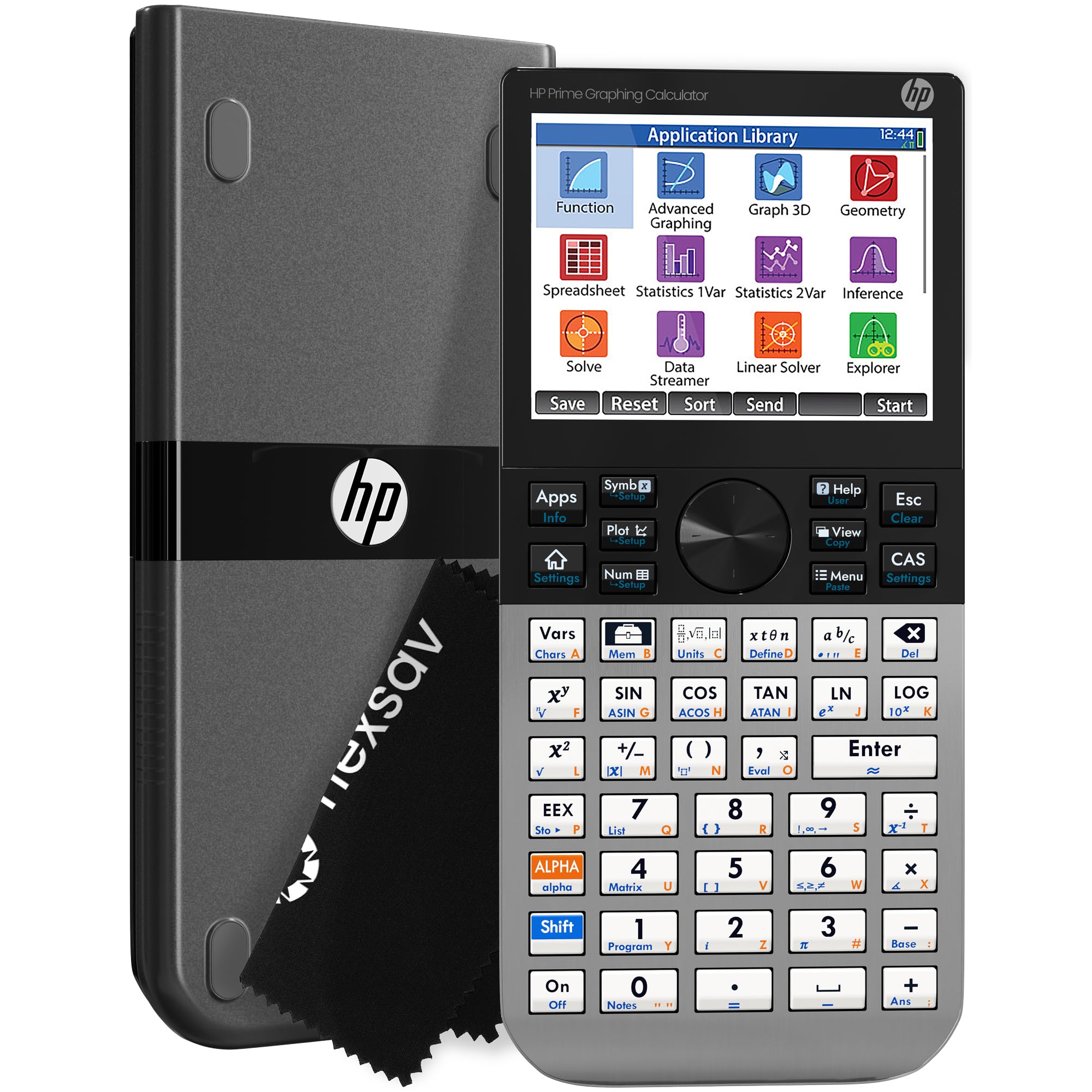
The HP Prime G2 redefines graphing calculator speed with a responsive multi-touch screen and near-instant plotting, making it the fastest model in this roundup. Its Computer Algebra System and wireless connectivity add capabilities far beyond what high school math requires. The metal build feels premium in hand, a clear step up from the plastic TI-84 family.

This calculator suits engineering and STEM students who work with complex symbolic algebra and need to visualize functions quickly. The downside: the operating system is nothing like a TI or Casio, so plan on a weekend of dedicated practice to navigate menus and learn RPN logic. Battery life is adequate for a day of classes, but some units have shown charging port sensitivity over time.

Where the TI-84 Plus CE wins on sheer ubiquity and classroom familiarity, the Prime G2 offers a more modern experience for those willing to adapt. The touch interface makes zooming and panning graphs intuitive, but the display can wash out when the calculator lies flat on a desk. For students whose courses allow CAS and who prioritize speed over tradition, the Prime G2 is a compelling alternative.

Tip: Set aside a few hours to explore the menu system and practice RPN before relying on it in an exam — the learning curve eases quickly with hands-on use.

Bottom line: The HP Prime G2 is the right choice for engineering students who want the fastest graphing and are willing to invest time in learning, but for most high school courses, the TI-84 Plus CE remains the safer standard.

5

NumWorks

NumWorks

Middle school beginner

Our Score 9.4/10
Check Price

Worth Noting

  • Lacks a Computer Algebra System, so symbolic algebra and calculus steps are not built in.
  • Some units can stop responding after months of normal use, requiring a reset or replacement.
CAS
No
Battery
USB-C rechargeable
Display
2.8-inch color LCD
Exam Approval
Approved

The NumWorks stands out with a crisp color display, an intuitive app-based interface, and USB-C charging – a rare combination in this category. Its open-source platform receives regular software updates that add functionality, keeping the calculator current through middle school and college coursework. This makes it the easiest graphing calculator to learn for students new to the category.

This calculator suits students who value a modern, smartphone-like experience over compatibility with classroom norms. It works well for high school math and introductory college courses, but buyers should know that it lacks a Computer Algebra System (CAS) for symbolic algebra, and some units may become unresponsive after several months of normal use – a tradeoff that makes it less suitable for those who depend on long-term consistent performance.

Bottom line: Pick the NumWorks if ease of use and modern design matter most, and you’re comfortable with the possibility of hardware variability. For a more consistent classroom experience, the top pick remains the safer choice.

6

Casio fx-9750GIII

Casio fx-9750GIII

Budget high school

Our Score 9.4/10
Check Price

Worth Noting

  • In classrooms where teachers use TI-specific menu paths, the Casio's different layout can slow you down initially.
  • When comparing multiple graphs or working in dim lighting, the monochrome display can be less clear than color screens.
CAS
No
Battery
4 AAA batteries
Display
Monochrome LCD
Exam Approval
Approved

The Casio fx-9750GIII delivers essential graphing functions - algebra, trig, calculus, and statistics - at the lowest price point among full-featured models. It includes Python programming and USB connectivity, making it future-ready for coding-adjacent courses. Where it falls short of pricier alternatives is the monochrome display: in low light or when comparing multiple graphs, the lack of color reduces readability. The menu navigation also differs from the TI layout common in many US classrooms, so expect a short adjustment period. This trade-off is manageable for independent learners focused on getting the job done without spending extra.

Tip: Casio's menu system differs from TI; spending time with the manual can reduce the adjustment period.

Bottom line: Best for budget-conscious students who need full graphing power and don't mind a monochrome screen or a short learning curve.

How to Choose

Display: Color vs. Monochrome

Color displays let you distinguish multiple graph lines at a glance and make reading complex functions easier. Monochrome models save money but force you to trace curves manually or rely on labels.

If you frequently work with three or more equations simultaneously, color is a significant time-saver. For basic algebra and standardized tests, a monochrome display is adequate.

CAS Capability

A Computer Algebra System (CAS) can manipulate symbolic expressions, solve equations symbolically, and simplify integrals. This is invaluable for calculus, engineering, and advanced math courses.

The catch: many standardized exams (SAT, ACT, some AP tests) ban CAS calculators. If you are in high school, verify your test policies before buying a CAS model. For college engineering, CAS is often required.

Battery Type

Rechargeable lithium-ion batteries are convenient but have a limited lifespan. Some users report charging port failures or battery degradation after 12-18 months.

Models powered by AAA batteries avoid this, but you'll need to keep spares on hand. For long-term reliability, AAA-powered calculators are often more predictable, though you trade off the convenience of USB recharging.

Exam Approval

Every graphing calculator in this guide is approved for the SAT, ACT, AP, and IB exams, but CAS models are restricted on some test sections. Check the specific calculator policy for each test you plan to take.

Some schools also have classroom policies that limit certain models. If you're buying for a specific course, ask the teacher first to avoid an unapproved device.

Ease of Use

The interface design varies dramatically. The NumWorks and TI-84 Plus CE are known for intuitive menus and quick setup, while the HP Prime G2 requires a significant time investment to master.

If you want a calculator that works out of the box with minimal manual reading, choose an 'Easy' or 'Moderate' learning curve model. Power users who enjoy customizing and exploring advanced features will appreciate the steeper learning curve of the HP Prime.

Frequently Asked Questions