Gaming

6 Best Gaming Mouse 2026: Find Your Ideal Weight and Button Count

Which gaming mouse actually suits your play style and budget? This guide cuts through marketing hype to match you with the right sensor, weight, and button layout.

Scroll wheel failures and double-clicking are the top frustrations among gaming mouse owners. Mechanical switches wear down within months for many users, while wireless connectivity drops can wreck a ranked match. But these problems aren't universal — they depend on the design choices each manufacturer makes.

The real divide is between mice built for speed and those built for versatility. Lightweight esports models sacrifice extra buttons and comfort for quick flicks. Heavier alternatives pack more programmable buttons and adjustable weight systems, but can feel sluggish in fast-paced shooters. There's no single perfect mouse; the right one matches your grip style, game genre, and tolerance for trade-offs.

This guide focuses on the four specs that matter most: sensor accuracy, button count, connection stability, and switch type. Understanding how these interact will help you avoid the common pitfalls that lead to buyer's remorse.

1

Logitech G502 Lightspeed

Top Pick
Logitech G502 Lightspeed

All-round gamer

Our Score 9.2/10
Check Price

Worth Noting

  • Free-spin scroll wheel can be too sensitive for precise actions; some units develop wheel play over time.
  • Mechanical switches may register double-clicks after extended use; unit-to-unit variation.
Sensor DPI
25,600
Switch Type
Mechanical
Weight & Shape
114g adjustable, ergonomic
Connection Type
LIGHTSPEED wireless

The G502 Lightspeed retains the iconic ergonomic shape with a thumb rest and contoured buttons, now free of the cable. Its adjustable weight system includes four 3.6g weights that alter the balance from 114g to 130g, letting you fine-tune the heft to your liking.

Eleven programmable buttons — including two DPI switches behind the scroll wheel and three side buttons — provide ample customization for MOBA and MMO commands. LIGHTSPEED wireless delivers a low-latency connection that feels identical to a wired setup, and the 60-hour battery life means infrequent charging.

The sensor tracks without cursor jitter across various surfaces, and the coating resists fingerprints. The rubberized sides offer good grip during extended sessions. Charging via micro-USB takes around two hours, and the mouse remains fully functional while plugged in.

This is the right choice for gamers who want a wireless mouse with a full suite of buttons and the ability to adjust weight. It works well for mixed game types. That said, the scroll wheel's free-spin mode can overshoot in scenarios requiring precise clicks — such as weapon selection or map zoom. After months of heavy use, some units may develop double-clicks or wheel play, a known characteristic of mechanical switches.

Tip: Switch the scroll wheel to click-step mode for precise actions; reserve free-spin for rapid menu navigation.

Bottom line: The G502 Lightspeed pairs an established formula with wireless freedom at a mid-range price — ideal for gamers who want adjustability and button count without chasing ultralight trends.

2

Logitech G PRO X Superlight 2

Logitech G PRO X Superlight 2

Competitive FPS

Our Score 9.0/10
Check Price

Worth Noting

  • Only five programmable buttons limit customization for games outside FPS.
Sensor DPI
44,000
Switch Type
LIGHTFORCE hybrid
Weight & Shape
60g, ambidextrous
Connection Type
LIGHTSPEED wireless, 8K polling

The Logitech G PRO X Superlight 2 sets the standard for ultralight wireless gaming mice at just 60 grams. Its 44,000 DPI sensor and 8K polling rate deliver near-instant tracking, while the PTFE feet glide freely on most surfaces. This is a mouse built for speed, trading the adjustable weight and extra buttons of the G502 Lightspeed for pure flick acceleration.

This mouse is designed for esports and competitive FPS players who use claw or fingertip grips and want every millisecond shaved off their aim. However, click quality can vary — some units may develop double-clicking over time, a possibility worth weighing if you need consistent actuation under pressure.

Battery life reaches 95 hours under normal use, and the LIGHTSPEED wireless connection holds steady during fast-paced matches. The weight and shape suit long gaming sessions without fatigue, making it a practical daily driver for its target audience.

Bottom line: Lightweight, precise, and wireless — the Superlight 2 sets a high bar for competitive performance.

3

Razer Basilisk V3

Razer Basilisk V3

Budget gamer

Our Score 9.2/10
Check Price

Worth Noting

  • Scroll wheel responsiveness may occasionally lag or behave erratically.
  • Unit-to-unit variance can lead to scroll wheel or sensor issues within months of use.
Sensor DPI
26,000
Switch Type
Optical Gen-2
Weight & Shape
101g, ergonomic thumb rest
Connection Type
Wired USB

The Razer Basilisk V3 brings optical Gen-2 switches and 11 programmable buttons to a wired ergonomic shell at a price that undercuts most competitors. Where the G502 Lightspeed adds wireless convenience, the Basilisk V3 focuses on delivering consistent click actuation and a high button count without the battery or connectivity tradeoffs of wireless. Its 26,000 DPI sensor and customizable RGB further close the gap to premium wired mice.

The contoured thumb rest and gradual slope reduce fatigue during long gaming sessions. Razer Synapse provides granular control over DPI steps, button assignments, and lighting effects, allowing players to tailor the mouse to specific games or workflows. The optical switches use light-based actuation, which avoids the double-click failure typical of mechanical switches and provides a crisp feel. The 101g weight gives a solid feel without being too heavy for flick shots.

This mouse suits budget-conscious gamers who prefer a wired connection for zero latency and want more buttons than typical esports mice provide. The tradeoff is being tethered to the desk, which may not suit those who move between setups. Additionally, some units have developed scroll wheel or sensor inconsistencies within months, so checking the unit early is advisable.

Bottom line: A strong wired pick for gamers who want many programmable buttons and optical switches without spending on wireless, though individual unit consistency is worth monitoring.

4

Razer Basilisk V3 X HyperSpeed

Razer Basilisk V3 X HyperSpeed

Budget wireless

Our Score 8.8/10
Check Price

Worth Noting

  • Battery life falls short of the 285-hour claim; AA replacements are needed more often than expected.
  • Wireless connection can drop intermittently in environments with signal interference.
Sensor DPI
18,000
Switch Type
Mechanical Gen-2
Weight & Shape
110g, ergonomic
Connection Type
HyperSpeed wireless, Bluetooth

The Razer Basilisk V3 X HyperSpeed brings the comfortable ergonomic thumb-rest shape to a wireless format at a budget-friendly price. It uses mechanical Gen-2 switches rather than the optical switches in the wired Basilisk V3, and the nine programmable buttons cover macros and key binds for most casual and competitive titles. The 110g weight and balanced chassis keep the mouse nimble without feeling unstable.

This mouse suits casual gamers and daily drivers who prioritize ergonomic comfort and wireless freedom without spending premium money. The AA battery life runs shorter than the advertised 285 hours; under heavy use with RGB on, expect to swap batteries every week or two. Some users have noted occasional wireless disconnects, particularly when using the 2.4GHz dongle near other wireless devices.

For those who don't mind a cable, the wired Basilisk V3 offers optical switches and a lower price, but the wireless convenience of the X HyperSpeed is hard to match at this price point. The tradeoffs in battery longevity and connection stability are real but manageable for buyers who keep a spare AA battery and maintain a clear line of sight to the receiver.

Tip: Use a high-capacity rechargeable AA battery to reduce waste and extend runtime.

Bottom line: A value-driven wireless ergonomic mouse best for casual users who can manage AA battery swaps and have a stable wireless environment.

5

ASUS ROG Spatha X

ASUS ROG Spatha X

MMO

Our Score 8.4/10
Check Price

Worth Noting

  • At 168g, the weight may tire your wrist during long raids or long sessions.
  • The wide shape and aggressive thumb rest do not suit small hands or fingertip grips.
  • Wireless pairing can be unstable; some units lose connection unpredictably.
Sensor DPI
19,000
Switch Type
Hot-swappable mechanical
Weight & Shape
168g, large palm grip
Connection Type
2.4GHz wireless, USB-C, dock

The ASUS ROG Spatha X stands apart by offering hot-swappable mechanical switches and a magnetic charging dock, a combination rare in wireless mice. Its 12-button layout (6 side) suits MMO and MOBA players who need quick access to skills or macros, and the 19,000 DPI sensor handles high-resolution displays smoothly. Battery life reaches up to 67 hours with the dock, which keeps the mouse topped off between sessions.

This mouse is blunt about its audience: it weighs 168 grams, more than most wired models, and the shape is wide with a pronounced thumb rest. Those with large hands and a palm grip will find it stable, but the bulk can cause fatigue during extended play. The wireless connection uses 2.4GHz, but some units may drop pairing or require a USB extender to maintain a stable link — a point to verify if your setup has interference.

Tip: Place the USB receiver on a short extension cable close to the mouse to reduce the chance of wireless drops.

Bottom line: The Spatha X is for MMO players with large hands who want many buttons and don't mind a heavy carry — but check your desk environment for wireless interference before committing.

6

Redragon M612 Predator

Redragon M612 Predator

Ultra budget

Our Score 9.2/10
Check Price

Worth Noting

  • Some units may develop button or scroll wheel issues within months of use.
  • Side buttons and rapid-fire button are easy to press accidentally due to their close placement.
Sensor DPI
8,000
Switch Type
Mechanical
Weight & Shape
126g, ergonomic large
Connection Type
Wired USB

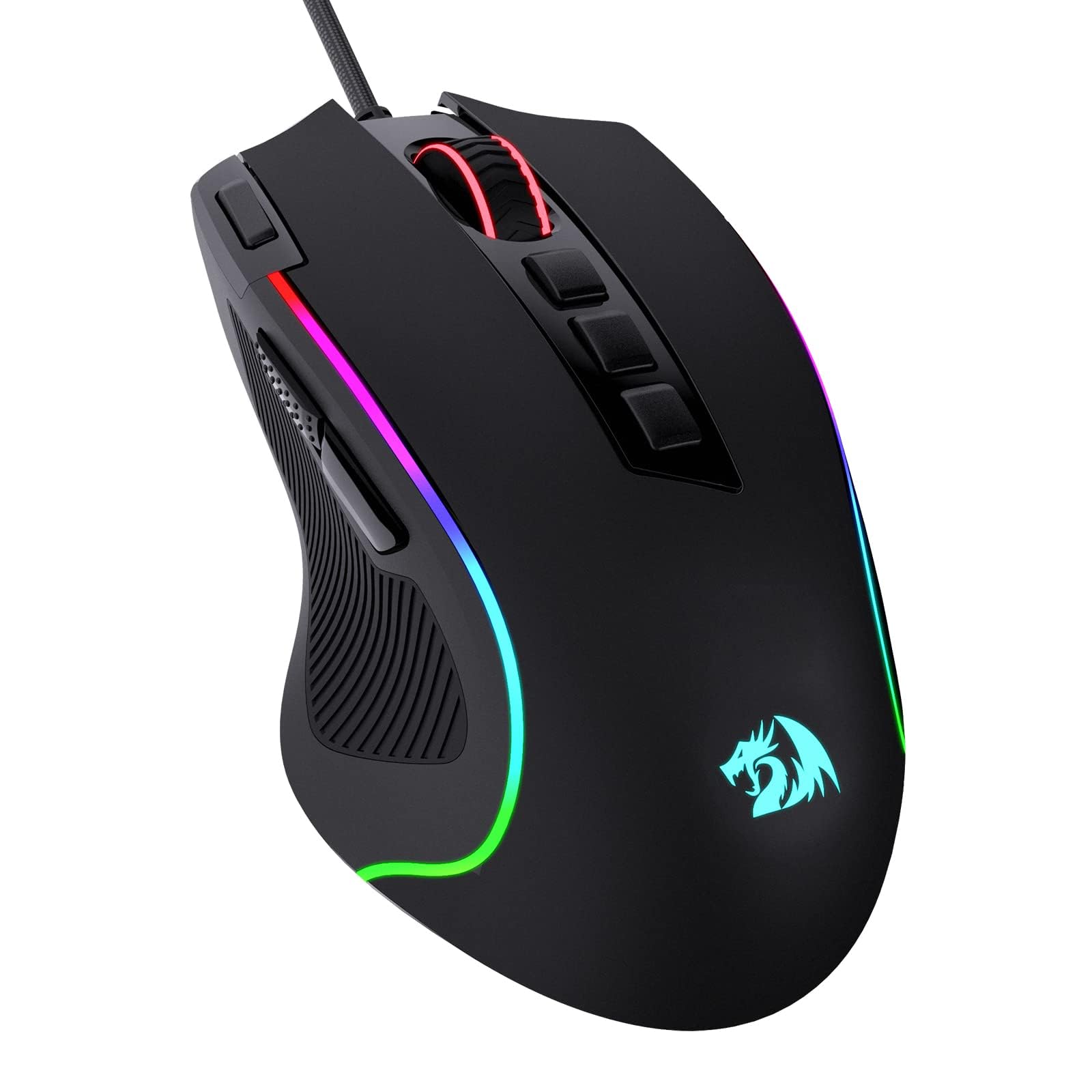
The Redragon M612 Predator delivers a striking combination of 11 programmable buttons and customizable RGB lighting at a price that’s hard to beat. For casual gaming or as a spare mouse, the ergonomic shape accommodates larger hands comfortably. However, the build quality is where corners were cut — some units may develop button or scroll wheel issues within months, and the closely spaced side buttons are prone to accidental presses. This isn’t a mouse for competitive play where consistent performance matters; it’s a capable entry-level option for those who prioritize features over long-term durability.

Bottom line: A smart fit when you need a wired backup mouse or an ultra-budget option for light gaming, provided you accept that individual units vary in longevity.

How to Choose

Sensor DPI and Tracking Accuracy

DPI (dots per inch) determines how far the cursor moves per inch of physical mouse movement. Higher DPI isn't always better — most competitive gamers use 800–1600 DPI with low in-game sensitivity for precise aim. A sensor that can handle high DPI without smoothing or jitter is more important than the max number.

Optical sensors from PixArt (HERO, Focus+) are widely trusted. Laser sensors can introduce acceleration. For flick shots or rapid tracking, a sensor that maintains accuracy at high speeds (like the HERO 25K or Razer Focus Pro) is worth prioritizing over raw DPI.

Programmable Buttons

Button count directly affects your in-game efficiency. MMO players often need 6–12 side buttons for abilities, while FPS players typically use only 2–4. Extra buttons add weight and complexity — a mouse with 11 buttons can be cumbersome for a claw-grip user.

Check the position of side buttons. Some mice place them too close to the main buttons, leading to accidental presses during intense gameplay. Prioritize buttons you can reach without shifting your grip.

Connection Type

Wired mice eliminate battery anxiety and connectivity risk, but the cable can drag. Modern wireless protocols from Logitech (LIGHTSPEED) and Razer (HyperSpeed) have latency comparable to wired. The trade-off is battery life and occasional interference from USB 3.0 ports or crowded 2.4GHz bands.

Polling rate above 1000Hz (like 8K) reduces input lag but consumes more CPU and battery. For most gamers, 1000Hz is indistinguishable from higher rates. Save 8K for esports setups with high-end hardware.

Weight and Ergonomic Shape

Weight heavily influences fatigue and control. Sub-70g mice allow rapid flicks but offer less stability for tracking. Over 100g provides a planted feel but can tire your wrist during long sessions. Adjustable weight systems let you tune the heft, but they add complexity.

Ergonomics are personal. Palm-grip users need a high, wide shell (like the Basilisk series). Claw and fingertip grippers prefer shorter, narrower shapes (like the Viper or Superlight). Thumb rests or pinky ledges can relieve strain for large hands.

Switch Type

Mechanical switches (Omron, Kailh) are common but prone to double-clicking after thousands of actuations due to contact wear. Optical switches use a light beam to register clicks, eliminating debounce delay and contact corrosion. They last longer but often feel stiffer or louder.

Hybrid switches like Logitech's LIGHTFORCE combine a mechanical feel with optical actuation. For users who prioritize reliability over feel, optical switches are the safer bet. Hot-swappable switches (like on the Spatha X) let you replace worn switches without soldering.

Frequently Asked Questions