Creator & Streaming

8 Best DJ Controller of 2026: The Ones That Actually Last and Grow With You

Find the DJ controller that matches your skill level and budget without sacrificing reliability—from beginner to pro.

Most DJ controller listings promise 'professional' features, but the real difference between a good purchase and a regretted one comes down to long-term reliability and software compatibility. Many controllers under $150 develop dead jogs, crackling outputs, or crossfader failure within months—leaving beginners frustrated and out of pocket.

This guide cuts through the marketing noise to focus on controllers that hold up over time, work with your preferred software out of the box, and offer a clear upgrade path as your skills grow. Whether you are learning on a tablet, building a 4-deck setup, or stepping up to a standalone system, the picks here prioritize consistent performance over flashy specs.

1

Pioneer DDJ-FLX4

Top Pick
Pioneer DDJ-FLX4

Beginner, dual software

Our Score 9.4/10
Check Price

Worth Noting

  • Plastic jog wheels and knobs may feel less premium than older Pioneer models
  • Some units develop microphone input issues within the first few months
Decks
2 physical
Software
rekordbox, Serato
Jog Wheels
Capacitive, 4.5 inch
Portability
2.8 kg, USB power

The DDJ-FLX4 ships with both rekordbox and Serato DJ Lite natively, so you don't need to choose sides or pay extra for software. Its Smart Fader and Smart CFX automate smooth transitions, making it easier for newcomers to sound polished during practice sessions. Lightweight at 6.2 pounds, it's also portable enough for mobile setups.

The plastic construction keeps weight down and cost in check, but the jog wheels and knobs lack the solid feel of Pioneer's premium metal units. That tradeoff is irrelevant for home practice or light mobile use, where the controller's feature set more than compensates. A small number of units have developed microphone input issues within months, so early testing of that port is wise if you plan to use a mic regularly.

This controller is best for absolute beginners who want to learn on the two most popular DJ platforms without investing in separate hardware. It also suits mobile DJs who need a lightweight rig with streaming service support (Beatport, Tidal, SoundCloud). If you're a scratch-focused DJ or need rugged metal construction for heavy touring, the FLX4's plastic build and layout will feel limiting.

Tip: If you plan to use the microphone input, test it early during the return period to catch any potential issues.

Bottom line: For beginners who want to learn on both rekordbox and Serato without extra cost, the FLX4 is the most sensible starting point in its price range.

2

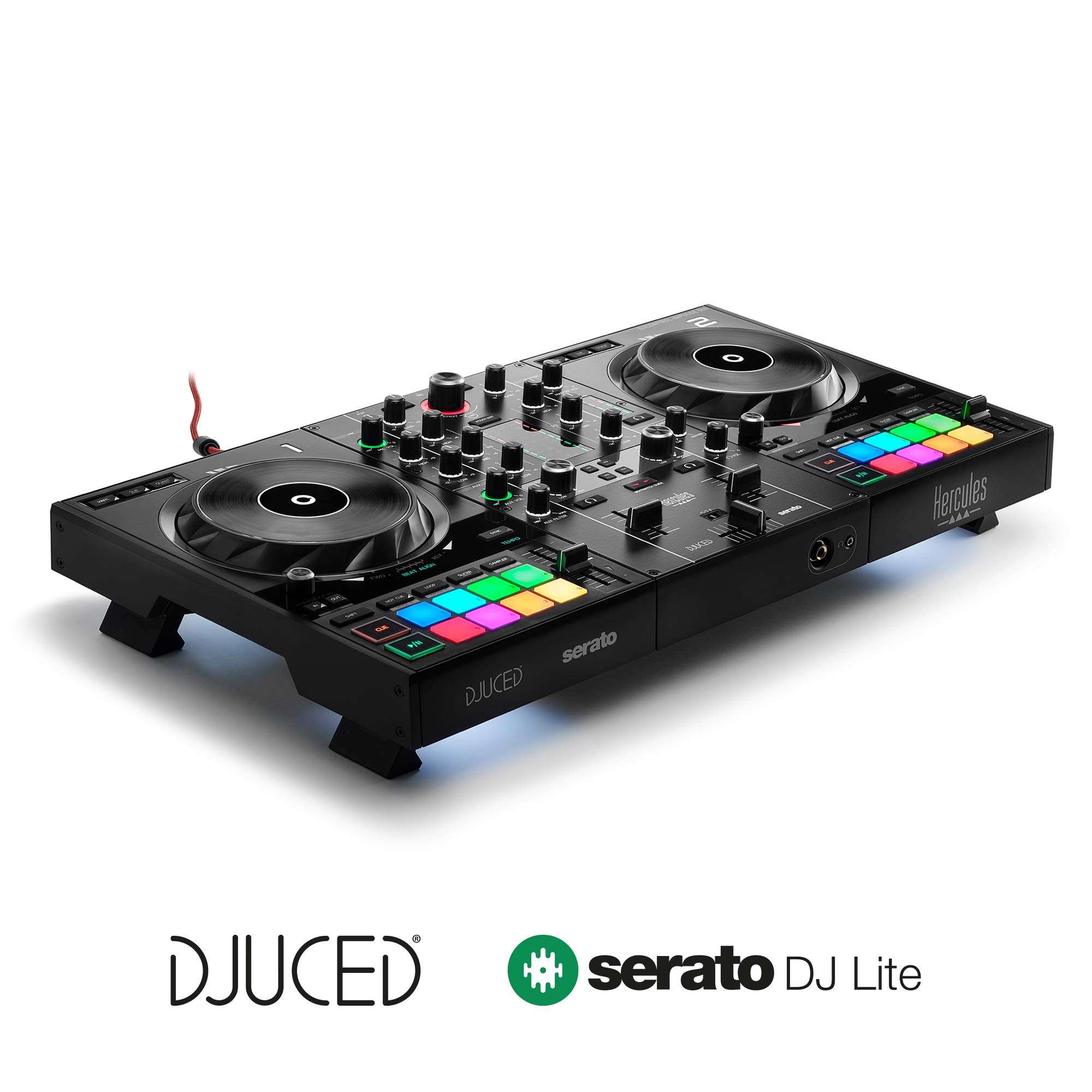
Hercules Inpulse 300 MK2

Hercules Inpulse 300 MK2

Build quality, learning

Our Score 9.2/10
Check Price

Worth Noting

Decks
2 physical
Software
Serato Lite, DJUCED
Jog Wheels
Touch capacitive
Portability
2.5 kg, USB power

A metal top plate and sturdy faders set the Inpulse 300 MK2 apart from plastic competitors in the same price range. The Beatmatch Guide uses colored LEDs to show when two tracks are in sync, teaching manual beatmatching rather than relying on a sync button. This focus on physical build and skill-building makes it feel more substantial than the feature-heavy Inpulse 500, which trades some durability for extra pads and effects.

This controller is made for beginners who want to learn proper technique without cutting corners. The two-deck layout and lack of built-in streaming integration mean it won't support advanced workflows like four-deck sets or live streaming from services like Tidal – that's the domain of higher-priced models such as the Pioneer FLX4. If your goal is to master beatmatching with a controller that can take some travel and table bumps, the Inpulse 300 MK2 delivers exactly that.

Bottom line: For the beginner who prioritizes build quality and wants to learn beatmatching the old-school way, the Inpulse 300 MK2 is a focused, honest choice – just be aware of its two-deck ceiling from the start.

3

AlphaTheta DDJ-FLX2

AlphaTheta DDJ-FLX2

Portability, mobile use

Our Score 8.8/10
Check Price

Worth Noting

  • Bluetooth pairing may drop or fail to connect on certain tablets
  • Small jog wheels and no dedicated effects limit advanced scratching and live remixing
Decks
2 physical
Software
rekordbox, Serato, djay
Jog Wheels
Small capacitive
Portability
1.2 kg, tablet support

USB‑C and Bluetooth connectivity let you plug into a smartphone or tablet without an adapter, and the included beginner course walks through the basics of beatmatching and transitions. At 1.2 kg, it slides into a backpack alongside a laptop — no other controller at this price travels as lightly.

This setup suits travelers, students, or anyone who wants to practice on a tablet before investing in a full‑size deck. The small jog wheels limit scratching precision, and Bluetooth pairing can be inconsistent with some Android tablets — plugging in via USB‑C sidesteps the issue entirely.

Tip: Use USB‑C for audio and power — Bluetooth works best for track navigation, not reliable streaming.

Bottom line: The DDJ‑FLX2 is the right call for mobile learners who want to practice anywhere — grab it if portability matters more than full‑size controls.

4

Numark Mixtrack Platinum FX

Numark Mixtrack Platinum FX

Budget 4-deck

Our Score 9.2/10
Check Price

Worth Noting

  • Crossfader can develop drift or reduced accuracy over time, especially with scratching
  • Plastic build and light weight feel less substantial than dedicated 2-deck controllers
Decks
4 software
Software
Serato Lite
Jog Wheels
Display, 6 inch
Portability
2.4 kg, USB power

The Numark Mixtrack Platinum FX brings 4-deck control and on-jog BPM displays to a price point well under $300, making it one of the most affordable ways to layer multiple tracks without outgrowing the hardware too quickly. While the Pioneer DDJ-FLX4 offers smoother software integration and a more polished feel, the Numark packs more deck access and visual feedback at a lower entry cost.

This controller suits beginners who want to learn 4-deck mixing and hobbyist DJs who value features over long-term build toughness. The plastic chassis and lightweight construction mean it’s better suited for home practice than regular gigs or heavy transport. Crossfader durability can become inconsistent under frequent scratch use, so this is not the best choice for turntablists or mobile performers who need rugged hardware.

Tip: If you rely on the crossfader for scratch techniques, consider reserving this controller for practice and using a sturdier unit for performances.

Bottom line: Ideal for home-based learners who want 4-deck capability without a big budget, but the build quality and crossfader life mean it’s not one to take on the road.

5

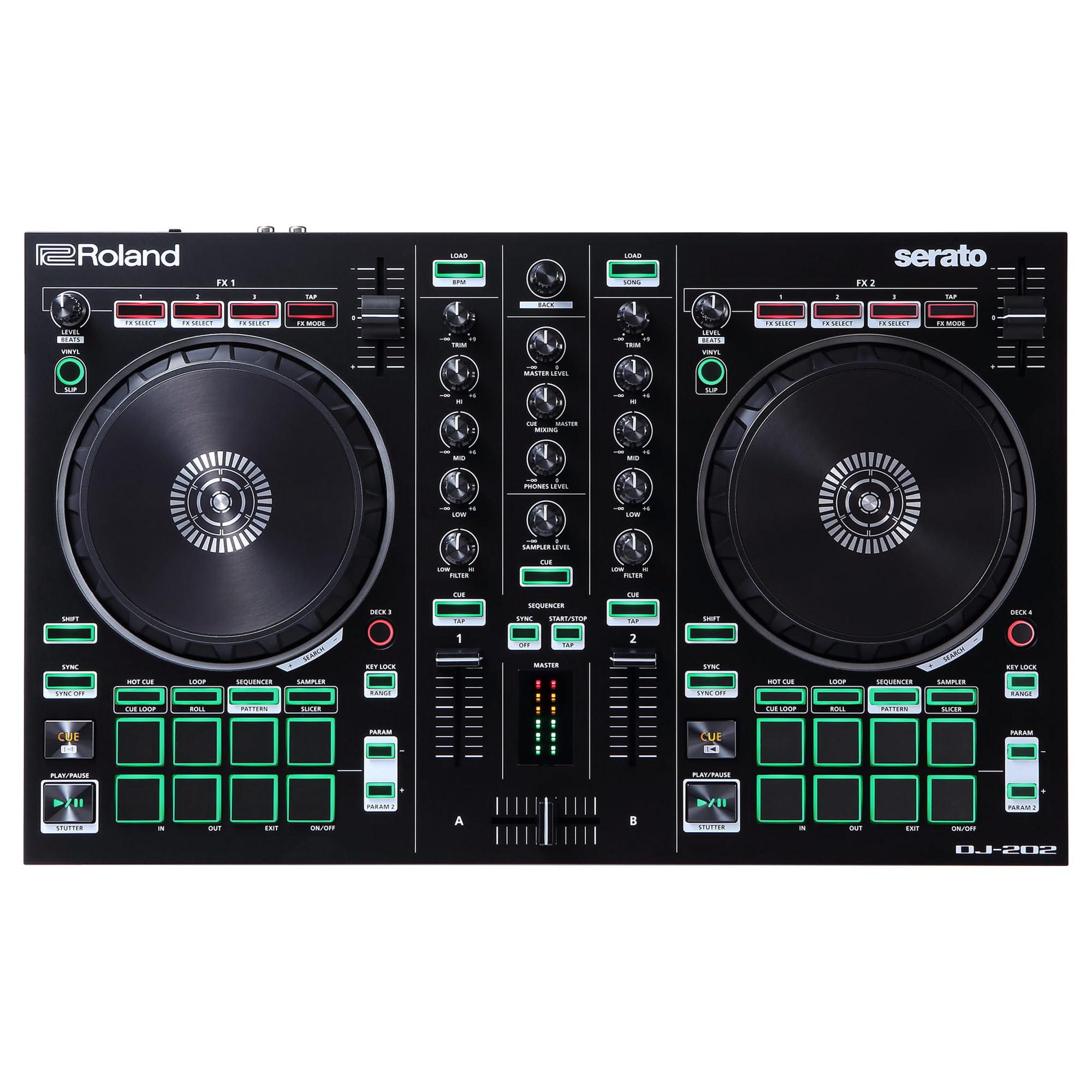
Roland DJ-202

Roland DJ-202

Drum production

Our Score 9.0/10
Check Price

Worth Noting

  • System compatibility can be inconsistent
  • Serato Pro upgrade is not reliably included; some listings ship only Lite, requiring an additional purchase
Decks
4 software
Software
Serato Lite (Pro claim)
Jog Wheels
Capacitive, 5 inch
Portability
2.1 kg, USB power

The Roland DJ-202 stands apart from typical two-deck controllers by integrating a genuine TR-808/909 drum machine and sequencer directly into the hardware. This lets you layer drum patterns on top of tracks in real time without needing a separate box or software, something no other mid-range controller offers. It pairs with Serato DJ Lite, but the promise of a free Pro upgrade has been inconsistent across listings.

This controller suits DJ-producers who want to build beats on the fly and are comfortable verifying their software bundle before purchase. If mixing alone is your focus, the Pioneer DDJ-FLX4 offers simpler software support and wider reliability consensus. The DJ-202’s compatibility can be finicky — some users have run into jog wheel freezes or software crashes — so it’s best for those willing to troubleshoot occasionally.

Tip: Confirm the listing explicitly states Serato Pro is included before buying; otherwise expect Serato Lite.

Bottom line: Best for beat-making DJs who want Roland’s drum sounds in a controller and don’t mind double-checking the software bundle — skip it if plug-and-play reliability is your priority.

6

Pioneer DDJ-FLX10

Pioneer DDJ-FLX10

Pro mobile DJ

Our Score 9.0/10
Check Price

Worth Noting

  • Some units can freeze during extended use, particularly in demanding gig environments
  • DMX lighting control only works fully with rekordbox
Decks
4 physical
Software
rekordbox, Serato Pro
Jog Wheels
On Jog Display
Portability
6.7 kg, AC power

The Pioneer DJ DDJ-FLX10 brings professional-grade features like track separation and built-in DMX lighting control that go well beyond the entry-focused FLX4. It supports both rekordbox and Serato DJ Pro with seamless integration, making it a single hardware solution for mobile DJs who switch between software. The On Jog Display provides track information at a glance, reducing the need to look at a laptop.

This controller is best suited for professional and mobile DJs who need advanced stems control and lighting integration for live sets. The freezing issue, though occasional, may be a concern in demanding gig environments – casual home users are less affected. Additionally, the DMX lighting control works fully only with rekordbox; Virtual DJ users will lose lighting functionality. At 6.7 kg, it is built for a mobile rig rather than backpack portability.

Tip: Use rekordbox to get full DMX lighting capabilities; Virtual DJ integration is limited.

Bottom line: For professional DJs who need track separation and DMX lighting in a single controller, the DDJ-FLX10 delivers – provided you work within rekordbox and accept the occasional freezing risk.

7

Hercules Inpulse 500

Hercules Inpulse 500

Solid mid-range

Our Score 9.2/10
Check Price

Worth Noting

  • Compatibility with Serato DJ Lite can be inconsistent after updates
  • Audio output may lack clarity for quiet listening or critical mixing
Decks
2 physical
Software
Serato Lite, DJUCED
Jog Wheels
Touch capacitive
Portability
5.3 kg, USB power

The Hercules DJControl Inpulse 500 offers a premium feel at a mid-range price with its metal top plate, RGB pads, and retractable feet that let you angle the mixer. It includes the Beatmatch Guide and DJUCED tutorials to help beginners learn, and works with both Serato DJ Lite and DJUCED. However, at over 11 pounds it's heavier than typical 2-deck controllers, and the audio output lacks the clarity needed for critical listening. The Pioneer DDJ-FLX4 provides broader software compatibility and a larger beginner community, but the Inpulse 500 is a capable alternative if you prefer the Hercules ecosystem.

Bottom line: A solid choice for beginners who want a sturdy controller with built-in learning tools, especially if they prefer the Hercules ecosystem and don't need ultra-portability or studio-grade sound.

8

Numark Mixtrack Pro FX

Numark Mixtrack Pro FX

Budget 2-deck

Our Score 9.2/10
Check Price

Worth Noting

  • Software freezes and hardware failures can occur between units, especially RCA port issues.
  • Jog wheel touch sensitivity may be unresponsive on some copies, affecting scratching precision.
Decks
2 physical
Software
Serato Lite
Jog Wheels
Capacitive, 5 inch
Portability
2.3 kg, USB power

The Numark Mixtrack Pro FX keeps costs low with a full set of performance pads and paddle-triggered FX, making it a tempting entry point for casual home mixing. However, the tradeoff for that price is inconsistent build quality: some units encounter Serato Lite freezes or RCA port failure within the first year, and jog wheel touch sensitivity can be unresponsive on certain copies. This controller works best for budget-conscious beginners who are willing to accept some unit-to-unit variance and don't need a dependable rig for regular performances.

Bottom line: A reasonable pick only if your budget is tight and you're prepared to handle possible hardware quirks. For a safer entry, consider the Hercules Inpulse 300 MK2 or Pioneer FLX4.

How to Choose

Number of Decks

A 2‑deck controller is the standard for learning and most club mixing. 4‑deck controllers let you layer tracks and manage loops without switching, but they often require Serato Pro or a paid upgrade to unlock full functionality. For beginners, 2 decks are plenty; start there unless you already plan to produce or juggle multiple sources.

Software Compatibility

Not all controllers work with every DJ software. Some come bundled with Serato DJ Lite, which lacks stems, 4‑deck mixing, and keylock. If you prefer rekordbox or Traktor, make sure the controller includes native support. The safest bet is a controller that works with multiple platforms out of the box so you can switch ecosystems later.

Build Quality

Plastic faders and knobs wear faster under regular use. Metal top plates add weight but resist flexing and keep the electronics aligned. A controller that feels sturdy at the store often survives years of home practice, while lightweight plastic units may develop loose jogs or crackling outputs within months. Weigh portability against durability based on how often you move it.

Jog Wheel Size and Responsiveness

Larger jog wheels (6‑7 inches) give you more control for scratching and pitch bending. Smaller wheels are fine for basic beatmatching but make precise scratching difficult. Capacitive touch platters respond to surface contact, while mechanical ones can wear out. If scratching is a priority, look for wheels with a textured surface and adequate weight.

Performance Pads and Effects

Performance pads trigger cues, loops, and samples. The number of pads (8 or 16) determines how many functions you can access without a menu. Effects like filters and echo add color but aren’t critical for beginners. Some controllers include a built‑in drum machine or sequencer, which is useful for live production but adds complexity.

Portability and Connectivity

If you plan to practice on a laptop at home, a 3‑4 kg controller is fine. For travel or tablet use, look for USB‑C power and sub‑2 kg weight. Bluetooth support is rare and often unreliable—stick to wired USB for consistent performance. Check that auxiliary inputs can handle a phone or microphone if you intend to host parties.

Frequently Asked Questions