TVs & Video

10 Best Blu Ray Player of 2026: Smart Features That Actually Work

Not all 'smart' Blu-ray players include Wi-Fi or work reliably. This guide helps you pick the right player for your discs, TV, and streaming needs.

The Blu-ray player market is shrinking, but the flood of 'smart' labels hasn't shrunk with it. Many players claim streaming capabilities but lack Wi-Fi or have outdated app support. It's easy to end up with a disc-only machine when you expected a media hub.

The real choice comes down to value versus absolute video quality. A premium player can deliver reference-level HDR processing, but often at the cost of a sluggish interface and occasional reliability issues. A well-rounded mid-range model delivers 90% of the picture quality with built-in Wi-Fi and consistent performance.

This guide focuses on players that deliver on their core promises -- whether that's reliable 4K playback, Dolby Vision support, or simple disc spinning. Match the trade-off to your priorities and you'll find the right fit.

1

Sony UBP-X700M

Top Pick
Sony UBP-X700M

4K & streaming

Our Score 8.8/10
Check Price

Worth Noting

  • Some units may freeze during 4K playback, requiring a power cycle to restore function.
  • Remote control has small, cramped buttons that can be unresponsive.
Region
BD A, DVD 1
4K vs HD
4K
Streaming
Wi-Fi, apps
Audio Codecs
Dolby Atmos, DTS:X

The Sony UBP-X700M produces detailed 4K images with Dolby Vision support, delivering rich HDR color and contrast. It handles a wide array of disc formats — from 4K Blu-ray to SACD and DVD-Audio — making it a flexible hub for physical media. Built-in Wi-Fi and streaming apps add convenience for those who occasionally watch online content.

Picture quality is consistently praised, with users noting the vibrancy of Dolby Vision content. However, some units may experience freezing during 4K playback, requiring a power cycle to resume operation. This happens unpredictably and is not tied to any particular disc type or firmware version.

This player suits buyers who want Dolby Vision on a budget and already have a dedicated streaming device — the built-in apps are usable but secondary. Those who need flawless reliability for scheduled movie nights should consider the Panasonic UB820, which offers steadier playback at a higher price. The remote layout is also a minor frustration for users with larger hands.

For everyday disc watchers who prioritize picture quality over absolute reliability, the X700M delivers strong performance at a competitive price. The occasional freezing is a known possibility, but many owners report months of trouble-free use.

Tip: A universal remote or the Sony smartphone app offers better ergonomics than the included remote.

Bottom line: A capable 4K player that balances Dolby Vision and disc versatility with a mid-range price — best for those who can accept the occasional hiccup in favor of cost savings.

2

Panasonic DP-UB820-K

Panasonic DP-UB820-K

Picture purists

Our Score 8.6/10
Check Price

Worth Noting

  • Menu navigation can feel sluggish when browsing disc titles or settings.
  • The disc tray may not open or read discs reliably in some units.
Region
BD A, DVD 1
4K vs HD
4K
Streaming
Wi-Fi, apps
Audio Codecs
Dolby Atmos, DTS:X

The Panasonic UB820 delivers the most refined 4K picture quality available in a dedicated player, driven by its Hollywood Cinema Experience processor. It supports both Dolby Vision and HDR10+, handles HDR to SDR conversion with precise accuracy, and upscales standard content without artifacts. The HCX processor optimizes content frame by frame, extracting maximum detail from 4K discs. Build quality is solid, and operation is whisper-quiet, reinforcing its home theater focus.

Where the top pick balances features and price, the UB820 goes all-in on video processing. Its HDR conversion is a standout for mixed-display setups, and it handles high-resolution audio formats. Compared to the Sony X700M, the UB820 offers more advanced video processing and dual HDR support but sacrifices interface responsiveness. The tradeoff is a slower user interface and occasional disc tray issues that the more balanced top pick avoids.

This player suits home theater purists with a Dolby Vision or HDR10+ display who demand reference-level image quality. The sluggish interface and possible disc tray failures mean it is best for those who load a disc and press play rather than browse menus or use smart features. It is not for budget-conscious buyers or those who need a fast, modern interface.

Tip: Set the player to auto-play discs to bypass the home screen and avoid interface lag.

Bottom line: For home theater enthusiasts who value video performance above all else, the UB820 delivers reference-quality HDR that justifies its premium price. It is not the most practical player for everyday browsing, but for disc-centric viewing it is unmatched.

3

Tojock EVP-101

Tojock EVP-101

Budget 1080p

Our Score 8.8/10
Check Price

Worth Noting

  • In a dimly lit room, the small remote buttons are hard to read, frustrating operation without backlighting.
Region
BD A, DVD free
4K vs HD
1080p
Streaming
No Wi-Fi
Audio Codecs
Dolby TrueHD, DTS-HD

While some budget players emphasize boot speed, the Tojock EVP-101 covers a wider range of disc types — from BD-R to VCD and CD — in a footprint that slips easily into tight entertainment centers. It handles standard Blu-ray and DVD playback without fuss, making it a straightforward option for HDTV setups.

This player suits viewers who already have a streaming stick or smart TV and just need a disc spinner for a guest room or secondary setup. The remote's small, unlit buttons can be hard to read in dim lighting, so it's best placed in a room where you can control the ambient light or plan to use a universal remote.

For the price, the EVP-101 delivers consistent playback across optical media and includes useful audio formats like Dolby TrueHD and DTS-HD Master Audio. It is a no-nonsense disc player that does not pretend to be more — a practical fit for its intended use case.

Tip: Use a universal remote or keep a nearby lamp on when using the included remote in low light.

Bottom line: If you need a basic disc player for an HDTV and can work around a finicky remote, this is a cost-effective choice.

4

Panasonic DP-UB420-K

Panasonic DP-UB420-K

Value 4K

Our Score 8.4/10
Check Price

Worth Noting

  • Remote control has a cluttered layout with many small buttons that can be frustrating to use without memorizing positions.
  • Some units may stop reading discs or freeze after several months of use, so checking return policy is wise.
Region
BD A, DVD 1
4K vs HD
4K
Streaming
Wi-Fi, apps
Audio Codecs
Dolby Atmos, DTS:X

The Panasonic UB420-K delivers exceptionally sharp 4K imagery with HDR10+ support and upscaling that breathes new life into 1080p discs. Its HCX processor matches the picture quality of players that cost nearly twice as much, making it a standout for buyers who prioritize raw video performance over format flexibility.

This player is best suited for disc collectors with HDR10+ displays who don't need Dolby Vision and are comfortable with a few caveats. The remote control has a dense, button-heavy layout that can take time to learn, and a small percentage of units may develop playback issues after months of use. For home theater setups where the player sits out of sight and a universal remote handles control, the UB420 remains a compelling choice.

Support for high-resolution audio files via USB or network adds value for audiophiles on a budget, with FLAC and DSD playback that rivals dedicated media streamers. The twin HDMI outputs allow separate audio and video paths, useful for older receivers that lack 4K passthrough.

Tip: Using a universal remote or the Panasonic app can bypass the included remote's layout issues.

Bottom line: If you can work around the remote and accept a small reliability risk, the UB420 offers the best picture quality per dollar in the 4K Blu-ray player market.

5

Sony S1500RF

Sony S1500RF

Region-free

Our Score 8.8/10
Check Price

Worth Noting

  • Sold without warranty
  • Streaming apps are based on an older Sony platform; some services may no longer update or function.
Region
Region-free
4K vs HD
1080p
Streaming
Wi-Fi, apps
Audio Codecs
Dolby Digital, DTS

The Sony S1500RF plays Blu-rays from any region (A/B/C) and DVDs from any region (0-9, PAL/NTSC) without disc-size tricks or additional codes. For collectors with international discs, this is the direct solution. The compact chassis and simple setup add to its appeal for those who need disc playback across region boundaries.

This player targets international travelers, expats, or collectors with a mixed-region library. It is sold as a modified unit by third-party sellers without a manufacturer warranty — if it stops working, there is no official support. The streaming app library is based on an older Sony platform, so expect limited app availability going forward. For pure disc playback in a multi-region household, it does the job, but streaming is best handled by a separate device.

Despite its age, the player delivers crisp 1080p video with Dolby Digital and DTS audio support. PAL/NTSC conversion works smoothly on most TVs, making it a reliable disc transport for standard collections. At a mid-range price, it offers region-free playback that dedicated multi-region players often charge more for, but the lack of warranty and aging platform mean this is a niche buy, not a long-term investment.

Tip: Use a dedicated streaming device like Roku or Fire Stick for app access — the built-in apps won't see ongoing support.

Bottom line: If you need one player to handle discs from any region, the S1500RF delivers — just accept the warranty risk and plan for separate streaming.

6

Sony BDP-S1700U

Sony BDP-S1700U

Disc only

Our Score 8.8/10
Check Price

Worth Noting

  • No Wi-Fi or Ethernet
  • Region-locked to Blu-ray A and DVD 1
Region
BD A, DVD 1
4K vs HD
1080p
Streaming
No Wi-Fi
Audio Codecs
Dolby TrueHD, DTS

The Sony BDP-S1700U boots in under a second with Super Quick Start mode, faster than most budget players. Unlike the top budget pick which includes streaming, this Sony focuses solely on disc playback, trading online features for speed and simplicity.

This player suits households that already have a smart TV or streaming stick for online content. It has no Wi-Fi or Ethernet port, so Netflix, YouTube, and other apps are not available. Additionally, it plays only region A Blu-rays and region 1 DVDs, which is standard for US releases but a limitation for international discs. For buyers who need a fast, no-frills disc player from a major brand, this is a straightforward fit.

DVD upscaling gives standard-def discs a cleaner, sharper look on 1080p screens, and the compact design slides easily into tight entertainment centers. The tradeoff is clear: you get a dedicated disc spinner with no smart features, but at a lower price than many streaming-equipped rivals.

Tip: Pair with a streaming stick or smart TV to cover online content – this player handles discs only.

Bottom line: A fast, no-frills disc player for buyers who already have a smart TV or streaming stick, offering good upscaling and a major brand at a budget price.

7

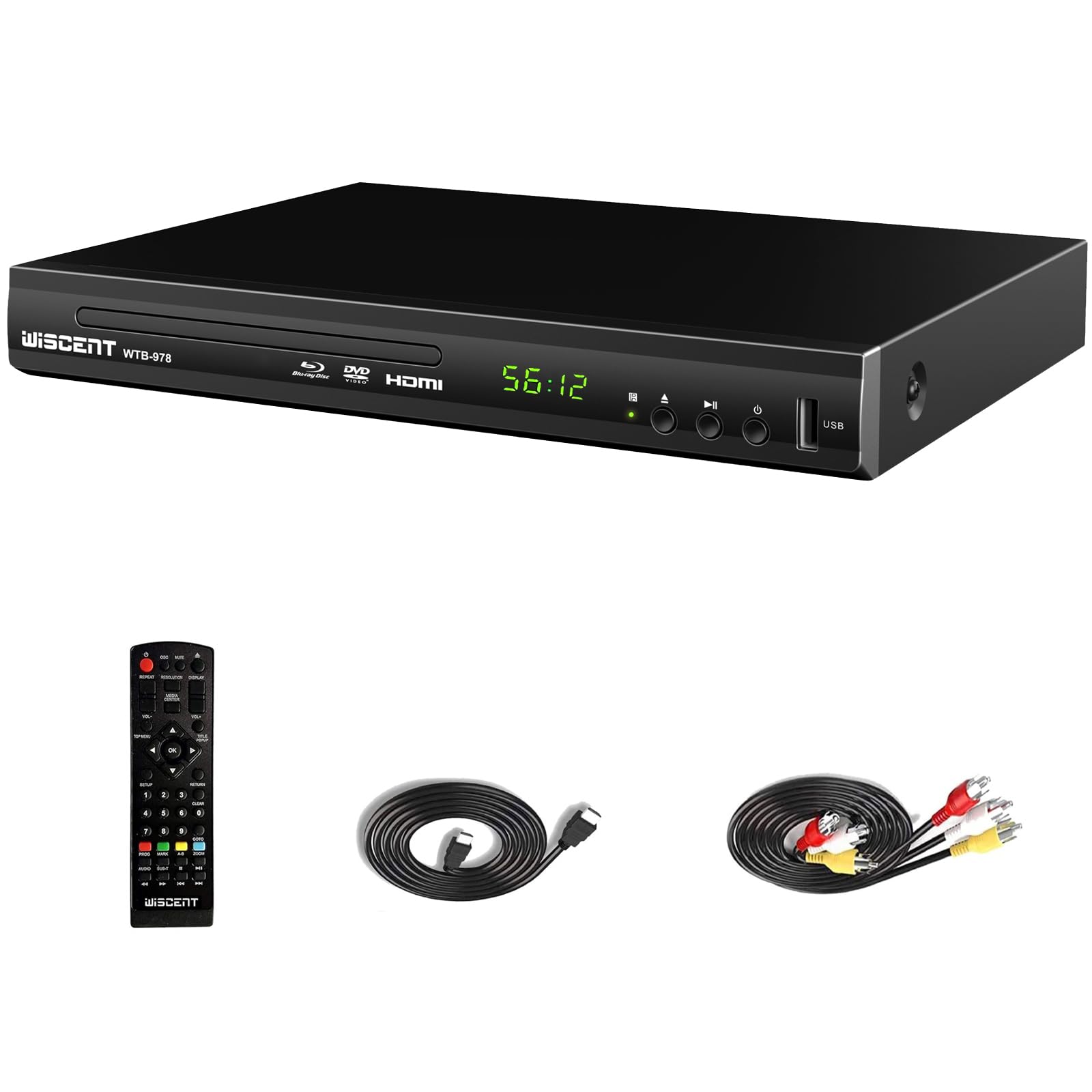
WISCENT WTB-978

WISCENT WTB-978

Budget alternative

Our Score 8.8/10
Check Price

Worth Noting

  • Remote can have unresponsive buttons; some units ship with a non-working remote.
Region
BD A, DVD free
4K vs HD
1080p
Streaming
No Wi-Fi
Audio Codecs
Dolby TrueHD, DTS-HD

The WISCENT WTB-978 delivers consistent playback across Blu-ray, DVD, VCD, and CD formats at a budget-friendly price — setup takes minutes thanks to the included HDMI and AV cables. It offers good value for a 1080p-only player, with Dolby Digital and TrueHD audio support. The remote, however, can present issues: some units arrive with unresponsive buttons or a finicky feel, which may frustrate viewers who rely heavily on the remote for navigation. This player is nearly identical in specs to the top budget pick (the Tojock) but swaps a larger user base for an extended 18-month warranty — a reasonable trade if you value coverage over polished controls.

Bottom line: Consider the WISCENT if the longer warranty matters more than a flawless remote experience — otherwise the Tojock remains the safer budget pick.

8

LONPOO LP-100 Metal

LONPOO LP-100 Metal

HDD playback

Our Score 8.8/10
Check Price

Worth Noting

  • Confusing remote with small, poorly labeled buttons.
  • Some units may experience disc reading or connectivity issues over time.
Region
BD A, DVD free
4K vs HD
1080p
Streaming
No Wi-Fi
Audio Codecs
Dolby Digital, DTS, MP3

The LONPOO LP-100 stands apart in the budget segment by supporting external hard drives up to 2TB for media playback – a feature not common at this price. Setup is quick, and the metal build adds some heft. But the remote control uses tiny, poorly labeled buttons that can be frustrating, and a subset of units have shown disc reading or connectivity issues. This player is best suited for those who need HDD playback and can tolerate remote quirks and potential unit variability.

Tip: Use a universal remote or the player's front panel buttons to avoid the included remote's quirks.

Bottom line: A good fit if HDD playback is a priority and you can work around the remote design and possible disc reading variability.

9

Panasonic BD84P-K

Panasonic BD84P-K

Hi-res audio

Our Score 8.6/10
Check Price

Worth Noting

  • Remote is small, cramped, and difficult to use in darkness.
  • Some units may develop playback issues after several months of use.
Region
BD A, DVD 1
4K vs HD
1080p
Streaming
No Wi-Fi
Audio Codecs
Dolby Digital, FLAC, DSD

The Panasonic BD84P-K focuses on audio playback, supporting FLAC, DSD, and WAV files directly from USB drives at a price point where most players skip hi-res audio. Its compact, minimalist design and simple setup work well for secondary systems or bedroom setups. However, this is a pure 1080p player with no streaming apps or 4K support, so it only makes sense for buyers who already have a separate streaming device or don't need smart features. The remote is tiny and hard to operate in low light, and some units may develop disc-reading issues after extended use.

Tip: A third-party universal remote or media remote app can replace the included controller for easier use.

Bottom line: Best suited for budget-conscious listeners who want hi-res audio from a simple disc player and can accept the cramped remote and lack of streaming.

10

Sony UBP-X800M2

Sony UBP-X800M2

SACD audio

Our Score 8.8/10
Check Price

Worth Noting

  • Freezing during 4K playback can occur, requiring a power cycle to resolve.
  • Remote control is basic with no backlight and may feel unresponsive at times.
Region
BD A, DVD 1
4K vs HD
4K
Streaming
Wi-Fi, apps
Audio Codecs
Dolby Atmos, DTS:X, SACD

The Sony X800M2 delivers strong 4K picture quality with Dolby Vision and immersive Dolby Atmos sound, along with high-resolution audio playback including SACD and DVD-Audio. Build quality is solid and operation is quiet. However, freezing during 4K playback can occur, requiring a power cycle in some cases, making it a gamble for reliability. This player is best for audiophiles who prioritize SACD and DVD-Audio compatibility and are willing to accept occasional hiccups in exchange for format support.

Bottom line: Fit for audiophiles who need SACD playback and can handle occasional freezing; otherwise, the Sony X700M offers more consistent operation for similar features.

How to Choose

4K vs Full HD Playback

A 4K player offers native 2160p resolution and better upscaling for standard Blu-rays. However, the upscaling quality depends heavily on the video processor inside the player. Cheaper 4K models often introduce artifacts, while premium processors (like Panasonic's HCX) retain fine detail. If you watch mostly 1080p discs on a 4K TV, a strong upscaling player is more important than native 4K playback.

HDR Support

High Dynamic Range formats (HDR10, HDR10+, Dolby Vision) require both a compatible player and a compatible TV. Dolby Vision uses dynamic metadata for better scene-by-scene brightness, but it's useless if your TV only supports HDR10. HDR10+ is similar but less common. Check your TV's HDR support before paying extra for a player with a format you can't use.

Streaming Capabilities

Many budget players advertise 'smart' features but lack Wi-Fi entirely. Even models with Wi-Fi may have outdated app stores that lose Netflix or YouTube support after a few years. If you plan to stream, verify that the player has built-in Wi-Fi and a recent firmware update history. A separate streaming stick often outperforms a player's smart platform.

Audio Codecs

Dolby Atmos and DTS:X require a compatible AV receiver or soundbar to decode the object-based audio. Some players only output the raw bitstream, leaving decoding to the receiver. Others can decode internally and output PCM. For hi-res audio fans, check support for FLAC, DSD, and WAV files. Players with dedicated audio outputs (like twin HDMI) isolate noise for cleaner sound.

Region Compatibility

Blu-ray discs are locked by region code (A, B, C), and DVD discs by region number (1-8). Most players sold in the US are locked to Region A and DVD Region 1. Region-free players are modified units that bypass these locks, but they often come without a manufacturer warranty and may lose firmware support. Only buy region-free if you regularly play discs from multiple regions.

Frequently Asked Questions