Creator & Streaming

15 Best Podcast Mixer of 2026: Reliable Recording Without a Computer

Find a podcast mixer that matches your show size and workflow – from portable 4-mic recorders to studio-grade consoles – without wasting money on features you don't need.

Portable all-in-one recorders promise a complete podcast studio in your bag, but many fall short on battery life or reliability. Traditional analog mixers offer hands-on control but require a computer to capture audio. The right choice depends on how you record, not just how many inputs you think you need.

The real trade-off is between built-in recording flexibility and analog sound quality. Battery-powered units let you record anywhere, but they drain quickly with multiple mics. USB-equipped analog mixers give you warm preamps and effects, yet their recording output can be too weak without an extra interface.

This guide focuses on matching your show's typical setup – number of hosts, remote guests, and preferred workflow – to the mixer type that actually delivers clean, reliable recordings without unexpected dropouts or complexity.

1

Zoom PodTrak P4

Top Pick
Zoom PodTrak P4

Remote interviewers

Our Score 9.4/10
Check Price

Worth Noting

  • Battery life may drop sharply when phantom power is active
  • Some units can experience random recording stops or SD card errors
Power
2x AA (3.5h)
Recording
SD card multi-track
XLR Inputs
4

Four XLR inputs with clean preamps fit in a device that runs on AA batteries and records directly to SD card. Each guest gets their own headphone volume control, and the interface is intuitive enough to set up between takes. Battery life drops to under an hour when powering condenser mics via phantom power, so plan for a USB power bank or AC adapter during longer sessions.

This suits remote interviewers who need a grab-and-go rig, mobile podcasters recording in the field, and budget-conscious shows with multiple hosts. The tradeoff is battery endurance with phantom power and the absence of built-in effects like compression or EQ — you handle that in post. Occasional recording interruptions have been noted on some units, so testing your SD card ahead of time is wise.

Tip: Use a USB power bank or AC adapter for sessions longer than an hour with phantom-powered mics.

Bottom line: For mobile podcasters who need four mic inputs and want to skip the laptop, the PodTrak P4 delivers at a price that leaves room for better microphones.

2

RØDE RCP II

RØDE RCP II

Professional podcasters

Our Score 8.8/10
Check Price

Worth Noting

  • Occasional unexpected shutdowns or USB port glitches may interrupt live sessions.
  • Premium pricing may not appeal to those who only need basic recording capabilities.
Power
AC
Recording
SD card, USB-C
XLR Inputs
4

The RØDECaster Pro II delivers the cleanest preamps and most polished integrated processing in its class, with APHEX suite that adds presence and compression without external gear. This makes it a strong choice for podcasters who want studio-quality audio from a single device.

That polish comes with a caveat: some units can shut down unexpectedly or develop USB port glitches, so a backup recorder is advisable for critical sessions. The premium price also stands out against simpler recorders like the PodTrak P4, which offers reliable basics at a lower cost. This console suits professionals who value audio quality above all and are prepared for occasional hiccups.

Tip: An extended warranty and a backup recorder can provide peace of mind for important recordings.

Bottom line: Podcasters who prioritize audio fidelity and want an all-in-one workflow will find the RCP II compelling if they can accept occasional glitches.

3

TC-Helicon GoXLR

TC-Helicon GoXLR

PC streamers

Our Score 9.2/10
Check Price

Worth Noting

  • Windows-only platform limits access for Mac users.
  • Software crashes and freezes can occur, and the sampler may become unresponsive.
Power
USB
Recording
USB
XLR Inputs
1

Unlike studio-focused consoles with APHEX processing, the GoXLR prioritizes real-time vocal effects and a built-in sampler for dynamic live interaction. Its motorized faders and extensive routing give streamers hands-on control over audio sources.

This mixer suits PC streamers and vocal producers who want deep customization and effects. Windows-only and occasional software crashes mean it’s not a fit for Mac users or those needing 100% reliability for live broadcasts.

Tip: Save your sampler settings and profiles regularly to minimize disruption from software crashes.

Bottom line: Streamers who want deep vocal effects and sampler control will get the most from the GoXLR, provided they work on Windows and can handle occasional software hiccups.

4

Yamaha MG10XU

Yamaha MG10XU

Musicians

Our Score 9.2/10
Check Price

Worth Noting

  • USB output may be too low for direct recording without an external preamp or interface
Power
AC
Recording
USB 2-in-2-out
XLR Inputs
2

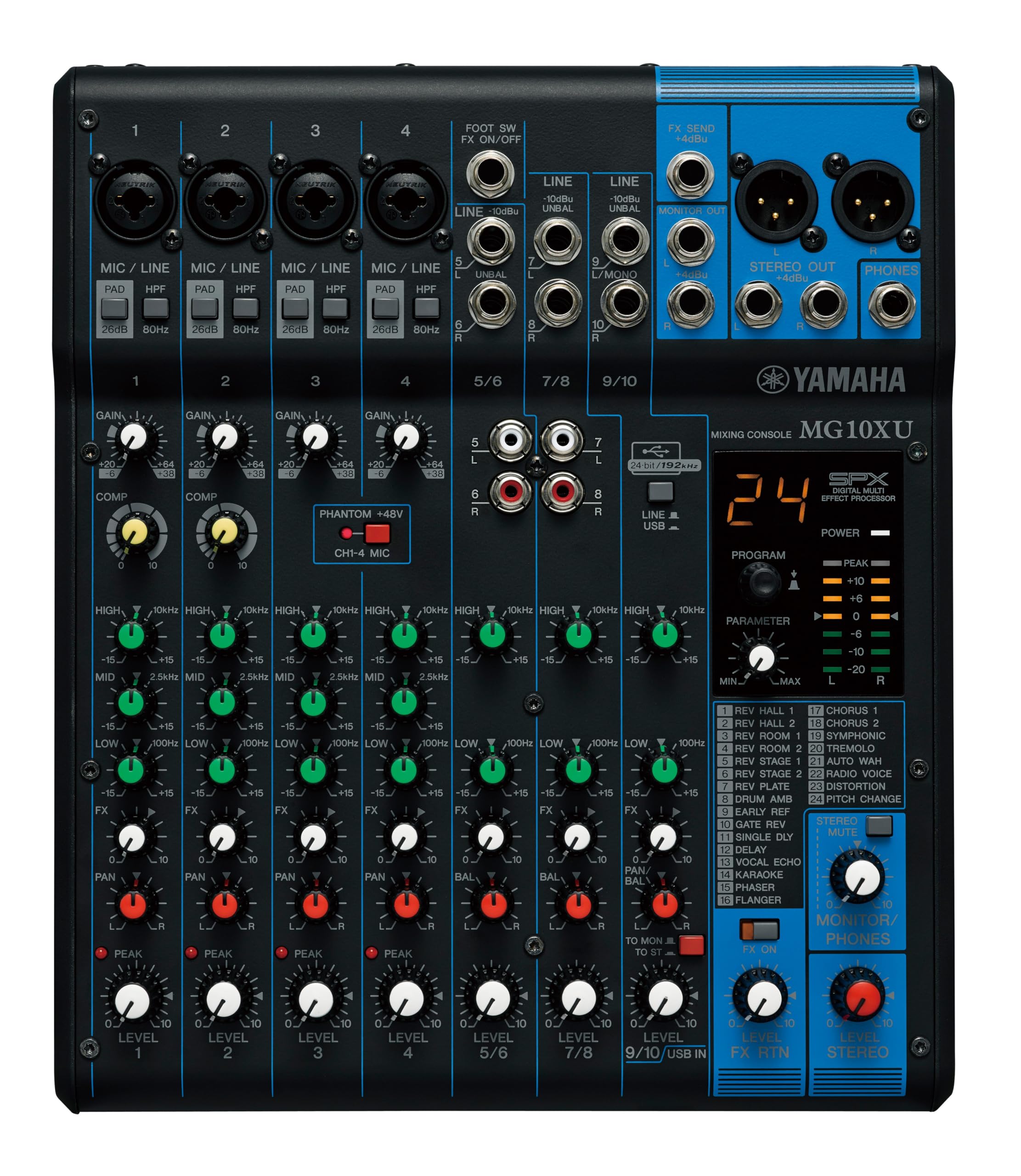
The Yamaha MG10XU brings clean D-PRE preamps and one-knob compressors to vocal clarity, along with SPX reverb and delay effects that are rare in this price range. Unlike the PodTrak P4's all-in-one recorder approach, the MG10XU is a traditional analog mixer — you get faders, EQ, and effects in a sturdy chassis, but no SD recording or multitrack USB.

This mixer suits podcasters who already own an audio interface and want a dedicated mixing board for live effects and EQ shaping. However, the USB output may deliver low volume that requires an external preamp or interface for clean recording — so it's not a standalone USB solution.

Tip: Connect an external preamp or audio interface between the MG10XU and your computer to compensate for the low USB output.

Bottom line: A capable analog mixer for vocal effects and hands-on control, best paired with a separate audio interface for podcast recording.

5

Zoom PodTrak P8

Zoom PodTrak P8

Multi-host podcasts

Our Score 9.4/10
Check Price

Worth Noting

  • Battery life is roughly two hours
  • Sample rate locked at 44.1 kHz, requiring conversion for video editing workflows.
Power
2x AA (2h)
Recording
SD card multi-track
XLR Inputs
6

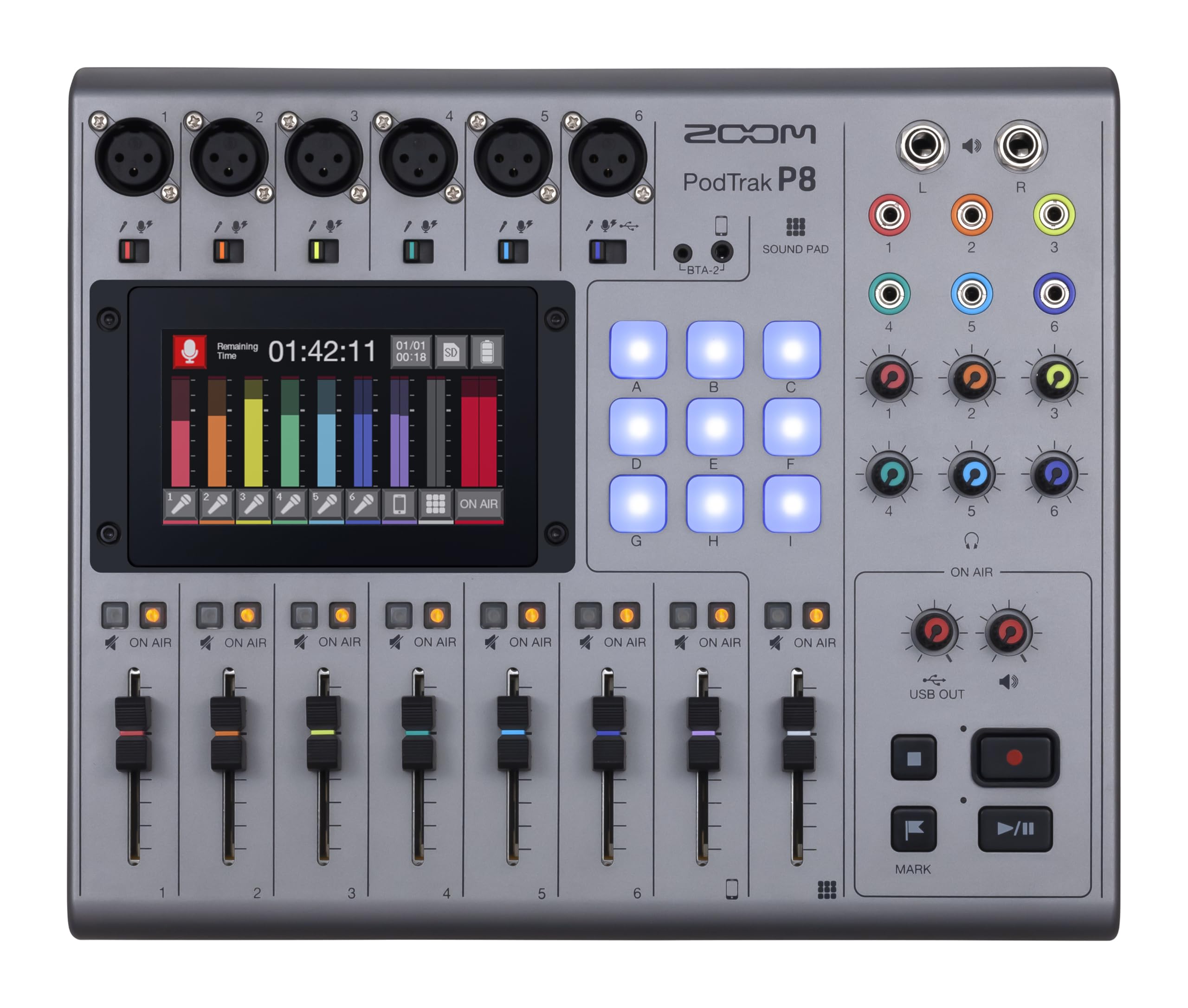
Dedicated to multi-host podcasts, the PodTrak P8 gives you six XLR inputs, six headphone outputs, a touchscreen, and 36 sound pads — enough to run a show with up to six on-site guests. Setup is minimal thanks to its purpose-built design; you can start recording to SD card within minutes. The battery lasts about two hours, which is fine at a desk with a power adapter nearby, but not for mobile use. The locked 44.1 kHz sample rate adds a conversion step if you are syncing audio to video — a minor extra task for studio podcasters. Compared to the slimmer PodTrak P4, the P8 trades portability for input volume.

This recorder is best suited for regular studio podcasts with a consistent crew — not for solo hosts on a budget or field recording on the go. Keep a power adapter handy for sessions longer than two hours, and plan for sample-rate conversion if your workflow includes video editing.

Tip: Use the included power adapter instead of batteries for consistent power during long recording sessions.

Bottom line: For multi-host podcasts that do not need field mobility, the P8 delivers the inputs and monitoring you will actually use — just plan for AC power and a sample-rate conversion step if editing video.

6

Behringer FLOW 8

Behringer FLOW 8

Mobile performers

Our Score 9.4/10
Check Price

Worth Noting

  • No per-channel EQ limits fine-tuning for individual microphones.
  • USB power port can become loose or short with cable strain.
Power
USB
Recording
USB
XLR Inputs
2

This digital mixer pairs Midas preamps with automatic gain setting and a Bluetooth app for remote control, making it a strong option for DJs and streamers who want to adjust levels from across the room. The six line inputs handle groups or instruments, while the 60mm faders provide smooth mixing. For podcasters, the lack of per-channel EQ and a fragile USB power port that can be damaged by cable strain are limiting – this suits mobile sound reinforcement and casual streaming better than multi-mic interview recording.

Tip: Secure the USB cable to reduce stress on the power port – a right-angle adapter helps.

Bottom line: If your priority is remote control and digital mixing for mobile use, this is a cost-effective option – just treat the USB port with care.

7

FIFINE SC3

FIFINE SC3

Budget gamers

Our Score 8.8/10
Check Price

Worth Noting

  • Background noise and static can be present, especially in quiet recording environments.
Power
USB
Recording
USB
XLR Inputs
1

The SC3 delivers a single XLR input with 48V phantom power and six voice changer modes at an entry-level price, ideal for budget-conscious streamers. However, background noise and occasional connectivity issues make it unsuitable for podcasters who need multi-mic support or clean audio.

Bottom line: Good for gamers testing XLR on a tight budget, but skip if you need clean multi-mic recording for podcasting.

8

Yamaha MG06X

Yamaha MG06X

Solo performers

Our Score 9.2/10
Check Price

Worth Noting

  • Only two XLR inputs
Power
AC
Recording
XLR Inputs
2

The Yamaha MG06X delivers clean, detailed sound and built-in digital effects in a compact 7.9-inch chassis that fits any desk. Portability and build are strong points, but the two XLR input limit means multi-mic podcast setups are out of scope. There is no USB output for recording, so you will need an external interface or recorder to capture audio digitally. This mixer works best for musicians or podcasters who stay within a two-microphone workflow and value analog simplicity over streaming convenience.

Bottom line: A good fit for solo performers or home karaoke who want a small analog mixer with effects and can work without USB recording.

9

Behringer XR18

Behringer XR18

Bands

Our Score 9.4/10
Check Price

Worth Noting

  • Built-in WiFi may drop out during live use; wired Ethernet recommended instead.
Power
AC
Recording
18x18 USB
XLR Inputs
16

Midas preamps and 18x18 USB recording make the XR18 a capable digital mixer for multitrack use. It's overkill for simple podcast setups, and WiFi can be unreliable for live control — wired Ethernet is more dependable. Best suited for bands, live sound, or podcasters recording many microphones.

Bottom line: This mixer fits best when you need many inputs and multitrack recording and can work with a wired Ethernet connection for control.

10

Mackie 1604VLZ4

Mackie 1604VLZ4

Live sound engineers

Our Score 9.2/10
Check Price

Worth Noting

  • No USB audio interface
Power
AC
Recording
XLR Inputs
16

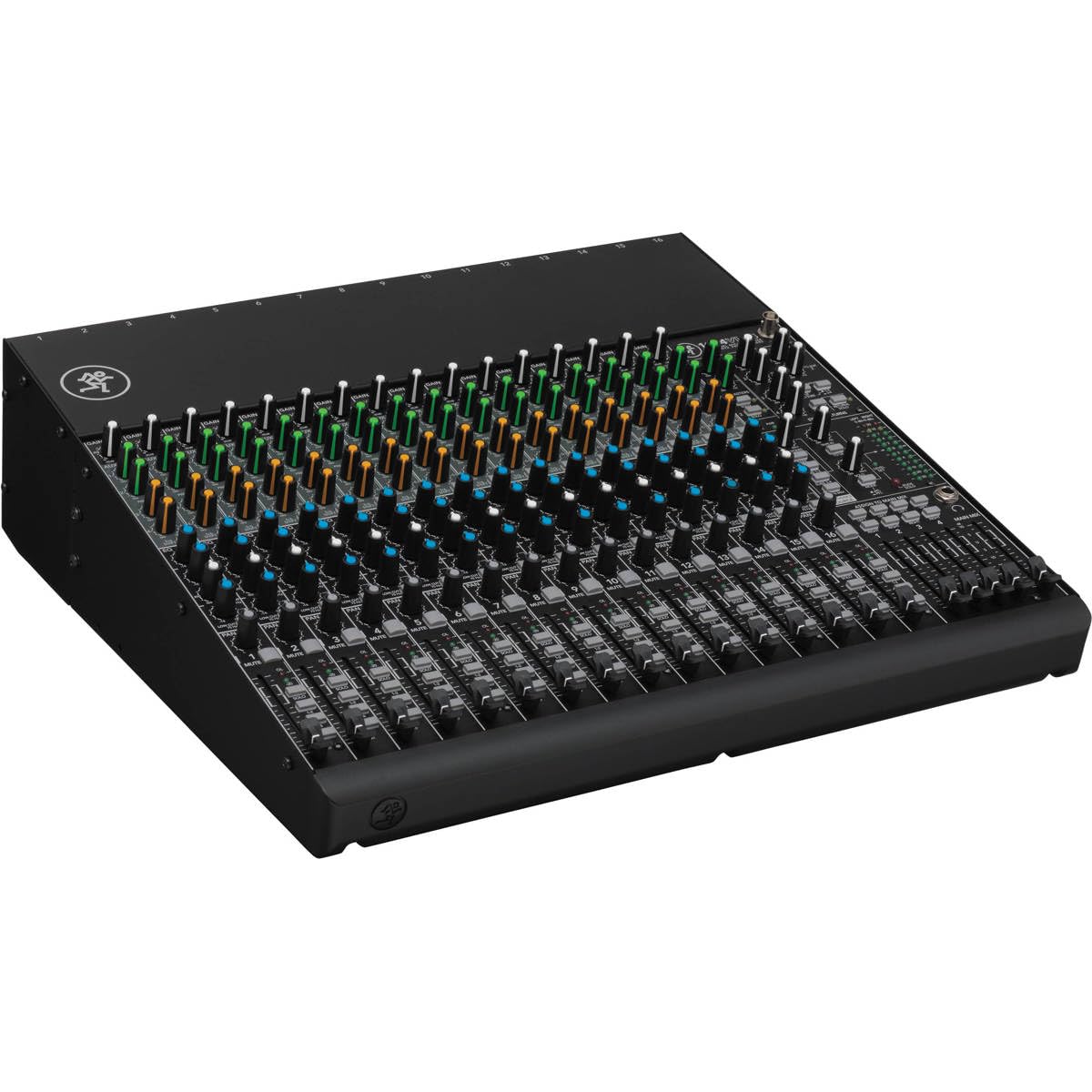
The Mackie 1604VLZ4 packs 16 Onyx preamps in a rugged steel chassis with high RF rejection and low noise. It lacks USB recording, requiring an external interface. Heavy and premium-priced, it is ideal for live sound or studio setups needing many analog inputs, not podcast production.

Bottom line: Best reserved for live sound engineers and studios with multiple analog inputs who don't need USB connectivity.

11

Behringer XENYX 802S

Behringer XENYX 802S

Home studio beginners

Our Score 9.0/10
Check Price

Worth Noting

  • Two XLR inputs limit mic count for multi-host podcasts.
Power
AC
Recording
USB stereo
XLR Inputs
2

The Behringer XENYX 802S brings a compact footprint, 48V phantom power, and stereo USB interface into a budget-friendly package. It delivers clean sound for basic two-mic streaming or home recording. However, with just two XLR inputs and no built-in effects, it falls short as a dedicated podcast mixer - the limited inputs and missing features make it better suited for solo streamers or musicians than multi-host podcasters.

Bottom line: Best for solo podcasters or streamers who need only two mics and want an affordable mixer with USB recording.

12

MAONO AME2

MAONO AME2

Podcasters

Our Score 8.8/10
Check Price

Worth Noting

  • Some units may develop static or ground hum during use
Power
USB
Recording
USB
XLR Inputs
2

The MAONO AME2 brings 11 sound pads and a dedicated guitar input to podcasters who also play instruments. Sound quality handles spoken word well, but some units may develop ground hum or lose pad functionality over time – a tradeoff for those relying on consistent daily performance.

Bottom line: Best for podcasters who value sound pad variety and instrument input, and accept the possibility of early noise or functionality issues.

13

MAONO G1 NEO

MAONO G1 NEO

Strict budget gamers

Our Score 8.6/10
Check Price

Worth Noting

  • In quiet rooms, a ground loop hum or static may be noticeable
Power
USB
Recording
USB
XLR Inputs
1

The MAONO G1 NEO is the lowest-priced XLR mixer with 48V phantom power and voice effects. Setup is simple, and audio quality is decent for the cost. But noise, buzzing, and delay can occur, making it a casual streaming tool rather than a reliable podcast mixer. Spend a bit more on the FIFINE SC3 or Zoom PodTrak P4 for consistent performance.

Bottom line: Best for a gamer who wants basic XLR mic with voice effects and accepts occasional noise — not for podcasters needing clean audio.

14

MAONO AM200-S1

MAONO AM200-S1

Absolute beginners

Our Score 8.4/10
Check Price

Worth Noting

  • Audio can include static and low output; the mixer's performance may degrade over months
Power
USB
Recording
USB
XLR Inputs
2

This bundle gets you recording with a condenser mic and a basic mixer at a low cost, making it accessible for complete newcomers. However, the audio quality can be thin with background noise, and the hardware may not hold up over many months — these limitations make it suitable only for the most budget-conscious beginners who view it as a trial setup.

Bottom line: Best for absolute beginners who want the lowest-cost way to try podcasting and are prepared for potential limitations in audio quality and hardware lifespan.

15

Pyle PMXU43BT

Pyle PMXU43BT

Karaoke

Our Score 8.6/10
Check Price

Worth Noting

  • Can introduce buzz or static in quiet listening environments.
Power
AC
Recording
USB
XLR Inputs
2

This Pyle mixer delivers Bluetooth streaming and two phantom-powered XLR inputs at an entry-level price, with a build quality that holds up for occasional transport. The trade-off? Hum or static can creep into the signal, and the built-in effects sound thin — fine for a living room sing-along, but a dealbreaker for clean podcast recording where audio quality matters.

Bottom line: Worth a look for casual karaoke or basic live sound reinforcement, but skip it if you need clean multi-track podcast recording.

How to Choose

XLR Mic Inputs

Each host or guest needs a dedicated XLR input for clean audio. More inputs add weight and cost, so match the count to your typical show size. A two-person podcast needs at least two XLR inputs; a four-person roundtable needs four. Multi-input recorders also demand more power, especially when using phantom power for condenser mics.

Budget units often include only one XLR input, forcing you to upgrade later. If you plan to grow your show, choose a mixer with one or two extra inputs beyond your current needs.

Built-in Recording

Mixers that record directly to SD card let you capture audio without a computer, ideal for field recording or reducing setup complexity. Analog mixers with USB output stream audio to a computer but depend on that computer's reliability. Some USB mixers deliver a weak signal that requires an external preamp to reach proper recording levels.

If you frequently record on location, an SD recorder removes the risk of laptop crashes. For studio use, a USB mixer can be fine, but verify the output level in reviews before buying.

Headphone Outputs

Each person recording needs their own headphone output for real-time monitoring without latency. A single headphone jack forces guests to share, leading to discomfort and bleed. Dedicated outputs with independent volume controls let everyone adjust their own mix.

Portable recorders often include multiple headphone jacks, while analog mixers typically have just one. If you record with multiple people, prioritize a mixer with at least as many headphone outputs as microphones.

Sound Pads and Effects

Sound pads trigger pre-recorded clips, jingles, or sound effects during live recordings or streams. Built-in effects like reverb, compression, and EQ shape vocal tones without post-production. These features add convenience but also complexity: each pad or effect increases the learning curve and can introduce latency or crashes.

If you produce a polished show with live elements, sound pads and voice effects save editing time. For straightforward interview podcasts, they are unnecessary extras that complicate setup.

Power and Portability

Battery-powered mixers let you record anywhere, but AA batteries drain quickly with multiple mics and phantom power – often in under two hours. USB power via a power bank offers longer runtime but requires the mixer to support it. AC-powered mixers are reliable for studio use but tether you to a wall outlet.

If you record outside a studio, look for mixers with USB-C power input or rechargeable internal batteries. For a permanent desk setup, AC power is simpler and avoids battery anxiety.

Frequently Asked Questions