UGREEN AK704 Triple Monitor
Top Pick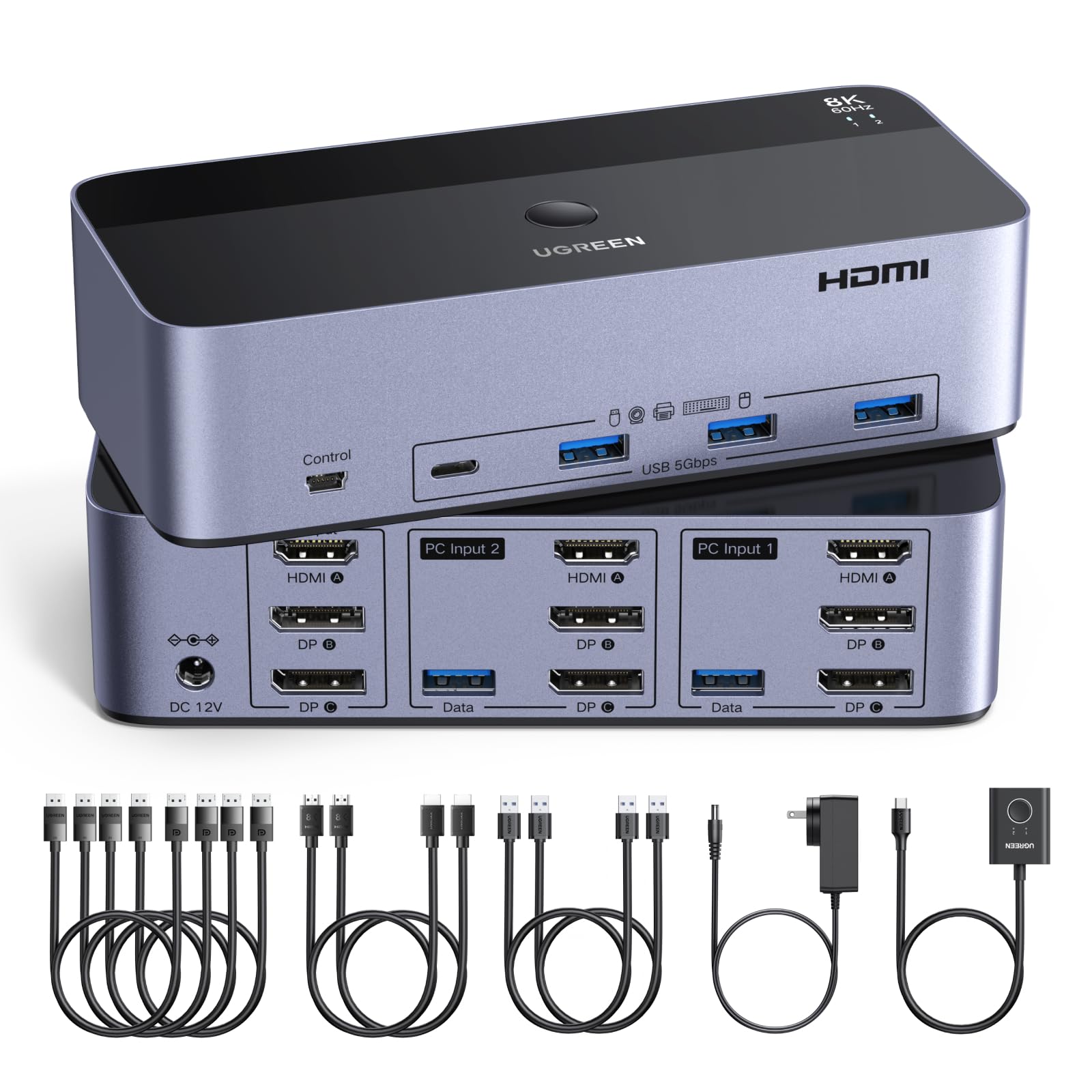
What We Like
- Works with both Windows and Mac, including USB-C laptops via an adapter
- Supports triple monitors at up to 8K@60Hz or 4K@240Hz
- Included cables are high-quality and the aluminum build feels durable
- Plug-and-play setup with good value for the triple-monitor feature set
Worth Noting
- No EDID emulation can cause monitors to re-detect briefly when switching computers
- Switching requires pressing a button or using the desktop controller
- Monitors
- 3 (2 DP + 1 HDMI)
- Switching
- Button + desktop controller
- USB Ports
- 4x USB 3.0
- Max Resolution
- 8K@60Hz / 4K@240Hz
The UGREEN AK704 handles three monitors at once — two DisplayPort and one HDMI — with support for 8K@60Hz or 4K@240Hz on compatible displays. This makes it a strong fit for content creators and gamers who want high refresh rates across a multi-monitor setup without upgrading to a single ultra-wide. It also works with both Windows and Mac computers, including USB-C laptops when used with an adapter.
Switching between computers happens via a button on the unit or the included desktop controller — there is no keyboard hotkey support. The lack of EDID emulation means monitors may go through a brief re-detection cycle when you switch sources. For most users, this delay lasts a few seconds and is noticeable but not disruptive; it becomes more of an issue if you switch frequently or run applications that lose window placement during the transition.
This KVM is best suited for a home office with mixed Windows and Mac systems, or a content creation setup where triple-monitor real estate and high refresh rates matter. Laptop users will need a USB-C to HDMI or DisplayPort adapter, which is common but adds to the total cost. People who rely on quick hotkey switching or need seamless, instant monitor transitions should consider other options, as the button-only switching and EDID gap are inherent tradeoffs here.
The aluminum housing gives the unit a solid feel, and the included cables (two DisplayPort, one HDMI, and USB) are of good quality — no need to buy extras for a typical triple-monitor setup. Setup is straightforward: connect the monitors and USB peripherals, plug in the two computers, and press the button to switch. For the feature set and build, the price falls in the mid-range and represents reasonable value.
Tip: Using identical monitors with the same resolution and refresh rate can reduce re-detection delays when switching sources.
Bottom line: If your setup demands triple monitors, high refresh rates, and cross-platform compatibility, this UGREEN KVM delivers those features at a mid-range price — just be ready to trade hotkey switching and instant monitor transitions for that versatility.