Gaming

9 Best Arcade Stick of 2026: Match Your Console and Skill Level

Which arcade stick works with your consoles and skill level? This guide helps you avoid compatibility pitfalls and stock component disappointment.

Stock buttons that feel mushy, platform lock-in, and reliability nags – the arcade stick market is full of trade-offs that only become obvious after purchase. A stick that feels great on one console may ignore another entirely, and entry-level models often ship with components that demand immediate upgrades for responsive play.

The real challenge isn't finding a stick – it's finding one that matches your consoles, your skill level, and your willingness to mod. This guide cuts through the compatibility confusion and component quality gaps, pointing you to sticks that deliver a solid experience out of the box or provide a cost-effective base for customization.

Whether you are a tournament regular on PS5, a casual Switch player, or an Xbox owner looking for wireless freedom, the right stick is one that aligns with your specific ecosystem and performance needs – not the one with the flashiest marketing.

1

Mayflash F300 Elite

Top Pick

Mayflash F300 Elite

Budget premium

Our Score 9.2/10
Check Price

Worth Noting

  • Compact layout can feel cramped for players with larger hands, especially during long sessions
  • Native PS5 support requires the optional Magic-S Ultimate adapter
Build
Compact plastic
Buttons
9 Sanwa
Modding
Easy
Joystick
Sanwa JLF

The F300 Elite stands out in the budget segment by equipping a Sanwa JLF joystick and nine Sanwa buttons – components that cost as much as a cheap stick on their own. The joystick offers the precise, notch-based gate feel that competitive players expect, and the buttons actuate with a light, consistent response that requires no immediate upgrades.

Compatibility is where this stick truly differentiates. It works with Switch, Xbox Series S/X and Xbox One, PS4, PS3, PC, Mac, Steam Deck, and Android – all through a single wired USB connection. No dongles, no wireless pairing, no platform-specific versions. Setup is plug-and-play on every supported system.

Build quality matches the component quality. The housing is rigid, the bottom rubberized pad grips slick surfaces, and the weight (about 5.3 pounds) gives it enough mass to resist sliding during aggressive inputs. The compact footprint, however, means the stick sits closer to the buttons than on full-size models; players with large hands may find their wrists resting at an awkward angle during extended sessions.

This is the stick for the player who wants to buy once and use across a home arcade setup spanning multiple consoles and a PC. If you plan to play fighting games on PS5, you will need to purchase the Magic-S Ultimate adapter – a $30 add-on that adds native support. The smaller size also makes it a strong travel companion, as long as you are comfortable with a desk-centric play style rather than a heavy lap stick.

At just over $100, the F300 Elite delivers the same core feel as sticks costing twice as much. The only compromise is the enclosure size, which some find limiting. For the buyer who prioritizes component quality and platform coverage over a lap-friendly form factor, this is the most budget-friendly entry to genuine Sanwa performance.

Tip: For a more comfortable lap experience with larger hands, set the stick on a desk or use a lapboard.

Bottom line: The F300 Elite offers genuine Sanwa performance across more platforms than any other stick at this price – just account for its compact layout and the PS5 adapter if needed.

2

8Bitdo Xbox Stick

8Bitdo Xbox Stick

Xbox wireless

Our Score 8.8/10
Check Price

Worth Noting

  • Stock buttons may feel less responsive for competitive play, so upgrading is recommended
Build
Plastic, solid
Buttons
8
Modding
Easy
Joystick
Standard (Sanwa clone)

Seamless wireless connectivity with official Xbox licensing sets this stick apart from any other arcade controller on the market. While many sticks require adapters or wired connections, the 8Bitdo connects instantly via 2.4G or USB-C, and the 30-hour battery keeps you in the fight through long sessions.

This stick is built specifically for Xbox Series X|S, Xbox One, and Windows users who want wireless freedom without latency concerns. The stock buttons use Sanwa-clone parts that feel solid out of the box, but competitive players will likely want to upgrade to higher-quality buttons – a straightforward, plug-and-play swap.

The build quality and easy customization make this a strong contender for modders. The mounting plate accepts standard parts, so swapping the joystick or adding custom art is simple. Just keep in mind that the stock buttons are decent but not tournament-ready, so budget for an upgrade if you play at a high level.

Tip: Swapping the stock buttons for higher-quality ones is cheap and requires no soldering – a worthwhile investment for competitive play.

Bottom line: For Xbox players who want wireless freedom and a mod-friendly platform without the adapter hassle, this stick delivers a unique package – just be ready to upgrade the buttons for serious competition.

3

8Bitdo Switch Stick

8Bitdo Switch Stick

Switch/PC budget

Our Score 9.2/10
Check Price

Worth Noting

  • Stock buttons can feel mushy; many users upgrade for a crisper response.
  • Limited to Nintendo Switch and Windows
Build
Plastic
Buttons
16
Modding
Easy
Joystick
Standard (Sanwa-mountable)

The 8Bitdo Arcade Stick gives Switch and PC players three connectivity options: Bluetooth, 2.4G wireless, and USB-C wired. Unlike many budget sticks that rely on a single connection method, this one lets you choose the lowest-latency path for your setup. Its universal mounting plate and hot-swappable buttons have made it a favorite among modders who want to upgrade to Sanwa or Seimitsu parts without soldering.

This stick is best suited for Nintendo Switch owners and PC gamers who prioritize wireless convenience and plan to customize their setup. Stock buttons feel mediocre out of the box – swapping in aftermarket parts is a common upgrade that significantly improves responsiveness. If you do not want to mod, consider a stick with better stock components. For those who enjoy tinkering, the 8Bitdo offers a low-cost entry point into a high-performance arcade stick.

Tip: Installing Sanwa buttons is a simple screwdriver-free mod that dramatically improves feel.

Bottom line: For Switch and PC players who want wireless freedom and a mod-friendly platform, this stick delivers solid performance – just plan to swap the buttons for competitive play.

4

HORI Alpha

HORI Alpha

PS5 competitive

Our Score 9.2/10
Check Price

Worth Noting

  • Plastic chassis can feel less substantial compared to metal alternatives in the same price range.
  • Hayabusa buttons may be overly sensitive, leading to accidental inputs during fast sequences.
Build
Plastic, heavy
Buttons
17
Modding
Easy
Joystick
Hayabusa

The HORI Alpha brings Hayabusa joystick and buttons out of the box - components known for their responsiveness and durability - along with a tool-free interior that makes swapping parts a matter of seconds. Unlike ultra-compact alternatives that sacrifice feel for portability, this full-sized stick stays planted on your lap or desk thanks to its weight distribution.

This stick is aimed at PS5 players who want tournament-grade performance without aftermarket upgrades. The plastic construction, however, may feel less premium than metal rivals in the same price tier - a tradeoff worth accepting if you prioritize function over finish. Similarly, the Hayabusa buttons are responsive but can be too sensitive for some, registering accidental presses during high-pressure moments.

Compatibility covers PS5, PS4, and PC via a detachable USB cable, making it a straightforward option for cross-platform play sessions. The stick's balance keeps it stable during intense matches, though the lightweight plastic body means it won't feel as anchored as heavier metal alternatives.

Tip: If accidental inputs become an issue, swapping to Sanwa buttons can provide a firmer actuation feel.

Bottom line: For PS5 players who value responsive stock parts and easy modding over a metal chassis, the HORI Alpha delivers where it counts - just be aware of the plastic build and button sensitivity.

5

Mayflash F700

Mayflash F700

PS5 wireless

Our Score 9.0/10
Check Price

Worth Noting

  • Only works with fighting games
  • Joystick drift may develop after extended use in some units
Build
Plastic, heavy
Buttons
10
Modding
Easy
Joystick
Standard (Sanwa compatible)

Native PS5 wireless support for fighting games without an adapter is the F700’s standout feature — a rarity at this price. Where the top pick offers genuine Sanwa parts and works with nearly any arcade-style game, the F700 is locked to the fighting genre and ships with OEM joystick and buttons that may feel less precise to competitive players.

This stick is best suited for PS5 fighting game enthusiasts who want the convenience of wireless play without relying on third-party dongles. Its Bluetooth, 2.4G, and wired connectivity options also make it a natural fit for multi-platform owners juggling a PS5, Switch, and PC. The build quality is reassuringly heavy and the price feels fair given the native PS5 wireless — but buyers should know the F700 will not work with other game genres, and occasional joystick drift has been noted after months of use.

The solid construction and premium heft give the stick a sturdy lap feel, and the wide platform support (PS4, Switch, PC, Mac, Android) adds flexibility beyond the PS5. For fighting game players who prioritize immediate out-of-box PS5 compatibility over component pedigree, the F700 presents a practical, cost-effective option.

Tip: For lowest input lag, use the 2.4G wireless receiver or USB-C wired mode — Bluetooth adds slight latency for competitive play.

Bottom line: PS5 fighting game players who want native wireless without adapters and accept genre limitations will find the F700 a cost-effective fit; stick purists should look to the Sanwa-equipped top pick.

6

HORI Mini

HORI Mini

Small hands casual

Our Score 8.6/10
Check Price

Worth Noting

  • Missing PS5 touchpad button forces menu navigation through a controller
  • Lightweight body slides around on a lap; best placed on a desk
Build
Compact plastic
Buttons
8
Modding
Limited
Joystick
HORI original

The HORI Mini delivers a functional entry-level arcade experience at a budget-friendly price, with full PS5/PS4/PC compatibility and a lightweight build that tucks into any backpack. The compact size is a genuine asset for travel or tight desk setups. However, the small footprint and 467g weight mean it slides around during lap use – it needs a firm surface. The missing touchpad button on PS5 requires a standard controller for menu navigation, and the buttons have a loose, squishy feel that suits casual play but not precision inputs.

Bottom line: A practical pick for a child or casual player who wants a cheap, portable stick for occasional fighting game sessions and can work around the missing touchpad.

7

Neo Geo Arcade Stick Pro

Neo Geo Arcade Stick Pro

Retro collectors

Our Score 9.0/10
Check Price

Worth Noting

  • No native support for PS5, Xbox, or modern fighting games
  • Some units may ship without the power brick and HDMI cable, requiring separate purchase.
Build
Heavy plastic
Buttons
8
Modding
Limited
Joystick
SNK electrostatic

Built-in 20 SNK classics turn this stick into a standalone arcade console. The SNK electrostatic joystick delivers a satisfying clicky feel that matches the original arcade cabinets. For someone who wants to play Samurai Shodown or King of Fighters '98 right out of the box without hooking up a console, this design makes immediate sense.

The tradeoff is sharp: this is not a general-purpose fight stick. It lacks native support for PS5, Xbox, or modern fighting games like Street Fighter 6. Compatibility is limited to Neo Geo Mini, PC (via adapter), and some Android devices. Additionally, the box may omit the power brick and HDMI cable — a potential inconvenience. This suits retro collectors who value the built-in library over cross-platform flexibility.

Tip: Verify included accessories (power brick, HDMI cable) upon delivery, as some packages arrive without them.

Bottom line: For a Neo Geo collector who wants a playable arcade replica with built-in classics, this stick delivers. Skip it if you need a modern console fight stick.

8

8Bitdo All-Button

8Bitdo All-Button

Xbox leverless

Our Score 9.2/10
Check Price

Worth Noting

  • Leverless design not suitable for players who prefer a traditional joystick
  • Extremely clicky switches may be too loud for quiet environments
Build
Plastic
Buttons
Modding
Hot-swappable
Joystick
Leverless

The 8BitDo All-Button offers a budget-friendly entry into leverless controls for Xbox players. It pairs 2.4G wireless connectivity with hot-swappable Kailh Wizard low-profile mechanical switches, letting you swap feel without soldering. Programmable buttons and RGB lighting add convenience, while the build quality punches above its price range.

If your search is specifically for a traditional joystick-based fight stick, this leverless design won't match that expectation. The switches are extremely clicky, making them unsuitable for quiet shared spaces. For Xbox owners committed to the all-button layout and comfortable with audible actuation, it's a capable and affordable option.

Bottom line: Best for Xbox players specifically seeking an affordable leverless controller and willing to accept a clicky, non-traditional input.

9

Qanba Sapphire S1

Qanba Sapphire S1

PS5 leverless

Our Score 9.2/10
Check Price

Worth Noting

  • Leverless form factor requires a different technique than traditional joysticks
  • Only works on PS5, PS4, and PC
Build
Plastic
Buttons
18
Modding
Limited
Joystick
Leverless

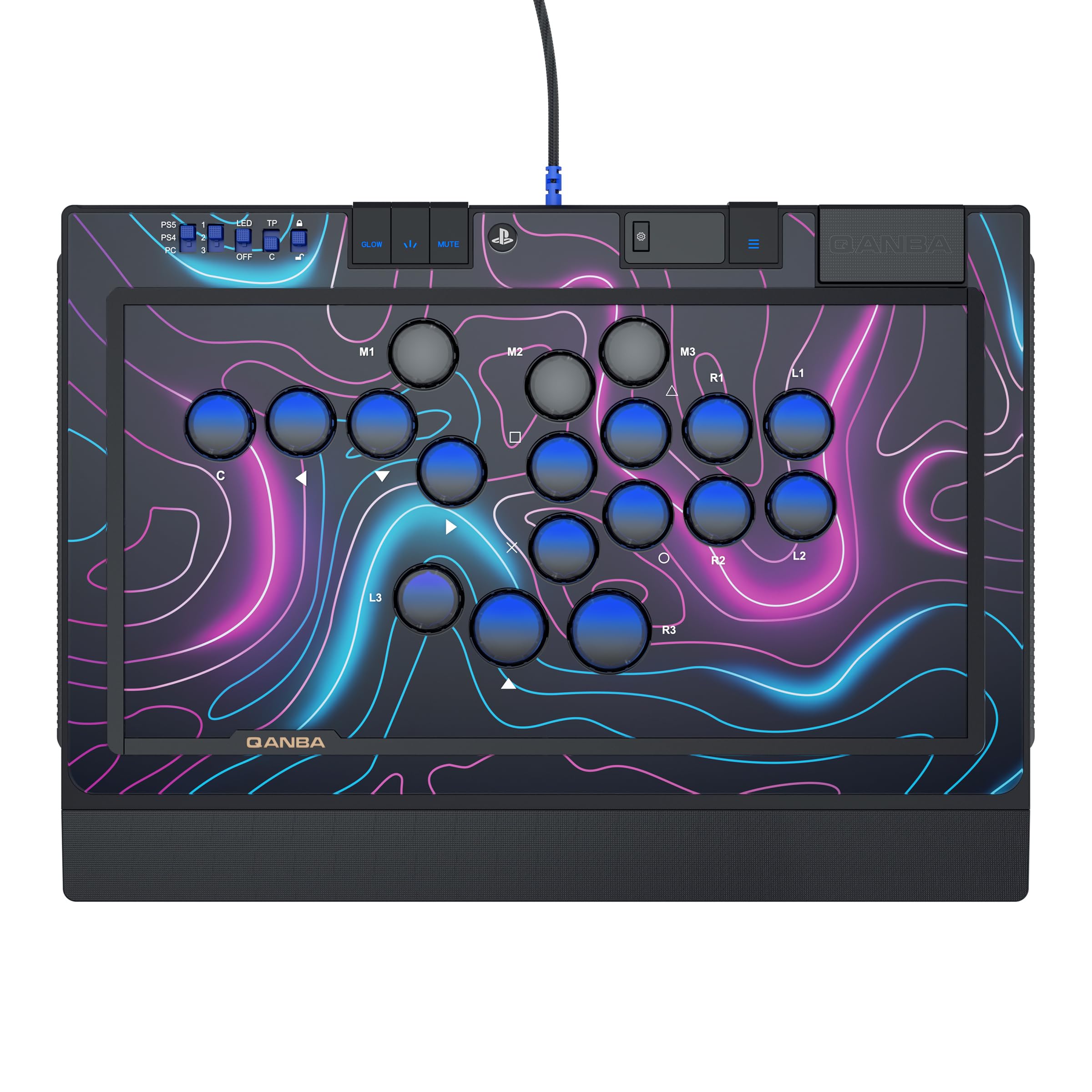
The Qanba Sapphire S1 delivers a responsive, all-button experience with Cherry Silver switches and a clean, tournament-legal PS5 license — a rare combination at this price point. The build quality holds up well, with a durable USB cable and snappy inputs that feel consistent out of the box. However, the leverless layout means it won't satisfy players looking for a traditional joystick; the learning curve is steep if you're accustomed to a stick. Platform support is limited to PS5, PS4, and PC, so Xbox or Switch owners can't use it. The product's track record with sustained competitive play is still emerging, making it a choice for early adopters rather than those wanting a long-proven design.

Bottom line: Best suited for PS5 players committed to a leverless layout and looking for a licensed, mid-priced option — not for anyone expecting a traditional arcade stick.

How to Choose

Joystick Type

The joystick is the heart of the stick. Entry-level models use generic sticks that feel loose or imprecise, while premium options like Sanwa JLF or Hayabusa offer crisp, responsive movement with a shorter throw.

If you play competitively, a Sanwa or Hayabusa stick is essential for consistent inputs. For casual play or modding, a standard stick is fine – you can always swap it later.

Button Count and Quality

More buttons give you more control options – 8 is standard for fighting games, but some sticks come with only 4 face buttons, limiting your layout.

Stock buttons on budget sticks are often mushy and require replacement with Sanwa or Seimitsu for a satisfying click. Factor that cost into your budget.

Platform Compatibility

Many arcade sticks are exclusive to one console ecosystem. PlayStation sticks rarely work on Xbox, and Switch sticks don't support PS5 without adapters.

Check compatibility carefully: if you own multiple consoles, choose a stick like the Mayflash F300 Elite that supports PS4, Xbox, Switch, and PC out of the box.

Wireless vs. Wired

Wireless freedom comes at a price: most wireless sticks use 2.4GHz or Bluetooth, which adds latency (though usually imperceptible to most players). Wired sticks are simpler, cheaper, and guaranteed lag-free.

Native wireless support is rare – the 8Bitdo Xbox Stick and Mayflash F700 are exceptions. Many 'wireless' sticks require adapters for PS5, adding cost and complexity.

Weight and Build Material

Heavier sticks (5+ lbs) stay put on your lap or desk, reducing accidental movement during intense matches. Lightweight models slide around and are better for desk use with a non-slip base.

Plastic builds are common at budget and mid-range, but metal cases add durability and heft. The trade-off is portability – aluminum sticks are bulky for tournaments.

Moddability

Modding allows you to upgrade joystick, buttons, and art later. Easy-access interiors and universal mounting plates make swapping parts simple.

If you plan to mod, avoid sticks with non-standard form factors or glued panels. The Mayflash F300 and 8Bitdo sticks are famously mod-friendly, while compact models like the HORI Mini are not.

Frequently Asked Questions